Introduction
Welcome to the final lesson in our module on business foundations. In the last lesson, we explored pricing strategies and you selected a model for both a simple and a more complex digital product. A key takeaway was the power of value-based pricing, which requires a deep understanding of the transformation your product provides to a customer.
Now, it's time to communicate that value. A product listing is your 24/7 salesperson, and its effectiveness determines whether a visitor becomes a customer. In this lesson, you will learn how to write an optimized product listing title and description using benefit-driven language and keywords.
We'll break down the art of copywriting into a systematic process. You'll learn the crucial difference between features and benefits, how to structure a description that connects with your audience, and how to use keywords so that your ideal customers can find your product in the first place.
1. The Core Principle: Features Tell, Benefits Sell
Before writing a single word, it's critical to understand the fundamental distinction between what your product is and what it does for the customer.
- Features are the factual, technical specifications of your product. (e.g., "15-page Notion template," "Includes 10 PNG files," "Designed in a 4K resolution.")
- Benefits are the positive outcomes, feelings, or solutions a customer gets from using your product. (e.g., "Finally organize your entire academic life," "Create a beautiful and motivating workspace," "Experience stunning clarity on any monitor.")
Customers buy results, not just specifications. Your primary job in a product description is to connect each feature to a meaningful benefit. A powerful and systematic way to do this is with the "so you can" framework.
Copywriting tips: Features vs. Benefits - The Critical Key to Selling More
The video 'Copywriting tips: Features vs. Benefits' by Jon Benson provides a clear and direct explanation of this concept. He introduces a simple but highly effective technique for turning a dry feature into a compelling benefit.
Please watch the segment from 5:53 to 7:15. Pay close attention to how he uses the three words "so you can" to bridge the gap between a product feature and a customer benefit.
Let's apply this to a digital product.
| Feature (What it is) | "So you can..." Bridge | Benefit (What it does for you) |
|---|---|---|
| Linked databases for classes and assignments. | ...so you can... | ...instantly see all your homework for a specific class and never miss a deadline again. |
| Includes 5 color variations. | ...so you can... | ...customize your desktop to perfectly match your mood or aesthetic. |
| 4K resolution wallpaper pack. | ...so you can... | ...enjoy a crisp, professional-looking display without any blurriness on your high-end monitor. |
This simple "Feature -> so you can -> Benefit" exercise is the foundation of all effective product descriptions.
2. Crafting a Compelling Narrative
With the core principle of benefits in mind, we can build out a full description that persuades and converts. This involves more than just listing benefits; it's about creating a scannable, engaging, and trustworthy narrative.
How To Write Good Copywriting Product Descriptions That SELL
The video 'How To Write Good Copywriting Product Descriptions That SELL' from Learn With Shopify offers a comprehensive guide to crafting a full product description. It covers everything from audience to formatting.
Please watch the following segments. As you watch, think about how you could apply these techniques to a digital product like a Notion template or a wallpaper pack. Tip 1: Write to your ideal customer (0:49 - 1:46) Tip 2: Entice customers with benefits (1:46 - 3:03) Tip 5: Appeal to your customers' imagination (6:59 - 8:46) Tip 9: Make your description scannable (11:49 - 12:53)
Here is a checklist for a strong product description, combining the principles from the video:
- Speak Directly to Your Ideal Customer: Use "you" and address their specific pain points and aspirations.
- Lead with the Primary Benefit: Your first sentence or two should immediately answer "What's in it for me?"
- Paint a Picture: Use the "Imagine..." technique. Help the customer visualize their life after they've used your product. Describe the feeling of being more organized, more creative, or less stressed.
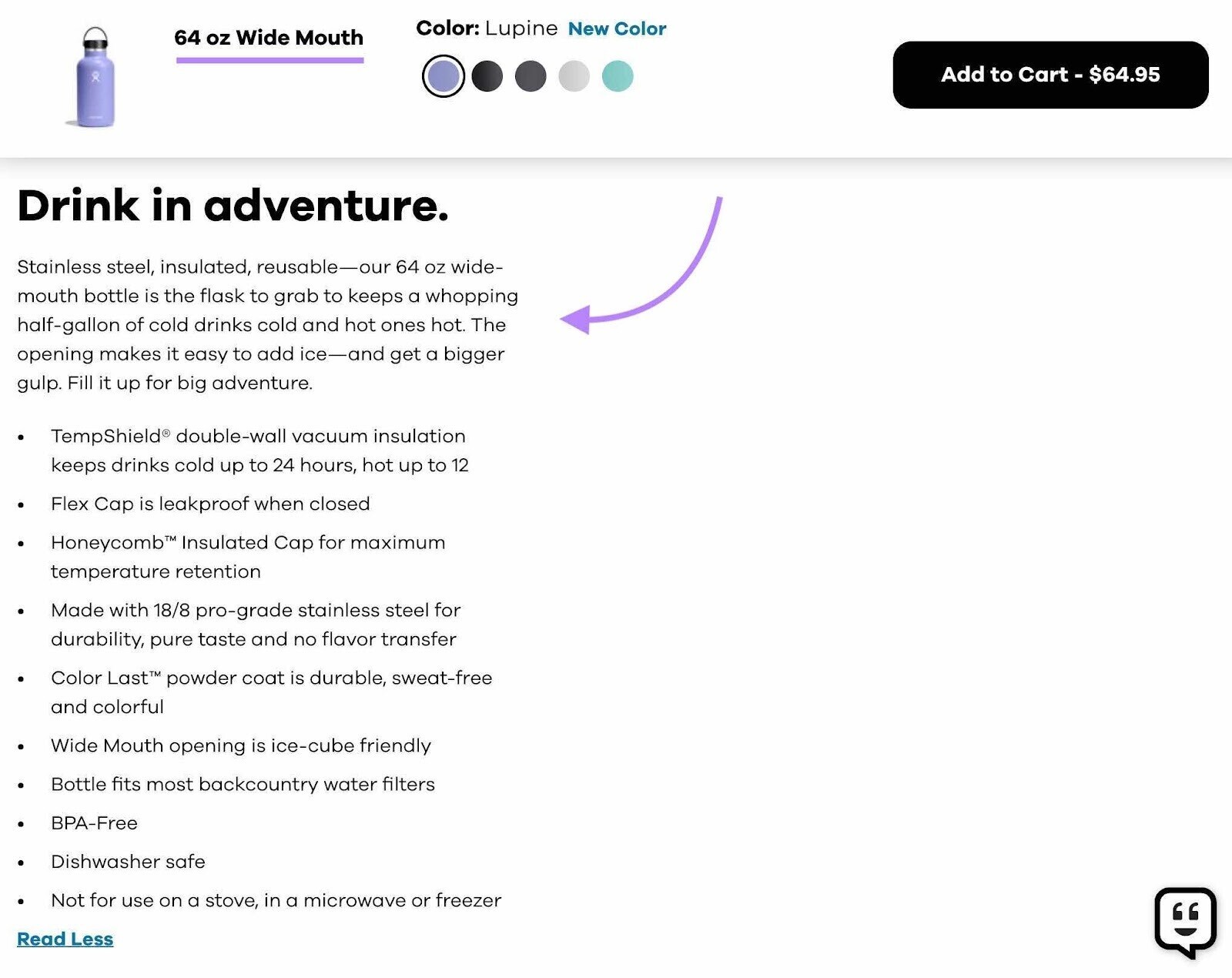
- Make It Scannable: Online readers scan, they don't read. Use:
- Short paragraphs.
- Bold text for key phrases.
- Benefit-driven headlines to break up sections.
- Bulleted lists for features and benefits.
Let's look at how these principles are applied in the real world.

3. Optimizing for Discoverability with Keywords
A perfectly written description is useless if no one finds your product page. This is where Search Engine Optimization (SEO) comes in. You need to include the specific words and phrases—keywords—that your target audience is searching for.
5 SEO Tips To Optimize Your Gumroad Sales Page
This article from Gumroad, '5 SEO Tips To Optimize Your Gumroad Sales Page', provides a concise, actionable guide for getting your products discovered on marketplaces and search engines.
Please read tips 1, 2, 3, and 5. These are the most critical for writing your title and description.
Here is your a simple, systematic process for keyword optimization:
-
Brainstorm & Research: Think like your customer. What would you type into Google or Gumroad to find a product like yours?
- Start with broad terms: "Notion template," "desktop wallpaper."
- Get specific: "student notion template," "minimalist black and white wallpaper."
- Use Google's "People Also Ask" section and the search auto-complete to find related phrases and questions. Free tools like Ubersuggest or Google Keyword Planner can provide search volume data, but even just using Google Search is a great start.
-
Strategically Place Your Keywords:
- In the Product Title: This is the most important place. Your title should be descriptive and include your primary keyword.
- In the First Paragraph: Repeat your main keyword naturally in the opening sentences of your description.
- In Headings: Use keywords in the subheadings that break up your description.
- In the URL/Slug: Many platforms (like Gumroad) let you customize the product URL. Use your primary keyword here.
Example Keyword Placement:
- Product: Student Productivity Hub Notion Template
- Primary Keyword: "Notion template for students"
- Title: The Ultimate Notion Template for Students: Productivity Hub & Assignment Tracker
- URL:
yourstore.gumroad.com/l/notion-template-for-students - First Sentence: This Notion template for students is the all-in-one system you need to manage your classes, track assignments, and ace your exams.
Activity: Write Your Product Listing (15 minutes)
Let's put all these pieces together. For this activity, you will write a title and description for the hypothetical "Student Productivity Hub" Notion template we discussed in the last lesson.
-
Brainstorm Features & Benefits (5 mins):
- Create a two-column list. In the left column, list at least 3 specific features of the template (e.g., "Assignment tracker with due dates," "Course syllabus database," "Built-in grade calculator").
- In the right column, use the "so you can..." method to write a compelling benefit for each feature.
-
Draft the Title & Description (10 mins):
- Identify Keywords: List 2-3 keywords a student might search for.
- Write a Title: Craft a title that is both compelling and includes your primary keyword.
- Write the Description: Write a short product description (approx. 100-150 words) that includes:
- An opening paragraph that addresses the student's pain points (e.g., feeling overwhelmed, missing deadlines).
- An "Imagine..." statement.
- A bulleted list of your 3 features and their benefits.
- A closing sentence with a call to action (e.g., "Get the hub and take control of your semester!").
Conclusion
You now have a complete framework for writing product listings that both convert customers and get discovered by them. By focusing on the customer's transformation and using a clear, structured format, you can create a compelling sales pitch for any digital product you create.
Key Takeaways:
- Features Tell, Benefits Sell: Always connect what your product is to what it does for the customer using the "so you can..." method.
- Structure for Scannability: Use headlines, short paragraphs, bold text, and bullet points to make your description easy to read.
- Engage the Imagination: Help customers visualize the positive outcome of using your product.
- Keywords are Key: Strategically place relevant search terms in your title, URL, and description to attract organic traffic.
Preview of the Next Lesson
With your pricing and product description strategy ready, you are prepared to build your online storefront. In the next lesson, we will kick off a new module by comparing the two most popular platforms for digital creators: "Compare the fee structures, features, and payout options of Gumroad vs. Payhip to select a sales platform." You'll have everything you need to choose the right home for your new digital business.