Hello! Welcome to your fourth lesson in the "Shopify Platform & Data Architecture" module.
In our last session, we mapped out Shopify's "pre-purchase" data model, focusing on how products are structured using Products, Variants, and Collections. We now understand the data behind the catalog a customer browses.
The natural next question is: what happens after the customer clicks "buy"? An order isn't just a static receipt; it's a dynamic entity that moves through various stages of payment and delivery. Understanding this flow is essential for building any app that interacts with post-purchase events, from simple order tracking to complex fulfillment logistics.
Today, we will describe the order lifecycle through Orders, Fulfillments, and Transactions. We'll deconstruct what an "order" really is in Shopify's architecture and trace its journey from creation to completion.
The Order: More Than Just a Record
From your experience with web applications, you can think of an order as the central record created when a customer completes a checkout. In Shopify, the Order object serves precisely this role, acting as a hub that connects customer details, the products they bought, payment information, and shipping data.
However, a single Order object presides over two parallel, interconnected processes:
- The Financial Lifecycle: Tracking the movement of money (payments, refunds).
- The Fulfillment Lifecycle: Tracking the movement of goods (packing, shipping, delivery).
The overall status of an order (e.g., Open, Closed, Cancelled) is determined by the state of these two underlying processes. Let's break them down.
1. The Financial Lifecycle: Following the Money
When a customer places an order, a series of financial events are initiated. These are recorded as Transactions associated with the order.
To understand the core concepts, let's consult the official API documentation for the Order object.
This documentation for the GraphQL Admin API is the source of truth for Shopify's data models. We'll use it to understand the financial and fulfillment aspects of an order.
First, read the descriptions for the following fields to understand the financial state of an order: fullyPaid, totalCapturableSet, totalReceivedSet, totalRefundedSet, and transactions. Focus on what each field represents.
As you've just read, the transactions array provides a complete audit trail of all financial activities. Each transaction has a kind, which is critical for understanding the lifecycle:
- Authorization: The payment gateway confirms the customer has sufficient funds and places a hold on the amount. The money has not been transferred yet. The order's financial status is
authorized. - Capture: The merchant "captures" the authorized amount, initiating the transfer of funds from the customer to the merchant. Once complete, the order's financial status becomes
paid. - Sale: This combines authorization and capture into a single step. This is the most common transaction kind for many stores.
- Refund: The merchant returns money to the customer. The financial status might become
partially_refundedorrefunded. - Void: The merchant cancels an
authorizationbefore it's captured. No money ever changed hands.
For you as a developer, understanding the difference between authorization and capture is crucial. Some business models require capturing payment only when an item ships. An app you build might need to trigger the capture transaction via the API at the right moment.
2. The Fulfillment Lifecycle: From Warehouse to Doorstep
Once an order's payment is secured, the process of getting the products to the customer begins. This is the fulfillment lifecycle, and it involves a few distinct data objects that can be confusing at first.
The diagram below provides a high-level overview of how these objects relate to each other.
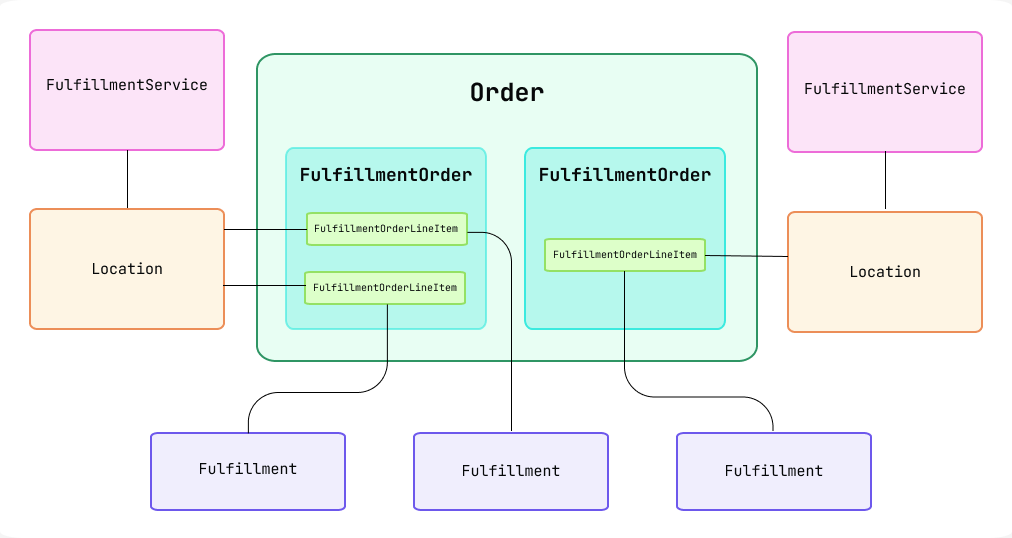
Let's clarify the key distinction:
-
FulfillmentOrder: Think of this as a work order or a to-do list. When a customer places an order, Shopify automatically creates one or moreFulfillmentOrderobjects. For example, if a customer buys two items that are stocked in different warehouses (Locations), two separateFulfillmentOrderobjects will be created. This object represents the request to fulfill a set of items from a specific location. -
Fulfillment: This is the record of completion. When a merchant or an app ships the items from aFulfillmentOrder, they create aFulfillmentobject. This object contains the tracking number, the carrier, and which line items were included in that specific shipment.
To solidify this, let's dive into the documentation for these objects.
First, let's go back to the Order documentation to see how fulfillments are represented at the top level.
Now, read the descriptions for the fields fulfillable, fulfillmentOrders, and fulfillments. This reinforces the relationship we just discussed.
FulfillmentOrder - GraphQL Admin
Next, let's explore the FulfillmentOrder object in more detail. This documentation explains its lifecycle and purpose.
Read the introduction and the section 'The lifecycle of a fulfillment order'. Pay close attention to the distinction between the lifecycle at a merchant-managed location versus one managed by a fulfillment service. This is a key detail for app developers.
The key states of an order's fulfillment, visible to the merchant, are:
- Unfulfilled: No items have been shipped yet.
- Partially fulfilled: Some, but not all, items in the order have been shipped. This happens when there are multiple
FulfillmentOrderobjects or when a single one is only partially shipped. - Fulfilled: All items in the order have been shipped.
3. A Practical Example: Automation with Shopify Flow
Understanding these data models and statuses isn't just theoretical. It's the foundation for automating a merchant's business logic. Shopify Flow is a first-party app that allows merchants to create workflows based on store events, like an order being created.
Watching how Flow uses order data is an excellent way to see the lifecycle concepts in action.
Shopify Flow Tutorial for Beginners - How to use the Shopify Flow App
This video from 'Coding with Jan' demonstrates how to use Shopify Flow. While the focus is on the tool itself, it's a perfect practical demonstration of the order lifecycle concepts we've just covered.
Watch the following parts: Introduction (00:18 - 01:30): Notice how the core building blocks are a 'trigger' (like 'Order Created'), 'conditions' (checking order properties), and 'actions' (like changing fulfillment status). Building the Workflow (02:30 - 04:49): See how an 'Order created' event kicks off the entire process. Advanced Logic (10:08 - 14:11): This is the most relevant part. Pay close attention to how the code fetches a customer's historical orders and checks their 'financial status' (paid, partially refunded, refunded). This is a direct, programmatic application of the financial lifecycle we discussed.
As you saw in the video, every automated workflow begins with a trigger, and Order Created is one of the most common. The conditions and actions that follow all depend on accessing the properties of the Order object and its related objects—properties that reflect its state in the financial and fulfillment lifecycles.
Test your understanding!
A customer orders a custom-printed T-shirt and a stock "Brand" hat. The T-shirt is printed on-demand by a third-party service, while the hat ships from the merchant's own warehouse. The customer pays by credit card, and the store is configured to authorize payment on order creation and capture it upon shipment.
Describe the likely sequence of events and the state of the key objects (Order, FulfillmentOrder, Transaction, Fulfillment) at these three points in time:
- Immediately after the customer completes checkout.
- After the merchant ships the hat from their warehouse.
- After the third-party service ships the T-shirt.
Show answer
-
After Checkout:
Order: Created withfulfillment_status: unfulfilledandfinancial_status: authorized.Transaction: Oneauthorizationtransaction is created for the total order amount.FulfillmentOrder: TwoFulfillmentOrderobjects are created:- One for the hat, assigned to the merchant's warehouse
Location. - One for the T-shirt, assigned to the third-party fulfillment service's
Location.
- One for the hat, assigned to the merchant's warehouse
-
After Hat Ships:
Order: Status becomesfulfillment_status: partially fulfilled. Thefinancial_statusmight change topartially_paidorpaiddepending on how captures are handled.FulfillmentOrder: The one for the hat is now closed.Fulfillment: A newFulfillmentobject is created for the hat, containing tracking info.Transaction: Acapturetransaction is created, at least for the value of the hat. Some systems might capture the full order amount on the first shipment.
-
After T-shirt Ships:
Order: Status becomesfulfillment_status: fulfilledandfinancial_status: paid. The order can now beClosed.FulfillmentOrder: The secondFulfillmentOrderfor the T-shirt is now closed.Fulfillment: A secondFulfillmentobject is created for the T-shirt.Transaction: If not already captured, a finalcapturetransaction is created for the remaining amount.
Conclusion
Today we've traced the entire post-purchase journey of an order. You now have a solid mental model for how Shopify represents and manages this complex process.
Key Takeaways:
- The
Orderobject is the central hub for the post-purchase lifecycle. - The lifecycle consists of two parallel streams: Financial (tracked by
Transactionobjects) and Fulfillment (managed byFulfillmentOrderandFulfillmentobjects). - A
FulfillmentOrderis a request to fulfill items from a specific location. - A
Fulfillmentis the record of shipment for those items. - An order's overall status (
Open,Closed) depends on the completion of both its financial and fulfillment obligations.
This understanding is non-negotiable for building robust Shopify apps. Whether you're creating an app to automate returns, sync data with an external inventory system, or provide custom shipping notifications, you will be interacting with these objects via the API.
In our previous lesson, we looked at the product catalog. In this lesson, we saw what happens when those products are sold. The one piece missing is the person who bought them. In our next lesson, we'll complete this part of the data model by exploring the Customer object and its relationship to Orders and Addresses.