Hello! Welcome to your third lesson in Module 2.
In our last session, we established a mental model for Shopify development by identifying the three customization layers: Themes (presentation), Apps (functionality), and APIs (communication). We learned how we can interact with a Shopify store.
Now, we need to understand what we are interacting with. Every e-commerce platform revolves around its product data. The way this data is structured has profound implications for everything you'll build, from a simple product page in a theme to a complex inventory management app.
Today's learning outcome is to explain the structure and relationships of core data objects: Products, Variants, and Collections. Mastering this data model is the first and most critical step in translating a merchant's business needs into a functional Shopify store.
The Fundamental Problem: One Product, Many Forms
Imagine a merchant wants to sell a t-shirt. Simple enough. But what if this t-shirt comes in three sizes (Small, Medium, Large) and two colors (Black, White)?
From your web development experience, you know it would be terrible practice to create six separate product pages. You would want a single product page for "The Classic T-Shirt" where the customer can select their desired size and color. Shopify's data model is built to solve exactly this problem, but with a specific hierarchy that you must understand.
The core principle is this: what the customer sees as a single "product" on a category page is actually a container for all its purchasable variations.
The Three-Tier Product Hierarchy
Shopify uses a three-tier hierarchy to model products with different options. To get a clear picture of this model, we'll consult two excellent resources: the official Shopify developer documentation and a practical article that breaks it down.
About products and collections
First, let's look at Shopify's official definition of the product model. This document introduces the three-tier hierarchy that is central to how products are structured.
Read the section titled 'Product model'. Pay close attention to the definitions of Product, Options, and Variants, and examine the diagram and the sample data structure. This shows the parent-child relationship clearly.
Modeling Complex Product Catalogs in Shopify: Variants, ...
Next, this article from Zaelab offers a very clear, developer-focused explanation that emphasizes the most important distinction in this model: the difference between a product and a variant.
Read the section 'Products vs Variants'. The key takeaway here is understanding which object holds the critical commerce data like price and inventory.
Let's synthesize what you've just read.
-
Product: This is the top-level container. It holds the information that is common to all variations, such as the
title("Classic T-Shirt"),description,vendor("MyBrand"), and a gallery of images and videos. A product itself is not directly purchasable. -
Options: These are the characteristics that a customer can choose, like 'Size', 'Color', or 'Material'. A product can have up to 3 options.
-
Variants: This is the most important object for you as a developer. A variant is the actual purchasable item. It represents a unique combination of the product's option values (e.g., "Small / Black"). The variant is what has its own
price,SKU(Stock Keeping Unit),barcode, and, critically,inventory_quantity.
If a product has no options (e.g., a book), it still has one single, default variant that holds its price and inventory data.
The image below shows how this hierarchy is represented in the Shopify admin panel.
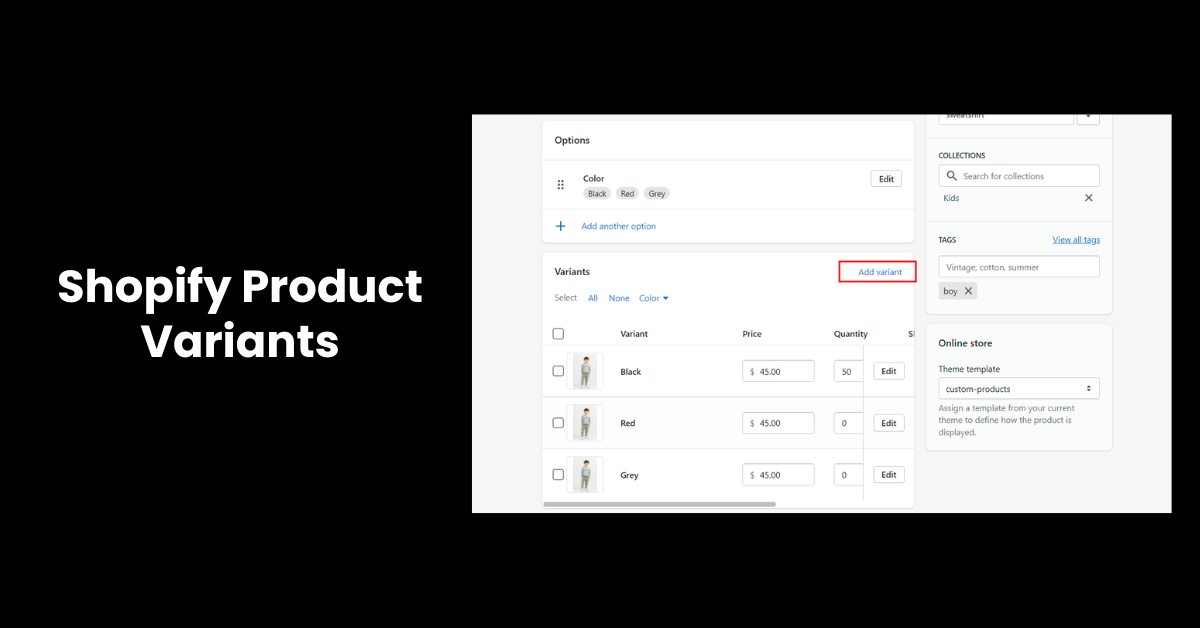
From a data structure perspective, which is most relevant to your work, this looks like a nested object. A Product object contains an array of its Variant objects. You saw an example of this in the Shopify documentation. This parent-child relationship is fundamental to how you will access and display product information in your code.
Organizing Products: Collections
Now that we understand how an individual product is structured, the next logical question is: how do merchants group them together? You wouldn't want a store showing an endless list of every single product. Customers expect to browse by categories like "T-Shirts," "New Arrivals," or "Summer Sale."
This is where Collections come in. A collection is simply a logical grouping of products.

A product can exist in multiple collections simultaneously. For example, the "Classic T-Shirt" could be in "T-Shirts," "Men's Apparel," and "Bestsellers."
There are two types of collections:
- Manual Collections: The merchant hand-picks which products belong to the collection. This is simple but requires manual maintenance.
- Automated Collections: The merchant defines a set of rules, and Shopify automatically includes any products that match. This is far more powerful and scalable. Rules can be based on:
- Product title
- Product type
- Vendor
- Price
- Tags (a versatile labeling system)
As a developer, you will frequently work with collections to build navigation menus, create category pages, and display "related products" sections.
Test your understanding!
A client sells coffee beans. They offer a single "Ethiopia Yirgacheffe" coffee. It's available in two sizes (12oz and 2lb bags) and two grind types (Whole Bean and Ground). The price and SKU are different for each of the four possible combinations.
- How would you model this in Shopify? (How many products, options, and variants?)
- The client wants a page on their site that lists all their African coffees. How would you achieve this?
Show answer
-
Modeling:
- Product: You would create one Product named "Ethiopia Yirgacheffe".
- Options: The product would have two Options: "Size" (with values "12oz", "2lb") and "Grind" (with values "Whole Bean", "Ground").
- Variants: This setup would automatically generate 2x2 = 4 Variants. Each variant (e.g., "12oz / Whole Bean") would have its own unique price, SKU, and inventory level.
-
Grouping: You would create an Automated Collection named "African Coffees." You could set up a rule for this collection to automatically include any product with the tag "Africa." Then, you would simply add the "Africa" tag to the "Ethiopia Yirgacheffe" product.
Conclusion
You've just learned the foundational data model for all of Shopify commerce. This structure directly influences how you will query data using APIs and render it using Liquid in themes.
Key Takeaways:
- Products are containers: They hold the general description and media for an item.
- Variants are the real items for sale: They are created from a product's options and are the objects that have a price, SKU, and inventory. Even products without options have a single default variant.
- Collections are for organization: They are logical groups of products used to create category pages and organize the storefront for customers.
- The Hierarchy: A Collection contains Products. A Product contains Variants.
In our previous lesson, we identified the APIs as the communication layer. Now you know the primary objects you'll be communicating about. When your app uses the Admin API to "update inventory," you are really targeting a specific Variant object, not a Product. When your theme code builds a category page, it is looping through the products within a Collection object.
With this understanding of the catalog structure, we are ready to move on to the next critical data set. In the next lesson, we will explore what happens after a customer clicks "buy": the order lifecycle, represented by the Order, Fulfillment, and Transaction objects.