Hello! Welcome to your next lesson in Module 2.
In our last session, we established a crucial "first principle": Shopify's multi-tenant architecture is designed for security and scale, which means you, as a developer, can't touch the core code or database. All interactions happen through controlled, sandboxed interfaces. This naturally leads to the question: what are these interfaces?
Today, we'll answer that. We're going to map out the developer's world within Shopify. Our learning outcome is to identify the three main customization layers: themes, apps, and APIs. Understanding these layers is fundamental because every development task you undertake will fall into one or more of these categories. This lesson will provide the mental model you need to decide how to approach any given feature request.
The Three Layers of Customization
Think of the Shopify platform as a high-performance engine. You can't rebuild the engine block (the core), but you have three distinct ways to customize the car built around it:
- Themes (The Presentation Layer): This is the car's bodywork, paint job, and interior. It's everything the customer sees and touches—the look, feel, and layout of the online store.
- Apps (The Functionality Layer): These are like after-market upgrades. Want to add a turbocharger, a GPS system, or a better sound system? You install an app to add new features and capabilities that the core engine doesn't provide.
- APIs (The Communication Layer): This is the car's electronic control unit (ECU) and wiring harness. It’s the set of rules and protocols that allow the theme and apps to communicate with the core engine and with each other.
Let's break down each layer.
1. Themes: The Presentation Layer
A theme controls the visual presentation of an online store. It's a collection of files written in Liquid, HTML, CSS, and JavaScript. Since you're proficient in modern front-end development, you'll find this layer the most familiar.
- Purpose: To control the storefront's branding, layout, and user experience.
- Technology:
- Liquid: A templating language created by Shopify. We briefly mentioned it last lesson as a "sandboxed" language. It's used to pull store data (like product titles and prices) from Shopify's database and render it in your HTML.
- HTML, CSS, JavaScript: The standard web technologies you already know. You'll use these to structure the content, style it, and add interactivity.
- Scope: Customization is limited to what a customer can see and do in their browser on the storefront. You can change product page layouts, build custom navigation, or create unique animations, but you can't change how Shopify processes a payment or calculates shipping rates at its core.
The image below shows a conceptual wireframe of how different parts of a theme (like the header, footer, and main content) come together.
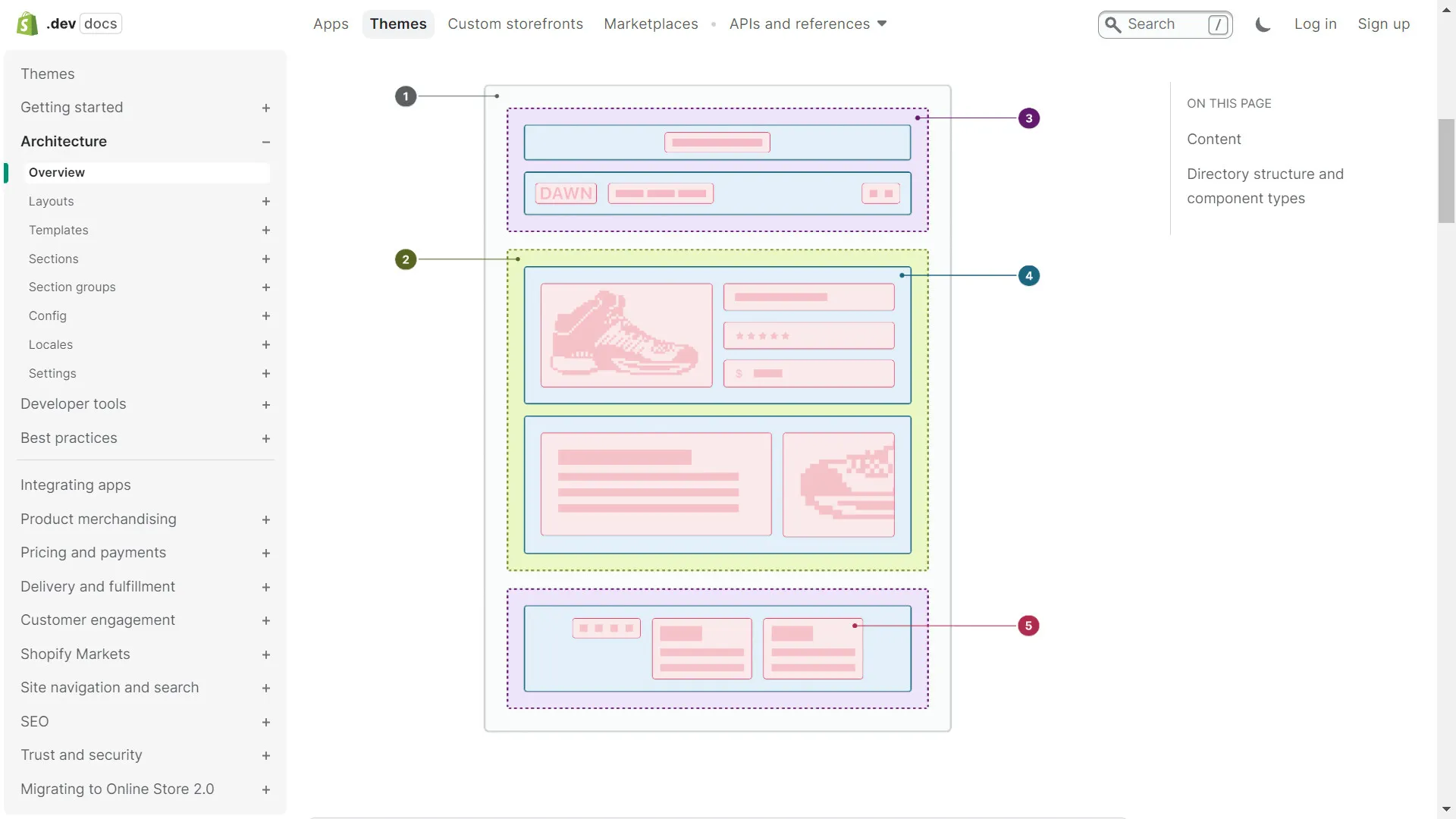
The Shopify developer documentation provides a formal list of the technologies involved in theme development.
Shopify API, libraries, and tools
The official Shopify documentation gives a concise overview of the technologies used for building themes. This will formalize what we've just discussed.
In this resource, scroll down to the section titled 'Build themes'. Briefly review the technologies listed there: Liquid, Ajax API, and Section Rendering API. We will cover the APIs in more detail shortly.
2. Apps: The Functionality Layer
When a merchant needs functionality that goes beyond what their theme can do, they turn to apps. An app is a separate piece of software that extends Shopify's capabilities.
- Purpose: To add new features, automate backend processes, or integrate with third-party services.
- Technology: Apps can be built with any tech stack. Given your background, a Node.js and Express.js backend with a React front-end is a very common and powerful choice. The app then communicates with the Shopify store using APIs.
- Scope: The scope is vast. An app can:
- Add a user interface inside the Shopify Admin for merchants to use (an "embedded app").
- Run backend processes, like syncing inventory with a warehouse system.
- Add new features to the storefront, like a loyalty program or product reviews.
- Connect to external services, like an email marketing platform or an accounting software.
This is where your full-stack development skills come directly into play. You are essentially building a microservice that securely connects to Shopify to read or write data.
The following diagram perfectly illustrates the relationship between the merchant, the store, your app, and the underlying APIs.

Shopify's own content uses a great "Lego" analogy to describe this composable approach.
Making Commerce better with Shopify's composable ...
This Shopify Enterprise blog post explains the concept of 'composable commerce'. It's a higher-level, architectural view that aligns with your interest in the 'why'.
Read the first two sections, 'The enterprise imperative: embracing agility and flexibility' and the following paragraphs that introduce the Lego analogy. This will reinforce how apps and APIs act as building blocks to extend the core platform.
3. APIs: The Communication Layer
The API layer is what makes everything else possible. It's the "contract" that Shopify provides for developers to programmatically interact with a store. Since you cannot access the database directly, the APIs are your only gateway to the data.
Understanding the different APIs and their specific use cases is critical. For instance, the way you update a cart in a theme is completely different from how you would read order data in a backend app.
The following video provides an excellent overview of the main Shopify APIs. As you watch, focus on associating each API with a specific use case.
Shopify API for Beginners (2026) – Full Guide for Theme & App Developers
Jan from 'Coding with Jan' offers a clear, practical breakdown of Shopify's most important APIs. This will give you a solid map of the communication landscape.
Watch the video from the beginning to 08:44 and then the summary from 09:31 to 09:43. Pay close attention to the distinct purpose of each API he covers.
Let's summarize the key APIs from the video and place them within our layered model:
-
Ajax API:
- Layer: Used within Themes.
- Purpose: To make the storefront interactive without page reloads. Think of adding items to a cart, updating quantities, or building a predictive search. It's a public-facing, front-end API.
-
Admin API (GraphQL and REST):
- Layer: The primary tool for Apps.
- Purpose: To read and write core store data (Products, Orders, Customers, etc.). This is a secure, authenticated API that can only be used from a backend server, never from the front-end. This is a direct consequence of the multi-tenant architecture we discussed.
-
Storefront API:
- Layer: A specialized tool for APIs, enabling "headless commerce".
- Purpose: To build completely custom front-ends (e.g., using your skills in Next.js or React) that use Shopify purely as a backend for commerce. It gives you public access to product data and cart functionality, but not sensitive admin data.
-
Webhooks:
- Layer: An event-driven part of the API layer, used by Apps.
- Purpose: Instead of constantly asking Shopify "is there a new order yet?", you can subscribe to an event (like
orders/create). When a new order occurs, Shopify sends a notification (a payload of data) to your app. It's a push model, not a pull model.
Test your understanding!
A merchant asks you to build a feature where customers can upload an image to be printed on a t-shirt. They want the image upload field on the product page, and they need to see the uploaded image file when they view the order in their Shopify Admin.
Briefly outline which customization layer(s) and specific APIs you would use for this task.
Show answer
You would use all three layers:
- Theme Layer: You'd modify the product page template to add an HTML
<input type="file">field for the image upload. You would use JavaScript to handle the upload process. - API Layer (Ajax API): When the customer adds the product to the cart, you'd use JavaScript to first upload the image to a third-party storage service (like AWS S3 or Cloudinary) because you can't upload files directly to Shopify's servers. You'd then get a URL for the uploaded image. Using the Ajax API, you would add this URL to the product as a line item property when adding it to the cart.
- App Layer (optional but robust): The line item property will show the URL in the order details. However, for a better merchant experience, you could build a small app. This app would use the Admin API to read the order details, retrieve the image URL from the line item properties, and display the image itself directly within the Shopify Admin order page using an Admin UI extension. This is a more advanced but much cleaner solution for the merchant.
Bringing It All Together
The most powerful solutions often combine all three layers. To synthesize these concepts, let's watch one more short clip. This video frames the layers slightly differently but arrives at the same conclusion, which will help solidify your understanding.
Shopify Editions - What this means for developers (Summer 2022)
This video from 'Code with Chris the Freelancer' provides a developer-focused summary of Shopify's customization stack, connecting the concepts of presentation, data, and backend logic.
Watch the section from 01:34 to 02:51. Notice how he maps the concepts: 'presentation layer' maps to our Themes, the 'database layer available through APIs' maps to our API layer, and 'extending backend logic' maps to our App layer.
Conclusion
You now have a complete mental model of how to build on Shopify. You're not just learning a list of tools; you're understanding an ecosystem with clear boundaries and points of interaction.
Key Takeaways:
- Themes are for Presentation: They control the look and feel of the storefront using Liquid, HTML, CSS, and JS.
- Apps are for Functionality: They are separate software applications that add new features or backend logic, communicating with the store via APIs.
- APIs are for Communication: They are the secure, contractual bridge between your code (in themes or apps) and the Shopify platform. Different APIs serve different purposes (front-end, back-end, headless).
- Choosing the Right Layer: A key developer skill is analyzing a requirement and determining whether it needs a theme modification, a full-blown app, or a combination of both, all powered by the right APIs.
In our previous lesson, we saw why Shopify is structured the way it is. Today, we've defined what the developer's interaction points are. In our next lesson, we will begin exploring the actual data you'll be manipulating through these layers, starting with the core objects of any e-commerce store: Products, Variants, and Collections.