Hello! Welcome to your fifth lesson in the "Shopify Platform & Data Architecture" module.
In our last two lessons, we deconstructed the data models for what a store sells (Products, Variants, Collections) and the process of a sale (Orders, Fulfillments, Transactions). We've built a solid picture of the catalog and the transaction, but we're missing the most important piece: the person making the purchase.
Today, we will complete our tour of Shopify's core data objects by focusing on the customer. Our learning outcome is to explain the Customer object and its relationship to Orders and Addresses. This will give you a complete, foundational understanding of how Shopify models the essential entities of commerce.
The "Why": A Single Source of Truth for Customers
Given your background in full-stack development, you've likely worked with user tables in a database. A fundamental principle of good database design is normalization—avoiding data duplication by storing related information in separate, linked tables. Shopify's architecture follows this principle.
Instead of storing a customer's name and address on every single order they place, Shopify uses a central Customer object. This object acts as the single source of truth for that individual's information and their entire history with the store.
This design choice has several key benefits:
- Data Integrity: If a customer updates their name, you only need to change it in one place, not across dozens of historical orders.
- Customer Relationship Management (CRM): It allows merchants to see a customer's total spending, order count, and other valuable metrics at a glance.
- Streamlined User Experience: It enables customer accounts, allowing logged-in users to check out faster using their saved addresses.
The image below gives a simplified but powerful visualization of this structure. You can see distinct "tables" for customers, their addresses, and their orders, representing how these entities are stored separately but linked together.
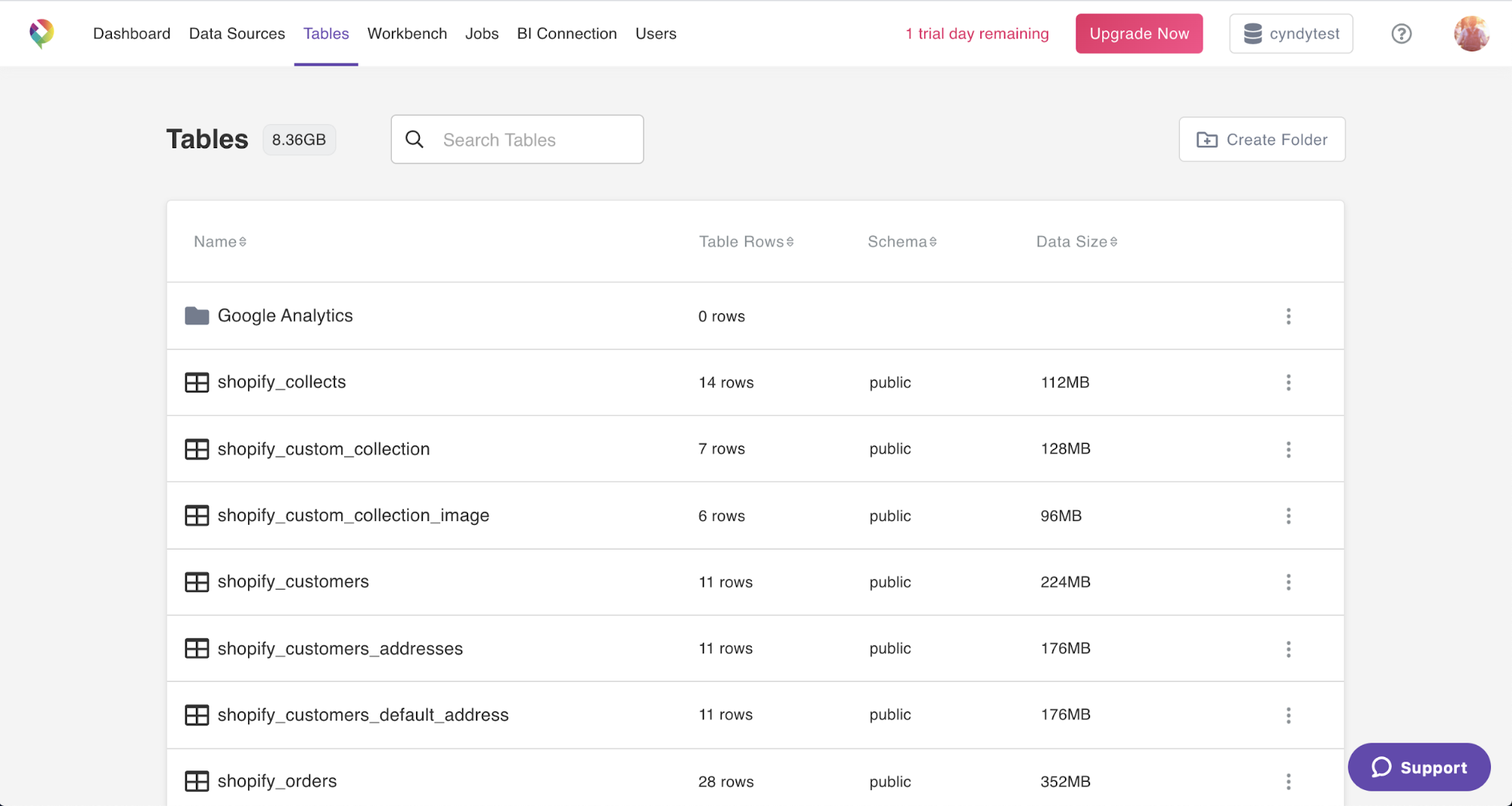
Let's now dive into the specific relationships between these objects.
The Customer and Address Relationship
A customer doesn't just have one address; they might have a home address, a work address, and a P.O. box. Shopify models this as a one-to-many relationship: one Customer can be associated with many Address objects.
Within this collection of addresses, one is typically designated as the default_address, which is pre-filled during checkout for convenience.
To see how this is structured in the backend, we'll look at the Admin API documentation. This resource describes the data model from a server-side perspective, which is what you'd interact with when building a Shopify App.
The Shopify Admin API documentation for the Customer resource provides the definitive structure. We'll examine the properties that define the customer-address relationship.
In the 'Properties' section, find and read the descriptions for addresses and defaultAddress. Notice that addresses is a list of address objects, and each address within that list has its own set of properties (like city, zip, etc.). This directly represents the one-to-many relationship.
As the documentation shows, the Customer object doesn't contain address fields directly. Instead, it contains an array of separate Address objects. This is the practical implementation of the one-to-many relationship.
The Customer and Order Relationship
Similarly, a single customer can place multiple orders over time. This is another classic one-to-many relationship: one Customer object can be linked to many Order objects.
When an order is created, it is associated with a customer. This link allows you to retrieve all orders placed by a specific individual. From the customer's perspective, this relationship allows Shopify to calculate aggregate data like total_spent and orders_count.
Let's turn to the Liquid object documentation. Liquid is the templating language used in themes, so this resource shows us how customer and order data are exposed on the storefront.
The customer Liquid object documentation shows how a customer's data is made available within a theme, which is crucial for building customer account pages.
In the 'Properties' section, find and read the descriptions for orders, orders_count, and last_order. This shows how the relationship to the Order object is exposed. Also, re-examine the addresses and default_address properties here to see the parallel with the Admin API.
You can see the symmetry between the backend API model and the frontend Liquid model. Both provide access to a customer's list of orders and addresses, reinforcing that this is a core architectural concept. Having properties like orders_count and total_spent pre-calculated on the customer object is a common optimization to avoid expensive database queries every time a page is loaded.
Guest Checkouts vs. Customer Accounts
A common point of curiosity is what happens during a guest checkout. If the customer doesn't create an account, is a Customer object still created?
Yes.
Every order must be associated with a customer record for the merchant's operational needs (e.g., shipping, contact information, order history).
- When a guest checks out, Shopify creates a
Customerobject in the database but does not create an associated login account. - When a customer creates an account, that same
Customerobject is simply updated with login credentials and a flag indicating an account exists.
This is represented by the has_account boolean property you saw in the Liquid documentation. This allows you to build theme logic that, for example, shows a "Welcome back!" message to logged-in users but prompts guest users to create an account for faster checkout next time.
Test your understanding!
A new visitor, jane.doe@example.com, buys a product and checks out as a guest, shipping it to her home in New York. A week later, she returns to the site, creates an account with the same email, and buys another product, this time shipping it to her office in Boston.
Describe the state of the Shopify data for jane.doe@example.com after this second purchase. Specifically, how many of each object exist and what are their key properties?
Customerobject(s)Addressobject(s)Orderobject(s)
Show answer
Customerobject: There is only oneCustomerobject. It was created during the first guest checkout. Its key properties would now beemail: 'jane.doe@example.com',orders_count: 2,has_account: true.Addressobjects: There will be twoAddressobjects associated with this customer record: one for her home in New York and one for her office in Boston. The New York address was likely set as thedefault_addressinitially, but Jane might have changed the default to her Boston address during the second checkout.Orderobjects: There will be twoOrderobjects. Both orders are linked to the singleCustomerobject. Each order will reference one of the addresses as its shipping address.
Conclusion
You have now mapped out the three most fundamental data objects in Shopify's architecture: Products, Orders, and Customers. Understanding their individual structures and, more importantly, their relationships is the bedrock of Shopify development.
Key Takeaways:
- The
Customerobject is a central entity that acts as a single source of truth, following principles of data normalization. - The relationship between a
Customerand theirAddressesis one-to-many, with one address typically set as the default. - The relationship between a
Customerand theirOrdersis also one-to-many, allowing for a complete purchase history. - A
Customerrecord is created for every purchase, but a customer account (with a login) is an optional feature of that record.
In our journey through Shopify's data architecture, we've focused on the standard, out-of-the-box data models. But what happens when a merchant needs to store information that doesn't fit neatly into these predefined objects? For instance, how would you store a "birthdate" for a customer or an "engraving text" for a product?
In the final lesson of this module, we will explore the solution to this very problem: using Metafields to extend Shopify's default data model.