Introduction
Welcome to the next lesson in our game engine journey! In the last two lessons, we built a robust state machine to manage our game's flow, using getchar() as a temporary way to trigger transitions between states like the main menu and gameplay. While functional, getchar() is a blocking, simplistic method that isn't suitable for a real-time game.
Today, we'll replace that placeholder with a professional input handling system. Our goal is to handle keyboard press, release, and hold states using callbacks and a state array. This is a foundational step for nearly all future features, from player movement and camera control to interacting with UI elements.
We will cover three core concepts:
- Callbacks: How to tell our windowing library (GLFW) to notify us whenever a key is pressed or released.
- State Arrays: How to store the state of every key on the keyboard.
- State Logic: How to use the stored state to determine if a key was just pressed, just released, or is being held down.
1. Receiving Input Events with Callbacks
In a game, we can't just stop and wait for input like we did with getchar(). The game loop must continue running smoothly. Instead, we use an event-driven model. We register a "callback" function with GLFW and tell it, "Whenever a key event happens, call this function for me."
This is a powerful pattern. Since you have experience with C#, you can think of it as being conceptually similar to subscribing to an event like OnKeyDown. You provide a method, and the system invokes it when the event occurs. In C, we accomplish this with function pointers.
Let's start by understanding how GLFW handles this.
The official GLFW Input guide is the best place to understand how key events are handled. This section details the glfwSetKeyCallback function and the structure of the callback it expects.
Read the subsection titled 'Key input'. Focus on the signature of the key_callback function (void key_callback(GLFWwindow* window, int key, int scancode, int action, int mods)) and the different values for the action parameter: GLFW_PRESS, GLFW_RELEASE, and GLFW_REPEAT.
As the guide explains, our callback function will receive four important pieces of information:
key: An integer representing the physical key (e.g.,GLFW_KEY_A,GLFW_KEY_SPACE).scancode: A platform-specific identifier for the key. We'll stick to thekeyfor now as it's portable.action: This is crucial for us. It will beGLFW_PRESS,GLFW_RELEASE, orGLFW_REPEAT.mods: Indicates if modifier keys like Shift, Ctrl, or Alt were also held down.
This callback mechanism gives us the event, but it doesn't give us a way to check a key's state at any point in our game loop. For that, we need to store the information we receive.
2. The Two-Array System for State Tracking
The core problem is distinguishing between a key being held down and a key being pressed for the first time. A simple boolean is_down flag isn't enough. If the flag is true, was it also true in the last frame? If so, the key is being held. If it was false, the key was just pressed.
The classic solution is to maintain two arrays representing the keyboard's state: one for the current frame and one for the previous frame.
This approach is explained clearly in the following article by a developer who built their own engine in C.
How I made my own 2D game engine in under 2 months
This blog post details a robust method for handling input states. We are interested in the author's explanation of using 'current' and 'previous' state arrays to detect press and release events.
Read the 'Input' section. Pay close attention to the C code snippet showing the use of memcpy to update input_previous_keyboard_state from input_current_keyboard_state. Then, read the explanation of how aika_input_is_pressed works by comparing the two arrays. You can skip the Lua-specific details.
Let's formalize this logic:
- We have two arrays:
bool g_current_keys[MAX_KEYS]andbool g_previous_keys[MAX_KEYS]. - Our GLFW
key_callbackfunction will only ever modify theg_current_keysarray. It setsg_current_keys[key] = trueonGLFW_PRESSandg_current_keys[key] = falseonGLFW_RELEASE. - At the start of each frame's input processing, before we poll for new events, we copy the entire
g_current_keysarray intog_previous_keys. - With these two arrays, we can define our state checks:
- Key Hold/Down:
g_current_keys[key]istrue. - Key Press:
g_current_keys[key]istrueANDg_previous_keys[key]isfalse. - Key Release:
g_current_keys[key]isfalseANDg_previous_keys[key]istrue.
- Key Hold/Down:
This two-array system is simple, non-blocking, and gives us complete information about the state transitions of every key.
3. Implementing the Input System in C
Now, let's turn theory into code. We'll create a new input module (input.h and input.c) to encapsulate all this logic.
The following video from The Cherno demonstrates a similar implementation in C++. We will adapt his C++/GLFW approach to our C project. The core ideas—using a state array, setting a callback, and creating helper functions—are identical.
Ep. 3 : Input - Sparky Engine (How To Make a Game Engine)
This video walks through building a GLFW-based input system. Although it's in C++, the logic for setting up the callback and using a boolean array to store key states is directly transferable to our C implementation.
Watch the following segments: 3:45 - 6:33: Focus on the core idea of using a boolean array indexed by key codes. 6:33 - 20:47: This is a long segment. The key takeaway is how the key_callback function works. It receives the key and action and updates the state array. Pay attention to how he handles GLFW_PRESS vs GLFW_RELEASE. We will simplify this by ignoring the C++-specific friend and glfwGetWindowUserPointer details for now and using global state arrays. 20:47 - 22:57: See how he creates a helper function isKeyPressed to check the state, which is what we will do for our IsKeyDown, IsKeyPressed, and IsKeyReleased functions.
Let's build our input module.
3.1. input.h
This header will expose the public interface of our input system.
// input.h


#ifndef INPUT_H
#define INPUT_H


#include <stdbool.h>

// Initialize the input system and register callbacks
// Must be called AFTER the GLFW window is created
void Input_Init(struct GLFWwindow* window);

// Update the input state (copy current to previous)
// Should be called once at the start of each frame
void Input_Update();

// --- Keyboard State Queries ---

// Returns true if the key is currently held down
bool IsKeyDown(int key);

// Returns true only on the frame the key was first pressed
bool IsKeyPressed(int key);

// Returns true only on the frame the key was released
bool IsKeyReleased(int key);


#endif // INPUT_H
3.2. input.c
This is where the implementation lives. We'll define our state arrays and the callback function as static, hiding them from other parts of the program.
// input.c


#include "input.h"
#include <GLFW/glfw3.h>
#include <string.h> // For memcpy and memset

// GLFW supports up to 348 keys


#define MAX_KEYS 350

// We make these static so they are "private" to this file
static bool g_current_keys[MAX_KEYS];
static bool g_previous_keys[MAX_KEYS];

// This is our callback function that GLFW will call
static void key_callback(GLFWwindow* window, int key, int scancode, int action, int mods) {
    // Ignore invalid key codes
    if (key < 0 || key >= MAX_KEYS) {
        return;
    }

    if (action == GLFW_PRESS) {
        g_current_keys[key] = true;
    } else if (action == GLFW_RELEASE) {
        g_current_keys[key] = false;
    }
    // We intentionally ignore GLFW_REPEAT to avoid re-triggering presses
}

void Input_Init(GLFWwindow* window) {
    // Set all key states to false initially
    memset(g_current_keys, 0, sizeof(g_current_keys));
    memset(g_previous_keys, 0, sizeof(g_previous_keys));

    // Register our key_callback function with GLFW
    glfwSetKeyCallback(window, key_callback);
}

void Input_Update() {
    // Copy the current state to the previous state at the beginning of the frame
    memcpy(g_previous_keys, g_current_keys, sizeof(g_current_keys));
}

bool IsKeyDown(int key) {
    if (key < 0 || key >= MAX_KEYS) return false;
    return g_current_keys[key];
}

bool IsKeyPressed(int key) {
    if (key < 0 || key >= MAX_KEYS) return false;
    // Was not pressed last frame, but is pressed this frame
    return g_current_keys[key] && !g_previous_keys[key];
}

bool IsKeyReleased(int key) {
    if (key < 0 || key >= MAX_KEYS) return false;
    // Was pressed last frame, but is not pressed this frame
    return !g_current_keys[key] && g_previous_keys[key];
}
4. Integrating with the Game Loop
Now we need to wire our new module into the main application.
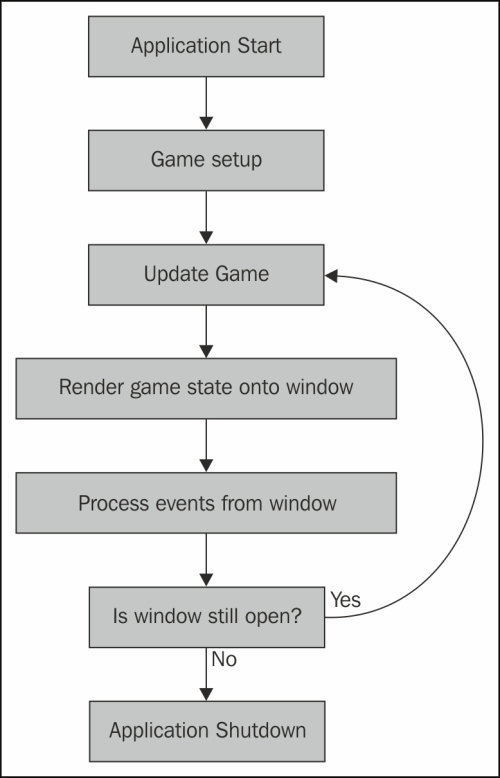
The order of operations in the main loop is very important:
Input_Update(): First, archive last frame's input state.glfwPollEvents(): Then, poll for new OS events. This will trigger ourkey_callbackif any keys were pressed/released, updating theg_current_keysarray for the current frame.StateManager_Update(): Now, run game logic, which can safely query the just-updated input state usingIsKeyPressed, etc.
Here's how you would modify main.c and your state files.
main.c
#include "state_manager.h"
#include "menu_state.h"
#include "input.h" // Include our new header
#include <GLFW/glfw3.h> // Assuming you have this from your windowing setup

int main() {
    // ... GLFW and window creation code ...
    GLFWwindow* window = /* ... create your window ... */;

    // Initialize our new systems
    StateManager_Init();
    Input_Init(window); // Pass the window to the input system

    StateManager_Push(&g_menu_state);

    while (!glfwWindowShouldClose(window)) {
        // --- INPUT ---
        Input_Update();
        glfwPollEvents();

        // --- UPDATE ---
        StateManager_Update(0.016f);

        // --- DRAW ---
        // ... clear screen, etc. ...
        StateManager_Draw(0.016f);
        glfwSwapBuffers(window);
    }

    StateManager_Cleanup();
    // ... cleanup GLFW ...
    return 0;
}
menu_state.c (Update function)
Now, you can replace the old getchar() logic with a clean, non-blocking input check.
// In menu_state.c


#include "input.h"
#include <GLFW/glfw3.h> // For key codes

// ...

static State* menu_update(float delta_time) {
    // No more blocking printf!

    // Check if the Enter key was pressed this frame
    if (IsKeyPressed(GLFW_KEY_ENTER)) {
        // Request a transition to the play state
        return &g_play_state;
    }

    // No transition requested
    return NULL;
}
Do the same for play_state.c, checking for IsKeyPressed(GLFW_KEY_ESCAPE) to return to the menu.
Conclusion
Excellent work! You have now implemented a fundamental engine subsystem. This input handler is far more powerful than our previous placeholder and forms the bedrock of user interaction in your game.
Key Takeaways:
- Input is best handled with a non-blocking, event-driven approach using callbacks.
- The
key_callbackfunction provided by GLFW tells us when a key's state changes. - To query a key's state at any time, we store it in a state array.
- Using two arrays (current and previous state) allows us to reliably distinguish between a key press (a single-frame event), a release (single-frame event), and a hold (a continuous state).
- The order of operations is crucial:
Input_Update(to copy state),glfwPollEvents(to get new events), and then your game logic update.
Preview of the Next Lesson:
With keyboard input sorted, the natural next step is the mouse. In the next lesson, we will handle mouse movement and button clicks. We'll extend our input system to track the mouse cursor's position and the state of its buttons, using the same robust patterns we established today.