Introduction
Hello! In our previous lessons, we've built some of the foundational data structures for our game engine. We designed a basic Entity-Component System and defined the core TransformComponent and PhysicsBodyComponent that describe the objects in our world. We now have a way to represent what things are, but not what the game as a whole is doing.
For example, how do we differentiate between being in the main menu, actively playing the game, or having the game paused? If we just have one continuous game loop, all our systems (physics, rendering, input) will always be running, which is not what we want.
Today, we'll address this by tackling our next learning outcome: implement a simple state machine to manage game states (e.g., main menu, playing, paused). A state machine is a powerful and widely-used pattern in game development for organizing the flow and logic of your application.
By the end of this lesson, you will understand why state machines are necessary and will have implemented a flexible state manager in C that will become the backbone of our game's architecture.
1. The Problem with Simple Flags
When first approaching this problem, a common instinct is to use a set of boolean flags to track the game's current state. For example:
bool is_in_menu = true;
bool is_playing = false;
bool is_paused = false;

while (game_is_running) {
    if (is_in_menu) {
        // process menu input, draw menu
    }
    if (is_playing && !is_paused) {
        // process game input, run physics, etc.
    }
    if (is_paused) {
        // draw pause overlay
    }
    // ...
}
This seems simple at first, but as you add more states (options menu, game over screen, loading screen), the number of flags and the complexity of the if conditions explode. It becomes difficult to manage, error-prone (what if is_in_menu and is_playing are both true?), and hard to debug.
The following video discusses this exact issue and introduces the concept of game states as a cleaner solution.
C++/Game Tutorial 38: Game States, enums, enum Classes!
To see why using boolean flags becomes problematic, watch this short clip from the YouTube channel MakingGamesWithBen. It clearly illustrates how quickly the logic can become messy.
Watch from the beginning until 01:33. The presenter starts with a simple boolean and shows how adding a main menu makes the logic convoluted.
This tangled web of flags is a clear sign that we need a more structured approach.
2. Finite State Machines (FSMs)
The solution to this problem is a Finite State Machine (FSM). This is a model of computation that is perfect for what we're trying to achieve.
Conceptually, an FSM is defined by a few simple rules:
- A finite number of states: The game can only be in a limited number of defined states (e.g.,
MENU,PLAYING,PAUSED). - One active state at a time: The game can't be in the menu and playing at the same time.
- Transitions between states: The machine switches from one state to another based on inputs or events (e.g., pressing the 'Play' button transitions from
MENUtoPLAYING).

To understand these core principles more formally, watch the next short segment from the video by The Shaggy Dev.
An introduction to finite state machines and the state pattern for game development
This video gives a clear and concise definition of what a finite state machine is and its core rules, using a character controller as an example.
Watch from 02:35 to 04:00. Focus on the four rules of an FSM that are presented. This provides the theoretical foundation for what we are about to build.
3. A Simple Implementation: enum and switch
The most direct way to implement an FSM in C is by using an enum to define the states and a switch statement in the main loop to execute the logic for the current state.
First, we define our possible states:
// game.h (or a new state_manager.h)
typedef enum {
    GAME_STATE_MAIN_MENU,
    GAME_STATE_PLAYING,
    GAME_STATE_PAUSED,
    GAME_STATE_GAME_OVER
} GameStateEnum;
Then, in our main application structure, we would have a variable to hold the current state, and our game loop would use a switch to decide what to do.
// main.c
GameStateEnum current_state = GAME_STATE_MAIN_MENU;

while (game_is_running) {
    // --- Process Input ---
    // (Input handling might change current_state)

    // --- Update ---
    switch (current_state) {
        case GAME_STATE_MAIN_MENU:
            // update_main_menu();
            break;
        case GAME_STATE_PLAYING:
            // update_gameplay();
            break;
        case GAME_STATE_PAUSED:
            // update_pause_menu();
            break;
        // ... and so on
    }

    // --- Draw ---
    switch (current_state) {
        case GAME_STATE_MAIN_MENU:
            // draw_main_menu();
            break;
        case GAME_STATE_PLAYING:
        case GAME_STATE_PAUSED: // Draw the game world in both playing and paused states
            // draw_gameplay();
            if (current_state == GAME_STATE_PAUSED) {
                // draw_pause_overlay();
            }
            break;
        // ... and so on
    }
}
This is a huge improvement over boolean flags! The logic is much cleaner, and it's impossible for the game to be in an invalid combination of states. This approach is perfectly fine for simple games.
However, it has drawbacks. The logic for a single state (e.g., its input, update, and drawing code) is spread out across multiple switch statements. Furthermore, if a state needs its own data (like a timer for a charging attack, as mentioned in the Game Programming Patterns article), that data has to be stored in the main game struct, even if it's only used by one state.
4. A More Flexible Design: The State Pattern in C
To create a truly scalable system, we can use a design known as the State Pattern. In object-oriented languages like C++, you'd create a State interface and have separate classes for each state. In C, we can achieve the same level of encapsulation using a struct of function pointers.
The idea is to define a generic State structure that holds pointers to functions for the core behaviors: initializing, updating, drawing, and destroying.
// A generic state definition
typedef struct {
    void (*init)();
    void (*update)(float delta_time);
    void (*draw)(float delta_time);
    void (*destroy)();
} State;
Each actual state (like the main menu or gameplay) will be its own State instance, with its function pointers pointing to its own specific functions.
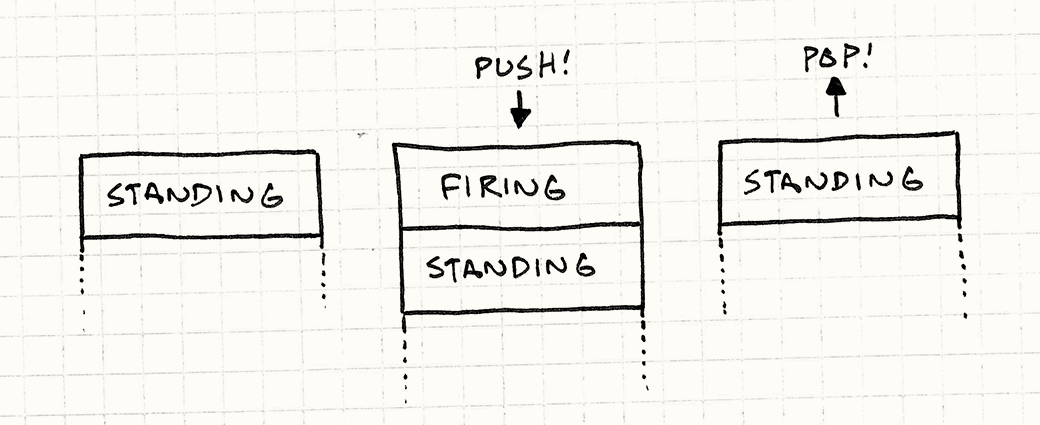
A StateManager will then manage a stack of these states. Using a stack is a powerful enhancement because it naturally handles nested states. For example, when you are in the PLAYING state and press pause, you can simply push the PAUSED state onto the stack. The game loop will now only run the update and draw functions for the state at the top of the stack (PAUSED). When you unpause, you pop the PAUSED state, and the PLAYING state is once again at the top, ready to resume.
The following article provides a complete C implementation of this exact concept. It's a fantastic resource that we will use to build our own state manager.
How to write a game engine in pure C: Part 1 – State Manager
Please read the following sections from the article "How to write a game engine in pure C: Part 1 – State Manager" by prdeving. This will walk you through the theory and C implementation of a stack-based state manager using function pointers.
Read the following sections: Start with 'THE STACK BASED STATE MANAGER' to understand the stack concept. Continue to 'THE CODE' to see the State and StateManager struct definitions. Finally, read through the function implementations (like STATEMANAGER_push and STATEMANAGER_pop) to see how the stack is managed and how the state's init and destroy functions are called automatically. You can skim the code for scale and free for now.
Implementing Our State Manager
Inspired by the article, let's create our own state_manager.h and state_manager.c. This implementation will be the core of our game's architecture.
state_manager.h
#ifndef STATE_MANAGER_H
#define STATE_MANAGER_H

// Represents a single game state with its own logic.
// The function pointers allow each state to define its own behavior.
typedef struct {
    void (*init)();
    void (*destroy)();
    void (*update)(float delta_time);
    void (*draw)(float delta_time);
} State;

// Manages a stack of game states.
void StateManager_Init();
void StateManager_Cleanup();

// Stack operations
void StateManager_Push(State* state);
void StateManager_Pop();
void StateManager_Change(State* state); // Convenience: pops current and pushes new

// Forward calls to the top state on the stack
void StateManager_Update(float delta_time);
void StateManager_Draw(float delta_time);


#endif // STATE_MANAGER_H
state_manager.c
This implementation uses a simple fixed-size array for the stack. The prdeving article shows how to make it dynamically resizable with realloc, which is a great improvement you can add later.
#include "state_manager.h"
#include <stdio.h>
#include <stdlib.h>


#define MAX_STATES 8

// The stack of states
static State* state_stack[MAX_STATES];
static int top = -1; // Index of the top of the stack

void StateManager_Init() {
    top = -1;
}

void StateManager_Cleanup() {
    // Pop and destroy all states on the stack
    while (top > -1) {
        StateManager_Pop();
    }
}

void StateManager_Push(State* state) {
    if (top + 1 >= MAX_STATES) {
        fprintf(stderr, "Error: State stack overflow.\n");
        return;
    }

    top++;
    state_stack[top] = state;

    // Call the state's init function if it has one (entry action)
    if (state->init) {
        state->init();
    }
}

void StateManager_Pop() {
    if (top < 0) return; // Stack is empty

    State* top_state = state_stack[top];

    // Call the state's destroy function if it has one (exit action)
    if (top_state->destroy) {
        top_state->destroy();
    }

    state_stack[top] = NULL;
    top--;
}

void StateManager_Change(State* state) {
    if (top > -1) {
        StateManager_Pop();
    }
    StateManager_Push(state);
}

void StateManager_Update(float delta_time) {
    if (top < 0) return;
    State* top_state = state_stack[top];
    if (top_state->update) {
        top_state->update(delta_time);
    }
}

void StateManager_Draw(float delta_time) {
    if (top < 0) return;
    State* top_state = state_stack[top];
    if (top_state->draw) {
        top_state->draw(delta_time);
    }
}
This design is clean and powerful. Each state's logic is fully encapsulated, and the init and destroy functions (called "entry" and "exit" actions in the Game Programming Patterns book) provide a clean way to set up and tear down a state when you transition.
Conclusion
Today we've laid a critical piece of our engine's foundation. We've moved beyond simple flags and implemented a robust system for managing the overall flow of our game.
Key Takeaways:
- Managing game flow with boolean flags is complex and error-prone.
- Finite State Machines (FSMs) provide a structured way to manage game states, ensuring only one state is active at a time and transitions are handled cleanly.
- A simple FSM can be implemented with an
enumand aswitchstatement, which is fine for small projects. - A more powerful, C-idiomatic implementation of the State Pattern uses a
structof function pointers to encapsulate all of a state's logic (init,update,draw,destroy). - Using a stack to manage states naturally handles nested scenarios like pausing the game.
Preview of the Next Lesson:
We now have a StateManager, but we don't have any actual States to manage! Our next task will be to implement functions for transitioning between game states. We will create concrete implementations for a MainMenuState and a GameplayState and write the logic that allows us to switch between them, for example, by pushing the GameplayState when a "Play" button is "clicked" in the menu.