Introduction
Welcome back! In our last lesson, we organized our vertex buffer setup using a Vertex Array Object (VAO). You learned that a VAO acts like a "recipe" that stores how our vertex data is laid out in memory, which greatly simplifies our rendering loop.
However, we ended with a conceptual problem. To draw a simple square, we need two triangles, which means defining 6 vertices. Since a square only has 4 unique corner points, we are duplicating two vertices entirely. This might seem minor for a square, but for a complex 3D model with thousands of triangles, this redundancy leads to significant wasted memory and performance loss.
This lesson tackles that problem head-on. Our goal is to use an Element Buffer Object (EBO) to perform indexed drawing. This powerful technique allows us to define only the unique vertices of a mesh and then specify the order in which to draw them, eliminating data duplication.
The Problem: Redundant Vertex Data
Let's make the problem of vertex duplication concrete. To draw a rectangle using two triangles, our vertex data array would look something like this:
float vertices[] = {
    // First triangle
     0.5f,  0.5f, 0.0f,  // top right
     0.5f, -0.5f, 0.0f,  // bottom right
    -0.5f,  0.5f, 0.0f,  // top left
    // Second triangle
     0.5f, -0.5f, 0.0f,  // bottom right (DUPLICATE)
    -0.5f, -0.5f, 0.0f,  // bottom left
    -0.5f,  0.5f, 0.0f   // top left (DUPLICATE)
};
We are storing 6 vertices (18 floats), but two of them are exact copies. The video below explains why this approach is suboptimal.
Watch this first segment from The Cherno's video, 'Index Buffers in OpenGL'. He clearly explains why duplicating vertices is inefficient, especially when you consider that a vertex can contain much more than just position data (like colors, normals, and texture coordinates).
Watch from 04:06 to 07:00. The key takeaway is understanding the cost of redundant data and the need for a more efficient way to define geometry.
The Solution: Indexed Drawing
The solution is to store only the unique vertices and then create a separate list of indices that tells OpenGL which vertices to pick (and in what order) to form the triangles.
For our rectangle, we would have:
- A
verticesarray with just the 4 unique corners. - An
indicesarray that defines the two triangles by referencing the vertices' positions (indices) in theverticesarray.
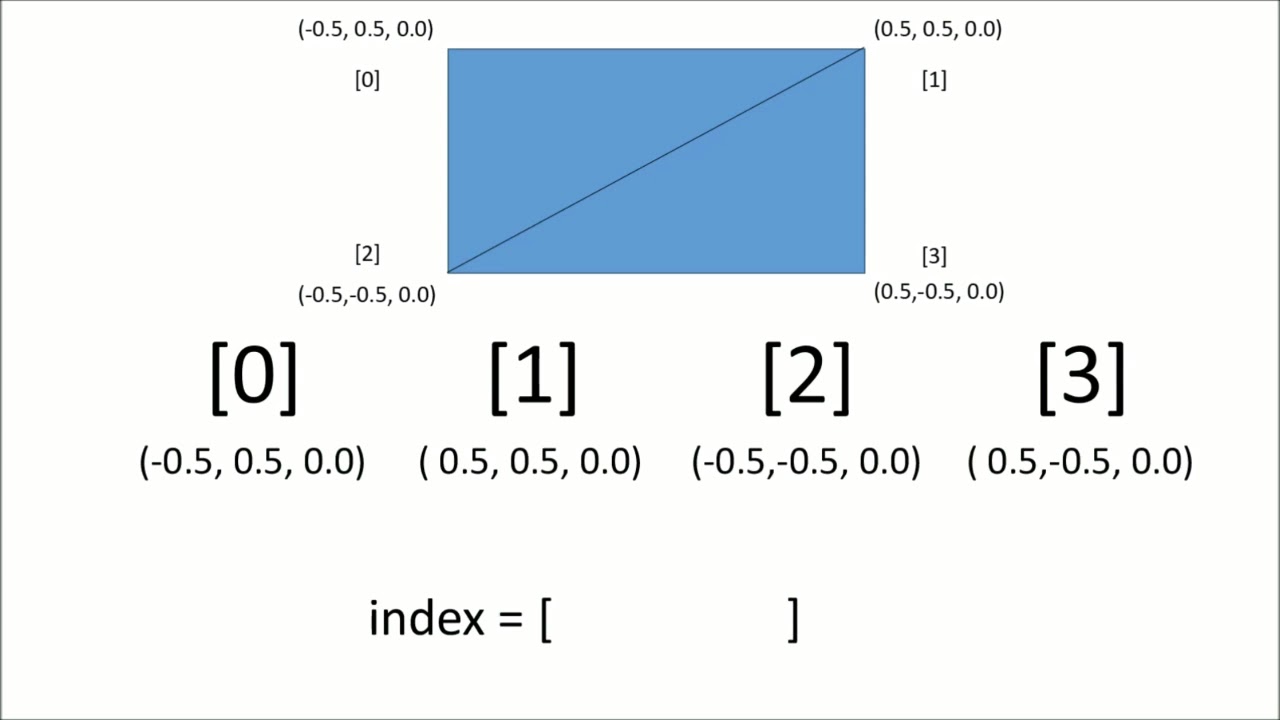
The code for this would look like this:
// 1. Define only the 4 unique vertices
float vertices[] = {
     0.5f,  0.5f, 0.0f,  // 0: top right
     0.5f, -0.5f, 0.0f,  // 1: bottom right
    -0.5f, -0.5f, 0.0f,  // 2: bottom left
    -0.5f,  0.5f, 0.0f   // 3: top left
};

// 2. Define the order to draw vertices to form two triangles
unsigned int indices[] = {
    0, 1, 3,   // first triangle
    1, 2, 3    // second triangle
};
This is the core concept of indexed drawing. We now need a way to send this indices array to the GPU.
The Element Buffer Object (EBO)
Just as we use a Vertex Buffer Object (VBO) to store vertex data, we use an Element Buffer Object (EBO) to store our index data on the GPU. The EBO is also often called an Index Buffer Object (IBO).
The process of creating and populating an EBO is almost identical to that of a VBO, with one key difference: the buffer target.
Hello Triangle - Element Buffer Objects
The 'Hello Triangle' tutorial on LearnOpenGL provides an excellent, comprehensive explanation of EBOs. It walks you through defining the unique vertices and indices, creating the EBO, and using the correct draw call.
Read the entire section titled 'Element Buffer Objects'. Pay close attention to: The C++ code for the vertices and indices arrays. The use of GL_ELEMENT_ARRAY_BUFFER as the target for glBindBuffer and glBufferData. The new draw function, glDrawElements, and the meaning of its arguments.
To see this process in action, the following video segment provides a great visual walkthrough.
This clip from The Cherno's video demonstrates the C++ code for creating, binding, and sending data to an EBO.
Watch from 08:59 to 11:08. Notice how similar the functions (glGenBuffers, glBindBuffer, glBufferData) are to the VBO setup you already know. The main change is the buffer target GL_ELEMENT_ARRAY_BUFFER.
Switching to glDrawElements
With an EBO, we no longer use glDrawArrays. Instead, we use glDrawElements. This function tells OpenGL to draw using the indices from the currently bound EBO.
glDrawElements(GL_TRIANGLES, 6, GL_UNSIGNED_INT, 0);
Let's break down its parameters:
mode:GL_TRIANGLES, just like before.count: The number of indices we want to draw. For our rectangle, this is6.type: The data type of the indices in the EBO. This must be an unsigned type, so we useGL_UNSIGNED_INT.indices: An offset into the EBO. Since we want to start drawing from the beginning of our index buffer, we provide a null pointer, which OpenGL interprets as an offset of0.
The following clip reinforces the usage of this function and points out a very common beginner mistake.
Watch this segment to see the glDrawElements call put into practice and to learn about a crucial detail regarding the data type of your indices.
Watch from 11:08 to 13:35. Pay attention to the parameters of glDrawElements. The video also highlights what happens if you mistakenly use a signed integer type for your indices—it results in a black screen with no errors, a frustrating bug to track down!
How the VAO Ties Everything Together
You might be wondering: "How does glDrawElements know which EBO to use?" The answer, once again, is the VAO!
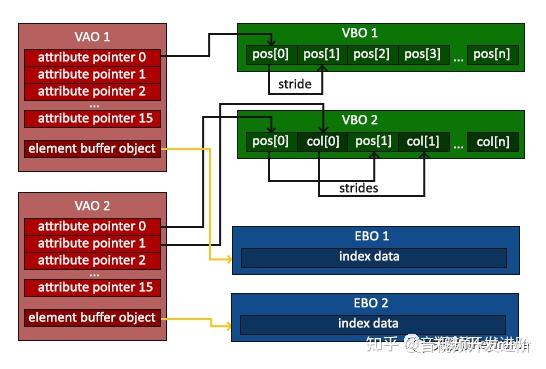
A VAO stores not only your VBO bindings and attribute pointer configurations but also the binding for the GL_ELEMENT_ARRAY_BUFFER. When you bind an EBO while a VAO is active, the VAO "remembers" that EBO.
This means your one-time initialization flow now looks like this:
glGenVertexArrays/glBindVertexArray(Create and bind your VAO).glGenBuffers/glBindBuffer/glBufferData(Set up your VBO with vertex data).glVertexAttribPointer/glEnableVertexAttribArray(Configure vertex attributes).glGenBuffers/glBindBuffer/glBufferData(Set up your EBO with index data).glBindVertexArray(0)(Unbind the VAO. It now stores the state for the VBO, its attributes, and the EBO).
After this setup, your render loop remains beautifully simple. When you call glBindVertexArray(VAO), OpenGL automatically restores the VBO and binds the correct EBO for you. All you have to do is call glDrawElements.
Conclusion
You've now learned one of the most fundamental optimization techniques in graphics programming. By using indexed drawing, you can render complex objects far more efficiently.
Key Takeaways:
- Indexed drawing avoids duplicating vertex data by defining unique vertices once and using a separate list of indices to define primitives.
- An Element Buffer Object (EBO) is a GPU buffer used to store this index data.
- You create and populate an EBO using the
GL_ELEMENT_ARRAY_BUFFERtarget withglBindBufferandglBufferData. - Rendering is performed with
glDrawElements, which uses the indices from the bound EBO to draw vertices from the bound VBO. - The VAO encapsulates the EBO binding along with the VBO and attribute settings, simplifying the rendering process.
Preview of the Next Lesson:
So far, we've treated the small programs that run on the GPU—the shaders—as black boxes. In the next lesson, "Write a basic vertex shader in GLSL to process vertex positions," we will open up that box. You will learn the basics of the OpenGL Shading Language (GLSL) and write your very first vertex shader, giving you direct control over how each vertex is processed.