Introduction
Hello again! In the previous lesson, we took a significant step by writing our first vertex shader. We learned how to write a small GLSL program that runs on the GPU to take in vertex data and determine the final position of each vertex. This gave us control over where our shapes are drawn.
However, our shapes are still just conceptual outlines. We haven't told the GPU what they should look like. That brings us to the second essential part of the shader puzzle: the fragment shader. While the vertex shader positions the vertices, the fragment shader is responsible for calculating the color of the surfaces between them.
Today, your goal is to write a basic fragment shader in GLSL to output a solid color. By the end of this lesson, you'll understand the role of the fragment shader in the graphics pipeline and be able to give your rendered shapes their first coat of paint.
From Vertices to Fragments: Coloring the Pixels
Let's revisit the graphics pipeline. After our vertex shader processes the vertices of a primitive (like a triangle), the pipeline doesn't immediately draw them. Instead, a fixed-function stage called the Rasterizer takes over.
The rasterizer's job is to figure out which pixels on your screen fall inside the shape defined by the vertices. For every one of these pixels, it generates a fragment. You can think of a fragment as a "potential pixel" that holds all the information needed to color a single point on the screen. The fragment shader's job is to calculate that final color.
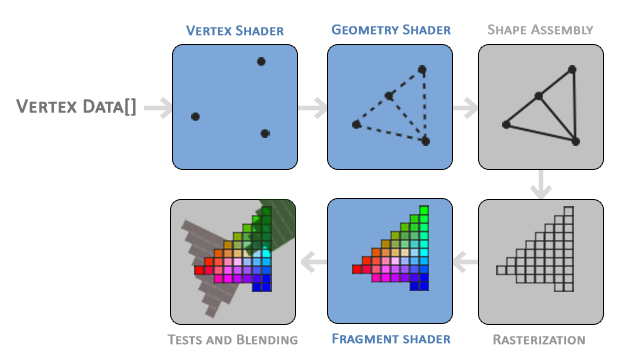
The distinction between a fragment and a pixel is subtle but important. To clarify this, the following reading is very helpful.
To understand what a fragment shader does, we first need to understand what a 'fragment' is. It's a key concept that's often confused with a pixel. This article provides a clear explanation with helpful diagrams.
Read the first two sections, 'What is a fragment shader' and 'What is a fragment'. Focus on understanding the difference between a pixel and a fragment.
Writing Your First Fragment Shader
Now that we know the fragment shader runs once for every fragment generated by the rasterizer, let's see how to write one. Its structure is very similar to the vertex shader. The main difference is its output: instead of a position, it must output a color.
Here is a minimal fragment shader that outputs a solid red color:
#version 330 core

out vec4 FragColor;

void main()
{
    FragColor = vec4(1.0, 0.0, 0.0, 1.0);
}
This simple piece of code is the key to coloring our first triangle. Let's break it down.
#version 330 core: Just like in the vertex shader, this declares that we're using GLSL version 3.30 and the core profile.out vec4 FragColor;: This declares the shader's output variable.out: Specifies that this is an output variable.vec4: A 4-component vector type. For colors, this represents the Red, Green, Blue, and Alpha (transparency) components, often abbreviated as RGBA.FragColor: A name we choose for our output variable. This name is arbitrary, but it's a common convention.
void main() { ... }: The entry point of the shader. This code is executed for every single fragment.FragColor = vec4(1.0, 0.0, 0.0, 1.0);: This is where the magic happens. We assign a color to our output variable.- In GLSL, colors are typically represented as floating-point numbers between
0.0(no intensity) and1.0(full intensity). - The
vec4constructor here takes four floats: (R, G, B, A). - So,
vec4(1.0, 0.0, 0.0, 1.0)means full red, no green, no blue, and fully opaque (alpha = 1.0).
- In GLSL, colors are typically represented as floating-point numbers between
To get a more formal understanding of the GLSL syntax for types and outputs, the LearnOpenGL guide is an excellent resource.
The LearnOpenGL article on Shaders provides a more detailed look at the GLSL syntax, including data types and the crucial in and out keywords for passing data between shader stages.
Read the introduction, the section on 'Types' (especially 'Vectors'), and the section 'Ins and outs'. You can skim parts you remember from the last lesson. Focus on how the fragment shader declares an out variable for the final color and notice the example fragment shader code provided.
A quick note: The LINK article you read earlier uses gl_FragColor, which is a built-in output variable from older versions of GLSL and WebGL. In modern core-profile OpenGL (which we are using), the standard practice is to declare your own out variable, as shown above.
A Practical Demonstration
We've covered the theory and syntax. Now let's see it in practice. The process of getting GLSL code to run involves storing it as a string in our C program, then using OpenGL functions to compile it and link it with a vertex shader into a single "shader program."
We will dedicate the next lesson to writing the C functions for this process. For now, watching a demonstration is the best way to see how the GLSL fragment shader fits into the larger picture.
This video from The Cherno demonstrates writing both a vertex and fragment shader and getting them to run. It's a great practical look at the whole process. The code is in C++, but the OpenGL calls and GLSL syntax are identical to what you will use in C.
Watch from 19:18 to 26:27. The key parts for our lesson are: 19:18 - 23:23: A quick review of writing the vertex shader as a C++ string. 23:23 - 24:36: Writing the fragment shader to output a solid red color. Pay close attention to this part as it directly implements what we've just discussed. 24:36 - 26:27: Using the shader program and seeing the red triangle result. Notice how he even debugs a simple GLSL syntax error using the error logging he implemented—this is a very practical skill!
As you saw in the video, both the vertex and fragment shaders are required to draw anything. They work as a team: one defines the shape's geometry, and the other defines its surface color.
Conclusion
Excellent work! You have now written both types of fundamental shaders. By creating a fragment shader that outputs a solid color, you've unlocked the ability to control the appearance of your rendered objects, moving beyond simple wireframes.
Key Takeaways:
- After the vertex shader, the rasterizer generates fragments for all the pixels covered by a primitive.
- The fragment shader is a GPU program that runs for every single fragment to determine its final color.
- The primary output of a fragment shader is a
vec4color (RGBA), declared using theoutkeyword in modern GLSL. - In GLSL, color components are typically represented by
floatvalues ranging from0.0to1.0.
Preview of the Next Lesson:
We've now written the GLSL source code for both a vertex shader and a fragment shader. But these are just text strings sitting in our program's memory. How do we turn them into an executable program that the GPU can run? In the next lesson, "Create a C function to compile GLSL shaders and link them into a shader program," we will write the essential C code to bridge this gap and make our shaders operational.