Introduction
Hello! In our last lesson, we successfully added surface normals to our vertex data, a crucial step for implementing lighting. We created a Normal output in our vertex shader and passed the model-space normal directly to the fragment shader.
As we previewed, this direct pass-through (Normal = aNormal;) is a simplification that breaks down as soon as we rotate or, more critically, non-uniformly scale our objects. The lighting will look incorrect because the normals are no longer pointing in the right direction relative to the world.
Today's lesson tackles this problem head-on. Our learning goal is to transform normals into world space to ensure correct lighting on rotated objects. We'll investigate why a simple transformation with the model matrix fails and learn the correct mathematical approach using a special normal matrix. This will ensure our Phong lighting model behaves realistically, no matter how our objects are oriented.
The Problem: Why Normals Need Special Treatment
When we transform a vertex's position, we multiply it by the model matrix to move it from local model space into world space. It might seem intuitive to do the same for normals. However, this is incorrect.
A normal vector isn't a position; it's a direction. While rotations affect positions and directions similarly, other transformations, like scaling, do not.
Consider what happens when we apply a non-uniform scale (scaling by different amounts on different axes) to an object.
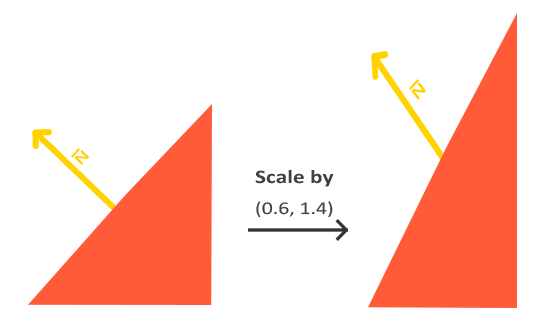
This visual shows the core of the issue. To calculate lighting correctly, the normal vector must remain perpendicular to the surface after transformation. A simple multiplication with the model matrix doesn't guarantee this.
To see a practical demonstration of how this affects lighting on a rotated object, the following video clip is very illustrative.
Shader Fundamentals - Normal Mapping
This short clip from Dan Game Dev demonstrates incorrect lighting on a rotated object when its normals are not transformed correctly.
Watch from 04:31 to 05:00. Notice how the light seems 'stuck' to the object as it rotates, which is wrong. The light source should be fixed in the world.
The Solution: The Normal Matrix
The correct way to transform normals involves a special matrix known as the normal matrix. This matrix is specifically designed to handle the transformation of normal vectors, preserving their perpendicularity to the surface even after non-uniform scaling.
The normal matrix is defined as the transpose of the inverse of the upper-left 3x3 part of the model matrix.
That's a mouthful, but luckily, GLSL provides built-in functions to compute it easily. The following article from LearnOpenGL provides an excellent and clear explanation of this entire concept.
This article is the core resource for this lesson. It explains the problem with non-uniform scaling and presents the solution using the normal matrix.
Read the section titled 'One last thing'. It begins after the first image of the lit cube. Focus on understanding why the model matrix fails and what the normal matrix is. Pay close attention to the single line of GLSL code that implements the solution.
As the article explains, we can perform this transformation directly in the vertex shader. Let's update our shader from the previous lesson.
Old Vertex Shader (Incorrect):
#version 330 core
layout (location = 0) in vec3 aPos;
layout (location = 1) in vec3 aNormal;

out vec3 Normal;
out vec3 FragPos;

uniform mat4 model;
uniform mat4 view;
uniform mat4 projection;

void main()
{
    gl_Position = projection * view * model * vec4(aPos, 1.0);
    FragPos = vec3(model * vec4(aPos, 1.0));

    // This is incorrect because it doesn't account for model transformation.
    Normal = aNormal;
}
New Vertex Shader (Correct):
#version 330 core
layout (location = 0) in vec3 aPos;
layout (location = 1) in vec3 aNormal;

out vec3 Normal;
out vec3 FragPos;

uniform mat4 model;
uniform mat4 view;
uniform mat4 projection;

void main()
{
    gl_Position = projection * view * model * vec4(aPos, 1.0);
    FragPos = vec3(model * vec4(aPos, 1.0));

    // Correctly transform the normal into world space
    Normal = mat3(transpose(inverse(model))) * aNormal;
}
Let's break down the new line:
inverse(model): Computes the inverse of our 4x4 model matrix.transpose(...): Computes the transpose of that inverse matrix.mat3(...): Casts the resulting 4x4 matrix to a 3x3 matrix. This conveniently discards the translation components, which shouldn't affect a direction vector like a normal anyway.... * aNormal: We multiply our original model-space normalaNormalby this newly computed normal matrix to get the correct world-space normal.
The resulting Normal vector, now in world space, is what we pass to the fragment shader.

The Theory: A Brief Mathematical Justification
Given your chemical engineering background, you might appreciate the elegant mathematical reasoning behind the "inverse transpose" rule. We don't need to derive it from scratch, but understanding the principle is satisfying.
The core idea is based on the properties of the dot product. A normal vector n is, by definition, perpendicular to any tangent vector t on the surface at the same point. In vector math, this means their dot product is zero.
This relationship must hold true even after we transform the object. Let's call the transformed tangent t' and the transformed normal n'. So, we must have:
A tangent vector t transforms correctly with the model matrix M, so t' = M * t. The question is, what matrix N do we need to multiply n by so that n' = N * n preserves the zero dot product?
The mathematical proof (which you can explore in the resource below if you're curious) shows that the only matrix N that satisfies this condition is the inverse transpose of M.
Transforming Normals - Geometry
This article from Scratchapixel provides a more rigorous mathematical proof for why the inverse transpose matrix is necessary. You don't need to memorize this, but it's great for building a deeper understanding.
Read the section 'Mathematical Justification for Transposing the Inverse in Normal Transformations'. The key concept is the invariance of the dot product between the tangent and the normal.
Final Polish: Re-Normalizing in the Fragment Shader
There is one last detail to consider. The Normal vector we calculate in the vertex shader is passed to the fragment shader as an out variable. OpenGL then interpolates this vector for every pixel on the triangle's surface. This interpolation process can cause the resulting vectors to no longer be unit vectors (i.e., their length is not 1).
Since all our lighting equations (especially the dot product) assume we are working with unit vectors, this can introduce subtle lighting errors.
The solution is simple: always re-normalize the normal vector as the first step in your fragment shader.
GLSL tutorial 4 - per-fragment lighting
The following clip from a tutorial by thecplusplusguy explains this exact problem and shows the one-line fix in the fragment shader.
Watch from 26:10 to 27:48. He provides a clear visual and code-based explanation for why the interpolated normal needs to be re-normalized.
Here is how your fragment shader should start:
#version 330 core
out vec4 FragColor;

in vec3 Normal;
in vec3 FragPos;
// ... other 'in' variables

// ... uniforms for light, etc.

void main()
{
    // First, re-normalize the interpolated normal vector.
    vec3 norm = normalize(Normal);

    // Now, use 'norm' for all lighting calculations...
    // e.g., float diff = max(dot(norm, lightDir), 0.0);
    // ...
}
A Note on Performance: As the LearnOpenGL article mentioned, calculating inverse() in a shader is computationally expensive. For a high-performance application, you would typically calculate the normal matrix on the CPU once per object and pass it to the shader as another uniform, just like the model matrix. For our purposes, calculating it in the vertex shader is perfectly fine and keeps the code simpler.
Conclusion
Congratulations! You've tackled one of the more subtle but critical aspects of 3D graphics programming. Your lighting system is now robust and will work correctly regardless of how you rotate or scale your objects.
Key Takeaways:
- Normal vectors cannot be transformed using the model matrix directly because non-uniform scaling will make them non-perpendicular to their surface.
- The correct method is to use a normal matrix, which is the transpose of the inverse of the model matrix.
- In GLSL, this is implemented in the vertex shader with
Normal = mat3(transpose(inverse(model))) * aNormal;. - Because normals are interpolated between the vertex and fragment shaders, they can lose their unit length. They must be re-normalized in the fragment shader with
normalize()before being used in lighting calculations.
Preview of the Next Lesson:
Our geometry is now correctly represented in world space. The next step is to make our lighting more dynamic. In the next lesson, we will focus on how to pass light properties (e.g., position, color) and the camera's position to the shader as uniforms. This will complete the setup for our Phong lighting model, allowing us to move lights around the scene and properly calculate specular highlights, which depend on the viewer's position.