Hello! Welcome back to our course.
In the last lesson, we dove into the ClickBank marketplace and learned how to interpret the key performance metrics for different products. You now know how to use the Gravity Score, Initial $/conversion, and Average $/conversion to identify products that are not only profitable but also have a proven sales record.
Today, we're taking the next logical step. Once you've found a promising product, how do you actually link to it in a way that ensures you get paid for the sales you refer? This lesson will answer that question by teaching you how to generate a unique affiliate HopLink for a chosen ClickBank product. This is one of the most fundamental and critical technical skills you'll need as a ClickBank affiliate.
What is a HopLink?
Before we create one, let's clarify what a HopLink is and why it's so important.
A HopLink is the official term ClickBank uses for an affiliate's referral URL. It's a special link that contains your unique affiliate ID. When a potential customer clicks your HopLink, a small file called a "cookie" is placed on their browser. This cookie tells ClickBank that you were the one who sent them.
HopLinks Guide - ClickBank Support
The official ClickBank HopLinks Guide provides a concise definition and explains a key benefit of this system: the tracking duration.
Please read the 'Overview' section. Pay close attention to the detail about how long the tracking lasts after a customer clicks your link.
As you just read, if that customer makes a purchase within 60 days of clicking your link, you get the commission for the sale. This is a powerful feature, as it means you can still get paid even if the customer doesn't buy immediately.
Generating Your First HopLink
The process of creating a HopLink is straightforward. You'll do it directly from the product listing in the marketplace.
Let's walk through the steps. Imagine you've found a product you want to promote. On the marketplace listing, you'll see a prominent "Promote" or "Get Affiliate Link" button.
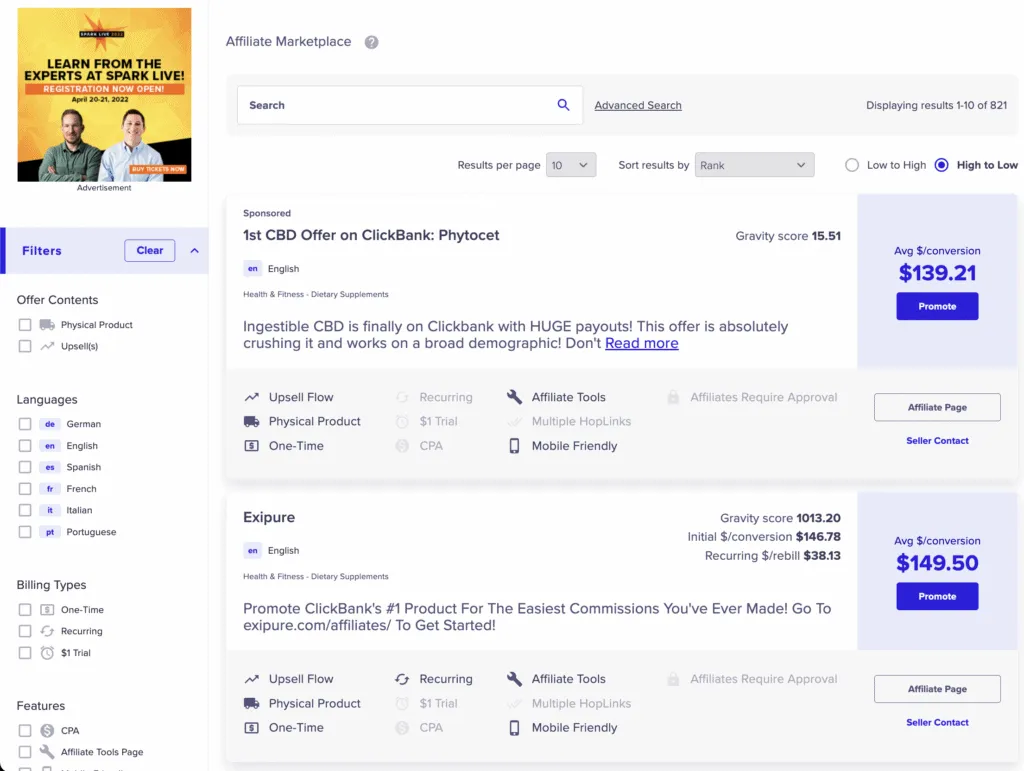
Clicking this button opens the HopLink Generator.
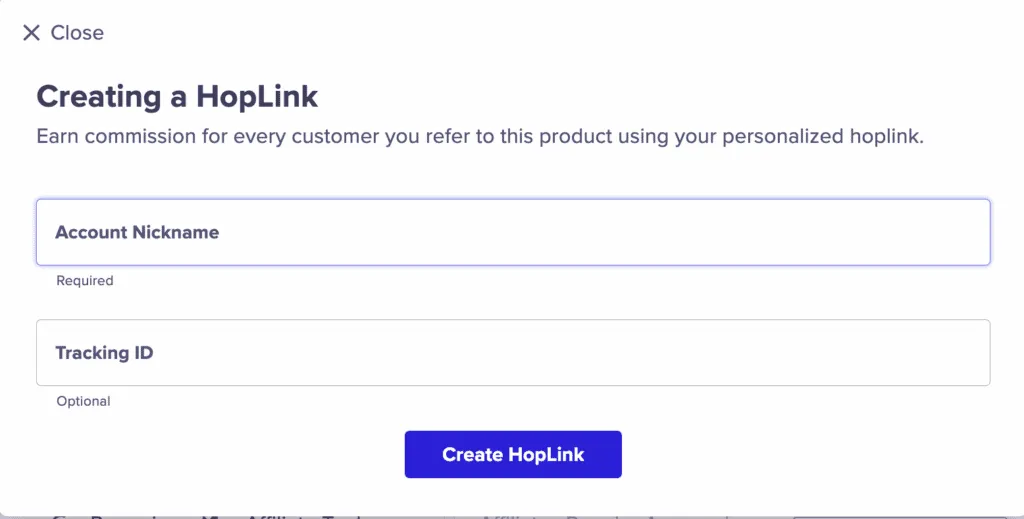
The following video from ClickBank provides a clear, step-by-step walkthrough of this entire process.
ClickBank Hoplink EXPLAINED: How To Promote ClickBank Products
This video, 'ClickBank Hoplink EXPLAINED', will guide you through finding a product and using the HopLink Generator to create your affiliate link.
Watch from the beginning to 02:47. The presenter will walk you through navigating the marketplace, clicking 'Promote', and generating your first link.
As you saw in the video and the image above, the generator has two main fields:
- Account Nickname: This is your unique ClickBank ID. It's automatically filled in if you're logged in.
- Tracking ID (TID): This is an optional but highly valuable tool. Let's explore what it's for.
Why You Should Use Tracking IDs (TIDs)
Your learning preferences indicated you want to understand the "why" behind the strategy, and Tracking IDs are a perfect example. While optional, using them is a key habit of successful affiliates.
A Tracking ID (TID) is a short code you add to your HopLink to identify where the click came from. For example, you could use different TIDs for the same product link:
- One link with the TID
blog_reviewfor your website. - Another link with the TID
email_welcomefor your email sequence. - A third with the TID
facebook_post1for a social media update.
When a sale is made, ClickBank's reporting will show you which TID it came from. This tells you which of your marketing efforts are working and which are not, allowing you to focus your energy where it gets the best results.
This next video explains the strategic value of using these parameters.
How to Make Money with ClickBank in 2026 (Complete Beginner Tutorial)
This clip from another ClickBank tutorial provides an excellent explanation of why tracking parameters are so important for optimizing your campaigns.
Watch from 20:00 to 22:23. The presenters discuss how using TIDs and other parameters gives you the information needed to improve your performance.
For a detailed text reference on how to format and use TIDs, the official HopLinks Guide is invaluable.
HopLinks Guide - ClickBank Support
Let's return to the 'HopLinks Guide' to see the technical format for TIDs and more examples.
Read the section titled 'Using Tracking IDs with HopLinks'. It shows you exactly how the TID is added to both unencrypted and encrypted HopLinks.
Key Rule: As the guide notes, never use dashes (-) in your TIDs. Use underscores (_) or just letters and numbers. For example, blog_post_1 is good, but blog-post-1 is not.
The Most Important Step: Testing Your Link
You've generated your link. You've added a smart Tracking ID. You're ready to start promoting, right? Not yet.
There's one more crucial step that beginners often forget: testing your HopLink. If your link is broken or incorrect, you will not get credit for any sales. Testing takes less than a minute and can save you from losing commissions.
Here's the process:
- Copy the full HopLink you generated.
- Paste it into the address bar of a new browser window (or an incognito/private window).
- Hit Enter. You should be redirected to the product's sales page.
- Click the 'Buy Now' or 'Add to Cart' button on the sales page to go to the ClickBank order form.
- Scroll to the very bottom of the order form. You should see your affiliate nickname listed (it may be encrypted).
This confirms that the entire tracking process is working correctly. Let's watch this in action.
ClickBank Hoplink EXPLAINED: How To Promote ClickBank Products
We'll go back to the 'ClickBank Hoplink EXPLAINED' video. This section demonstrates exactly how to test your link and points out a very common mistake to avoid.
Watch from 03:48 to 06:11. Pay close attention to the warning about what not to copy (the final landing page URL) and how to confirm your affiliate ID is on the order form.
Your Turn: Practical Exercise
It's time to put this into practice.
- Log in to your ClickBank account and go to the Marketplace.
- Find any product. For this exercise, the metrics don't matter.
- Click the Promote button.
- In the HopLink Generator, add
lesson_testas your Tracking ID. - Click Create HopLink.
- Copy the generated link.
- Follow the testing procedure above to ensure your link works and that your affiliate information appears at the bottom of the secure order form.
Completing this simple exercise will solidify your understanding and give you confidence in this essential process.
Conclusion
Congratulations! You now hold the "keys" to earning commissions on ClickBank. Generating and testing a HopLink is a foundational skill, and you've now mastered it.
Here are your key takeaways from this lesson:
- A HopLink is your unique affiliate URL that tracks your referrals for up to 60 days.
- You can generate a HopLink by clicking the "Promote" button on any product listing in the marketplace.
- Tracking IDs (TIDs) are essential for understanding which of your marketing campaigns are driving sales.
- Always test your HopLink by clicking through to the order form and verifying your affiliate ID is present. This ensures you get paid for your efforts.
Preview of the next lesson:
You know how to analyze a product's stats, and you know how to create the link to promote it. But what if two products have similar, strong metrics? In the next lesson, we will address that by learning how to compare two ClickBank product listings and select the stronger offer based on both metrics and sales page quality. You'll learn to look beyond the numbers and evaluate the actual sales material your audience will see, which is a critical piece of the puzzle.