Hello! Welcome back to our module on building your affiliate website.
In our last lesson, you took a huge first step by registering your domain name. You now have a unique address for your future website, like CleverCanineGuide.com. Think of this as owning a plot of land with a street address. But right now, it's just an empty lot. To build your website (your "house"), you need the land and utilities connected—and that's where web hosting comes in.
Today, we'll cover exactly that. This lesson will explain the function of web hosting and guide you through selecting a suitable entry-level hosting provider. By the end, you'll understand what web hosting is, the different types available, and how to choose the right service for your new affiliate business.
What is Web Hosting?
Web hosting is a service that stores all the files that make up your website (text, images, code, etc.) on a special, powerful computer called a server. This server is connected to the internet 24/7, ensuring that whenever someone types in your domain name, your website is there to greet them.
Without hosting, your domain name would be an address leading to an empty lot. Hosting provides the actual space where your website "lives."
What is Web Hosting and How Does It Work? (For Complete Beginners)
To get a clear understanding of this concept, let's watch a short video from Create a Pro Website. It uses a simple analogy that perfectly explains what hosting is and how it differs from the domain name you just bought.
Watch the video from the beginning until 01:55. Pay close attention to the analogy of renting a physical shop and how both a domain (the address) and hosting (the shop space) are necessary to be open for business.
To visualize the technical process, here is a simple diagram:
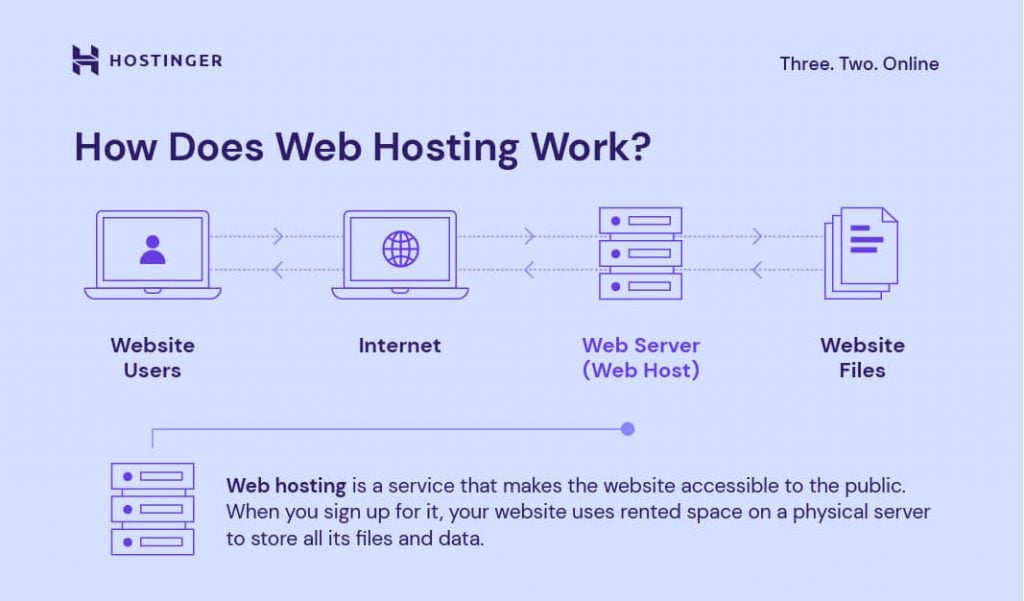
In short, a web hosting company rents you space on their servers and handles all the complex technical work of keeping that server running, secure, and connected to the internet. This allows you to focus on building your website, not managing hardware.
The Different Types of Web Hosting
When you start looking for a hosting provider, you'll see several different types of hosting plans. As a beginner, it's easy to get overwhelmed by the options: Shared, VPS, Cloud, Dedicated.
For your first affiliate site, the choice is quite simple, but it's important to understand what these terms mean so you know why you're making that choice.
What is web hosting? Web hosting for beginners explained
This article from Hostinger provides a clear, concise breakdown of the most common types of web hosting. It will help you understand the landscape before we narrow down our choice.
Read the section titled 'Types of web hosting services'. Focus on the descriptions for Shared hosting, VPS hosting, and Managed hosting for WordPress. Notice the pros and cons for each.
Here's a quick summary tailored to your needs as a new affiliate marketer:
- Shared Hosting: This is like renting an apartment in a large building. You share the building (the server) and its resources (CPU power, memory) with other tenants (websites).
- Why it's right for you: It's the most affordable and beginner-friendly option. The hosting company manages all the technical maintenance. It's perfect for new websites that don't have a lot of traffic yet. This is where you will start.
- VPS (Virtual Private Server) Hosting: This is like owning a townhouse. You still share the same plot of land with others, but you have your own dedicated unit with guaranteed resources. It offers more power and control than shared hosting. You might upgrade to this years from now if your site becomes very successful.
- Dedicated Hosting: This is like owning a standalone house. You have an entire server all to yourself. It's extremely powerful, secure, and expensive. This is for massive, high-traffic websites and is not something you need to consider.
- Managed WordPress Hosting: This is a specialized type of shared hosting specifically optimized for WordPress websites (which we'll be using). It often includes extra features like automatic updates and expert support. It's an excellent choice for beginners.
The takeaway is clear: You should start with a Shared Hosting or Managed WordPress Hosting plan. They provide everything you need at an affordable price.
How to Select a Suitable Entry-Level Hosting Provider
Now for the practical part: choosing a company. While many providers offer similar-sounding shared hosting plans, there are key factors to compare to ensure you're making a good decision for your new business.
How Do I Choose The Right Web Hosting Provider?
This video from Site Starters provides an excellent framework for how to research and compare hosting providers. It covers the key features you need to look for.
Watch the following segments to build your evaluation checklist: Research and Compare (01:33 - 02:21): Focus on how to check reviews and assess a provider's legitimacy. Dependable Support (03:31 - 04:44): Understand the importance of good customer support and the different types available. Key Considerations (07:07 - 08:51): Pay attention to the points on WordPress installers, security (SSL certificates), and what you need to start.
Based on the resources and the needs of a new affiliate site, here is a checklist of the most important factors to consider when choosing your first hosting provider.
Your 6-Point Hosting Checklist:
- Price & Value: Look for a low introductory price, but also check the renewal rate. Hosting companies often offer a steep discount for the first year. Ensure the long-term cost fits your budget.
- Ease of Use & WordPress Installation: The provider must offer a user-friendly control panel (like cPanel or a custom one) and, most importantly, a "1-Click WordPress Install" feature. This will make setting up your website incredibly simple in our next lessons.
- Customer Support: As a beginner, you will have questions. Look for a provider that offers 24/7 support through live chat or phone. Before you buy, you can even test their support by asking a pre-sales question on live chat to see how quickly and helpfully they respond.
- Uptime Guarantee: Uptime is the percentage of time your website is online. Look for providers that offer a 99.9% uptime guarantee. Anything less is not acceptable, as downtime means lost visitors and potential sales.
- Free SSL Certificate: An SSL certificate encrypts data between your website and your visitors. It's what puts the "https://" and padlock icon in the browser bar. This is essential for visitor trust and for search engine rankings. A good host will include this for free.
- Positive Reviews: Check independent review sites like Trustpilot or HostAdvice to see what real users are saying. Look for recent reviews that mention support quality and performance.
Exercise: Compare Hosting Providers
Your task is to practice the selection process. You don't need to purchase anything yet. The goal is to get familiar with what to look for.
- Choose two of the following popular entry-level hosting providers (or any others you've heard of):
- Hostinger
- SiteGround
- Bluehost
- Namecheap (they also offer hosting)
- Go to their websites and find their basic Shared Hosting or Managed WordPress Hosting plan.
- Using the 6-point checklist above, compare the two providers. Create a simple table or list in your notes to answer these questions for each provider:
- What is the introductory price and the renewal price?
- Do they mention a 1-click WordPress installer?
- What kind of customer support do they offer (24/7, live chat)?
- Do they promise 99.9% uptime?
- Is a free SSL certificate included?
- (Optional) Find one positive and one negative comment about them on a review site.
This exercise will give you the confidence to make an informed decision when you're ready to buy.
Conclusion
You now understand the critical role web hosting plays in bringing your website to life. It's the engine that powers your online presence, and choosing the right provider is a key business decision.
Here are your key takeaways:
- Web hosting is the service that stores your website's files on a server, making it accessible on the internet 24/7.
- As a beginner, a Shared Hosting or Managed WordPress Hosting plan is the most suitable and cost-effective choice.
- When selecting a provider, you must evaluate them on price, ease of use (especially 1-click WordPress install), 24/7 support, uptime, and the inclusion of a free SSL certificate.
Preview of the next lesson:
With your domain name registered and a plan for selecting your web host, you're ready for the next exciting step. In our next lesson, we will install WordPress on your hosting account and perform the initial setup. This is where your empty plot of land finally gets the foundation for the house you're about to build.