Introduction
Hello and welcome back. In our last lesson, we explored the crucial difference between free (organic) traffic and paid traffic. You learned that while organic traffic builds a long-term asset, paid traffic acts as an accelerator, allowing you to get faster data and scale what's already working.
Now that you understand why and when to use paid ads, it's time to learn how they are organized. Trying to run ads without a clear plan is like trying to build a house without a blueprint—it quickly becomes chaotic and expensive.
In this lesson, you will learn to describe the basic structure of a paid ad campaign, focusing on the three-tier hierarchy used by major platforms like Meta (Facebook and Instagram): Campaign, Ad Set, and Ad. Mastering this structure is the first and most critical step to creating organized, manageable, and ultimately profitable advertising campaigns.
The Three-Level Hierarchy
Think of an ad campaign's structure like a filing cabinet. The cabinet itself is the Campaign, each drawer is an Ad Set, and each file inside a drawer is an Ad. This organization keeps everything tidy and easy to find.

To get a quick overview of how these three parts work together, let's watch a short, clear explanation.
Facebook Ad Campaign Structure Explained: Campaigns, Ad Sets & Ads
This video from the 3 Minutes Fix channel provides a perfect high-level introduction to the Campaign, Ad Set, and Ad structure. It will give you a solid mental model before we dive into the details.
Watch from the beginning to the 2:10 mark. Pay close attention to the specific responsibility of each of the three levels.
As the video explained, each level has a distinct job:
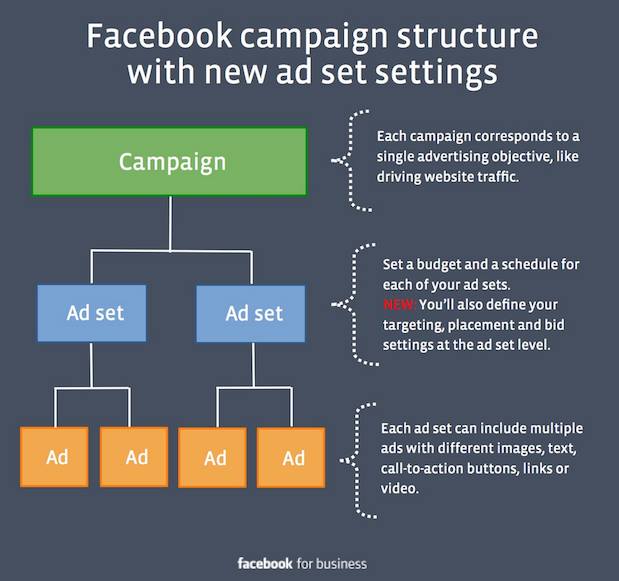
- The Campaign: This is the highest level. Its only job is to set a single, overarching objective for your advertising effort. Are you trying to get sales, generate leads, or just make people aware of your brand?
- The Ad Set: This is the middle level. Here, you define your targeting and logistics. This includes who you want to see your ads (your audience), where the ads will appear (placements like Facebook feeds or Instagram Stories), and how much you'll spend (budget and schedule).
- The Ad: This is the level your audience actually interacts with. It contains the creative content—the images, videos, text, headlines, and call-to-action buttons that make up the advertisement itself.
A single campaign can contain multiple ad sets, and each ad set can contain multiple ads. This allows you to test different audiences and different creatives all under one main goal.
A Deeper Look at Each Level
Now that you have the big picture, let's zoom in on the specific settings and decisions you make at each level. We'll walk through a detailed video that shows the campaign creation process. While the video is long, we will only focus on the parts that explain the function of each level. You don't need to memorize every button, just understand the purpose.
Level 1: The Campaign (Your Objective)
Everything starts with your goal. Choosing the right campaign objective is the most important decision you'll make, as it tells Meta's powerful algorithm exactly what result you want it to optimize for. If you choose "Sales," it will find people likely to buy. If you choose "Traffic," it will find people likely to click, who may or may not buy.
The BEST Facebook Ads Tutorial For Beginners in 2026
Let's watch a segment from Ben Heath's detailed tutorial. He does an excellent job explaining the different campaign objectives and why this choice is so critical.
Watch from 08:05 to 14:00. Focus on his explanation of the main objectives: Awareness, Traffic, Engagement, Leads, and Sales. Note his advice that beginners should almost always focus on Leads or Sales.
Key settings at the Campaign Level:
- Campaign Objective: The primary goal (e.g., Sales, Leads).
- Special Ad Categories: A declaration if your ad relates to sensitive topics like credit or employment.
- Campaign Budget: You can set your budget here and let Meta distribute it across your ad sets (this is called Advantage Campaign Budget, formerly CBO), or you can set budgets at the ad set level.
Level 2: The Ad Set (Your Audience & Logistics)
Once you've set your goal, the ad set level is where you define who you will target and how your ads will be delivered. This is where you connect your affiliate offer to a specific group of people.
The BEST Facebook Ads Tutorial For Beginners in 2026
Continuing with the same tutorial, let's look at the Ad Set level. Pay attention to how you can define your audience by location, age, and interests.
Watch from 27:30 to 38:00. Don't worry about the advanced details like 'custom audiences' for now. Focus on understanding the core targeting options: Location, Age, Gender, and Detailed Targeting (Interests). Also, notice the 'Placements' section, where you choose where your ads appear.
Key settings at the Ad Set Level:
- Audience: Define who sees your ads using location, age, gender, and interests (e.g., people in Canada interested in "gardening").
- Placements: Decide where your ads show up (e.g., automatically on all platforms, or only on Instagram Stories).
- Budget & Schedule: Set the daily or lifetime budget for this specific ad set and schedule the start and end dates.
Level 3: The Ad (Your Creative)
This is the final and most visible piece of the puzzle. The ad is what your potential customer sees scrolling through their feed. It’s your chance to grab their attention, present your solution, and persuade them to click.
The BEST Facebook Ads Tutorial For Beginners in 2026
Finally, let's look at the Ad level. This part of the video shows the different components that make up the ad itself.
Watch from 41:20 to 46:00. Identify the four main components of the ad creative: the media (image/video), the primary text, the headline, and the call-to-action (CTA) button.
Key components at the Ad Level:
- Identity: The Facebook Page and/or Instagram account the ad will run from.
- Ad Creative: The visual element, such as an image or a video.
- Ad Copy: The text, including a headline, primary text, and description.
- Call to Action (CTA): The button that tells people what to do next (e.g., "Shop Now," "Learn More").
- Destination: The URL where people will go after clicking the ad (e.g., your affiliate presell page).
For a quick textual reference of these three levels, you can review the following resource.
Meta Ads campaigns:How to structure for success.
The article 'Meta Ads campaigns: How to structure for success' from Bind Media offers a concise written summary of the three levels we've just discussed.
Read the section 'What are the different levels within Meta Ads campaigns?'. It clearly outlines the purpose of the Campaign, Ad sets, and Ads levels, reinforcing what you've learned in the videos.
An Affiliate Marketing Example
Let's tie this all together with a practical example for a ClickBank affiliate promoting a weight loss product.
-
CAMPAIGN:
- Objective: Sales
-
AD SET 1: Targeting new mothers
-
Audience: Women, Age 25-40, in the United States, with interests in "Parenting blogs," "Postpartum fitness," and "Baby care."
-
Budget: $15/day
-
Placements: Facebook and Instagram Feeds
-
AD 1-A:
- Creative: A video testimonial from a mom who used the product.
- Headline: "Struggling with post-baby weight? 🤔"
- CTA: Learn More
-
AD 1-B:
- Creative: An image ad showing a "before and after" photo.
- Headline: "My #1 Tip for Losing the Baby Weight"
- CTA: Learn More
-
-
AD SET 2: Targeting women interested in yoga
-
Audience: Women, Age 30-55, in the United States, with interests in "Yoga Journal," "Lululemon," and "Meditation."
-
Budget: $15/day
-
Placements: Instagram Stories and Reels
-
AD 2-A:
- Creative: A short video of a simple yoga flow.
- Headline: "The Perfect Complement to Your Yoga Practice"
- CTA: Shop Now
-
This structure allows you to test two different audiences (new moms vs. yoga enthusiasts) and multiple ad creatives for each, all while working towards the single campaign goal of getting sales.
Conclusion
Understanding the Campaign > Ad Set > Ad structure is non-negotiable for success with paid advertising. It transforms a complex system into an organized framework for testing, managing, and scaling your affiliate offers.
Key Takeaways:
- All paid ad campaigns are built on a three-level hierarchy.
- The Campaign level sets the single, overall Objective (your "why").
- The Ad Set level defines the Audience and logistics (your "who," "where," and "how much").
- The Ad level contains the Creative content (your "what").
- This structure allows you to test different audiences and ads methodically under one unifying goal.
Preview of the next lesson:
Now that you have the theoretical blueprint, it's time to enter the workshop. In the next lesson, we'll take our first practical step by creating a Facebook Ads account and taking a guided tour of the Ads Manager interface. This is the dashboard where you will build, manage, and analyze all your future campaigns.