Hello! Welcome back to our course on affiliate marketing.
In our last lesson, you learned how to write descriptive alt text for your images. This was an important step in making your content more accessible and improving its visibility in search engines. We are continuing our deep dive into on-page SEO, focusing on the elements that you have direct control over to improve your site's performance.
Today, we're building on that foundation to tackle a topic that is fundamental to both user experience and SEO: internal linking. The goal of this lesson is to learn how to add internal links from a new blog post to other relevant content on your site.
By linking your pages together logically, you create pathways that guide both your visitors and search engine crawlers through your website. This helps visitors discover more of your valuable content, keeping them engaged longer, and it signals to search engines how your content is related, which can boost your rankings.
1. What Are Internal Links and Why Do They Matter?
First, let's establish a clear definition. An internal link is a hyperlink that points from one page on your website to another page on the same website. An external link, by contrast, points to a page on a different website.
Internal links are a cornerstone of a well-structured website for three main reasons:
- They improve crawlability: Search engines like Google use links to discover new pages. A strong internal linking structure ensures that all your content can be found and indexed.
- They pass authority: Links pass a certain amount of "authority" or "PageRank" between your pages. When an important page links to another, it signals to search engines that the linked page is also valuable.
- They establish relevance: The words you use in your links (the anchor text) and the context around them help search engines understand what your pages are about and how they relate to one another.
To get a quick and clear overview of these core concepts, please watch the first part of this video from Ahrefs.
How to Use Internal Links to Rank Higher in Google
This video, 'How to Use Internal Links to Rank Higher in Google', starts by perfectly defining internal links and explaining their three main benefits for SEO.
Watch from the beginning until 01:15. Focus on understanding the three key roles of internal links: helping search engines discover pages, passing PageRank (authority), and establishing relevance.
2. Thinking Strategically: Site Structure and Content Hubs
Randomly adding links isn't a strategy. The real power of internal linking comes from using it to create a logical structure for your website. A well-structured site is easier for both users and search engines to understand.
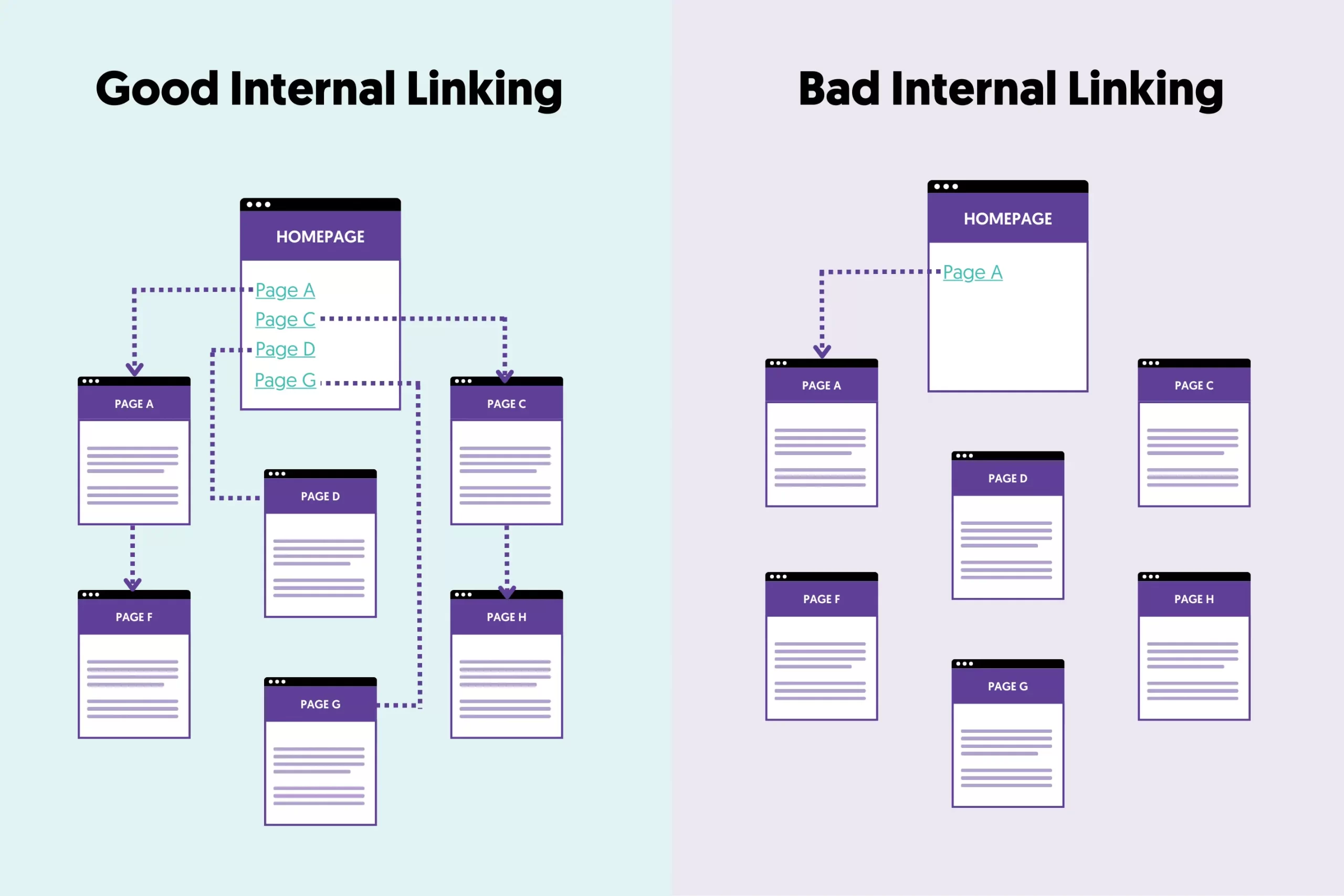
A powerful way to structure your site is by creating content hubs (also known as "topic clusters" or "silos"). This involves:
- Pillar Content: A main, comprehensive article that covers a broad topic (e.g., "The Ultimate Guide to Beginner Knitting"). This is usually a page you want to rank high for a competitive term.
- Cluster Content: Several smaller, more specific articles that cover sub-topics related to the pillar (e.g., "Best Knitting Needles for Beginners," "How to Cast On," "5 Easy Knitting Stitches").
- Linking: You link from all the cluster articles up to the pillar page, and the pillar page links down to the cluster articles. You also link between the cluster articles where relevant.
This structure demonstrates to Google that you have deep expertise on a topic, which can help all the related pages rank better.
The following video explains this concept of silo structure and topic clustering very clearly.
6 Best Internal Linking Practices for Higher Rankings
In this video from Rank Math SEO, '6 Best Internal Linking Practices for Higher Rankings', the presenter gives a great overview of how to structure your site using silos and topic clusters.
Watch from 02:18 to 03:42. Focus on understanding the relationship between a pillar page (the main topic) and the supporting content cluster around it.
3. Best Practices for Creating Internal Links
Now that you understand the strategy, let's cover the rules for creating effective internal links.
Use Descriptive Anchor Text
The anchor text is the clickable text of a link. It's one of the most important signals you can send to search engines about the page you are linking to.
- Be Descriptive: The anchor text should accurately describe the topic of the destination page.
- Avoid Generic Phrases: Never use "click here," "read more," or "this page."
- Use Variations: While it's good to use the target keyword of the destination page, don't use the exact same anchor text every single time. Use natural variations to avoid looking spammy.
This segment from the Rank Math video provides excellent examples of what to do and what to avoid with anchor text.
6 Best Internal Linking Practices for Higher Rankings
This is the most important section of the Rank Math video. It explains in detail how to optimize your anchor text for both users and SEO, with clear do's and don'ts.
Watch from 06:59 to 09:50. Pay close attention to the examples of good vs. bad anchor text and the explanation of why you should use a variety of anchor texts when linking to the same page multiple times.
Keep it Relevant
The golden rule of internal linking is relevance. Only add a link if it makes sense for the user and provides additional, relevant context. Forcing a link from an unrelated article just for SEO purposes is bad practice and offers a poor user experience.
Don't Overdo It
There's no magic number of internal links per page. However, avoid "link clutter" where too many links are crammed into a small space. Your priority should always be readability and user value. A few highly relevant links are far more valuable than dozens of irrelevant ones.
4. How to Add an Internal Link in WordPress
With the strategy and best practices in mind, let's move on to the practical steps. Adding an internal link in the WordPress editor is very straightforward.
How To Add an Internal Link in WordPress - Beginner's Guide
This guide from WP Astra, 'How To Add an Internal Link in WordPress', provides a simple, step-by-step tutorial on the mechanics of creating a link inside a WordPress post.
Read the section titled 'How To Build Internal Links For Your Wordpress Blog'. Focus on the simple steps shown in the images for highlighting text and adding a link.
Here's a summary of the process:
- Highlight the Text: In your post editor, select the text you want to become your anchor text.
- Click the Link Icon: In the toolbar that appears, click the link icon (it looks like a chain link).
- Search or Paste: A small box will appear. You can either:
- Paste the URL of the other page on your site.
- Start typing the title of the page you want to link to. WordPress will automatically search your site and show you a list of matching pages to choose from. This is often the easiest way.
- Apply the Link: Click the page you want from the search results, or press the "Apply" button (a bent arrow). Your link is now created.
It's generally considered good practice to set internal links to open in the same tab, as it keeps the user navigating within a single browser window on your site.
5. How to Find Linking Opportunities
When you publish a new blog post, you should look for opportunities to link to it from your older, existing posts. This helps Google find your new content faster and immediately integrates it into your site structure.
A simple and effective way to find these opportunities is by using a special Google search command.
How to Use Internal Links to Rank Higher in Google
Let's return to the Ahrefs video. This part demonstrates a free and easy way to find pages on your own site that are perfect candidates for adding a new internal link.
Watch from 02:48 to 03:28. The video explains how to use the 'site:' search operator in Google to find mentions of a specific phrase on your blog, creating a perfect opportunity to add a link.
To use this method, go to Google and search for:
site:yourwebsite.com "keyword or phrase"
Replace yourwebsite.com with your domain and "keyword or phrase" with a term related to your new article. Google will show you all the pages on your site that mention that phrase, giving you a list of potential places to add a link to your new post.
Conclusion
You've now learned one of the most impactful on-page SEO techniques. Internal linking is not just a technical task; it's the process of weaving your individual articles into a cohesive, authoritative resource for your audience.
Key Takeaways:
- Purpose: Internal links help users and search engines navigate your site, pass authority between pages, and establish topical relevance.
- Strategy: Use a "content hub" or "silo" structure, with pillar pages for broad topics and cluster pages for specific sub-topics.
- Anchor Text is Key: Use descriptive, keyword-rich anchor text that accurately describes the destination page. Avoid "click here."
- Relevance First: Only add links that provide value and context to the reader.
- Process: After publishing a new post, use the
site:search command to find older posts from which you can link to your new content.
Preview of the next lesson:
In our next lesson, we will bring everything from this module together. You will learn how to publish a fully optimized blog post targeting a specific long-tail keyword. This will involve applying what you've learned about on-page elements, keyword optimization, alt text, and the internal linking strategies we covered today.