Hello! Welcome to the final lesson of our module on Search Engine Optimization.
Over the past few lessons, we've broken down the essential components of on-page SEO. You've learned how to:
- Find valuable long-tail keywords.
- Identify and optimize key on-page elements like titles, meta descriptions, and URLs.
- Configure a WordPress SEO plugin.
- Write descriptive alt text for images.
- Strategically add internal links to build a strong site structure.
Today, we're putting all those pieces together. Our goal is to publish a fully optimized blog post targeting a specific long-tail keyword. This lesson will serve as a comprehensive checklist and a step-by-step workflow that you can use every time you create new content for your affiliate site.
Let's get started.
1. Your Pre-Publishing SEO Checklist
Before you even think about hitting the "Publish" button, it's crucial to run through a series of checks to ensure your post is set up for success in search engines. Think of this as your pre-flight check for content.
Step 0: The Foundation - Your Long-Tail Keyword
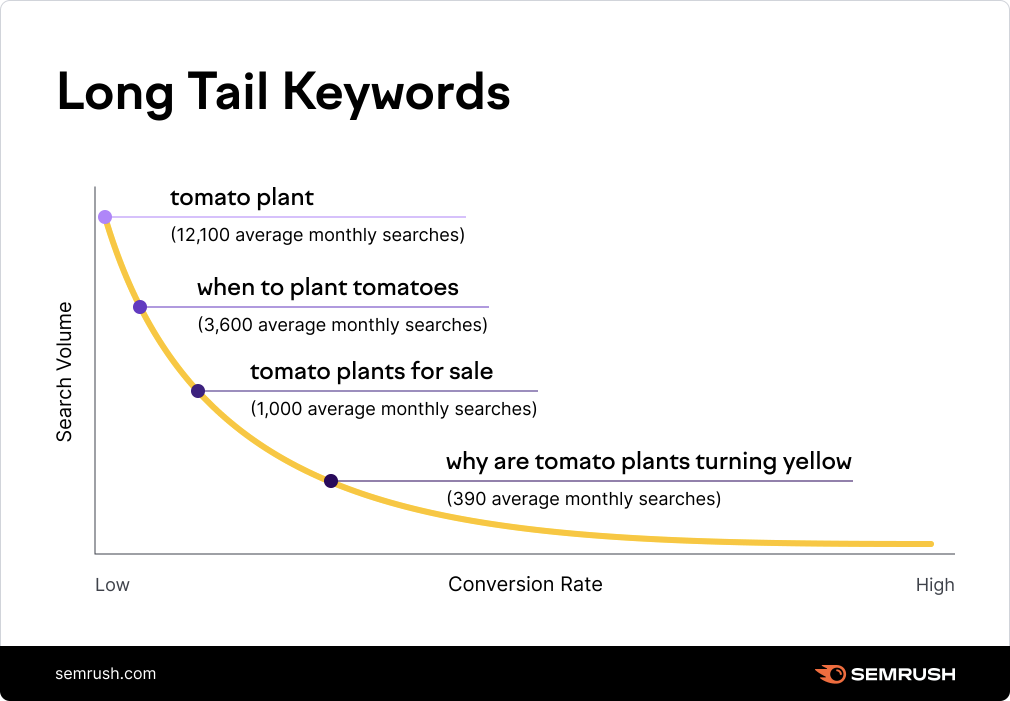
Everything starts with the long-tail keyword you researched in a previous lesson. Remember, these longer, more specific phrases have less competition and are used by people who are often closer to making a decision. This is your target.
Your primary goal is to signal to Google that your blog post is the most relevant and comprehensive answer for a searcher using this specific long-tail keyword. Every step that follows is designed to reinforce this signal.
The On-Page Optimization Walkthrough
The following video provides an excellent, practical demonstration of how to implement all the essential on-page SEO elements using a WordPress SEO plugin (in this case, Rank Math). The principles are universal, regardless of the specific plugin you use.
We will go through the optimization process step-by-step. For each step, I will explain the concept, and then you can watch the corresponding segment of the video to see exactly how it's done.
On Page SEO - How to Optimize Blog Posts for SEO 2025
The video 'On Page SEO - How to Optimize Blog Posts for SEO 2025' from Web & Blogging Academy is a perfect hands-on guide. We will use it as our main practical reference for the following steps.
You don't need to watch the whole video at once. I will refer you to specific timestamps for each checklist item below. Keep the video open and ready.
Now, let's work through our checklist.
✅ 1. SEO Title and Meta Description
- What it is: The title and short description that appear in Google search results.
- Why it matters: This is your first impression. A good title and description entice users to click.
- How to optimize:
- Title: Must include your long-tail keyword, ideally near the beginning. Keep it under 60 characters. Make it compelling (e.g., add numbers, use powerful words).
- Meta Description: Must include the keyword. Summarize what the article is about and why the user should read it. Keep it under 160 characters.
- See it in action: Watch the video from 02:08 to 03:49 to see how to add the focus keyword and write the title and meta description.
✅ 2. URL (or "Slug")
- What it is: The web address of your specific blog post (e.g.,
yourwebsite.com/how-to-optimize-posts). - Why it matters: A clean, readable URL helps both users and search engines understand the page's topic.
- How to optimize: Make it short, descriptive, and include your long-tail keyword. Use hyphens (
-) to separate words. - See it in action: Watch the video from 03:49 to 04:28 for a clear demonstration of editing the URL.
✅ 3. Keyword Placement in Content
- What it is: Integrating your keyword naturally into the body of your article.
- Why it matters: Confirms to Google that your content is truly about your target topic.
- How to optimize:
- Include the keyword within the first paragraph, preferably in the first 100 words.
- Use the keyword and its variations naturally throughout the text.
- Keyword Density: Aim for a density of around 0.5% to 1.5%. This means using the keyword 5 to 15 times in a 1000-word article. Don't force it; readability is more important. This is called avoiding "keyword stuffing."
- See it in action:
- For the first paragraph placement, watch from 04:28 to 05:37.
- For keyword density, watch from 09:49 to 10:35.
✅ 4. Headings (H2, H3)
- What it is: The subheadings that structure your article.
- Why it matters: They break up your text, making it easier to read. They also provide an outline that search engines use to understand the main points of your content.
- How to optimize: Use H2 tags for your main sections and H3 tags for subsections within them. Include your keyword or related phrases in some of your headings where it feels natural.
- See it in action: Watch from 07:32 to 08:30 to see how to strategically add the keyword to a subheading.
✅ 5. Image Alt Text
- What it is: A text description of an image for search engines and screen readers.
- Why it matters: Improves accessibility and gives you another opportunity to signal relevance to Google.
- How to optimize: As we covered in a previous lesson, write a concise description of the image. If it fits naturally, include your focus keyword.
- See it in action: Watch from 08:30 to 09:49 for a practical example of adding alt text.
✅ 6. Internal Linking
- What it is: Linking from your new post to other relevant articles on your own website.
- Why it matters: As you just learned, it helps search engines discover your content, passes authority between pages, and keeps visitors on your site longer.
- How to optimize: Find 2-3 opportunities to link to older, relevant posts using descriptive anchor text.
- See it in action: Watch from 11:31 to 12:27 to see how to find an opportunity and add an internal link.
2. A Final Written Checklist for Reference
Reading through a checklist can help solidify the concepts. The following resource provides a fantastic written summary of on-page optimization practices.
Affiliate SEO Marketing: The Ultimate Guide for Beginners (2026)
The article 'Affiliate SEO Marketing: The Ultimate Guide for Beginners' from Mangools contains an excellent, concise checklist for on-page optimization. Reading this will reinforce what you've just seen in the video.
Please read section 5. On-page optimization. It begins right after the section on 'Create high-quality content'. Focus on the bulleted list, which serves as a perfect summary of the steps we've just covered.
3. The Final Review: Readability and Publishing
You've checked all the technical SEO boxes. The final, and arguably most important, step is to review the post from a human perspective.
- Read it Aloud: Does it flow naturally? Are there any awkward sentences where you forced a keyword? Fix them.
- Check Readability: Is the text easy to scan? Use short paragraphs (2-3 sentences max), bullet points, and bold text to highlight key ideas. Remember, you are writing for people first.
- Review Your SEO Plugin Score: Your SEO plugin will give you a score (e.g., "Good" or 80/100). This is a helpful guide, but not an absolute rule. It's okay if not every single item is green, especially if fixing it would make the article read poorly.
- Hit Publish! Once you're confident that the post is valuable, readable, and well-optimized, it's time to publish it.
After publishing, you can submit the URL to Google Search Console to ask Google to index it faster, but we will cover that in a later module on technical SEO. For now, your on-page work is complete.
Conclusion
Congratulations! You have now walked through the entire process of creating and publishing a blog post that is fully optimized for a target keyword. This repeatable workflow is the engine of content-based affiliate marketing. By consistently applying this checklist, you build a solid foundation for attracting organic traffic from search engines.
Key Takeaways:
- SEO is a Process: Optimization isn't a single action, but a checklist of steps applied consistently to every piece of content.
- Start with the Keyword: Your long-tail keyword is the target that guides all your on-page optimization efforts.
- Optimize Key Elements: Pay close attention to the SEO title, meta description, URL, headings, and keyword placement.
- Don't Forget the Details: Alt text and internal links are crucial for creating a fully optimized and well-structured page.
- Human First, SEO Second: Your ultimate goal is to create a valuable and readable resource for your audience. SEO techniques help that resource get found.
Preview of the next module:
You've now spent an entire module learning how to get your content ready for "passive" traffic from Google. But what about actively driving visitors to your site? In our next module, "Driving Traffic with Social Media," we will explore how to identify the right social platforms for your niche, create engaging content, and build a community to drive your first waves of traffic.