Hello! Welcome to the first lesson in our module on handling data.
In our last session, we built a simple but complete CRUD API. We saw how to define multiple endpoints using different HTTP methods and even got a sneak peek at path parameters with the /items/{item_id} endpoint. You saw how FastAPI could use the item_id: int type hint to fetch a specific item.
Today, we're going to dive much deeper into that feature. This lesson is dedicated to mastering path parameters. You will learn how to define path parameters with type hints in your route functions, a cornerstone of creating robust and self-documenting APIs with FastAPI. We'll explore how this simple feature gives you automatic data conversion, validation, and interactive documentation for free.
1. Path Parameters: The Fundamentals
Path parameters are parts of the URL path used to point to a specific resource. For example, in /items/3, the 3 is a path parameter that identifies a unique item.
You've already written one, but let's formalize the concept. The official FastAPI documentation provides a clear and concise explanation.
Let's begin with the official documentation, which explains the core mechanics of path parameters. Pay close attention to how type hints are used.
Please read from the beginning of the page down to the end of the 'Data validation' section. Focus on these three points: The {item_id} syntax in the decorator. How that name is passed as an argument to the function. How adding a type hint like : int changes FastAPI's behavior.
As you just read, by adding a single Python type hint (item_id: int), FastAPI automatically gives you three powerful features:
- Data Conversion: It converts the path segment, which is always a string (e.g.,
"3"), into the specified type (e.g., the integer3). - Data Validation: It checks if the conversion is possible. If you try to access
/items/foo, FastAPI knows"foo"cannot be an integer and raises an error. - Documentation: It uses the type hint to generate rich, interactive API documentation, specifying the expected data type for the parameter.
2. Validation and Documentation in Action
Let's see this in action with the code from our previous lesson. Take the get_item endpoint you wrote:
# In your main.py from the last lesson

@app.get("/items/{item_id}")
async def get_item(item_id: int):
    if item_id < 0 or item_id >= len(items_db):
        raise HTTPException(status_code=404, detail="Item not found")
    return {"item": items_db[item_id]}
With your Uvicorn server running, try accessing two different URLs:
- A valid one: http://127.0.0.1:8000/items/1
- An invalid one: http://127.0.0.1:8000/items/hello
For the second URL, you won't get the 404 Not Found error from our function's logic. Instead, you'll receive a 422 Unprocessable Entity error directly from FastAPI. The JSON response body will be very detailed, explaining that the path parameter item_id should have been an integer. This automatic validation is incredibly useful for catching bad requests early.
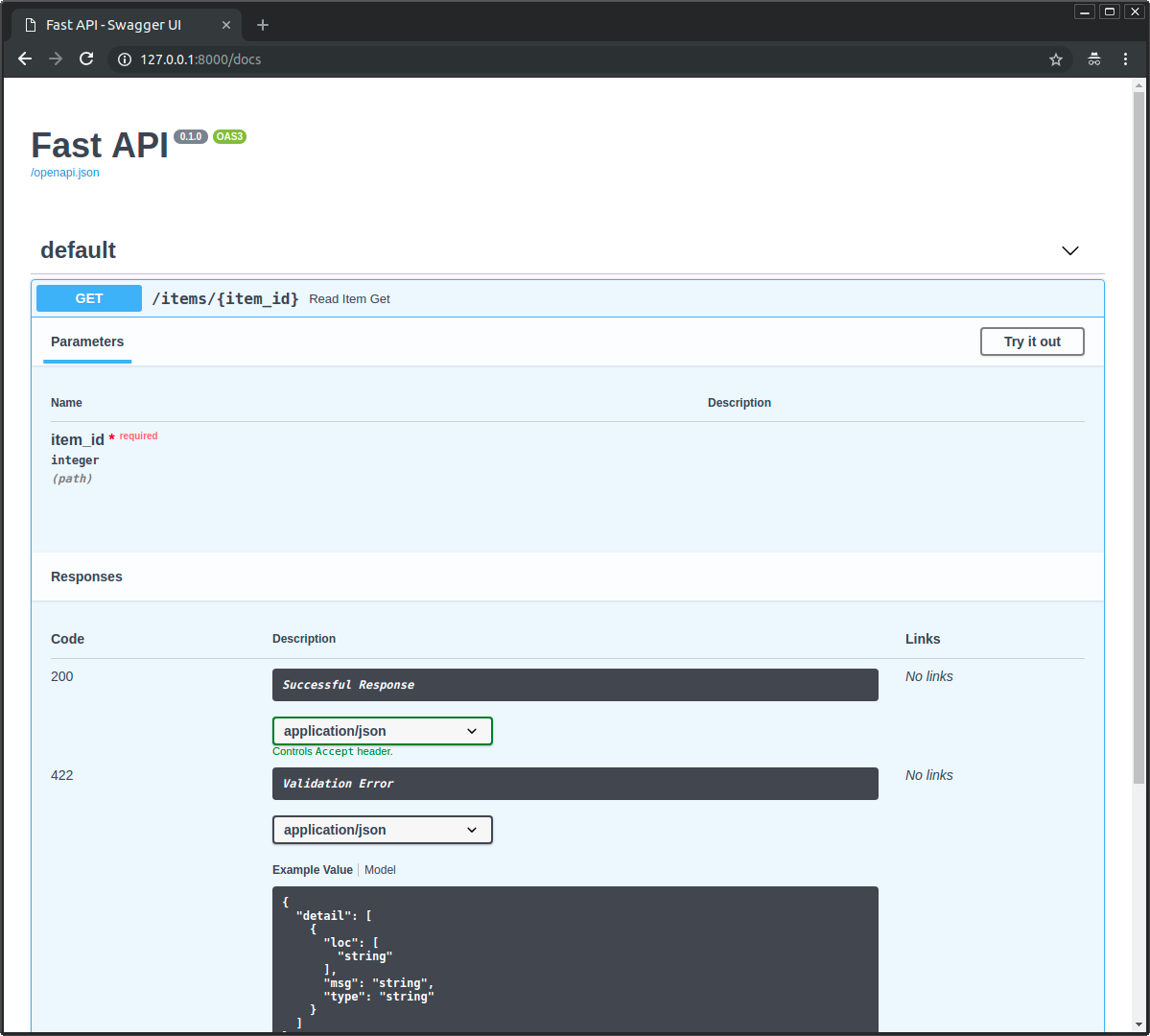
Now, go to your interactive documentation at http://127.0.0.1:8000/docs. Expand the /items/{item_id} endpoint. You'll see that FastAPI has documented that item_id is a required integer.
The following video provides an excellent summary of these concepts, demonstrating them in a new example.
Python FastAPI Tutorial (Part 3): Path Parameters - Validation and Error Handling
This video by Corey Schafer clearly demonstrates how type hints drive automatic validation and documentation for path parameters.
Please watch the following segments: 02:18 - 03:26: See how a path parameter is defined in code. 10:26 - 12:33: Observe the automatic validation for non-integer input and how the parameter type appears in the Swagger docs.
3. Connecting to Your Goals: Predefined Path Parameters
Path parameters aren't just for IDs. They are perfect for any time you need to select a specific resource by name. This is directly applicable to your goal of serving ML models. For instance, an API might have an endpoint like /predict/{model_name} to allow a user to choose which model to use for inference.
In such cases, you often want to restrict the model_name to a predefined list of available models. You can achieve this elegantly using Python's Enum type.
Let's explore how to create a path parameter that only accepts values from a predefined list. The FastAPI documentation has a perfect example that aligns with your interest in machine learning.
Read the section 'Predefined values'. Focus on how a class is created inheriting from str and Enum, and then used as a type hint for the model_name parameter.
4. Hands-On: Building a Model-Selection Endpoint
Let's add an endpoint to your main.py that simulates selecting an ML model. This will put the concept of using Enums for validation into practice.
First, you'll need to import Enum from Python's standard library.
from enum import Enum


# Add this with your other imports at the top of main.py
Next, define an Enum class for our available models and create the new endpoint. Add the following code to your main.py:
class ModelName(str, Enum):
    alexnet = "alexnet"
    resnet = "resnet"
    lenet = "lenet"


@app.get("/models/{model_name}")
async def get_model(model_name: ModelName):
    if model_name is ModelName.alexnet:
        return {"model_name": model_name, "message": "Deep Learning FTW!"}

    if model_name.value == "lenet":
        return {"model_name": model_name, "message": "LeCNN all the images"}

    return {"model_name": model_name, "message": "Have some residuals"}
A few things to note here:
- We inherit from
strandEnum. Inheriting fromstrtells FastAPI and the documentation that the values are strings. - The
model_nameparameter in our function is now type-hinted with ourModelNameenum. - Inside the function, you can compare the incoming parameter directly with the enum members (e.g.,
model_name is ModelName.alexnet). - You can also get the string value of the enum member using
.value(e.g.,model_name.value).
Now, restart your server and test it:
- Valid: http://127.0.0.1:8000/models/resnet
- Invalid: http://127.0.0.1:8000/models/gpt2
For the invalid URL, you'll get another automatic 422 validation error, but this time the message will list the allowed values: alexnet, resnet, or lenet.
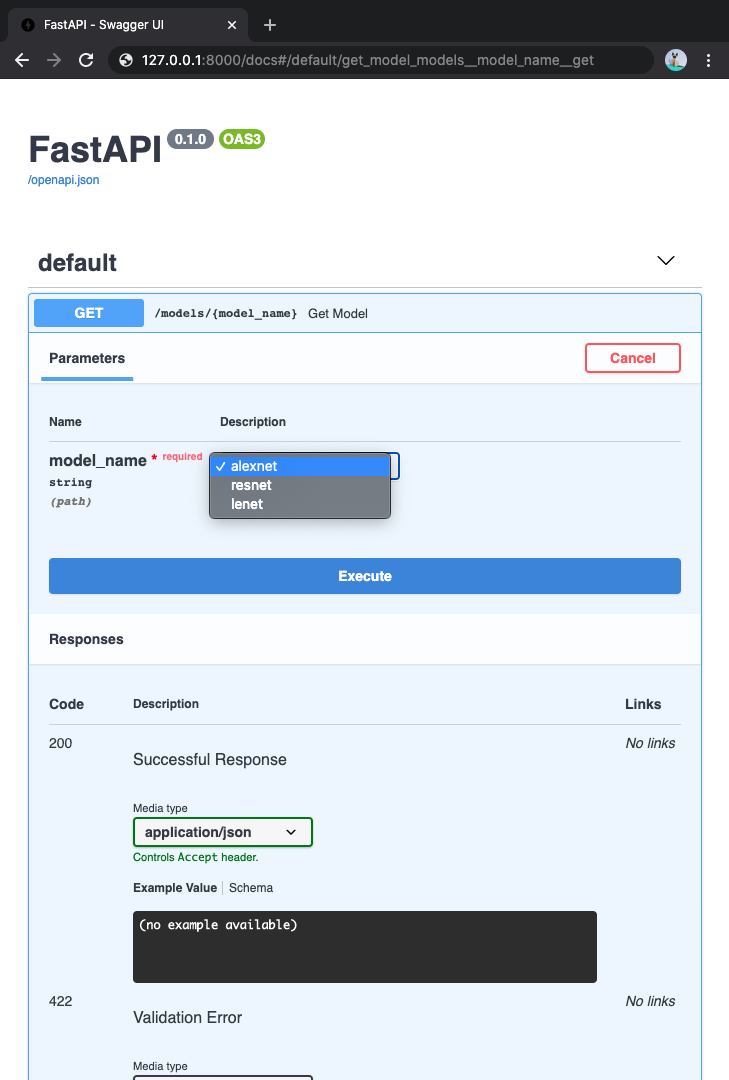
Finally, check your documentation at /docs. You'll see something amazing: FastAPI has created a dropdown menu for the model_name parameter, making your API even more discoverable and easy to use.
Conclusion
In this lesson, you've taken a significant step in mastering how FastAPI handles incoming data. You now have a solid understanding of how to define and validate path parameters, a fundamental part of nearly every REST API.
Here are the key takeaways:
- Path parameters are defined using curly braces in the path string (e.g.,
/items/{item_id}). - Using Python type hints (
int,str,Enum, etc.) for path parameter arguments enables FastAPI's automatic data conversion, validation, and documentation. - FastAPI will return a detailed
422 Unprocessable Entityresponse if a path parameter fails validation. - You can use Python's
Enumto restrict path parameter values to a predefined set, which is especially useful for cases like model selection.
So far, we've used the URL path to identify a specific, required resource. But what if you want to provide optional information to an endpoint, like instructions for sorting or filtering a list? For that, we turn to query parameters.
In our next lesson, we will cover how to define query parameters with default values and validation, adding another powerful tool to your API development toolkit.