Hello! Let's continue our exploration of FastAPI.
In our last session, we configured CORS middleware, a crucial step to allow your API to communicate with web frontends running on different origins. You now have a minimal FastAPI application with a single endpoint that is ready to be consumed by other services.
Today, we'll expand on that foundation to build a more functional API. A single "Hello World" endpoint is great for starting, but real applications need to handle various actions and resources. This lesson will teach you how to define multiple route handlers with different paths and HTTP methods, which is the core of building any REST API.
We'll create a simple in-memory "database" and build a set of endpoints to manage a list of items—a classic CRUD (Create, Read, Update, Delete) implementation.
1. Paths and Operations: The API's Vocabulary
Before we write more code, let's clarify two fundamental concepts in API design: paths and operations.
The official FastAPI documentation has a great explanation of these core ideas. This will help you understand the terminology we'll be using.
Read the sections under the heading 'Step 3: create a path operation'. Focus on understanding the definitions of 'Path' and 'Operation' (HTTP methods). Pay attention to the conventional uses of GET, POST, PUT, and DELETE.
To summarize the key points from the documentation:
- A Path is the part of the URL that comes after the domain (e.g.,
/items,/users/123). It's used to identify a specific resource or collection of resources. - An Operation refers to an HTTP method (
GET,POST,PUT,DELETE). It specifies the action you want to perform on the resource defined by the path.
For a quick video summary of what each method does, watch the first minute of this tutorial.
FastAPI Tutorial #2 - Creating and Managing Routes: GET, POST, PUT, DELETE Explained [2024]
This short clip clearly explains the purpose of the main HTTP methods.
Watch from 00:11 to 00:58. This will give you a clear, concise overview of GET, POST, PUT, and DELETE.
2. Building a Simple CRUD API
Let's apply these concepts by building a small API to manage a list of items. We'll add the code to the main.py file from our previous lessons.
First, let's create a simple in-memory "database". This is just a Python list that will be reset every time the server restarts. It's perfect for learning without the complexity of a real database, which we'll cover later.
Add this list to the top of your main.py, right after your imports:
from fastapi import FastAPI, HTTPException
from fastapi.middleware.cors import CORSMiddleware

app = FastAPI()


# ... (your CORS middleware code) ...


# In-memory "database"
items_db = ["Python", "FastAPI", "Machine Learning"]
We also import HTTPException which we'll use to return error responses, like when an item is not found.
Now, we'll add endpoints for each CRUD operation, one by one. You can test each one in your Swagger UI at http://127.0.0.1:8000/docs as you add it.
A. Read: GET Endpoints
First, let's create an endpoint to retrieve all the items in our list.
# Add this to your main.py

@app.get("/items")
async def get_items():
    return {"items": items_db}
This is straightforward: a GET request to /items will return a JSON object containing our list.
Next, let's add an endpoint to retrieve a single item by its index. This introduces path parameters.
# Add this to your main.py

@app.get("/items/{item_id}")
async def get_item(item_id: int):
    if item_id < 0 or item_id >= len(items_db):
        raise HTTPException(status_code=404, detail="Item not found")
    return {"item": items_db[item_id]}
Here, {item_id} in the path is a dynamic parameter. FastAPI captures the value from the URL and passes it as an argument to your function. The type hint item_id: int tells FastAPI to automatically validate that the value is an integer. If it's not (e.g., /items/foo), FastAPI will automatically return a 422 Unprocessable Entity error. We also add a check to see if the index is valid and raise a 404 Not Found error if it isn't.
B. Create: POST Endpoint
To add new items, we need a POST endpoint. This operation will accept data in the request body.
# Add this to your main.py

@app.post("/items")
async def create_item(item: str):
    items_db.append(item)
    return {"message": "Item added successfully", "item": item}
When you test this in Swagger UI, you'll see it asks for a "Request body", where you can enter a simple string (e.g., "Docker"). FastAPI will parse this JSON string and pass it to the item: str parameter. The new item is appended to our list, and a confirmation is returned.
C. Update: PUT Endpoint
To update an existing item, we use the PUT method. This combines a path parameter (to identify which item to update) with a request body (to provide the new data).
# Add this to your main.py

@app.put("/items/{item_id}")
async def update_item(item_id: int, new_item: str):
    if item_id < 0 or item_id >= len(items_db):
        raise HTTPException(status_code=404, detail="Item not found")
    items_db[item_id] = new_item
    return {"message": "Item updated successfully", "item_id": item_id, "new_item": new_item}
A PUT request to /items/0 with the request body "Asyncio" would change the first item in our list from "Python" to "Asyncio".
D. Delete: DELETE Endpoint
Finally, to remove an item, we use the DELETE method with a path parameter to specify which item to delete.
# Add this to your main.py

@app.delete("/items/{item_id}")
async def delete_item(item_id: int):
    if item_id < 0 or item_id >= len(items_db):
        raise HTTPException(status_code=404, detail="Item not found")
    deleted_item = items_db.pop(item_id)
    return {"message": "Item deleted successfully", "deleted_item": deleted_item}
3. Your API in the Swagger UI
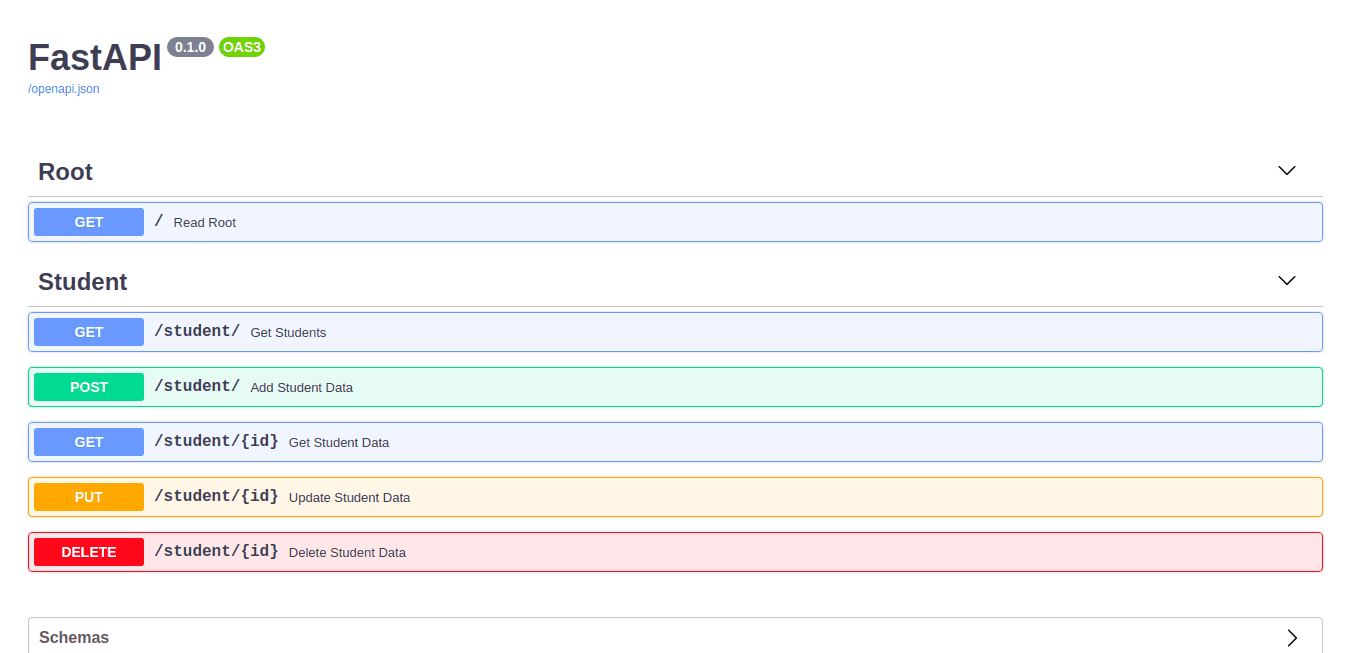
After adding all these endpoints, restart your Uvicorn server, and refresh the /docs page. Your API documentation should now look much more complete, with clearly defined operations for your /items resource.
4. A More Complete Video Walkthrough
We've just built a full set of CRUD operations. To see these same concepts applied in a slightly more complex example, the following video builds a similar API from scratch.
Note that the video uses Pydantic models for data validation, a topic we will dive into deeply in the next module. Don't worry about the details of the Track model for now; just focus on how the decorators (@app.get, @app.post, etc.) and path parameters are used. This will serve as an excellent bridge to our next topic.
FastAPI Essentials - Creating a CRUD API with GET, POST, PUT and DELETE Endpoints
This video provides a complete walkthrough of creating a CRUD API, covering GET (all and single), POST, PUT, and DELETE endpoints. It's a great practical summary of everything we've covered in this lesson.
Watch from 06:18 to 21:47. Observe how each HTTP method is implemented using a different decorator and how path parameters and request bodies are handled for different operations.
Conclusion
Congratulations! You've moved from a single endpoint to a functional API with multiple routes and operations. This is a fundamental skill for any backend developer.
Here are the key takeaways from today's lesson:
- API endpoints are defined by a combination of a path (URL) and an operation (HTTP method).
- You use decorators like
@app.get(),@app.post(),@app.put(), and@app.delete()to associate a Python function with a specific path and operation. - Path parameters (e.g.,
{item_id}) allow you to create dynamic routes that operate on specific resources. - FastAPI uses Python type hints to automatically parse and validate path parameters and request bodies.
- You can use
HTTPExceptionto return standard HTTP error responses with a specific status code and message.
In this lesson, we used simple types like str and int for our request bodies. This works, but it's not very robust or descriptive. What if you need to accept a JSON object with multiple fields? That's where Pydantic models come in.
In our next lesson, we will begin exploring how to define path parameters with type hints and validation, and define query parameters with default values, giving you even more control over your API's inputs.