Hello! Welcome back to our journey with FastAPI.
In the last lesson, you learned how to use FastAPI's automatic interactive documentation. You now know how to run your server, navigate to /docs, and use the Swagger UI to test your endpoints directly in the browser. This is a crucial skill for rapid development and testing.
Today, we address a fundamental aspect of building real-world applications: enabling your API to communicate with a separate web frontend. Your goal of building APIs for AI/ML models will almost certainly involve a user interface (like a dashboard or an interactive web app) that consumes your API. By default, browsers block this kind of communication for security reasons.
Our learning outcome for this lesson is to add CORS middleware to allow cross-origin requests from a web frontend. We'll explore what this means, why it's necessary, and how to implement it in just a few lines of code.
1. The Core Problem: Same-Origin Policy
Imagine your FastAPI backend is running at http://api.yourapp.com and your frontend (perhaps a React or Vue.js application) is at http://dashboard.yourapp.com. When the frontend's JavaScript code tries to make a request to the backend, the browser will block it.
This happens because of a security rule built into all modern browsers called the Same-Origin Policy. This policy states that a web page can only request resources from the same "origin" it was loaded from. An origin is defined by the combination of protocol (e.g., http), domain (e.g., yourapp.com), and port (e.g., :8000).
If any of these three parts differ, the browser considers it a "cross-origin" request and blocks it by default.

The solution to this is CORS, or Cross-Origin Resource Sharing. It's a mechanism that uses HTTP headers to tell the browser that it's safe to allow a web page from one origin to access resources from another.
To get a solid conceptual understanding of CORS, what it is, and how it works with "preflight" requests, please watch the beginning of the following video.
🔓 Mastering CORS: How to Securely Enable Cross-Origin Requests
This video provides an excellent and concise explanation of the Same-Origin Policy and how CORS works to solve the cross-origin communication problem. It also introduces the idea of simple vs. preflight requests.
Watch from the beginning until 04:13. Focus on understanding why the Same-Origin Policy exists and the roles of the Origin and Access-Control-Allow-Origin headers.
2. Solving CORS with Middleware
In FastAPI, the way we implement CORS is by using middleware.
Middleware is a function that works with every request before it is processed by a specific path operation (your endpoint function) and with every response before it is sent back to the client. It acts as a processing layer for your entire application or a subset of it.
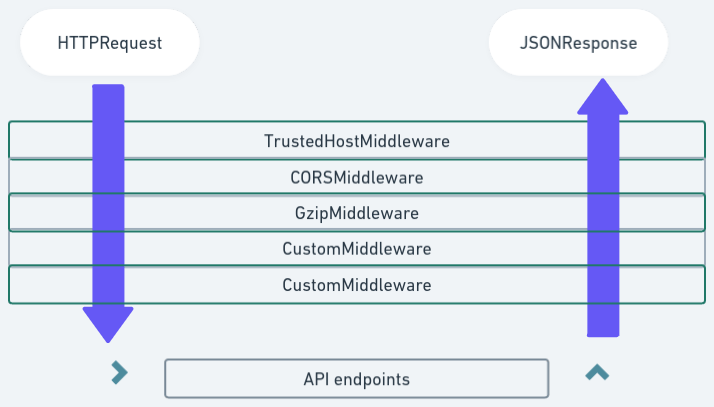
FastAPI provides a CORSMiddleware that handles all the complexities of the CORS protocol for you. All you need to do is add it to your application and configure it with the origins you want to allow.
3. Implementing CORSMiddleware in Your Application
Let's add CORS to the main.py file you created in the previous lessons. The official FastAPI documentation provides the best reference for this.
CORS (Cross-Origin Resource Sharing) - FastAPI
The official FastAPI documentation explains exactly how to use CORSMiddleware. Pay close attention to the code example and the explanation of the different parameters you can configure.
Read the section titled 'Use CORSMiddleware' and review the list of supported arguments that follows the code block. You don't need to memorize all the arguments, but understand the purpose of allow_origins, allow_methods, allow_headers, and allow_credentials.
Now, let's apply this to your code. Update your main.py file to look like this:
from fastapi import FastAPI
from fastapi.middleware.cors import CORSMiddleware

app = FastAPI()


# This is the list of origins that are allowed to make cross-origin requests.
# You can use a wildcard \"*\" to allow all origins, but it's a good practice
# to be specific for better security.
# For local development, you might have a frontend on http://localhost:3000
origins = [
    "http://localhost:3000",
    "http://localhost:8080",


    # Add other origins if needed
]

app.add_middleware(
    CORSMiddleware,
    allow_origins=origins,
    allow_credentials=True,
    allow_methods=["*"], # Allows all methods
    allow_headers=["*"], # Allows all headers
)

@app.get("/")
async def root():
    return {"message": "Hello World"}
Let's break down the app.add_middleware call:
CORSMiddleware: The first argument is the middleware class itself.allow_origins=origins: This is the most important parameter. It tells the middleware which frontend origins are permitted to access your API. We've defined a list that would work for common frontend development servers (like React on port 3000 or a simple local server on 8080).allow_credentials=True: This allows cookies or authorization headers to be included in cross-origin requests. You'll need this later when we add authentication.allow_methods=["*"]: This allows all standard HTTP methods (GET, POST, PUT, DELETE, etc.).allow_headers=["*"]: This allows the frontend to send any HTTP headers in its request.
With this configuration in place, your FastAPI application will now correctly handle cross-origin requests from the specified origins.
4. Seeing the CORS Error and Fix in Action
It can be hard to visualize the effect of this change without a frontend to test against. The following video demonstrates this perfectly by building a simple frontend, showing the CORS error in the browser's developer console, and then showing how adding the CORSMiddleware fixes the issue.
You do not need to build the frontend yourself; the key is to observe the before-and-after effect.
Fast API Tutorial, Part 28: Middleware and CORS
This clip from a FastAPI tutorial demonstrates the exact problem and solution. You will see a live example of a frontend request failing with a CORS error and then succeeding after the backend is configured correctly.
Watch the segment from 05:34 to 10:41. Notice the error message in the browser console when the request first fails. Then, see how adding the localhost origin to the FastAPI middleware immediately resolves the error and allows the data to be fetched.
This demonstration should solidify why CORSMiddleware is essential. Whenever you start a new project with a separate frontend and backend, adding this middleware is one of the very first steps.
Conclusion
In this lesson, you've tackled a crucial concept in modern web development. You now have both the theoretical understanding and the practical skills to handle cross-origin requests in your FastAPI applications.
Here are the key takeaways:
- Browsers enforce a Same-Origin Policy that blocks requests between different domains, protocols, or ports for security.
- CORS (Cross-Origin Resource Sharing) is the standard mechanism to safely bypass this policy.
- In FastAPI, you enable CORS by adding
CORSMiddlewareto your application. - The middleware must be configured with a list of allowed
origins(frontend URLs), and you can also control allowed methods, headers, and credentials.
You've now built a basic but robust foundation: a running API server that can be tested with Swagger UI and can communicate with a separate frontend.
In the next lesson, we'll start building a more realistic API. We will move beyond a single "Hello World" endpoint and learn how to define multiple route handlers with different paths and HTTP methods, such as GET for fetching data and POST for creating it.