Hello! Welcome back to our course on building APIs with FastAPI.
In the last lesson, we focused on path parameters, which are required parts of a URL used to identify a specific resource, like /items/1. You learned how Python's type hints give you automatic data conversion, validation, and documentation for these parameters.
Today, we'll explore another way to pass data to an endpoint: query parameters. This lesson fulfills the learning outcome: Define query parameters with default values and validation. Unlike path parameters, query parameters are typically optional and are used to filter, sort, or paginate collections of resources. You'll learn how to define them, provide default values, and enforce powerful validation rules.
1. What are Query Parameters?
Query parameters are a set of key-value pairs that appear at the end of a URL after a question mark (?). For example, in the URL http://127.0.0.1:8000/items?skip=0&limit=10, skip and limit are query parameters.
FastAPI makes defining them incredibly simple. Any function parameter in your path operation that is not part of the path is automatically interpreted as a query parameter.
Let's modify the /items endpoint from our previous work to include pagination. In your main.py, find your /items endpoint and update it to accept skip and limit:
# In main.py
# (Your other code, including the items_db list)

@app.get("/items")
async def get_items(skip: int = 0, limit: int = 10):
    return {"items": items_db[skip : skip + limit]}
Let's break this down:
skip: int = 0: We declare a parameterskipwith a type hint ofintand a default value of0.limit: int = 10: Similarly, we declarelimitas anintwith a default of10.
Because skip and limit are not in the path decorator (@app.get("/items")), FastAPI treats them as query parameters. The default values make them optional. If the client doesn't provide them, the default values are used.
Run your Uvicorn server and try these URLs:
http://127.0.0.1:8000/items(uses defaultsskip=0,limit=10)http://127.0.0.1:8000/items?skip=2&limit=5(uses provided values)http://127.0.0.1:8000/docs: Check the interactive documentation. You'll see that FastAPI has already documented these optional integer parameters for you.
This simple approach is powerful, but what if we want to add more constraints, like a maximum length for a string or a valid range for a number? For that, we need Query.
2. Declarative Validation with Query
While you could write if/else statements inside your function to validate parameters, FastAPI provides a more elegant, declarative solution using the Query dependency. This lets you define validation rules directly in the function signature.
The modern and recommended way to use Query is with typing.Annotated.
Let's start by reading the official documentation to see how this works.
Query Parameters and String Validations - FastAPI
The FastAPI documentation provides a clear explanation of how to use Query with Annotated to add validation. This is the current best practice.
Please read the following sections: 'Additional validation' 'Import Query and Annotated' 'Use Annotated in the type for the q parameter' 'Advantages of Annotated' 'Add more validations' Focus on understanding the syntax Annotated[<type>, Query(...)] and why this approach is preferred.
As the documentation explains, using Annotated keeps your code clean and your type hints and default values separate from FastAPI's specific metadata.
Hands-On: Adding String Validation
Let's create a new endpoint to search for items. Add the following to your main.py, making sure to import Query and Annotated:
from typing import Annotated
from fastapi import FastAPI, Query, HTTPException


# ... (rest of your app setup) ...

@app.get("/items/search")
async def search_items(
    q: Annotated[
        str | None,
        Query(
            title="Search query",
            description="The keyword to search for in item descriptions.",
            min_length=3,
            max_length=50,
        ),
    ] = None
):
    results = {"query": q, "matches": []}
    if q:


        # A simple search logic for demonstration
        for item in items_db:
            if q.lower() in item.lower():
                results["matches"].append(item)
    return results
Here, we've defined an optional query parameter q. If it's provided, it must be between 3 and 50 characters long.
Restart your server and test this in the docs (/docs):
- Try executing with no value for
q. It should succeed. - Try with a valid query like
"book". It should succeed. - Try with an invalid query like
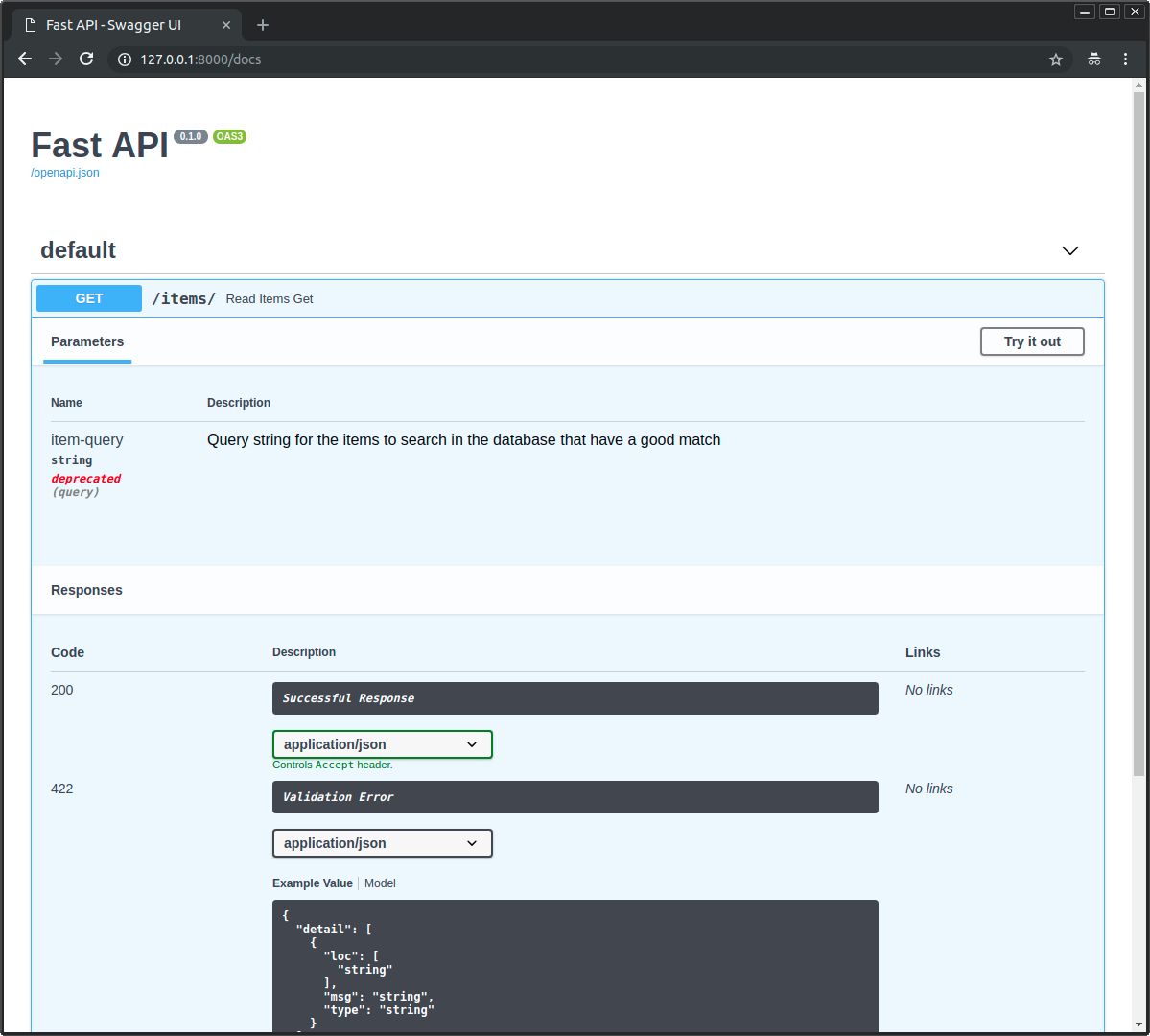
"hi"(too short). FastAPI will return a422 Unprocessable Entityerror with a descriptive message.
3. Exploring Query's Capabilities
The Query object is very powerful. It can handle string validation, numeric validation, aliasing, and more. The following video provides a great hands-on tour of its features.
Note: The video uses a slightly older syntax (q: str = Query(...)) where Query is used as the default value. The official documentation you just read explains this as the "old" way. While Annotated is now preferred, you will frequently encounter the older syntax in existing projects, so it's valuable to recognize it. The concepts are identical.
Fast API Tutorial, Part 5: Query Parameters and String Validation
This video from JVP Design is a practical deep dive into what you can do with query parameters. We'll watch it in segments to focus on specific features.
Please watch the following segments: Making Parameters Required (07:31 - 09:36): See how to make a query parameter mandatory and how to use ... (an ellipsis) when you need a required parameter that also has validation rules. Accepting a List of Values (09:36 - 11:33): Learn how to define a query parameter that can be sent multiple times in the URL (e.g., ?tag=A&tag=B). Creating a Parameter Alias (13:28 - 15:40): Discover how to use alias to allow a URL parameter name that isn't a valid Python variable name (e.g., item-query).
Numeric Validation
Just as you can validate strings, you can also validate numbers. You can specify that a number must be greater than, less than, or equal to certain values.
Fast API Tutorial, Part 6: Path Parameters and Numeric Validation
Now let's watch a short clip from the next video in the same series that demonstrates numeric validation.
Watch from 08:44 to 10:24. This section covers adding numeric constraints like gt (greater than) and le (less than or equal to) to query parameters.
Common numeric validators include:
gt: greater thange: greater than or equal tolt: less thanle: less than or equal to
4. Practice: Building a Sophisticated Endpoint
Let's tie these concepts together. You're going to enhance the /items endpoint to support more advanced filtering and pagination.
Replace your existing /items endpoint with this new version. Your task is to fill in the Annotated type hints with the correct Query validation.
Instructions:
Update the function signature below based on these requirements:
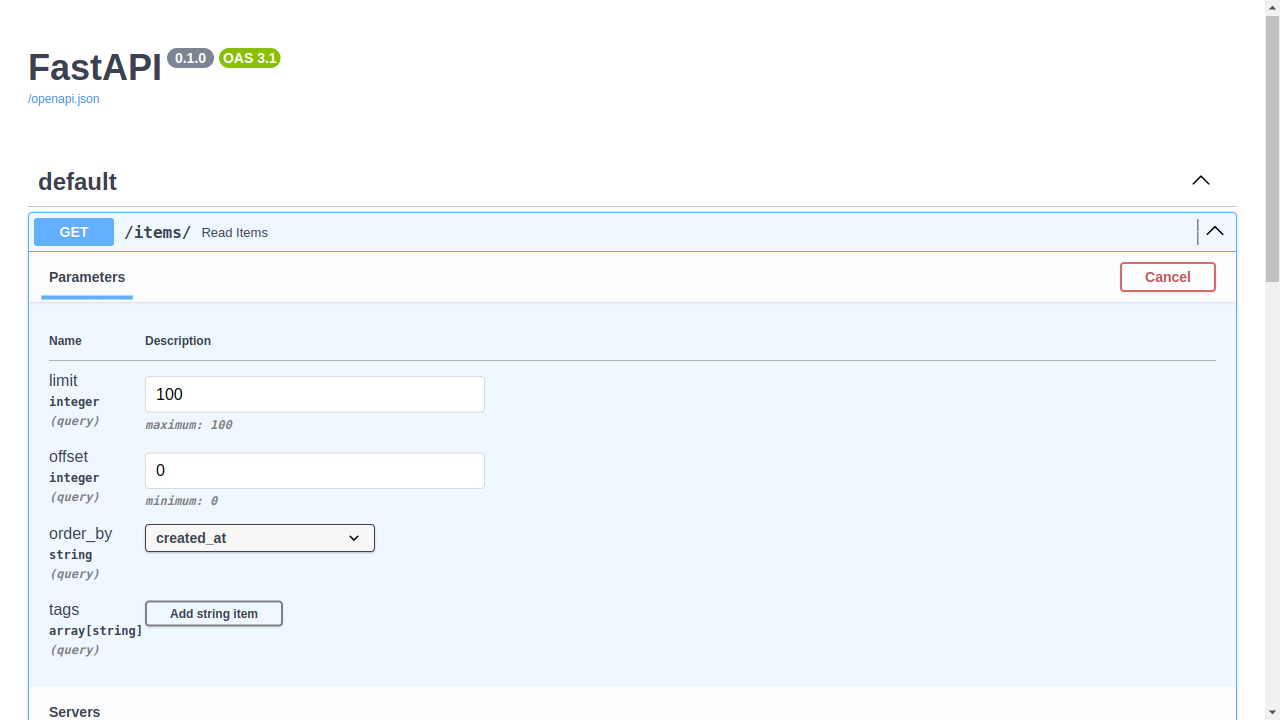
q: An optional string for searching. If provided, it must have amin_lengthof 3.skip: An optional integer for pagination. It should have a default value of0and must begreater than or equal to 0.limit: An optional integer. It should have a default value of10and must begreater than 0andless than or equal to 100.
# --- YOUR CODE GOES HERE ---
# Replace the old /items endpoint with this one, and fill in the blanks.
# Remember to import what you need!

@app.get("/items")
async def get_items(
    q: ... ,       # Your Annotated hint here
    skip: ... ,    # Your Annotated hint here
    limit: ...     # Your Annotated hint here
):


    # This logic is just for demonstration
    filtered_items = items_db
    if q:
        filtered_items = [item for item in items_db if q.lower() in item.lower()]

    paginated_items = filtered_items[skip : skip + limit]
    return {"query": q, "items": paginated_items}
Click here for the solution
@app.get("/items")
async def get_items(
  q: Annotated[
      str | None,
      Query(
          title="Search query",
          description="Keyword to filter items.",
          min_length=3,
      ),
  ] = None,
  skip: Annotated[int, Query(description="Items to skip for pagination.", ge=0)] = 0,
  limit: Annotated[
      int, Query(description="Max items to return.", gt=0, le=100)
  ] = 10,
):


  # This logic is just for demonstration
  filtered_items = items_db
  if q:
      filtered_items = [item for item in items_db if q.lower() in item.lower()]

  paginated_items = filtered_items[skip : skip + limit]
  return {"query": q, "items": paginated_items}
After implementing the solution, run your server and open the documentation at /docs. Your endpoint should look something like this, with all the defaults and constraints clearly documented.
Conclusion
Great work! You have now mastered a critical component of API design. Query parameters are the standard way to provide options for filtering, sorting, and pagination, and FastAPI's Query dependency makes adding robust validation and documentation effortless.
Here are your key takeaways:
- Query parameters are function arguments that are not in the URL path, used for optional data like filters (
/items?limit=10). - Setting a default value (e.g.,
limit: int = 10) makes a query parameter optional. - Using
Annotated[<type>, Query(...)]is the modern way to add declarative validation (min_length,max_length,gt,le) and metadata (title,description,alias). - FastAPI uses this information to automatically validate incoming requests and generate rich interactive documentation.
- You can accept multiple values for a single parameter by using a
listtype hint (e.g.,tags: Annotated[list[str] | None, Query()] = None).
So far, we have received data through the URL itself—via path and query parameters. This is perfect for simple values. However, to create or update complex objects, clients need to send data in the request body.
In the next lesson, we will dive into creating Pydantic models to define and validate JSON request bodies. This is fundamental to building endpoints that create and update data in your application.