Hello! Let's dive into our next lesson.
In our last session, we saw how response_model gives you control over your API's output, ensuring a consistent and secure data contract. You've now defined schemas for both incoming requests and outgoing responses. A key feature we've touched on is FastAPI's automatic validation. But what happens when that validation fails?
This lesson directly addresses the learning outcome: Handle validation errors and interpret FastAPI's automatic error responses. We will explore the detailed error messages FastAPI provides when input data is invalid and learn how to raise our own custom errors for scenarios beyond simple data validation. Understanding how your API communicates failure is just as important as knowing how it communicates success.
1. Automatic Validation Errors: The 422 Unprocessable Entity
One of FastAPI's most powerful features is its tight integration with Pydantic. When you define a type hint for a path parameter, query parameter, or request body, FastAPI uses it as a validation rule. If an incoming request violates this rule, FastAPI automatically intercepts it and returns a specific HTTP error.
Let's start by reading a concise explanation of this automatic process.
FastAPI Request Body Validation
This article from ApX Machine Learning clearly outlines the steps FastAPI takes to validate a request body, culminating in what happens when validation fails.
Read the numbered list under the heading 'Here's what FastAPI automatically does...'. Pay close attention to step 5, which describes the automatic generation of an HTTP 422 Unprocessable Entity error.
As the article mentions, you get a 422 Unprocessable Entity status code. This code signifies that the server understands the request's content type and the syntax of the request entity is correct, but it was unable to process the contained instructions. In simpler terms: "I know you sent me JSON, but the data inside it is wrong."
2. Interpreting the Error Response
FastAPI doesn't just say "something is wrong"; it gives you a detailed JSON response explaining exactly what is wrong. This is incredibly helpful for debugging and for client-side applications that need to display user-friendly error messages.
The error response has a standard structure. Let's examine it.
FastAPI Request Body Validation
This next section of the same article provides a perfect example of an invalid request and the corresponding 422 error response, breaking down its structure.
Read the section 'Example: Invalid Request'. Focus on the JSON response and its detail field. Note how it's a list, with each item containing three key pieces of information: loc, msg, and type.
The three key fields in each error object are:
loc: A list indicating the location of the error in the incoming data. For a request body, it will be["body", "field_name"]. For a path parameter, it would be["path", "param_name"].msg: A human-readable message explaining the error.type: A machine-readable string indicating the type of error (e.g.,value_error.missing,type_error.float).
Here is a visual example of such an error.
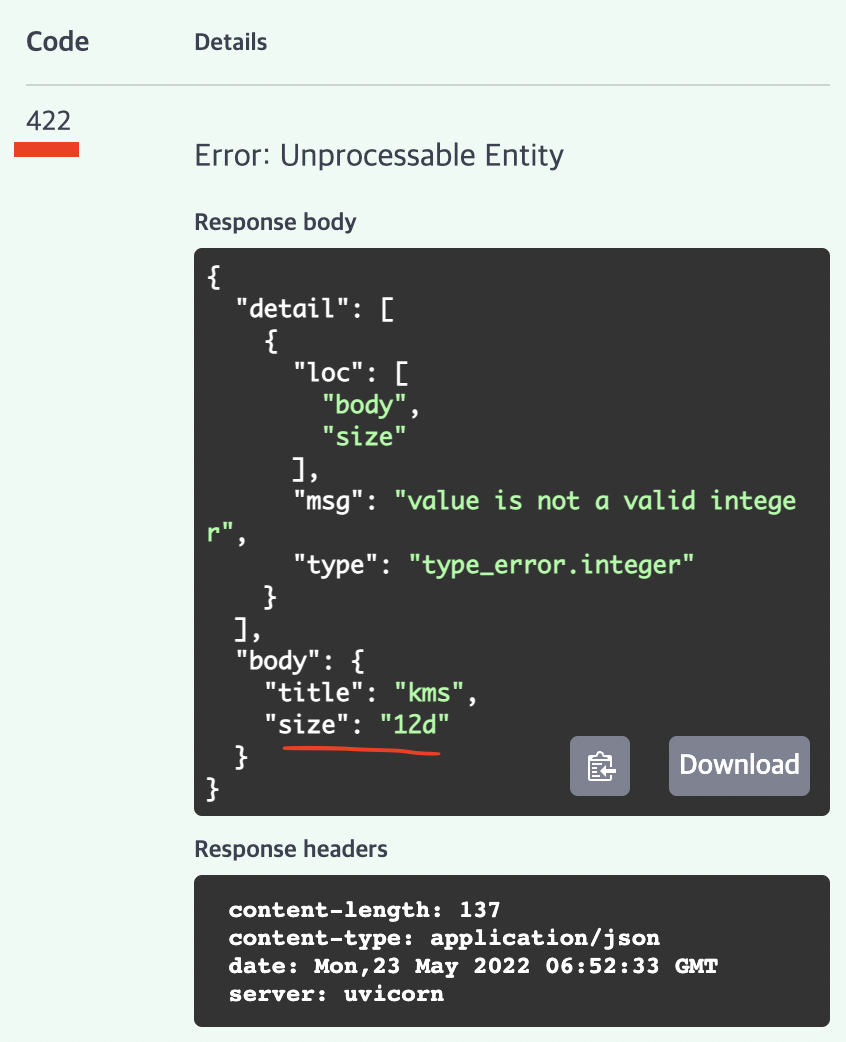
Let's see this in action. The following video demonstrates how these errors appear in the interactive documentation when you test an endpoint with invalid data.
Python FastAPI Tutorial (Part 4): Pydantic Schemas - Request and Response Validation
Corey Schafer's tutorial provides an excellent hands-on demonstration of triggering and inspecting these validation errors.
Watch from 17:58 to 19:28. Observe how sending a request with a too-short title or a missing field immediately results in a 422 error, and inspect the detailed response body that FastAPI generates.
This automatic validation isn't limited to request bodies. It works for path and query parameters too, based on their Python type hints.

3. Raising Your Own Errors with HTTPException
Automatic validation is for data that is structurally or typographically incorrect. But what about errors related to your application's business logic?
- A client requests a resource with an ID that doesn't exist in your database (
/items/999). - A user tries to perform an action for which they don't have permission.
- An ML model receives validly structured input that is nonsensical in the problem context (e.g., a house area of -100 sqft).
In these cases, the data is "valid" according to Pydantic, but "invalid" according to your rules. For this, you need to manually raise an exception. FastAPI provides HTTPException for this purpose.
The official FastAPI documentation explains how and why to use HTTPException.
Read the sections 'Handling Errors' and 'Use HTTPException'. Note that HTTPException is a Python exception, so you raise it, not return it. This will immediately halt the function's execution and send the error response.
The key is to use the correct HTTP status code to communicate the nature of the error. Common client-side error codes include:
400 Bad Request: A generic error for when the client sends a request that the server cannot process, often due to a business logic failure.404 Not Found: The requested resource does not exist.403 Forbidden: The client is authenticated, but not authorized to perform the action.409 Conflict: The request could not be completed due to a conflict with the current state of the resource (e.g., trying to create a user with an email that already exists).
Let's watch a practical example of refactoring code to use HTTPException for a "not found" scenario.
Python FastAPI Tutorial (Part 3): Path Parameters - Validation and Error Handling
In this clip, Corey Schafer demonstrates exactly why returning a simple dictionary is bad practice and how to fix it by raising a proper HTTPException with a 404 status code.
Watch from 04:40 to 09:40. The first part (until 06:52) shows the problem: returning an error message with a 200 OK status. The second part shows the solution using raise HTTPException and how it results in the correct 404 Not Found status code.
4. Hands-On Practice: Adding Business Logic Validation
Let's apply this to our ML prediction endpoint. While Pydantic ensures we get numbers for area_sqft and num_bedrooms, it doesn't know that a value of 0 for num_bedrooms might be illogical for a house price prediction. We'll add a check for this using HTTPException.
Task:
In your main.py file:
- Make sure you have
HTTPExceptionimported from FastAPI:from fastapi import FastAPI, HTTPException. - In your
predict_house_priceendpoint, add a business logic check right after the function definition. Ifhouse_data.num_bedroomsis less than 1, it's an invalid request. - If the condition is true,
raiseanHTTPExceptionwith astatus_codeof400(Bad Request) and a helpfuldetailmessage, like "Number of bedrooms must be a positive number." - Run your app and test the endpoint in the Swagger UI:
- First, send a request with
num_bedrooms: 0. You should see your custom400 Bad Requesterror. - Then, send a request with
area_sqft: "invalid-string". You should see FastAPI's automatic422 Unprocessable Entityerror. This will help solidify the difference between the two types of errors.
- First, send a request with
Click here for the solution
# In main.py
# You should already have your Pydantic models and the app instance defined.
from fastapi import FastAPI, HTTPException
from pydantic import BaseModel, Field

app = FastAPI()

class HousePredictionInput(BaseModel):
  area_sqft: float = Field(..., gt=0, description="Area of the house in square feet")
  num_bedrooms: int = Field(..., gt=0, description="Number of bedrooms")
  has_garage: bool

class HousePredictionOutput(BaseModel):
  predicted_price: float

@app.post("/predict/house-price", response_model=HousePredictionOutput)
async def predict_house_price(house_data: HousePredictionInput):


  # Our new business logic check
  if house_data.num_bedrooms < 1:
      raise HTTPException(status_code=400, detail="Number of bedrooms must be a positive number.")


  # Dummy prediction logic (same as before)
  predicted_price = 150_000 + (house_data.area_sqft * 150) + (house_data.num_bedrooms * 20_000)
  if house_data.has_garage:
      predicted_price += 25_000

  return {"predicted_price": predicted_price}
Note: In the solution, the Pydantic model for HousePredictionInput also includes gt=0 validation. The hands-on task asks you to use HTTPException for a similar check (< 1) to practice the concept. Both achieve a similar outcome, but HTTPException is more flexible for complex business rules that can't be expressed in Pydantic.
Conclusion
Excellent work! You now have a solid understanding of FastAPI's two-tiered error handling system.
Key Takeaways:
- Automatic Validation Errors: FastAPI automatically returns a
422 Unprocessable Entityerror when incoming data fails Pydantic validation. The JSON responsedetailfield tells you the preciseloc(location),msg(message), andtypeof each error. - Business Logic Errors: For custom validation rules (e.g., checking if a resource exists, validating logical constraints), you should manually
raise HTTPException. - Status Codes Matter: Using the correct HTTP status code (
422,404,400, etc.) is essential for building a predictable and reliable API that clients can easily integrate with.
In our next lesson, we will continue building on our knowledge of Pydantic by learning how to combine path, query, and body parameters in a single endpoint, seeing how FastAPI seamlessly handles validation for all of them at once.