Hello! Welcome back to our course on FastAPI.
In the last lesson, we explored FastAPI's powerful error handling capabilities. We saw how Pydantic validation automatically generates 422 Unprocessable Entity errors for invalid data and how we can use HTTPException to signal failures in our business logic, like a "not found" scenario.
This lesson is the capstone of our module on handling data. We will combine everything we've learned about parameters to achieve this lesson's learning outcome: Combine path, query, and body parameters in a single endpoint. This is a very common and powerful pattern you'll use frequently, especially for updating existing resources in your database or providing complex inputs to an ML model.
1. Combining Parameter Types: The Core Concept
Imagine you need to build an endpoint to update a specific item in your inventory. A typical PUT request for this might require:
- The ID of the item to update, taken directly from the URL path (e.g.,
/items/42). - The new data for the item, sent as a JSON object in the request body.
- An optional flag in the URL query string to trigger a side effect, like sending a notification (e.g.,
?notify_manager=true).
FastAPI makes it remarkably simple to handle all three types of input in a single function. It uses a clear set of rules to determine where to get the data for each parameter:
- Any parameter whose name matches a path variable (e.g.,
{item_id}) is taken from the path. - Any parameter that is type-hinted with a Pydantic model is, by default, taken from the request body.
- Any other parameter (of a simple type like
int,str,bool) is assumed to be a query parameter.
Let's start by looking at the official documentation, which provides the canonical example for this.
Body - Multiple Parameters - FastAPI
This section from the official FastAPI documentation shows a clear, concise example of an endpoint that mixes path, query, and body parameters.
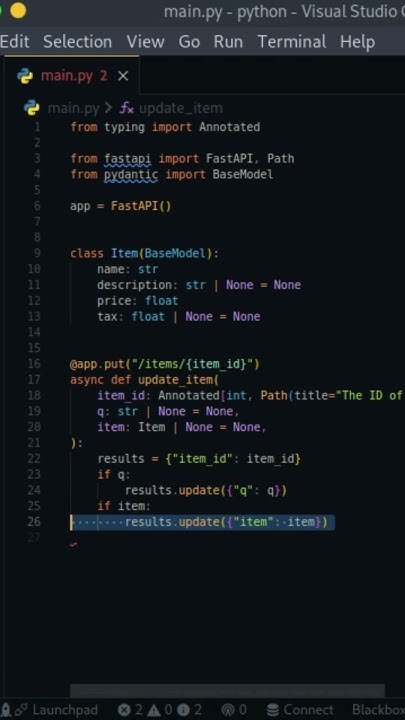
Please read the section titled 'Mix Path, Query and body parameters'. Pay close attention to the function signature of update_item and notice how item_id, q, and item are declared. This is the fundamental pattern we will be working with.
The code from the documentation beautifully illustrates FastAPI's intelligent parameter handling.
2. A Practical Walkthrough
Now let's watch a short video that builds this concept from scratch. Seeing it in action will help solidify your understanding of how these pieces fit together and how they are represented in the interactive API docs.
Fast API Tutorial, Part 7: Body - Multiple Parameters
This video from JVP Design provides a practical demonstration of the concept we just read about. You'll see an endpoint being built that combines a path parameter, a query parameter, and a request body.
Watch from 01:46 to 05:04. Pay attention to how the item_id, q, and item parameters are defined in the function and used within it. Also, notice how the Swagger UI automatically generates separate input fields for the path, query, and body parameters.
As you saw, FastAPI does the heavy lifting for you. It parses, validates, and documents all three types of input based on your Python type hints, leaving you to focus on the endpoint's logic.
3. Handling Multiple and Singular Body Parameters
While a single Pydantic model in the body is common, FastAPI offers more flexibility.
Multiple Body Parameters
What if you need to accept two distinct JSON objects in one request, for example, an item to update and a user who is performing the update? You can declare multiple Pydantic models as parameters. FastAPI will expect the request body to be a JSON object where the keys are the parameter names.
Body - Multiple Parameters - FastAPI
Let's return to the documentation to see how to define an endpoint that accepts multiple, distinct JSON objects in a single request body.
Read the section 'Multiple body parameters'. Notice how adding a user: User parameter changes the expected JSON structure to {"item": {...}, "user": {...}}. This is a powerful feature for complex operations.
Singular Values in the Body
By default, a simple type like importance: int would be interpreted as a query parameter. But what if you need a single value, like an importance score, to be part of the JSON body alongside a Pydantic model?
For this, you can import and use Body from fastapi. This explicitly tells FastAPI to treat a parameter as part of the request body, even if it isn't a Pydantic model.
from typing import Annotated
from fastapi import FastAPI, Body
from pydantic import BaseModel

app = FastAPI()

class Item(BaseModel):
    name: str
    price: float

@app.put("/items/{item_id}")
async def update_item(
    item_id: int,  # Path parameter
    item: Item,    # Body parameter (Pydantic model)
    importance: Annotated[int, Body()] # Body parameter (singular value)
):
    results = {"item_id": item_id, "item": item, "importance": importance}
    return results
In this case, FastAPI would expect a request body like:
{
    "item": {
        "name": "My Item",
        "price": 19.99
    },
    "importance": 5
}
This gives you fine-grained control over your API's data contract.
4. Hands-On Practice
Let's apply this to our house price prediction API. We'll modify the endpoint to make it more versatile by accepting a client ID from the path and an optional model version from the query string.
Task:
Modify your /predict/house-price endpoint in main.py:
- Change the path to
/predict/{client_id}/house-price. Theclient_idshould be captured as a path parameter in your function. You can type-hint it as astrorint. - Add an optional query parameter named
model_versionwith a type hint ofstr | None = None. - The
HousePredictionInputPydantic model should remain as the request body parameter. - Inside the function, modify the return value (or add a
printstatement) to include theclient_idandmodel_versionto confirm they are being received correctly. - Run your app and test the new endpoint in the Swagger UI. You should now see fields for the path, query, and body parameters.
Click here for the solution
# In main.py
from fastapi import FastAPI, HTTPException
from pydantic import BaseModel, Field

app = FastAPI()

class HousePredictionInput(BaseModel):
  area_sqft: float = Field(..., gt=0, description="Area of the house in square feet")
  num_bedrooms: int = Field(..., gt=0, description="Number of bedrooms")
  has_garage: bool


# We'll modify the output model to include the new parameters for verification
class HousePredictionOutput(BaseModel):
  predicted_price: float
  client_id: str
  model_version_used: str | None


# Note the new path and the additional parameters in the function signature
@app.post(
  "/predict/{client_id}/house-price",
  response_model=HousePredictionOutput
)
async def predict_house_price(
  client_id: str, # Path parameter
  house_data: HousePredictionInput, # Body parameter
  model_version: str | None = None # Query parameter
):


  # Dummy prediction logic (same as before)
  price_factor = 150
  if model_version == "v2":
      price_factor = 175 # Use a different factor for a different model version

  predicted_price = 150_000 + (house_data.area_sqft * price_factor) + (house_data.num_bedrooms * 20_000)
  if house_data.has_garage:
      predicted_price += 25_000

  return {
      "predicted_price": predicted_price,
      "client_id": client_id,
      "model_version_used": model_version
  }
Conclusion
Congratulations! You've successfully combined FastAPI's parameter types to create a flexible and powerful API endpoint. This is a fundamental skill that closes out our module on data handling.
Key Takeaways:
- FastAPI endpoints can seamlessly accept parameters from the path, query string, and request body all at once.
- The parameter type is determined by its name (for path), Pydantic model type (for body), or simple type (for query).
- You can accept multiple Pydantic models in the body, which FastAPI nests under keys corresponding to the parameter names.
- To force a simple-typed parameter to be read from the body, you can explicitly use
Body()fromfastapi.
In our next module, "Structuring Applications and Handling Errors," we will begin by taking a deeper look at HTTPException. Now that we can build more complex endpoints, we need robust strategies for handling the more complex business logic failures that can arise within them.