Hello! Welcome to your fourth lesson in our course on Backend Engineering.
In the previous lesson, we dissected the structure of HTTP messages, noting that every request begins with a start-line containing an "HTTP method." This method, a short verb like GET or POST, tells the server the client's intended action.
Today, we'll dive deep into these methods. This lesson is dedicated to differentiating between the primary HTTP methods—GET, POST, PUT, and DELETE—and understanding their specific use cases. Mastering these "verbs" of the web is fundamental to designing and building REST APIs, which are the backbone of modern backend services.
1. HTTP Methods and CRUD Operations
At a high level, most backend applications perform four basic functions on data: Create, Read, Update, and Delete. This is commonly known as CRUD. The designers of the web wisely mapped these four operations directly to the primary HTTP methods. This creates a standardized, predictable way for clients to interact with resources on a server.
A "resource" is any piece of information that can be named, such as a user account, a blog post, or a product listing. The HTTP method tells the server what to do with that resource.
This video provides an excellent overview of how these methods map to CRUD operations and why this is central to REST API design.
Mastering HTTP Methods: A REST API Deep Dive
This video from ByteMonk, 'Mastering HTTP Methods: A REST API Deep Dive', introduces HTTP methods as the verbs of REST APIs and directly connects them to CRUD.
Please watch from the beginning until 02:19. Focus on how the video defines 'resources' and maps HTTP methods to the CRUD acronym.
Now, let's examine each of the four main methods in detail.
2. The Four Primary Methods
a. GET: To Read a Resource
The GET method is used to retrieve data from the server. It is a read-only operation.
- Use Case: Fetching a web page, a list of articles, or the details of a specific user.
- Request: The client specifies the resource it wants in the URL's path (e.g.,
/users/123). Any filtering or parameters are passed in the query string (e.g.,/users?page=2).GETrequests do not have a body. - Response: If successful, the server returns a
200 OKstatus code and includes the requested data in the response body (e.g., as HTML or JSON).
b. POST: To Create a Resource
The POST method is used to submit data to the server to create a new resource.
- Use Case: Submitting a sign-up form, posting a new blog article, or uploading a file.
- Request: The data for the new resource is placed in the request body. The request is typically sent to a URL representing a collection of resources (e.g.,
/usersto create a new user). - Response: If successful, the server creates the new resource and typically returns a
201 Createdstatus code. The response often includes aLocationheader pointing to the URL of the newly created resource (e.g.,Location: /users/456).
c. PUT: To Update/Replace a Resource
The PUT method is used to update an existing resource by completely replacing it with new data.
- Use Case: Updating a user's entire profile information.
- Request: The request must be sent to the specific URL of the resource to be updated (e.g.,
/users/123). The complete new representation of the resource is placed in the request body. - Response: If successful, the server updates the resource and returns a
200 OKstatus code.
d. DELETE: To Delete a Resource
The DELETE method is used to remove a specific resource from the server.
- Use Case: Deleting a user's account, a blog post, or a comment.
- Request: The request is sent to the specific URL of the resource to be deleted (e.g.,
/users/123). - Response: If successful, the server deletes the resource and usually returns a
200 OKor204 No Contentstatus code.
To see these methods in action, the following video from Postman provides a great practical demonstration.
REST API Fundamentals: Learn to Use GET, POST, PUT, & DELETE
This video, 'REST API Fundamentals' from the Postman channel, demonstrates how to use each of the four main HTTP methods in a real API client.
Watch from 01:12 to 04:28. Observe how the URL, method, and request body change for each distinct CRUD operation (getting customers, creating one, updating it, and finally deleting it).
3. Key Characteristics: Safety and Idempotency
When differentiating HTTP methods, two important technical properties are safety and idempotency. Understanding these will help you design more predictable and robust APIs. Your background in computer science and interest in "under the hood" mechanics will make these concepts particularly relevant.
-
Safe Methods: A method is safe if it does not alter the state of the resource on the server. It's essentially a read-only operation.
GETis a safe method. Spiders and web crawlers can freely makeGETrequests without fear of changing data. -
Idempotent Methods: A method is idempotent if making the same request once or multiple times has the same net effect on the server.
GETis idempotent (fetching the same data ten times is the same as fetching it once).PUTis idempotent (updating a user's profile with the exact same data ten times results in the same final profile).DELETEis idempotent (deleting a resource ten times is the same as deleting it once; after the first time, the subsequent requests do nothing because the resource is already gone).POSTis NOT idempotent. Sending the same "create user" request ten times will result in ten new users being created.
The following Venn diagram provides a clear visual summary of which methods fall into which category.
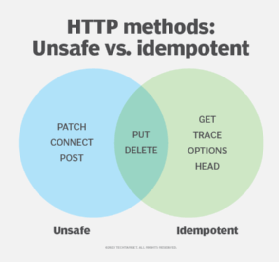
For a detailed textual definition of these concepts, the following resource is very helpful.
HTTP Methods - REST API Tutorial
This article from 'REST API Tutorial' provides concise definitions and a useful summary table for the HTTP methods.
Please read the 'Glossary' section at the end of the article. It contains clear definitions for 'Safe Methods' and 'Idempotent Methods'.
A Note on PATCH
You may also encounter the PATCH method. It is used for making partial updates to a resource. For example, if you only want to change a user's email address but not their name, you would use PATCH. This contrasts with PUT, which requires you to send the entire resource representation. While very useful, we will focus on the main four methods for now.
Test your understanding!
You are designing a REST API for a simple to-do list application. For each of the following actions, state which HTTP Method and URL you would use.
- Retrieve the full list of all to-do items.
- Create a new to-do item.
- View the details of the to-do item with ID
7. - Update the entire content of to-do item
7(e.g., change both its title and completion status). - Delete to-do item
7.
Show answer
- Method:
GET, URL:/tasks - Method:
POST, URL:/tasks(The data for the new task would be in the request body). - Method:
GET, URL:/tasks/7 - Method:
PUT, URL:/tasks/7(The complete new task data would be in the request body). - Method:
DELETE, URL:/tasks/7
4. A Glimpse into Django
Eventually, you will implement these concepts in code. In a Python framework like Django, you will write "view" functions that handle incoming requests. You will configure each view to respond to specific HTTP methods.
Here is a small preview of what that looks like in the Django REST Framework, which we'll cover in detail later in the course.
from rest_framework.decorators import api_view

@api_view(['GET', 'POST'])
def task_list(request):
    if request.method == 'GET':
        # ... logic to fetch and return all tasks ...
    elif request.method == 'POST':
        # ... logic to create a new task from request.data ...

@api_view(['GET', 'PUT', 'DELETE'])
def task_detail(request, pk):
    # ... logic to find the task with primary key (pk) ...
    if request.method == 'GET':
        # ... logic to return the single task ...
    elif request.method == 'PUT':
        # ... logic to update the task with request.data ...
    elif request.method == 'DELETE':
        # ... logic to delete the task ...
Notice how the @api_view decorator explicitly lists which HTTP methods a function can handle. The code then uses if request.method == '...': to execute the correct logic. This is the practical application of everything we've discussed today.
Conclusion
You have now learned to differentiate the core verbs of HTTP that drive the web. This knowledge is not just theoretical; it's the foundation for designing clean, predictable, and scalable backend APIs.
Key Takeaways:
- HTTP methods map directly to CRUD operations:
POST(Create),GET(Read),PUT(Update), andDELETE(Delete). GETretrieves data and is safe and idempotent.POSTcreates new data and is neither safe nor idempotent.PUTreplaces existing data and is not safe but is idempotent.DELETEremoves data and is not safe but is idempotent.- The choice of method is tied to the URL:
POSTusually targets a collection URL (e.g.,/tasks), whilePUTandDELETEtarget a specific resource URL (e.g.,/tasks/7).
Preview of the Next Lesson:
When a server sends a response, the very first thing in the status line is a three-digit status code (like 200, 201, or 404). These codes are a shorthand for the outcome of the request. In our next lesson, we will explore the different categories of status codes and what the most common ones mean.