Hello! Welcome back to your second lesson in Backend Engineering.
In our last session, we established the big picture: the client-server model and the role of HTTP as the language of the web. We saw that every HTTP request is directed at a specific resource, identified by a URL. Your browser or application (the client) sends a request to a URL, and the server on the other end responds.
Today, we're going to zoom in on that address label: the Uniform Resource Locator (URL). This lesson will fully unpack how URLs are structured and, crucially, how a web server—and specifically, a web framework like Django—parses that structure to understand what the client is asking for. Understanding this is the first step in building a backend that can respond to different kinds of requests.
1. The Anatomy of a URL
At first glance, a URL like https://www.example.com/products/search?id=123#details might look like a simple string of text. However, it's a highly structured address, with each part providing a specific piece of information.
Let's break down the standard components of a URL.

To get a formal definition and detailed explanation of each part, the MDN Web Docs are an excellent resource.
This article from the Mozilla Developer Network (MDN) provides a comprehensive breakdown of the components of a URL. It's a foundational text for any web developer.
Please read the sections from 'Basics: anatomy of a URL' through to 'Anchor'. Pay close attention to the purpose of each part: Scheme: The protocol to use. Authority: The server to connect to (including the domain and optional port). Path to resource: The specific resource being requested on the server. Parameters: Extra data for the server (also known as the query string). Anchor: A bookmark for the browser (also known as the fragment).
To see these concepts explained in a more dynamic way, the following video walks through each component with an interactive tool.
This video visually deconstructs a URL, explaining the role of each part. It complements the text you just read.
Watch the following segments that correspond to the components we've discussed: Protocol (Scheme): 0:33 - 1:10 Domain: 1:55 - 3:06 Path: 3:06 - 4:42 Hash (Anchor/Fragment): 4:42 - 5:39 Query String (Parameters): 5:39 - 6:35
Key Takeaways on URL Structure
Let's summarize the roles of these components in the client-server communication:
- Scheme (or Protocol):
https://- Tells the client how to communicate.
httpsmeans use the secure version of HTTP. Other examples includehttp,ftp(File Transfer Protocol), andmailto.
- Tells the client how to communicate.
- Authority (Domain Name + Port):
www.example.com:443- Tells the client where to send the request. The domain name (
www.example.com) is a human-readable alias for the server's IP address. The port (:443) is the specific "gate" on the server for the connection. Ports are often omitted because browsers use defaults (80 for HTTP, 443 for HTTPS).
- Tells the client where to send the request. The domain name (
- Path:
/products/search- This is the primary piece of information for your backend application. It specifies what resource the client wants from the server. It often looks like a file path, but as we'll see, it's an abstraction that doesn't necessarily map to a real directory structure.
- Query String (or Parameters):
?id=123&sort=price- A set of key-value pairs that provides additional data or parameters for the request. It always starts with a
?. Multiple parameters are separated by&. This is often used for filtering, sorting, or providing search terms. This information is actively used by your backend code.
- A set of key-value pairs that provides additional data or parameters for the request. It always starts with a
- Fragment (or Anchor):
#details- A special component that is not sent to the server. It's a "bookmark" used by the client's browser to scroll to a specific part of the returned page. Since it's purely client-side, we typically don't worry about it in backend development.
A quick note on terminology: URI vs. URL
You might occasionally see the term URI (Uniform Resource Identifier). What's the difference?- A URI is a generic identifier for a resource.
- A URL (Uniform Resource Locator) is a specific type of URI that tells you how to locate the resource (e.g., via the
httpsprotocol atexample.com). - A URN (Uniform Resource Name) is another type of URI that just names a resource, without specifying its location (e.g.,
urn:isbn:0451450523for a book).
In web development, nearly every identifier you encounter is a URL. The terms are often used interchangeably, but it's good to know that URL is the more specific term for a web address. For a deeper dive, the first three minutes of the video "URIs, URLs, and URNs" (LINK) provide a good explanation.
2. URL Parsing: How a Server Interprets the URL
Now that we know the structure, let's focus on how a web server uses it. When a request for https://api.example.com/v1/users/123?format=json arrives:
- The web server software (e.g., Nginx, Apache) uses the authority (
api.example.com) to confirm the request is for it. - It then passes the request to the backend application that is configured to handle that domain.
- Your backend application (e.g., a Django app) receives the request. For the application, the most important parts are the path (
/v1/users/123) and the query string (?format=json).
The application needs to parse these components to decide which code to execute.
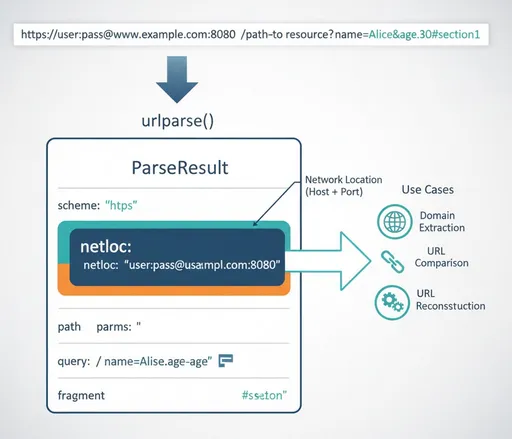
This process of matching a URL path to a specific function in your code is called routing or dispatching. Since your goal is to work with Django, let's look at exactly how Django handles this.
Django uses a system called a URLconf (URL configuration). It's a Python module that contains a list of patterns to match against the incoming URL's path.
URL dispatcher | Django documentation
The official Django documentation explains precisely how its URL dispatcher works. This directly addresses the 'parsed by web servers' part of our learning goal within your chosen framework.
Please read these two key sections: 'How Django processes a request': This describes the algorithm Django uses. Focus on how it finds the urlpatterns list and iterates through it to find a match for the requested path_info. 'What the URLconf searches against': This section is short but crucial. It clarifies that the URLconf only looks at the path, not the domain or the GET/POST parameters (query string).
So, in Django, you define a list called urlpatterns. Each item in the list maps a path pattern to a "view" (a Python function that handles the request).
For example, consider this urlpatterns from the Django documentation:
from django.urls import path
from . import views

urlpatterns = [
    path('articles/2003/', views.special_case_2003),
    path('articles/<int:year>/', views.year_archive),
    path('articles/<int:year>/<int:month>/', views.month_archive),
    path('articles/<int:year>/<int:month>/<slug:slug>/', views.article_detail),
]
Here’s how Django would parse an incoming request path:
- A request for
/articles/2003/matches the first pattern. Django stops searching and calls theviews.special_case_2003function. - A request for
/articles/2024/matches the second pattern. Django callsviews.year_archiveand passes the integer2024as an argument to the function. This is how you handle dynamic parts of a URL. - A request for
/articles/2024/05/hello-world/matches the final pattern. Django callsviews.article_detailwithyear=2024,month=5, andslug="hello-world"as arguments.
The <int:year> and <slug:slug> parts are called "path converters." They not only capture a part of the URL but also validate its type (e.g., ensuring year is an integer). This is a powerful feature for creating clean, robust, and readable APIs.
Test your understanding!
Given the urlpatterns list above, what happens with a request for /articles/2024/05/?search=django?
- Which URL pattern does it match?
- Which view function is called?
- What arguments are passed to the view from the path?
- What happens to the
?search=djangopart?
Show answer
- It matches the third pattern:
path('articles/<int:year>/<int:month>/', ...). - The
views.month_archivefunction is called. - The view receives
year=2024andmonth=5as keyword arguments. - The
?search=djangopart is the query string. It is not used for routing. It is available inside theviews.month_archivefunction for further processing, for example, to filter the articles it returns.
Conclusion
In this lesson, we've dissected the URL and seen how it serves as a precise address for a web resource.
Key Takeaways:
- A URL is composed of distinct parts: scheme, authority (domain + port), path, query string, and fragment.
- The scheme and authority guide the request to the correct server.
- The path is the primary component used by a backend application for routing.
- The query string provides extra data to the handler function but is not used for routing itself.
- The fragment is for the browser only and is never sent to the server.
- Frameworks like Django use a URL dispatcher to parse the path and match it against a list of predefined patterns (
urlpatterns), calling the appropriate view function and passing any captured values as arguments.
You now have a clear understanding of how a client's request for a specific URL gets translated into the execution of a specific piece of code on your server.
Preview of the Next Lesson:
The URL is just one part of an HTTP request. To get the full picture, a request also includes a method (like GET or POST), headers, and sometimes a body. In the next lesson, we will explore the complete structure of HTTP requests and responses, giving you all the pieces you need to understand a full client-server interaction.