Hello! Welcome to the fifth lesson in your Backend Engineering course.
In our last lesson, we explored the "verbs" of the web—the HTTP methods GET, POST, PUT, and DELETE. We saw how a client uses these methods to tell a server what action it wants to perform on a resource.
Today, we'll focus on the server's reply. After a server processes a request, it sends back a response. The very first part of this response is a three-digit HTTP status code. This code is a concise, standardized way for the server to communicate the outcome of the request. As a backend developer, understanding these codes is not just academic; it's essential for debugging problems, designing reliable APIs, and creating a good experience for the client applications that use your services.
This lesson is designed to help you explain the purpose of common HTTP status codes, from success and redirection to client and server errors.
1. The Five Classes of Status Codes
Every HTTP status code is a three-digit number. The first digit is the most important, as it places the code into one of five distinct classes. This classification gives you an immediate high-level understanding of the response.
- 1xx (Informational): The request was received and the process is continuing. These are rare in day-to-day web development.
- 2xx (Successful): The request was successfully received, understood, and accepted. This is what you hope to see!
- 3xx (Redirection): Further action needs to be taken by the client to complete the request, usually by going to a different URL.
- 4xx (Client Error): The request contains bad syntax or cannot be fulfilled. The client seems to have made a mistake.
- 5xx (Server Error): The server failed to fulfill a valid request. The server itself has a problem.
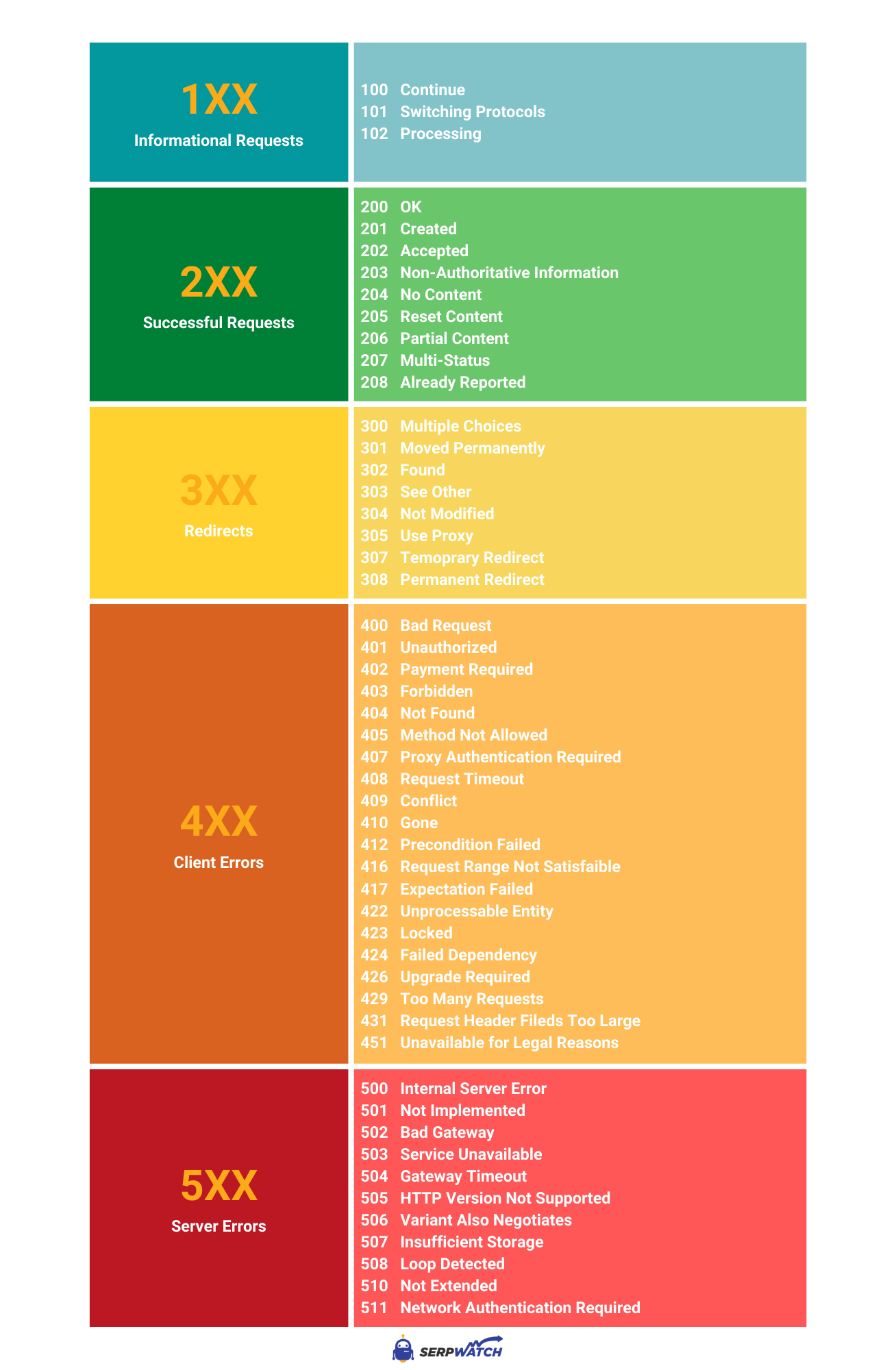
This cheat sheet provides an excellent visual summary of these categories and some common codes within each.
To get a quick and engaging animated overview of the most common codes in these categories, please watch the following short video.
HTTP Status Codes Explained In 5 Minutes
The video 'HTTP Status Codes Explained In 5 Minutes' from the ByteByteGo channel provides a fantastic, rapid tour of the essential status codes you'll encounter.
Please watch from 00:20 to 03:55. Pay attention to how the codes are grouped and the simple analogies used to explain their meanings.
2. A Deeper Look at Common Codes
Now that you have the big picture, let's explore the most important codes a backend engineer deals with, paying attention to some crucial nuances. The following video offers a slightly more detailed explanation. We will refer to parts of it as we go.
Every HTTP Status Code Explained in 8 Minutes!
The video 'Every HTTP Status Code Explained in 8 Minutes!' by Codist offers great explanations, especially on the subtle differences between similar codes.
We will reference specific parts of this video in the sections below. You can watch it through or pause and play as directed.
2xx: Success
These codes confirm that the request was successful.
200 OK: The "everything is fine" response. It's the standard reply for a successfulGETrequest.201 Created: This is a more specific success code. It confirms that the request was successful and, as a result, a new resource was created. This is the ideal response for a successfulPOSTrequest (e.g., a new user signs up). The response should also include aLocationheader pointing to the URL of the newly created resource. (Watch 00:53 - 01:28 in the Codist video for this).204 No Content: This code means the server successfully processed the request but has no content to send back in the response body. This is common forDELETErequests orPUTupdates where you just need to confirm the action happened. (Watch 01:28 - 01:41 in the Codist video).
3xx: Redirection
These codes tell the client to look elsewhere.
301 Moved Permanently: The requested resource has been permanently moved to a new URL. Browsers and search engines will update their records. This is important for SEO when you change your site's structure.302 Found(or Temporary Redirect): The resource is temporarily at a different URL, but the client should continue to use the original URL for future requests. This is useful for things like server maintenance. The key difference is permanence. (Watch 01:56 - 02:50 in the Codist video for the301vs.302distinction).304 Not Modified: An efficiency-related code. The client can send a request asking if a resource has changed since the last time it was downloaded. If it hasn't, the server sends304, telling the client to use its own cached version. This saves bandwidth.
4xx: Client Errors
The server is pointing the finger at the client's request.
400 Bad Request: A generic error indicating the server couldn't understand the request due to invalid syntax. This could be malformed JSON in aPOSTbody or invalid characters in a URL.401 Unauthorizedvs.403 Forbidden: This is a critical distinction.401 Unauthorizedmeans the client must authenticate to get a response. It’s like a bouncer saying, "Show me your ID." The client either didn't provide credentials (like a login token) or the credentials were bad.403 Forbiddenmeans the server understands the client's identity, but the client is not authorized to access this resource. It’s like the bouncer saying, "Your ID is valid, but you're not on the VIP list." The user is logged in but trying to access an admin-only page.- (Watch 04:14 - 05:20 in the Codist video for a great explanation of this difference).
404 Not Found: The most famous error. The server cannot find the requested resource. This is typically due to a typo in the URL or a link to a deleted resource.429 Too Many Requests: The client has sent too many requests in a given amount of time ("rate limiting"). This is a protective measure to prevent abuse. The response might include aRetry-Afterheader telling the client how long to wait.
5xx: Server Errors
The client's request was valid, but the server failed to process it.
500 Internal Server Error: A generic "something went wrong on our end" message. This is often the result of an unhandled exception or bug in your backend code. Your application crashed while trying to process the request.502 Bad Gateway: In modern architectures, requests often pass through multiple servers (like a reverse proxy or API gateway). This error means that one server in the chain received an invalid response from another server further upstream.503 Service Unavailable: The server is temporarily unable to handle the request. This might be because it's overloaded with traffic or is down for maintenance.
Test your understanding!
You are debugging an API. What is the most likely HTTP status code you would expect to see in each of the following scenarios?
- A user submits a registration form (
POST /users), and the server successfully creates a new user account. - A client tries to fetch a blog post using the URL
/posts/999, but no post with ID 999 exists. - A regular, authenticated user tries to access the admin dashboard at
/admin/dashboard. - A client tries to log in, but provides an incorrect password.
- An unexpected database connection error occurs in your backend code while a client is trying to fetch their profile.
Show answer
201 Created: A new resource was successfully created.404 Not Found: The specific resource does not exist.403 Forbidden: The user is authenticated but not authorized to access this resource.401 Unauthorized: The credentials provided are invalid, so authentication failed.500 Internal Server Error: An unexpected error on the server prevented it from fulfilling a valid request.
3. Returning Status Codes in Django
Understanding these codes is one thing; implementing them is another. As a backend developer, your code is responsible for sending the correct status code. Since you're focusing on Python and Django, let's see how this is done.
The Django documentation provides the definitive guide on this. You don't need to write a full server from scratch; Django gives you convenient tools.
Writing views | Django documentation
The Django documentation on 'Writing views' explains how to return errors and custom status codes. This bridges the theory of HTTP status codes with practical implementation in the framework you will be using.
Please read the section 'Returning errors', including its subsection on 'The Http404 exception'. Focus on the different ways to return a status code other than 200.
From that reading, you can see a few key patterns:
-
Use
HttpResponsesubclasses for common errors: Django provides ready-made classes likeHttpResponseNotFoundandHttpResponseForbiddenthat automatically include the correct status code.from django.http import HttpResponseForbidden def admin_dashboard(request): if not request.user.is_superuser: return HttpResponseForbidden("<h1>Access Denied</h1>") # ... otherwise, return the admin page -
Pass the status code directly to
HttpResponse: For any code, especially non-error codes like201, you can set it manually.from django.http import HttpResponse import json def create_task(request): # ... logic to create a new task in the database ... new_task_data = {"id": 101, "title": "My new task"} return HttpResponse(json.dumps(new_task_data), status=201, content_type="application/json") -
Raise the
Http404exception: As a convenient shortcut for the most common error, you can simplyraise Http404. Django will catch this and automatically generate a standard 404 response.from django.http import Http404 from .models import Product def product_detail(request, product_id): try: product = Product.objects.get(pk=product_id) except Product.DoesNotExist: raise Http404("Product does not exist") # ... return product details
This demonstrates how a core web concept—the status code—is directly manipulated within your application logic to build a correct and communicative API.
Conclusion
You have now learned about the crucial role HTTP status codes play in web communication. They are the server's primary language for telling a client what happened to its request. Correctly interpreting them is key to debugging, and correctly sending them is key to building robust backend systems.
Key Takeaways:
- HTTP status codes are grouped into five classes:
1xx(Informational),2xx(Success),3xx(Redirection),4xx(Client Error), and5xx(Server Error). - As a backend developer, you'll most frequently work with
200,201,204,301,400,401,403,404, and500. - Understanding the nuanced differences (like
401vs.403) is vital for correct API design and security. - Frameworks like Django provide clear and simple ways to send the appropriate status code in your response, either through helper classes or by setting the code directly.
Preview of the Next Lesson:
When a server sends a status code, it also sends a collection of key-value pairs called headers. These headers provide crucial metadata about the response, such as the type of content being sent (Content-Type), caching instructions (Cache-Control), and more. In our next lesson, we will describe the purpose of these common headers in both requests and responses.