Hello! Welcome to your next lesson in Backend Engineering.
In our previous session, we examined HTTP status codes, the server's way of telling the client the outcome of a request. We saw that the status code is the first part of the server's response. Today, we'll dive into the metadata that accompanies both requests and responses: HTTP headers.
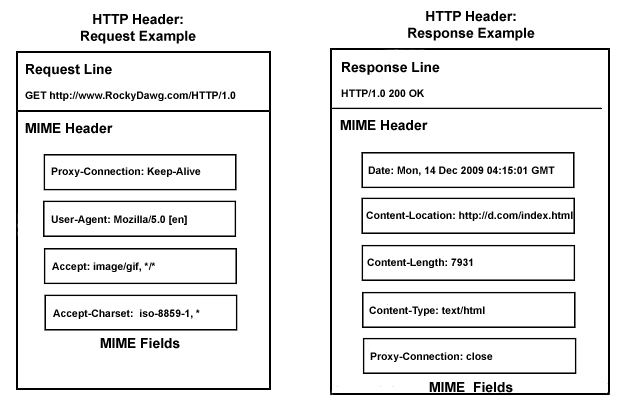
Headers are key-value pairs that carry crucial information, enabling everything from content negotiation and authentication to caching and session management. As a backend developer, you will constantly read headers from incoming requests and set headers on outgoing responses.
This lesson will teach you to describe headers in HTTP requests and responses and their purposes, fulfilling a core competency in web fundamentals.
1. What are HTTP Headers?
An HTTP message—whether it's a request from a client or a response from a server—is composed of a start-line, a block of headers, a blank line, and an optional body.

Headers are the "behind-the-scenes" messengers that provide context and instructions for the communication. To get a foundational understanding of what they are and why they're important, please read the first few sections of the following article.
HTTP Headers That Every Web Developer Should Know
The article 'HTTP Headers That Every Web Developer Should Know' from BrowserStack provides a clear definition of headers and categorizes them based on their role.
Please read the sections 'What Are HTTP Headers?', 'Why are HTTP Headers Important in Web Development', and 'Types of HTTP Headers'. Focus on understanding the role headers play and their primary categories.
As you read, note the key categories:
- Request Headers: Sent by the client (e.g., a browser) to the server. They provide more information about the request and what the client can handle.
- Response Headers: Sent by the server back to the client. They give additional context about the response.
- General Headers: Apply to both requests and responses but are independent of the data being exchanged.
- Entity Headers (now more broadly called Representation Headers): Describe the payload or body of the message, such as its content type or length.
2. A Tour of Common Headers
Now let's explore the headers you will encounter most frequently. We will group them by their primary function.
The following video provides an excellent tour of many of these headers. We'll refer to specific timestamps as we go.
Supercharge Your REST API with These Essential HTTP Headers
The video 'Supercharge Your REST API with These Essential HTTP Headers' by ByteMonk explains the purpose and importance of key headers in the context of API development.
You can watch the sections as they are referenced below to understand each header's function.
Content Negotiation
These headers help the client and server agree on the format of the data being exchanged.
Accept(Request): Tells the server which media types the client can understand. For example,Accept: application/jsonindicates the client wants a JSON response. A client can list multiple types in order of preference.Content-Type(Request & Response): Specifies the media type of the actual data in the message body. In aPOSTrequest,Content-Type: application/jsontells the server that the body contains JSON. In a response, it tells the client how to parse the body it has received.
Watch how these two headers work together in a negotiation process.
- Watch LINK from 02:09 to 04:36. This section clearly explains the distinct roles of
Content-TypeandAccept.
Authentication
This header is used to prove a client's identity to the server.
Authorization(Request): Carries credentials for authenticating a user agent with a server. This is fundamental for securing APIs. A common pattern isAuthorization: Bearer <your-api-token>, which builds directly on the concepts of401 Unauthorizedand403 Forbiddenfrom our last lesson.- Watch LINK from 06:13 to 07:00.
State Management
HTTP is a stateless protocol, meaning each request is independent. Headers provide a mechanism to create a "stateful" session.
Set-Cookie(Response): Used by the server to send a small piece of data (a cookie) to be stored by the client's browser. This is how a server can remember a user across multiple requests (e.g., a session ID after login).Cookie(Request): Used by the client to send previously stored cookies back to the server with subsequent requests. The server can then read the cookie to "remember" the client.- Watch LINK from 04:57 to 06:13. This part explains cookies and the importance of security attributes like
HttpOnlyandSecure.
Caching
Caching headers help improve performance by allowing clients (or intermediate proxies) to store and reuse responses.
Cache-Control(Response): Gives directives for caching in both requests and responses. The most common directive isCache-Control: max-age=3600, which tells the client it can reuse the response for 3600 seconds (1 hour) without re-consulting the server.- Watch LINK from 04:36 to 05:09.
Other Important Headers
User-Agent(Request): A string that lets the server identify the application, operating system, and vendor of the requesting user agent. Useful for analytics or serving different content to mobile vs. desktop browsers.Location(Response): Used in redirection responses (3xxstatus codes) to tell the client the new URL for the resource.
Test your understanding!
For each scenario, identify the primary HTTP header involved.
- An API client needs to inform the server that it wants the response formatted as XML.
- After a user logs in, the server needs to give the browser a session token to remember the user.
- On a subsequent request, the browser sends that session token back to the server.
- A client is sending a JSON payload in a
POSTrequest and needs to declare the format of the request body. - To access a protected endpoint, a client must present an API key.
Show answer
Accept: The client specifiesAccept: application/xml.Set-Cookie: The server sends aSet-Cookieheader with the session token.Cookie: The browser includes theCookieheader with the stored token.Content-Type: The client setsContent-Type: application/json.Authorization: The client uses theAuthorizationheader to send the key, e.g.,Authorization: Bearer <key>.
3. Practical Inspection and Interaction
Theory is great, but as an engineer, you need to see these headers in action.
Inspecting Headers with Browser Tools
Your web browser's developer tools are an indispensable resource for inspecting live HTTP traffic. The following video demonstrates this clearly.
HTTP Crash Course & Exploration
The 'HTTP Crash Course & Exploration' by Traversy Media includes a practical demonstration of how to find and inspect HTTP headers using the Network tab in Chrome's Developer Tools.
Watch from 12:47 to 16:19. Open the developer tools in your own browser (usually with F12 or Cmd+Opt+I) and follow along by visiting any website and inspecting the requests in the 'Network' tab.
As you explore, click on different requests (the main document, CSS files, images, API calls) and observe how the request and response headers change.
Interacting with Headers in Django
Your backend application needs to both read headers from incoming requests and set headers on outgoing responses. Since we're using Django, let's see how the framework makes this easy.
Request and response objects | Django documentation
The Django documentation on 'Request and response objects' is the definitive guide for programmatically handling headers.
First, read the subsection on 'HttpRequest.headers' to see how to access incoming headers. Then, read 'Setting header fields' to learn how to add headers to a response. Finally, look at 'HttpResponse.set_cookie()' to see the helper method for setting cookies.
Here's a summary of the key takeaways for your Django work:
1. Reading Request Headers:
Django parses incoming headers and makes them available on the request object via the request.headers attribute. This is a case-insensitive, dictionary-like object.
# In a Django view (e.g., in a file called views.py)
from django.http import HttpResponse

def my_view(request):
    # Access the User-Agent header
    user_agent = request.headers.get('User-Agent', 'unknown')

    # Access a custom header, e.g., 'X-API-Key'
    api_key = request.headers.get('X-Api-Key') # Note: case-insensitive

    return HttpResponse(f"Your browser is: {user_agent}")
2. Setting Response Headers:
You can set headers on an HttpResponse object just like you would with a Python dictionary.
from django.http import HttpResponse

def my_response_view(request):
    response = HttpResponse("This response has a custom header.")

    # Set a custom header
    response['X-Custom-Header'] = 'My-Value'

    # Set the Content-Disposition header to prompt a download
    response['Content-Disposition'] = 'attachment; filename="hello.txt"'

    return response
3. Setting Cookies (A Special Header Case):
While you could manually construct the Set-Cookie header string, Django provides a much safer and more convenient helper method.
from django.http import HttpResponse

def login_view(request):
    response = HttpResponse("You are now logged in!")

    # Set a session cookie that expires when the browser closes
    # httponly=True is a crucial security measure to prevent JavaScript access
    response.set_cookie('session_id', 'some-secret-session-value', httponly=True)

    return response
Conclusion
You've now explored one of the most fundamental components of web communication. Headers are the essential metadata that give context and control to the otherwise simple request-response cycle.
Key Takeaways:
- Headers are key-value pairs that travel with every HTTP request and response.
- Request headers (like
Accept,Authorization,Cookie) convey client capabilities, credentials, and state. - Response headers (like
Content-Type,Set-Cookie,Cache-Control) control how the client should interpret and handle the response. - You can easily inspect headers using your browser's developer tools.
- In Django, you can access incoming headers via
request.headersand set outgoing headers on theresponseobject.
Preview of the Next Lesson:
We mentioned that HTTP is a stateless protocol, and we saw how cookies provide a mechanism to overcome this limitation. In our next lesson, we will delve deeper into what statelessness truly means, why it was a foundational design choice for the web, and explore the common strategies—including cookies and tokens—that backend developers use to manage user state in a stateless world.