Hello! Welcome back to our backend engineering course.
In the last lesson, we dove deep into serializers, the workhorses that translate your Django models into JSON and back again. To see them in action, you built simple function-based views using the @api_view decorator. This was a great, focused way to understand the data-handling part of an API.
Today, we'll shift our focus to the views themselves. Our goal is to implement API endpoints using DRF's function-based and class-based views. We will formalize your understanding of the function-based views you've already used and then introduce class-based views, a more powerful and structured way to build APIs. This is a fundamental skill in backend development, as it's all about writing code that is organized, reusable, and easy to maintain as your application grows.
1. Function-Based Views (FBVs): The Complete Picture
In the previous lesson, you created task_list and task_create views. These handled GET for a list of items and POST to create a new one. To complete the standard set of CRUD (Create, Read, Update, Delete) operations, we also need endpoints to handle a single object: retrieving it, updating it, and deleting it.
Let's examine how to do this using the same function-based view pattern. We can create a single view that handles GET (retrieve), PUT (update), and DELETE for a specific task identified by its primary key (pk).
The official Django REST Framework tutorial provides excellent, clear examples of this pattern.
Tutorial 2: Requests and Responses
The DRF tutorial, 'Tutorial 2: Requests and Responses,' provides the canonical examples for building a full set of CRUD endpoints using function-based views. It's the best place to see the standard pattern.
Read the sections 'Pulling it all together' and the following code block for the instance view. You'll see two views: snippet_list (which you've essentially already built for tasks) and snippet_detail. Focus on how snippet_detail uses a try/except block to find the object and then uses if/elif statements to handle GET, PUT, and DELETE methods.
As you saw, the logic is straightforward:
- The view takes a
pk(primary key) from the URL. - It tries to fetch the object from the database. If not found, it returns a
404 Not Foundstatus. - It checks
request.methodand executes the appropriate logic forGET,PUT, orDELETE.
Practical Application: Completing Your Task API with FBVs
Let's apply this pattern to your project. You will now add a view to handle individual tasks.
Step 1: Create the task_detail View
In your api/views.py file, add the following function below your existing views:
# api/views.py

# ... (keep existing imports and views)

@api_view(['GET', 'PUT', 'DELETE'])
def task_detail(request, pk):
    """
    Retrieve, update or delete a task.
    """
    try:
        task = Task.objects.get(pk=pk)
    except Task.DoesNotExist:
        return Response(status=404) # Using numeric status for brevity

    if request.method == 'GET':
        serializer = TaskSerializer(task)
        return Response(serializer.data)

    elif request.method == 'PUT':
        serializer = TaskSerializer(instance=task, data=request.data)
        if serializer.is_valid():
            serializer.save()
            return Response(serializer.data)
        return Response(serializer.errors, status=400)

    elif request.method == 'DELETE':
        task.delete()
        return Response(status=204) # No Content
Step 2: Update URL Configuration
Now, let's wire up a URL for this view. In core/urls.py, add a new path. Note the <int:pk> part, which captures the ID from the URL and passes it as the pk argument to your view.
# core/urls.py
# ... (keep existing imports)
from api import views

urlpatterns = [
    path('admin/', admin.site.urls),
    # Your existing paths for list and create
    path('api/tasks/', views.task_list, name='task-list'),
    path('api/tasks/create/', views.task_create, name='task-create'),
    # New path for detail, update, delete
    path('api/tasks/<int:pk>/', views.task_detail, name='task-detail'),
]
Now you have a complete set of function-based views for your Task model. This approach is very explicit, which can be great for learning and for simple endpoints. However, you can probably see that if you had many models, you'd be writing a lot of similar if/elif blocks.
2. Class-Based Views (CBVs) with APIView
To solve the repetition and organization problem, DRF offers class-based views. The most fundamental of these is APIView. It's a small step up from FBVs but a giant leap in terms of organization.
Instead of one function with if/elif blocks, you create a class where different HTTP methods are mapped to different methods of that class.
- A
GETrequest is handled by a.get()method. - A
POSTrequest is handled by a.post()method. - A
PUTrequest is handled by a.put()method. - And so on.
This leverages object-oriented programming to group related logic, a concept you're likely very familiar with from your computer science and Python background.
This video provides an excellent introduction to APIView and demonstrates how to convert an FBV into a CBV.
Django REST Framework - APIView class
The video 'Django REST Framework - APIView class' by BugBytes clearly explains what APIView is and why it's a useful abstraction over Django's standard View.
Watch from the beginning to 05:06. Pay attention to: The key differences between DRF's APIView and Django's View. How a function-based view is refactored into a class with a .get() method. How the URL configuration is updated to use the new class with .as_view().
Practical Application: Refactoring to APIView
Let's refactor the two views you had for listing and creating tasks (task_list and task_create) into a single, cohesive class-based view.
Step 1: Create the TaskListCreateAPIView
In api/views.py, you can now combine the logic from task_list and task_create into one class. For now, you can comment out or remove the old task_list and task_create functions.
# api/views.py
from rest_framework.views import APIView
# ... other imports remain the same

# You can now comment out or remove task_list and task_create

class TaskListCreateAPIView(APIView):
    """
    View to list all tasks or create a new one.
    """
    def get(self, request):
        """
        Return a list of all tasks.
        """
        tasks = Task.objects.all()
        serializer = TaskSerializer(tasks, many=True)
        return Response(serializer.data)

    def post(self, request):
        """
        Create a new task.
        """
        serializer = TaskSerializer(data=request.data)
        if serializer.is_valid():
            serializer.save()
            return Response(serializer.data, status=201)
        return Response(serializer.errors, status=400)

# Keep the task_detail FBV for now
# @api_view(['GET', 'PUT', 'DELETE'])
# def task_detail(request, pk):
# ...
Step 2: Update URL Configuration
In core/urls.py, update the URL patterns to point to this new class. Since we combined two URLs into one, we can simplify our URL configuration. The .as_view() method is the key part that creates an actual view instance from your class.
# core/urls.py
# ...

urlpatterns = [
    path('admin/', admin.site.urls),
    # The new, combined URL for listing and creating tasks
    path('api/tasks/', views.TaskListCreateAPIView.as_view(), name='task-list-create'),
    # The detail view remains the same for now
    path('api/tasks/<int:pk>/', views.task_detail, name='task-detail'),
]
If you run your server and test the /api/tasks/ endpoint, you'll find that making a GET request lists all tasks, and making a POST request (using the browsable API's form) creates a new one. We've achieved the same functionality with better organization.

Test your understanding!
Based on what you've just done, what would be the next logical step to refactor the task_detail function-based view into a class-based APIView? What methods would that new class need to have?
Show answer
The next step would be to create a new class, perhaps named TaskDetailAPIView, that inherits from APIView.
This class would need to implement three methods to replicate the functionality of the task_detail FBV:
- A
.get(self, request, pk)method to retrieve a single task. - A
.put(self, request, pk)method to update a task. - A
.delete(self, request, pk)method to delete a task.
The logic for finding the task (Task.objects.get(pk=pk)) would likely be shared among these methods, which is a great example of how CBVs encourage code reuse within the class.
3. Unleashing the Power of CBVs: Generic Views & Mixins
Using APIView is a great improvement in organization, but you're still writing the logic to query the database, instantiate the serializer, and save the object. For common patterns like "list all objects" or "create a new object," this is still boilerplate code.
DRF provides an even higher level of abstraction to eliminate this boilerplate: Generic Views and Mixins.
GenericAPIView: A base class that provides core functionality like getting the queryset and serializer, but doesn't map directly to methods like.get()or.post().- Mixins: Classes that provide the action implementations. For example:
ListModelMixin: Provides a.list()action.CreateModelMixin: Provides a.create()action.RetrieveModelMixin: Provides a.retrieve()action.- ... and so on for update and delete.
You can combine GenericAPIView with one or more mixins to compose exactly the functionality you need.
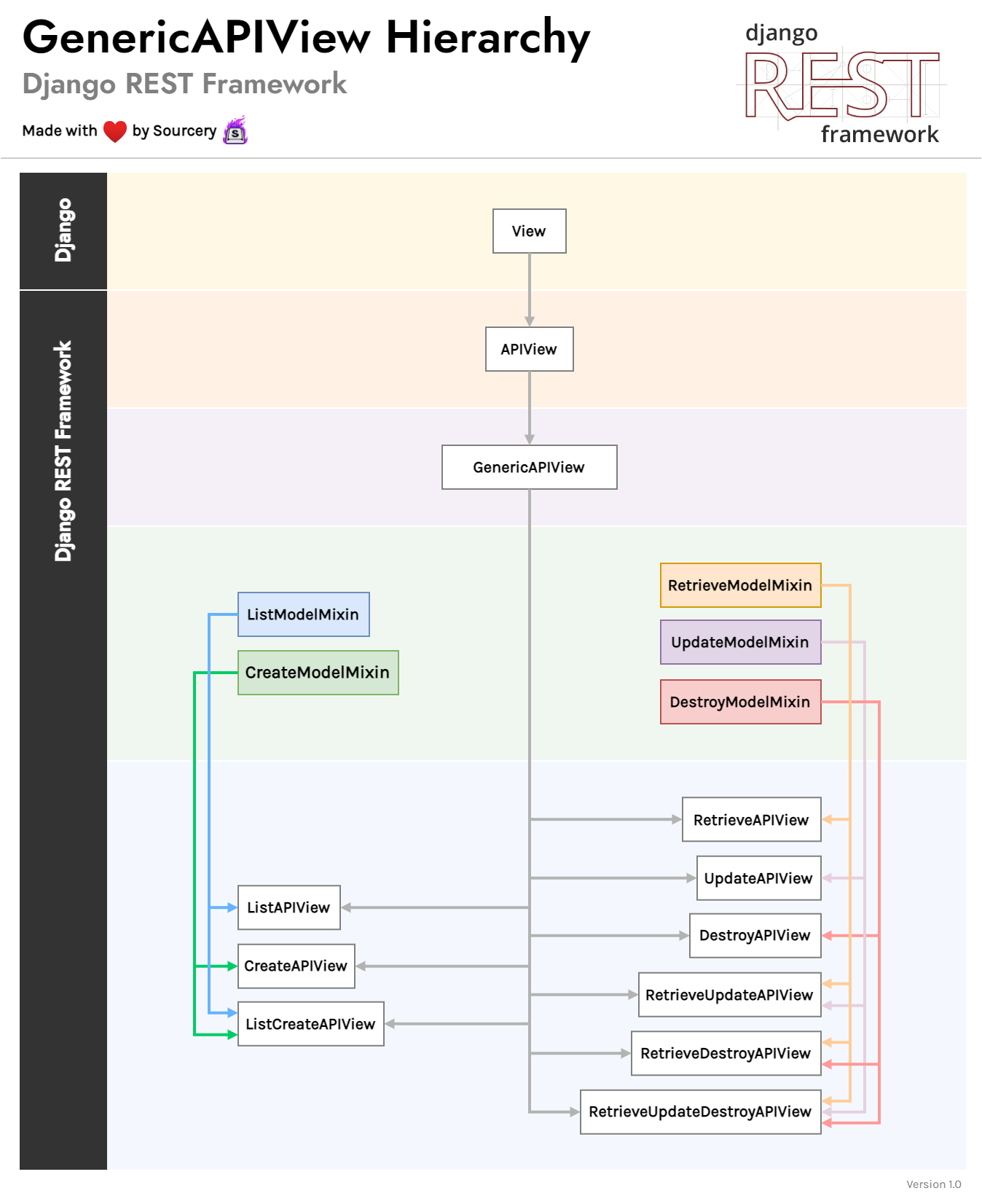
This video tutorial does an excellent job of demonstrating the refactoring process from a basic APIView to a more concise view using generics and mixins.
Class Based Views. (Generic API Views And Model Mixins) | Learn Django REST Framework #5
The video 'Class Based Views. (Generic API Views And Model Mixins)' by Ssali Jonathan is a perfect demonstration of the 'why' behind generic views. It shows you how to dramatically reduce your code by leveraging DRF's built-in components.
Watch the following two segments: From 21:03 to 27:10: This part shows how to refactor a list/create view from a basic APIView into a GenericAPIView combined with ListModelMixin and CreateModelMixin. From 27:10 to 32:58: This part does the same for a retrieve/update/delete view, using the corresponding mixins. Notice how much code is removed and replaced by simply defining queryset and serializer_class attributes.
Practical Application: Refactoring to Generic Views
Let's refactor both your TaskListCreateAPIView and task_detail view to use these powerful generics.
Step 1: Refactor the List/Create View
Replace your TaskListCreateAPIView in api/views.py with this new version. Notice how the .get() and .post() methods are now just one-line calls to the mixin methods.
# api/views.py
from .models import Task
from .serializers import TaskSerializer
from rest_framework import generics
from rest_framework import mixins

class TaskListCreateAPIView(mixins.ListModelMixin,
                            mixins.CreateModelMixin,
                            generics.GenericAPIView):
    queryset = Task.objects.all()
    serializer_class = TaskSerializer

    def get(self, request, *args, **kwargs):
        return self.list(request, *args, **kwargs)

    def post(self, request, *args, **kwargs):
        return self.create(request, *args, **kwargs)
Step 2: Create the Generic Detail View
Now, create a new class for the detail view that finally replaces the task_detail function.
# api/views.py
# ... (at the end of the file)

class TaskDetailAPIView(mixins.RetrieveModelMixin,
                        mixins.UpdateModelMixin,
                        mixins.DestroyModelMixin,
                        generics.GenericAPIView):
    queryset = Task.objects.all()
    serializer_class = TaskSerializer

    def get(self, request, *args, **kwargs):
        return self.retrieve(request, *args, **kwargs)

    def put(self, request, *args, **kwargs):
        return self.update(request, *args, **kwargs)

    def delete(self, request, *args, **kwargs):
        return self.destroy(request, *args, **kwargs)
Step 3: Final URL Configuration Update
Your core/urls.py needs one last update to use the new TaskDetailAPIView.
# core/urls.py
# ...

urlpatterns = [
    path('admin/', admin.site.urls),
    path('api/tasks/', views.TaskListCreateAPIView.as_view(), name='task-list-create'),
    # Update this path to use the new class-based view
    path('api/tasks/<int:pk>/', views.TaskDetailAPIView.as_view(), name='task-detail'),
]
You have now built a full set of CRUD endpoints using a highly structured, reusable, and professional pattern. You've progressed from explicit functions to organized classes, and finally to concise generic views, seeing the "why" at each step.
Conclusion
In this lesson, you've bridged the gap between simple functions and powerful, class-based API development in Django REST Framework. Understanding this progression is key to writing scalable and maintainable backend services.
Key Takeaways:
- Function-Based Views (FBVs) use the
@api_viewdecorator and are simple and explicit, but can lead to repetitive code. - Class-Based Views (CBVs) using
APIVieworganize logic by mapping HTTP methods (GET,POST, etc.) to class methods (.get(),.post(), etc.), improving code structure. - Generic Views and Mixins (
GenericAPIView,ListModelMixin, etc.) provide the highest level of reuse by offering pre-built actions for common CRUD operations, dramatically reducing boilerplate code.
Preview of the Next Lesson:
We've seen how GenericAPIView and mixins can save a lot of code. But DRF takes this one step further. In the next lesson, we will explore ViewSets and Routers. You'll learn how you can combine all the logic for a model's endpoints into a single class (a ViewSet) and have DRF automatically generate all the necessary URL patterns for you. It's the fastest way to get a full CRUD API up and running.