Hello! Welcome back to your backend engineering course.
In our last lesson, you masterfully refactored your function-based views into powerful generic class-based views. You saw how ListCreateAPIView and RetrieveUpdateDestroyAPIView dramatically reduced boilerplate by encapsulating common logic, leaving you with two lean, focused classes for your Task model.
Today, we're going to take that principle of "Don't Repeat Yourself" (DRY) to its logical conclusion in DRF. The goal for this lesson is to use ViewSets and Routers for rapid development of resource-based API endpoints. You'll learn to combine the logic from your two separate view classes into a single ViewSet and let DRF's Router automatically generate all the necessary URL patterns for you. This is one of the most significant productivity boosters in the framework and a core pattern for professional backend development.
1. The "Why": From Views to ViewSets
So far, we've had a clear separation: one class for "list" and "create" operations, and another for "retrieve," "update," and "delete." This is logical, but DRF recognizes that all these operations revolve around a single resource—in our case, the Task model.
A ViewSet is a type of class-based view that allows you to combine the logic for a set of related views into a single class. Instead of defining method handlers like .get() and .post(), you define actions like .list(), .create(), .retrieve(), and .update(). The mapping from HTTP methods to these actions is handled later, giving us a powerful abstraction.
DRF provides several types of ViewSets, each building on the last.
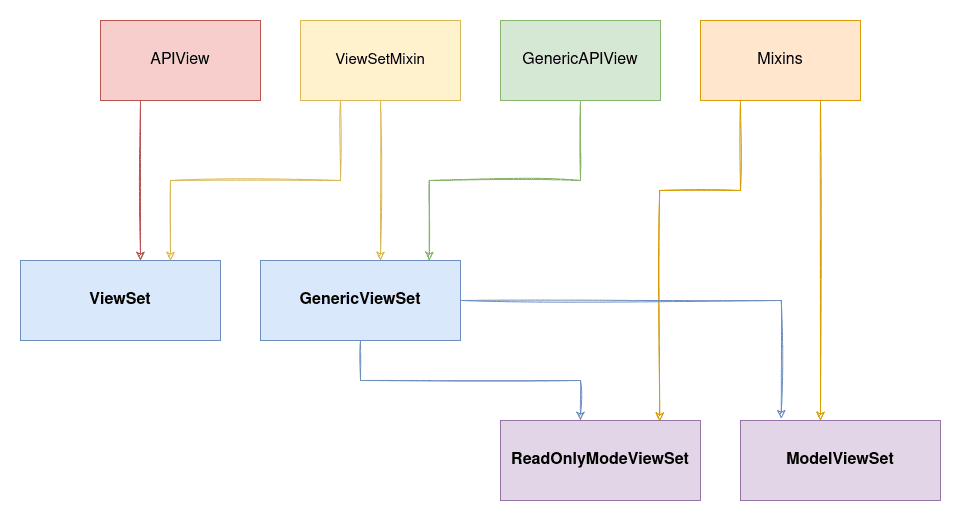
The article below gives an excellent overview of the different ViewSet types and the problems they solve.
Django REST Framework Views - ViewSets
The article 'Django REST Framework Views - ViewSets' from TestDriven.io provides a clear, conceptual breakdown of what ViewSets are, the different types available, and why they are so powerful.
Please read the following sections: Start with 'Contents' and 'ViewSets' to understand the core concept and the mapping from HTTP methods to actions. Jump to the 'ModelViewSet' section. This is the class we'll be using, and this section explains that it provides all default CRUD actions with minimal code. Finally, read the 'APIViews, Generic Views, and ViewSets Summary'. This provides a fantastic side-by-side code comparison that perfectly illustrates the evolution from APIView to ModelViewSet, driving home the efficiency gains.
As you read, the key takeaway is that ModelViewSet gives you a complete set of CRUD endpoints for a model with just a few lines of code by inheriting from GenericViewSet and including all the necessary ModelMixin classes you worked with in the last lesson.
2. The "How": Automating URLs with Routers
If ViewSets combine the view logic, how do we handle the URLs? Previously, we had to manually create a path() for our list view (/api/tasks/) and another for our detail view (/api/tasks/<int:pk>/).
This is where Routers come in. A Router class works with ViewSets to automatically generate the URL configuration for you. You simply "register" your ViewSet with a router, and it wires up all the conventional RESTful URLs.
GETandPOSTrequests to/tasks/will map to the.list()and.create()actions.GET,PUT,PATCH, andDELETErequests to/tasks/<pk>/will map to the.retrieve(),.update(),.partial_update(), and.destroy()actions.
This enforces consistency across your API and saves you from writing repetitive URL patterns. We will use DefaultRouter, which also conveniently creates a root API view that shows hyperlinks to all your registered resources.
3. Practical Application: Refactoring to a ModelViewSet
Now it's time to put theory into practice. You will refactor your two classes, TaskListCreateAPIView and TaskDetailAPIView, into a single TaskViewSet.
The following video provides a perfect walkthrough of this exact process. It shows how to replace existing views with a ModelViewSet and configure a DefaultRouter to handle the URLs.
Viewsets & Routers in Django REST Framework
The video 'Viewsets & Routers in Django REST Framework' by BugBytes is a concise and practical demonstration of exactly what we need to do. It shows how to refactor existing views into a much simpler ModelViewSet and hook it up to a DefaultRouter.
Please watch from the beginning to 05:27 and then the summary from 11:43 to the end. Focus on: The explanation of what a ViewSet is and its advantages (00:00 - 02:16). How the ModelViewSet provides default CRUD actions (02:16 - 02:44). The process of creating the OrderViewSet class and commenting out the old generic views (02:44 - 04:29). How to set up the DefaultRouter in urls.py to automatically generate the URLs (04:29 - 05:27). The final summary which recaps the power of this pattern (11:43 - 13:41). The middle section (05:27 - 11:43) demonstrates the functionality in the browser and fixes a serializer issue, which is useful context but not critical to watch for the refactoring steps.
Inspired by the video, let's refactor your Task API.
Step 1: Create the TaskViewSet
In your api/views.py file, import viewsets from rest_framework. Then, you can comment out or delete both the TaskListCreateAPIView and TaskDetailAPIView classes and replace them with this single, powerful class:
# api/views.py
from .models import Task
from .serializers import TaskSerializer
from rest_framework import viewsets # Import viewsets

# You can now remove or comment out TaskListCreateAPIView and TaskDetailAPIView

class TaskViewSet(viewsets.ModelViewSet):
    """
    This viewset automatically provides `list`, `create`, `retrieve`,
    `update` and `destroy` actions.
    """
    queryset = Task.objects.all()
    serializer_class = TaskSerializer
That's it. This one class now contains all the logic that was previously split across two classes and numerous mixins.
Step 2: Configure the Router
Now, let's update core/urls.py to use a router. This will look quite different, but much cleaner.
# core/urls.py
from django.contrib import admin
from django.urls import path, include
from rest_framework.routers import DefaultRouter
from api import views

# 1. Create a router
router = DefaultRouter()

# 2. Register our ViewSet with the router
# The first argument is the URL prefix 'tasks'
# The second is the ViewSet class itself
router.register(r'tasks', views.TaskViewSet, basename='task')

# The API URLs are now determined automatically by the router.
# We include the router's URLs under the 'api/' namespace.
urlpatterns = [
    path('admin/', admin.site.urls),
    path('api/', include(router.urls)),
]
Notice we use include(router.urls) to let the router handle all URL generation for the paths registered with it. The r'tasks' prefix means our endpoints will now be at /api/tasks/ and /api/tasks/<pk>/.
Test your understanding!
After making these changes, if you visit the root URL of your API (http://127.0.0.1:8000/api/), what do you expect to see in the browsable API, and why is it different from before?
Show answer
You should see a single entry: tasks: "http://127.0.0.1:8000/api/tasks/".
This is different from before because the DefaultRouter automatically creates this root API view for you, which lists all the registered endpoints. Previously, you would have just seen the raw JSON output of your TaskListCreateAPIView at the /api/tasks/ URL, and /api/ might not have even been a valid path.
4. The Trade-offs: When to Use ViewSets
ViewSets and Routers are incredibly powerful for building standard CRUD APIs. They reduce code, enforce consistency, and speed up development. However, this abstraction comes at a cost.

For most resource-based APIs, ModelViewSet is the perfect tool. But if you have a very unusual URL structure or a view that doesn't map cleanly to the CRUD actions on a model, a regular APIView or GenericAPIView might be a better, more explicit choice. Given your interest in understanding the underlying mechanisms, it's important to recognize this trade-off between convention and configuration.
Conclusion
Congratulations! You've reached the pinnacle of DRF's view abstractions. By refactoring your API to use a ModelViewSet and DefaultRouter, you've adopted a pattern that is not only efficient but also standard practice in professional Django projects.
Key Takeaways:
- ViewSets consolidate all the logic for a single resource (like
Task) into one class, using "actions" (list,create,retrieve) instead of direct HTTP method handlers. - ModelViewSet is the most commonly used, as it provides a complete set of CRUD actions for a model out-of-the-box with just a
querysetandserializer_class. - Routers automatically generate conventional URL patterns for your ViewSets, drastically simplifying your
urls.pyconfiguration. - This combination of
ModelViewSetandDefaultRouteris the fastest way to build a standard, resource-based REST API in Django.
Preview of the Next Lesson:
Currently, our /api/tasks/ endpoint returns every single task in the database. What happens when you have thousands or millions of tasks? The response would be enormous and slow. In the next lesson, we will solve this by learning how to implement pagination for API responses to handle large datasets, ensuring your API remains fast and scalable.