Hello! Welcome to the first lesson of our new module on API Security and Best Practices.
In the previous module, we focused heavily on performance, covering asynchronous tasks and both server-side and client-side caching. While a fast application is great, a secure application is non-negotiable. We'll now shift our focus to this critical aspect of backend engineering.
This lesson addresses the learning outcome: Explain common web vulnerabilities (SQL Injection, XSS, CSRF) and how Django mitigates them.
We will explore three of the most historically significant and common attack vectors on web applications. Just as in AI, where understanding potential failure modes and adversarial attacks is key to building robust models, understanding these web vulnerabilities is fundamental to writing secure backend code. You'll find that Django was designed with security as a core principle, providing powerful, out-of-the-box protections. Our job as developers is to understand these threats so we can leverage Django's defenses effectively and, more importantly, not accidentally disable them.
1. SQL Injection (SQLi)
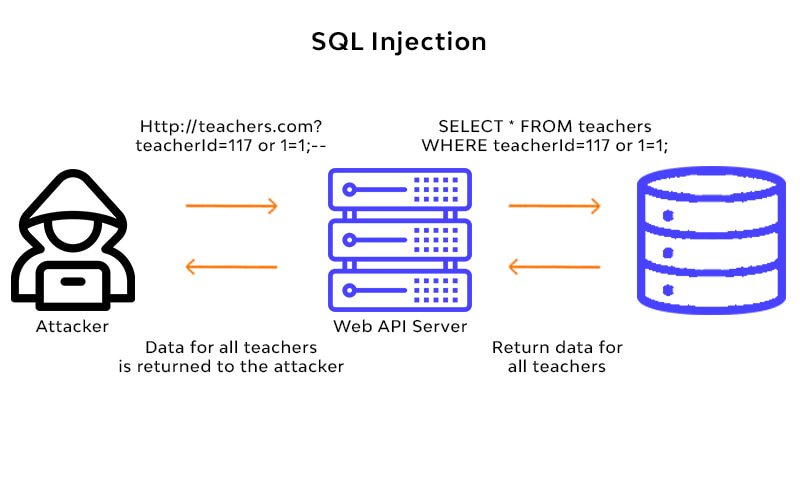
SQL Injection is an attack where a malicious user inserts, or "injects," SQL code into an application's input fields. If the application isn't careful, this injected code can be executed by the database, allowing the attacker to bypass authentication, steal data, modify data, or even destroy it.
The Attack Flow
Imagine a simple query that retrieves a user's data, constructed by concatenating strings:
# VULNERABLE CODE - DO NOT USE
username = request.GET.get('username')
sql_query = "SELECT * FROM users WHERE username = '" + username + "';"
# cursor.execute(sql_query)
An honest user would provide their username, say arun. The query becomes SELECT * FROM users WHERE username = 'arun';.
However, an attacker could provide the input admin' OR '1'='1. The resulting query becomes:
SELECT * FROM users WHERE username = 'admin' OR '1'='1';
Since '1'='1' is always true, the WHERE clause evaluates to true for every single row in the users table, potentially exposing all user data to the attacker.
Django's Primary Defense: The ORM
The single most important security feature Django provides against SQLi is its Object-Relational Mapper (ORM). When you write a query like User.objects.get(username=some_variable), Django does not simply mash strings together. Instead, it uses parameterized queries (also called prepared statements).
To understand this concept, which is fundamental to database security, please watch the following video.
SQL Injection Prevention: Security Simplified
This video, 'SQL Injection Prevention: Security Simplified' by Vickie Li Dev, provides an excellent explanation of what prepared statements are and why they are so effective at preventing SQL injection.
Please watch from 00:15 to 02:32, and then the recap from 09:01 to 09:28. The core idea to grasp is how prepared statements separate the SQL command (the code) from the user-supplied parameters (the data), making it impossible for the data to be misinterpreted as code.
In essence, the ORM tells the database, "Here is the query I want to run, and it has one placeholder for a username. Now, here is the value for that placeholder." The database engine treats the value as literal data, never as executable SQL, completely neutralizing the threat.
The Pitfall: Raw SQL Queries
The main way to become vulnerable to SQLi in a Django application is to bypass the ORM and write raw SQL queries incorrectly.
Deep Dive into Web Security: A Practical Guide for Django ...
This article, 'Deep Dive into Web Security' from Python in Plain English, explains this vulnerability in a Django context.
Read the section titled '1. SQL Injection (SQLi)'. Pay close attention to the flow of the attack and the crucial distinction between the default ORM behavior and the risks associated with raw SQL.
As the article highlights, if you absolutely must use raw SQL, you must still use parameterization.
- Wrong (Vulnerable):
cursor.execute("SELECT * FROM users WHERE username = '%s';" % username) - Correct (Safe):
cursor.execute("SELECT * FROM users WHERE username = %s;", [username])
By passing the parameters as a separate list, you allow the database driver to safely escape the values and prevent injection, preserving the security benefits of a prepared statement.
2. Cross-Site Scripting (XSS)
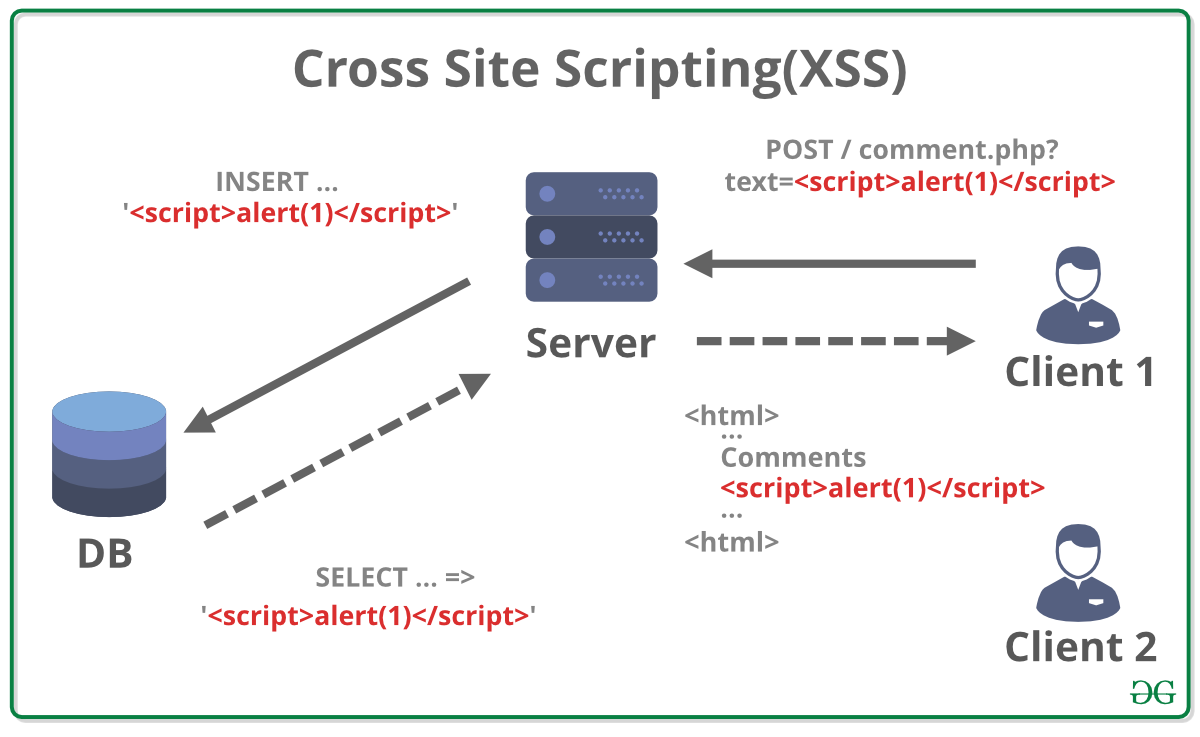
Cross-Site Scripting is an attack where a malicious user injects client-side scripts (usually JavaScript) into a web page that will be viewed by other users. When an unsuspecting user visits the page, the malicious script executes in their browser, with full access to that page. This can be used to steal session cookies, deface websites, or redirect users to malicious sites.
The Attack Flow
Consider a blog where users can post comments.
- An attacker submits a comment containing a malicious script:
<script>alert('Your session has been stolen!');</script>. - The server stores this "comment" in the database.
- Later, another user (perhaps an admin) views the comment section.
- The application retrieves the malicious comment from the database and embeds it directly into the HTML page.
- The victim's browser sees the
<script>tag and executes the JavaScript inside it.
Django's Primary Defense: Auto-Escaping
By default, the Django template engine protects you from XSS. It automatically escapes any variable's content before rendering it. This means it converts special HTML characters into their safe entity equivalents:
<becomes<>becomes>"becomes"'becomes'&becomes&
So, the attacker's malicious comment is rendered in the HTML as <script>alert('Your session has been stolen!');</script>. The browser displays this as literal text on the screen; it does not interpret it as a command to execute a script.
The Pitfall: The safe Filter
The most common way to create an XSS vulnerability in Django is by explicitly telling the template engine not to escape content using the |safe filter.
Deep Dive into Web Security: A Practical Guide for Django ...
Let's return to the 'Deep Dive into Web Security' article to see how XSS works in Django and how developers can accidentally disable its protections.
Read the section '2. Cross-Site Scripting (XSS)'. Focus on how Django's defense works by default and the two primary errors that nullify it: using the |safe filter and generating raw HTML in a view.
If you need to allow users to submit rich text (like bold or italic tags), using |safe is the wrong approach. The correct method is to use a sanitization library (like bleach) to clean the user's input before saving it to the database. This library will strip out dangerous tags (<script>, <iframe>) and attributes (onclick) while allowing a safe subset of HTML.
3. Cross-Site Request Forgery (CSRF)
A CSRF attack tricks an authenticated user into unknowingly submitting a malicious request to a web application they are logged into. It exploits the trust a site has in a user's browser, which automatically sends credentials like session cookies with every request to a given domain.
To fully grasp this, it's helpful to first review how cookies are used to maintain a login session.
What is a CSRF token? — Cookies and CSRF explained for Django and Flask
This excellent video, 'What is a CSRF token?' by teclado, begins by explaining cookies, which is the foundation for understanding CSRF attacks.
Watch from the beginning to 06:53. This will explain what cookies are, how they maintain your login session, and then demonstrate precisely how an attacker can exploit this mechanism to forge a request on your behalf.
Django's Primary Defense: The CSRF Token
As you saw in the video, the solution is to require a secret, unpredictable value in the request that an attacker's site cannot know. Django implements this via CSRF tokens.
Here's how it works:
- The
CsrfViewMiddleware(enabled by default in new Django projects) intercepts responses. - When you use the
{% csrf_token %}template tag in a form, Django generates a unique, secret token and embeds it as a hidden input field. This token is tied to the user's session. - When the user submits the form (via a state-changing method like
POST), the browser sends the form data along with the CSRF token. - The
CsrfViewMiddlewareintercepts the incoming request, extracts the token, and verifies that it matches the one it expects for that user's session. - If the tokens match, the request is allowed to proceed. If they don't match or the token is missing, Django rejects the request with a
403 Forbiddenerror.
Since an attacker on a different domain (evil.com) has no way of knowing the user's CSRF token for your-app.com, any forged request they trick the user into sending will be missing the valid token and will be blocked.
What is a CSRF token? — Cookies and CSRF explained for Django and Flask
Now, let's watch the rest of the video, which explains the defense mechanism and how it's implemented in Django.
Watch from 06:53 to the end (09:32). This section covers CSRF tokens as a solution and specifically shows the CsrfViewMiddleware and {% csrf_token %} tag in a Django context.
Test your understanding!
An attacker wants to trick a logged-in user of your Django application into deleting their own account. The account deletion is handled by a POST request to /account/delete. The attacker creates a webpage with a hidden form that submits to this URL.
Why will this attack fail on a standard Django application? What are the two key components Django uses to prevent it?
Show answer
The attack will fail because the attacker's forged POST request will not contain a valid CSRF token.
The two key components Django uses are:
django.middleware.csrf.CsrfViewMiddleware: This middleware is enabled by default and checks all incomingPOSTrequests for a valid CSRF token.{% csrf_token %}template tag: This tag must be included in any legitimate form on your site that performs aPOSTrequest. It renders the hidden input field with the unique token that the middleware checks for.
The attacker's form on their malicious site cannot generate this token, so Django will reject the request.
Conclusion
In this lesson, we've taken a tour of three foundational web security vulnerabilities. You now have a solid conceptual understanding of what they are and, more importantly, how Django's architecture provides robust, default protection against them.
Key Takeaways:
- SQL Injection (SQLi) is prevented by using Django's ORM, which employs parameterized queries. The biggest risk is using raw SQL with unsafe string formatting.
- Cross-Site Scripting (XSS) is mitigated by the Django template engine's default HTML auto-escaping. The biggest risk is using the
|safefilter or manually generating HTML in views. - Cross-Site Request Forgery (CSRF) is stopped by Django's CSRF token mechanism, which validates that state-changing requests originate from your own site. The biggest risk is forgetting to use
{% csrf_token %}in forms or disabling the middleware. - The common theme is that Django's "batteries-included" philosophy extends to security. Your primary job is to understand these protections so you don't inadvertently disable them.
Preview of the Next Lesson:
We will continue our exploration of web security by looking at a mechanism that governs how different websites are allowed to interact with each other. In the next lesson, we will implement Cross-Origin Resource Sharing (CORS) policies to control browser access to the API, a crucial step for securing modern web applications.