Hello! Welcome to our next lesson.
In our previous session, we explored server-side caching, using Redis to store pre-computed results and developing robust cache invalidation strategies to maintain data consistency. This was all about making our server faster by reducing the work it needs to do for each request.
Today, we take optimization a step further by focusing on client-side caching. Our goal is to prevent the client—typically a web browser—from having to make a request to our server at all.
This lesson is designed to meet the learning outcome: Use HTTP caching headers (e.g., ETag, Cache-Control) to enable client-side caching.
We will explore the HTTP specification's mechanisms for caching, which allow you to instruct browsers and other intermediary caches (like Content Delivery Networks) on how to store and reuse your responses. Given your interest in the underlying mechanics of systems, you'll appreciate how these simple headers enable a powerful, distributed caching system across the web. We will cover the theory and then implement these concepts directly in our Django views.
1. From Server-Side to Client-Side Caching
Server-side caching is effective, but it still requires a network round-trip from the client to our server. Client-side caching eliminates this trip entirely for certain resources.

There are two primary strategies a client's cache uses:
- Freshness (Expiration): The cache will use a locally stored response for a certain period without checking with the server. The response is considered "fresh."
- Validation (Revalidation): Once a cached response is no longer fresh (it's "stale"), the cache can ask the server if its version is still valid. If it is, the server can send a minimal
304 Not Modifiedresponse, saving the bandwidth of re-downloading the entire resource.
Let's start with a video that gives a comprehensive overview of these concepts.
Deep Dive into HTTP Caching: cache-control, no-cache, no-store, max-age, ETag and etc.
This video, 'Deep Dive into HTTP Caching' by Software Developer Diaries, provides an excellent visual explanation of why HTTP caching is important and how the client, cache, and server interact.
Please watch from the beginning to 05:21. This will introduce the core benefits of caching and define the key terms 'cache hit' and 'cache miss', setting the stage for the specific headers we'll discuss.
2. Controlling Cache Freshness with Cache-Control
The primary way we tell a client how long a response is "fresh" is with the Cache-Control HTTP response header. This header contains one or more directives that define the caching policy.
For a more formal and detailed explanation, the Mozilla Developer Network (MDN) documentation is the definitive guide.
HTTP caching - MDN Web Docs - Mozilla
This MDN article on HTTP caching is a fantastic reference. We'll start by reading about the concepts of fresh and stale responses.
Read the section titled 'Fresh and stale based on age'. It clearly explains how the max-age directive works.
The most important Cache-Control directives are:
max-age=<seconds>: This tells the cache that the response is fresh for the specified number of seconds. For this duration, the browser won't even try to contact your server for this resource.private: The response is for a single user and must not be stored by a shared cache (like a public CDN or a company proxy). This is essential for personalized data.public: The response can be stored by any cache, including shared ones.no-store: This is the most restrictive directive. It tells caches not to store the response under any circumstances. This is appropriate for highly sensitive information, like banking data.no-cache: This directive's name is a bit misleading. It does not mean "do not cache." It means the response can be stored, but it must be revalidated with the origin server before each use. This ensures the user always gets fresh data while still allowing for the benefits of a304 Not Modifiedresponse (which we'll cover next).
The following video segment explains these directives very clearly.
Deep Dive into HTTP Caching: cache-control, no-cache, no-store, max-age, ETag and etc.
Let's return to the 'Deep Dive into HTTP Caching' video to see these Cache-Control directives explained with examples.
Watch from 07:37 to 13:11. This covers max-age, no-store, no-cache, must-revalidate, public, and private.
Test your understanding!
You are building an API endpoint /api/me/ that returns the logged-in user's private profile data. The data changes infrequently, but you want to ensure the client always checks if there's a new version before displaying the data.
Which Cache-Control directives would be most appropriate and why?
Show answer
The most appropriate directives would be private, no-cache.
private: This is crucial because the response contains personalized content for a specific user. It prevents shared caches (like a corporate proxy or a CDN) from storing and potentially serving this data to another user.no-cache: This forces the browser to revalidate its cached version with the server before using it. The server can then respond with a full200 OKif the data has changed or a lightweight304 Not Modifiedif it hasn't. This ensures data freshness without forcing a full re-download every time.
3. Validating Stale Caches with ETag
What happens when a cache entry with a max-age expires? The browser marks it as "stale." Instead of blindly re-downloading the resource, it can ask the server, "I have a version from last week. Is it still good?" This is validation.
Initially, this was done with the Last-Modified header, but this approach had issues with time zone synchronization and file modification timestamp precision.
A more robust modern solution is the ETag (Entity Tag) header. An ETag is an opaque string that the server provides, which uniquely identifies a specific version of a resource. Think of it as a hash or a version number for the content.
The flow is as follows:
- Server to Client: The server sends a response with an
ETagheader (e.g.,ETag: "v2-a1b2c3d4"). - Client Caches: The browser caches the response body along with its
ETag. - Validation Request: When the cached response becomes stale, the browser makes a conditional request back to the server, including the
ETagit has in anIf-None-Matchrequest header (e.g.,If-None-Match: "v2-a1b2c3d4"). - Server Logic:
- If the current version's
ETagon the server matches theIf-None-Matchvalue, the server responds with an empty body and a304 Not Modifiedstatus code. The browser knows its cached version is still valid. - If the
ETags do not match, the server responds with a200 OK, the new resource content, and a newETagheader.
- If the current version's
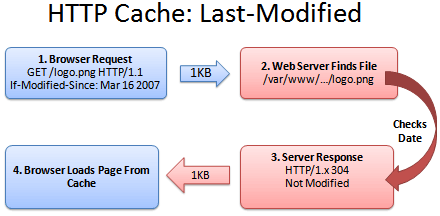
Let's see this explained in our video and reference material.
Deep Dive into HTTP Caching: cache-control, no-cache, no-store, max-age, ETag and etc.
The final segment of the 'Deep Dive' video explains the ETag mechanism and how it improves upon Last-Modified.
Watch from 18:26 to 20:00. This part focuses specifically on ETag and If-None-Match.
HTTP caching - MDN Web Docs - Mozilla
For a detailed textual description, let's go back to the MDN documentation.
Read the subsections 'If-Modified-Since' and 'ETag/If-None-Match' under the 'Validation' section. This will solidify your understanding of how conditional requests work.
4. Implementing HTTP Caching in Django
Now, let's put this theory into practice. Django provides convenient decorators to add these headers to your view responses.
Using @cache_control
The simplest way to add Cache-Control headers is with the @cache_control decorator. You can pass the directives you want as keyword arguments.
# your_app/views.py
from django.shortcuts import render
from django.views.decorators.cache import cache_control

# For a publicly cacheable static-like resource
@cache_control(public=True, max_age=3600) # Cache for 1 hour
def public_resource_view(request):
    # ... logic to generate a public resource ...
    return render(request, 'public_template.html')

# For a private, user-specific page that must be revalidated
@cache_control(private=True, no_cache=True)
def user_dashboard_view(request):
    # ... logic to get user-specific data ...
    return render(request, 'dashboard.html', {'user': request.user})
This approach is demonstrated in the following video. While the video also discusses Nginx (a web server we'll cover later), the final section focuses purely on how to manage these headers from within Django itself.
Django Nginx Cache | Vary Header | Header Directives
This video from Very Academy shows the practical application of cache control decorators in Django.
Watch from 36:04 to 46:29. This part introduces the Django @cache_control decorator and demonstrates how to use it to set directives like private, no_cache, and max_age directly on a view. Don't worry about the Nginx setup mentioned earlier in the video; focus on the Django code.
Using @condition for ETag Validation
Handling ETag validation is more involved. It requires your server to:
- Generate an
ETagfor a response. - Check the
If-None-Matchheader on an incoming request. - Compare the ETags and decide whether to send a
304 Not Modifiedor a full200 OK.
Doing this manually is tedious. Django offers the powerful @condition decorator to handle this entire flow. You simply provide a function that can calculate the ETag for a given request, and Django does the rest. This not only adds the right headers but also shortcuts your view execution entirely if the ETags match, saving significant server resources.
The official Django documentation explains this 'Conditional View Processing' feature perfectly. It shows how you can optimize expensive views by providing functions to generate ETags or Last-Modified times.
Read the introduction and the sections 'The condition decorator' and 'Shortcuts for only computing one value'. This will explain the rationale and the syntax for using this powerful feature.
Let's apply this to a product detail view from our project. We can generate an ETag based on the product's ID and its updated_at timestamp. If neither has changed, the content is the same.
# products/views.py
from django.shortcuts import render, get_object_or_404
from django.views.decorators.http import condition
from .models import Product

def product_etag_func(request, product_id):
    """
    Generates an ETag for a given product.
    The ETag changes if the product's 'updated_at' field changes.
    """
    try:
        product = Product.objects.only('id', 'updated_at').get(pk=product_id)
        # We create a hash of the ID and last update time.
        # The quotes are part of the ETag standard.
        return f'"{hash(f"{product.id}-{product.updated_at}")}"'
    except Product.DoesNotExist:
        return None

# The @condition decorator MUST be above any other decorators that might access the request,
# as it can short-circuit the entire view.
@condition(etag_func=product_etag_func)
def product_detail(request, product_id):
    """
    An expensive view to render product details.
    @condition will prevent this logic from running if the client
    has a fresh, validated copy in its cache.
    """
    print(f"Executing full view logic for product {product_id}...") # For demonstration
    product = get_object_or_404(Product, pk=product_id)
    # Imagine more expensive operations here...
    return render(request, 'products/product_detail.html', {'product': product})
With this setup, the first time a user visits a product page, the full view logic runs, and they get a 200 OK with an ETag. The second time they visit (after the cache is stale), their browser sends If-None-Match. Django calls product_etag_func, sees the ETag matches, and immediately sends a 304 Not Modified without ever running the main product_detail logic.
Conclusion
You've now seen how to leverage the HTTP protocol itself to build a distributed caching layer that lives on your users' machines. This is a fundamental technique for building fast, scalable web applications.
Key Takeaways:
- Client-side caching reduces latency and server load by allowing browsers to reuse responses without making a network request.
- The
Cache-Controlheader controls freshness. Key directives includemax-age,private,public,no-cache, andno-store. - The
ETagandIf-None-Matchheaders control validation, allowing a client to efficiently check if its stale content is still valid. - Django provides the
@cache_controldecorator to easily set freshness policies on your views. - Django's
@conditiondecorator provides a powerful way to implement ETag validation, short-circuiting view logic and saving server resources by sending304 Not Modifiedresponses.
Preview of the Next Lesson:
We've spent the last few lessons optimizing our application's performance. Now, it's time to shift our focus to an equally critical aspect of backend engineering: security. In our next lesson, we will begin this new module by exploring common web vulnerabilities like SQL Injection, Cross-Site Scripting (XSS), and Cross-Site Request Forgery (CSRF), and discover how Django's architecture provides built-in protection against them.