Hello! Welcome back to our module on API Security and Best Practices.
In our last lesson, we focused on controlling which external applications can communicate with our API by implementing Cross-Origin Resource Sharing (CORS). We configured our Django backend to explicitly trust our frontend application, preventing unauthorized cross-domain requests.
Today, we address a different but related challenge: controlling how often clients can access our API. Even legitimate, whitelisted clients can cause problems if they make an excessive number of requests, potentially overwhelming your server, running up costs, or preventing other users from accessing the service. This brings us to our learning outcome for this lesson: Apply rate limiting to API endpoints to prevent abuse and ensure service stability.
We will explore this topic from two angles, aligning with your interest in both the theoretical underpinnings and practical implementation. First, we'll examine the core algorithms that power rate-limiting systems. Then, we'll implement these concepts in our Django project using the powerful, built-in "throttling" features of the Django REST Framework (DRF).
1. The "Why" and "How": Understanding Rate Limiting Algorithms
Before we write any Django code, it's essential to understand the strategies behind rate limiting. At its core, rate limiting is about counting requests from a client over a time window and blocking them if they exceed a certain threshold. But how is this count maintained and evaluated?
Different algorithms offer different trade-offs between memory usage, performance, and accuracy. To get a comprehensive overview of the fundamental approaches, please watch the following video.
Five Rate Limiting Algorithms ~ Key Concepts in System Design
The video 'Five Rate Limiting Algorithms' by Hello Byte provides an excellent conceptual foundation. It explains what rate limiting is and breaks down five common strategies used in system design.
Watch the video from the beginning to 16:28. As you watch, focus on the core idea behind each algorithm and its main advantage and disadvantage: Leaky Bucket: Processes requests at a steady rate. Token Bucket: Allows for handling bursts of traffic. Fixed Window Counter: Simple but can allow double the rate at window boundaries. Sliding Window Log: Precise, but can be memory-intensive. Sliding Window Counter: A hybrid approach balancing precision and performance.
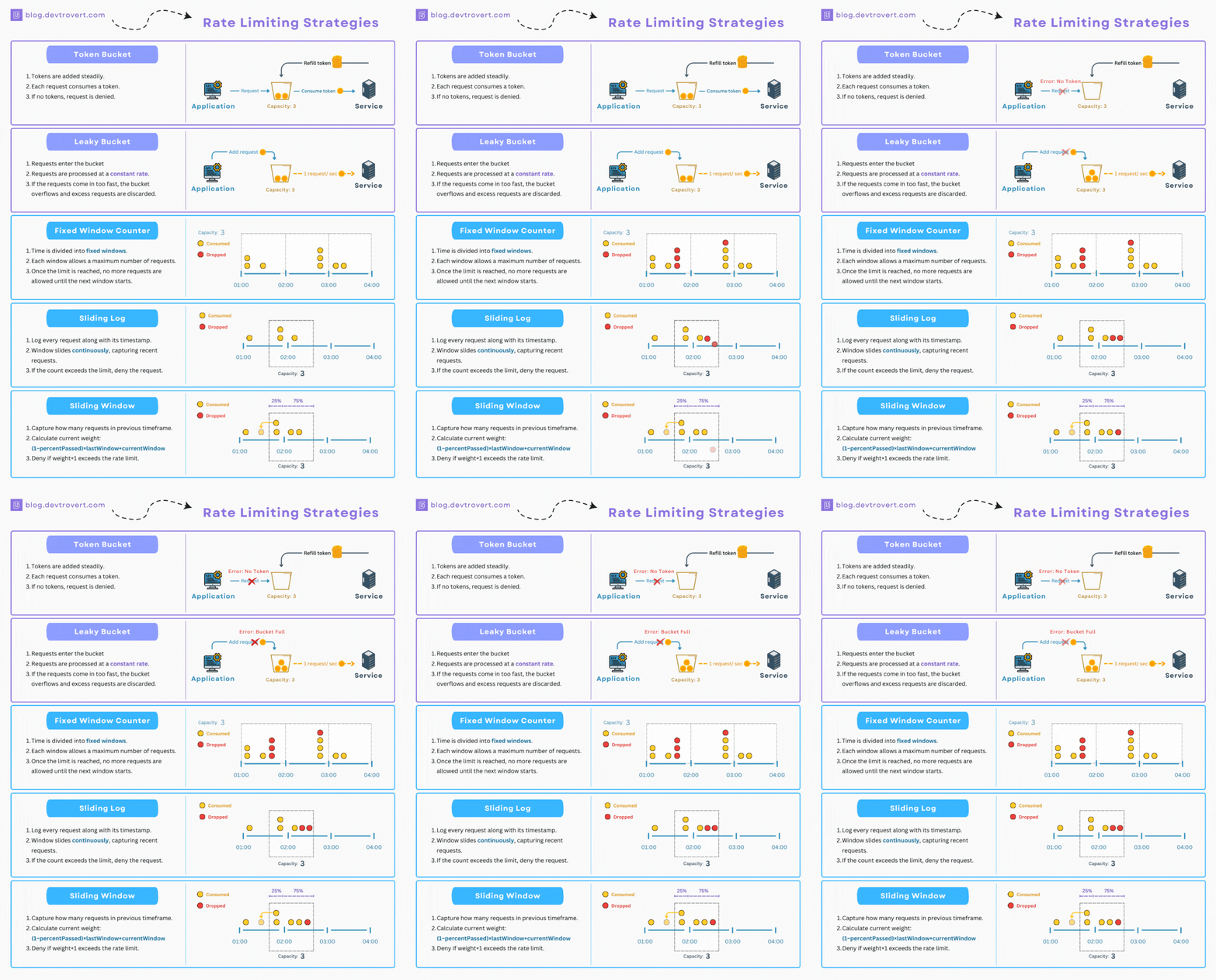
The throttling implementation in Django REST Framework is most analogous to the Fixed Window Counter algorithm. It's simple and effective for most use cases but, as the video and DRF's own documentation note, it can be susceptible to race conditions under high concurrency and spikes at the window boundaries. This is an important trade-off to remember: DRF's throttling is primarily for enforcing API usage policies, not for providing ironclad security against dedicated denial-of-service (DoS) attacks, which are better handled at the infrastructure level (e.g., with a Web Application Firewall or a service like Cloudflare).
2. Practical Implementation: Throttling in Django REST Framework
DRF uses the term throttling for rate limiting. It provides a flexible and easy-to-configure system using a set of throttle classes. We'll now walk through how to implement them, using a practical video guide supplemented by the official documentation.
API Throttling with Django REST Framework
The video 'API Throttling with Django REST Framework' by BugBytes is a concise, hands-on tutorial that covers the exact features we need to implement. We will watch it in sections as we cover different throttling strategies.
We will refer back to this video throughout the next sections. You don't need to watch it all at once.
Throttling - Django REST Framework
The official DRF documentation on Throttling is our source of truth. It provides detailed explanations and code examples for all the concepts we'll discuss. We'll use it as a reference alongside the video.
Keep this documentation handy as we go through the implementation steps. You can refer to it for code snippets and deeper explanations.
2.1. Global Throttling Policies
The simplest way to start is by setting a global policy for all your API endpoints. DRF makes a distinction between unauthenticated (anonymous) users and authenticated users.
Let's see how to set this up.
API Throttling with Django REST Framework
Watch this segment from the BugBytes video to see how to configure global throttling for both anonymous and authenticated users.
Please watch from the beginning to 05:50. Pay close attention to the two key settings added to REST_FRAMEWORK in settings.py and observe the 429 Too Many Requests response when the limit is exceeded.
As demonstrated, the configuration happens in your settings.py file within the REST_FRAMEWORK dictionary:
# settings.py

REST_FRAMEWORK = {
    # ... other settings
    'DEFAULT_THROTTLE_CLASSES': [
        'rest_framework.throttling.AnonRateThrottle',
        'rest_framework.throttling.UserRateThrottle'
    ],
    'DEFAULT_THROTTLE_RATES': {
        'anon': '100/day',
        'user': '1000/day'
    }
}
DEFAULT_THROTTLE_CLASSES: This list specifies which throttle classes to apply globally.AnonRateThrottle: Applies to requests from users who are not logged in. It identifies them by their IP address.UserRateThrottle: Applies to requests from authenticated users. It identifies them by their user ID.
DEFAULT_THROTTLE_RATES: This dictionary defines the rates for the scopes used by the throttle classes. The default scopes are'anon'and'user'. The rate is specified ascount/period, where the period can bes(second),m(minute),h(hour), ord(day).
When a client exceeds their limit, DRF automatically returns an HTTP 429 Too Many Requests status code. The response also includes a Retry-After header, indicating how many seconds the client should wait before making another request.

2.2. Scoped Throttling for Fine-Grained Control
A global policy is a good start, but often you need different rules for different endpoints. For example, a search endpoint that performs a complex database query should probably have a much stricter rate limit than a simple endpoint that retrieves a single object. This is where ScopedRateThrottle comes in.
API Throttling with Django REST Framework
This next segment demonstrates how to use ScopedRateThrottle to apply different limits to different API views.
Please watch from 09:09 to 12:23. Notice how a throttle_scope attribute is added to the view, and a corresponding entry is created in DEFAULT_THROTTLE_RATES.
The process for scoped throttling involves two steps:
- Add
ScopedRateThrottleto your default classes:# settings.py 'DEFAULT_THROTTLE_CLASSES': [ 'rest_framework.throttling.ScopedRateThrottle', ], - Define scopes and rates in
settings.pyand apply them to views:# settings.py 'DEFAULT_THROTTLE_RATES': { 'contacts': '1000/day', 'uploads': '20/day', } # views.py class ContactListView(APIView): throttle_scope = 'contacts' # ... class UploadView(APIView): throttle_scope = 'uploads' # ...
This approach provides excellent, declarative control over the policies for different parts of your API.
2.3. Combining Throttles for Complex Policies
You aren't limited to using just one throttle. DRF evaluates a list of them, and if any throttle in the list denies the request, the request is blocked. This allows you to create layered policies. For example, you can combine burst and sustained rates.
- Burst Rate: Allows a high number of requests in a short period (e.g., 60/minute).
- Sustained Rate: Enforces a lower limit over a longer period (e.g., 1000/day).
This prevents a user from spamming your API for a short time while still giving them a generous daily limit.
API Throttling with Django REST Framework
The video also covers how to implement this burst vs. sustained rate policy by creating simple subclasses of UserRateThrottle.
Please watch from 05:50 to 09:09. This is a powerful technique for creating more nuanced and realistic API usage policies.
This is achieved by creating custom throttle classes that define a unique scope, and then listing them all in DEFAULT_THROTTLE_CLASSES.
3. How It Works Under the Hood
Your interest in the underlying mechanisms is key to becoming a strong backend engineer. Let's look at two important details of how DRF's throttling works.
-
Client Identification: For anonymous users (
AnonRateThrottle), DRF uses the client's IP address. It first checks for theX-Forwarded-Forheader (common when behind a proxy or load balancer) and falls back to theREMOTE_ADDRfrom the WSGI environment. For authenticated users (UserRateThrottle), it uses theuser.pk. -
State Storage: How does DRF remember how many requests a user has made? It uses Django's cache framework. Each request from a client updates a counter in the cache with a specific timeout. This is a critical dependency—if your cache is not configured or not working, throttling will fail silently. As mentioned in the official documentation, this check is not an atomic operation, meaning under very high concurrency, there's a small chance a few extra requests could get through before the counter is updated.
This information is covered well in the final segment of the BugBytes video and the DRF documentation.
API Throttling with Django REST Framework
This final clip discusses the cache dependency and the important distinction between application-level throttling and infrastructure-level DoS protection.
Please watch from 13:14 to the end. This will solidify your understanding of the role and limitations of DRF's throttling.
Test your understanding!
You are building an API for a blog platform with the following requirements:
- Anonymous users can read a maximum of 5 posts per minute.
- Authenticated users can read up to 60 posts per minute.
- Posting a new comment is a more "expensive" operation. Authenticated users should only be able to post 10 comments per hour.
- There is no special limit on reading comments.
How would you configure this in settings.py and your views? Assume you have a PostListView and a CommentCreateView.
Show answer
Here is one way to configure this:
In settings.py:
REST_FRAMEWORK = {
    'DEFAULT_THROTTLE_CLASSES': [
        'rest_framework.throttling.AnonRateThrottle',
        'rest_framework.throttling.UserRateThrottle',
        'rest_framework.throttling.ScopedRateThrottle', # Needed for the custom comment scope
    ],
    'DEFAULT_THROTTLE_RATES': {
        'anon': '5/min',        # Requirement 1
        'user': '60/min',       # Requirement 2
        'comments.create': '10/hour', # Requirement 3
    }
}
In views.py:
# No changes needed for PostListView. It will automatically use the
# 'anon' and 'user' rates from the global policy.
class PostListView(ListAPIView):
    # ...
    pass

# For CommentCreateView, we apply the specific, stricter scope.
class CommentCreateView(CreateAPIView):
    throttle_scope = 'comments.create' # Applies the '10/hour' rate
    # ...
    pass
This configuration works because for PostListView, DRF will apply the default AnonRateThrottle and UserRateThrottle. For CommentCreateView, it will still check the default throttles, but it will also check the ScopedRateThrottle because the throttle_scope is defined, thus enforcing the stricter 10/hour limit for that specific action.
Conclusion
In this lesson, we've added another critical layer of control to our API. By moving from who can access our API (CORS) to how often they can access it (throttling), we've made our service more stable, predictable, and fair for all users.
Key Takeaways:
- Rate limiting is essential for API stability, security, and fair usage.
- Algorithms like Token Bucket and Fixed Window Counter provide the theoretical basis for rate limiting. DRF's implementation is similar to a fixed window counter.
- DRF provides three main throttle classes:
AnonRateThrottle(for anonymous users),UserRateThrottle(for authenticated users), andScopedRateThrottle(for specific endpoints). - Throttling policies can be set globally in
settings.pyor applied to specific views using thethrottle_scopeorthrottle_classesattributes. - DRF throttling relies on Django's cache to track request counts and should be seen as a tool for policy enforcement, not a complete defense against dedicated DoS attacks.
Preview of the Next Lesson:
We've controlled access from the outside and managed the rate of that access. Next, we'll turn our attention back to the data itself. In the upcoming lesson, we will learn how to strengthen input validation and data sanitization in serializers to mitigate security threats, ensuring that the data entering our application is clean and safe.