Hello! Welcome to the next lesson in our module on API Security and Best Practices.
In our previous lesson, we implemented rate limiting (throttling) to control the frequency of requests to our API, protecting it from abuse and ensuring stability. We've managed who can access our API (CORS) and how often (throttling). Now, we must focus on the content of the requests themselves. Untrusted user input is one of the biggest security risks for any web application.
This brings us to today's learning outcome: Strengthen input validation and data sanitization in serializers to mitigate security threats.
We will explore how to make your Django REST Framework (DRF) serializers act as vigilant gatekeepers, ensuring that only clean, safe, and valid data enters your system. This is a critical step in preventing a wide range of vulnerabilities and ensuring the integrity of your database.
1. The Core Concepts: Validation vs. Sanitization
Before diving into code, it's important to understand two related but distinct security concepts: Input Validation and Data Sanitization.
- Input Validation: This is the process of ensuring that submitted data conforms to expected rules. If the data is invalid, it is rejected entirely. Think of it as a strict bouncer at a club who only lets in guests whose names are on the list and who meet the dress code.
- Data Sanitization: This is the process of "cleaning" input by removing or modifying potentially harmful parts before processing it. The data is accepted, but only after the dangerous elements are stripped away. This is like an airport scanner that allows your luggage through but removes any prohibited items first.
This five-step process provides a great mental model for how to approach handling user input securely.

A common attack vector that both validation and sanitization help prevent is Cross-Site Scripting (XSS), where an attacker injects malicious scripts into your application that then get executed in other users' browsers.
24. Security Testing (Basics) - Input Validation and Output Encoding
To see a practical example of why this is so important, let's watch a brief conceptual video. It demonstrates how a simple malicious script can be injected into a site that lacks proper input validation.
Please watch from 00:30 to 08:52. The video demonstrates injecting a JavaScript alert() into a search box. It then explains how input validation (e.g., rejecting certain characters or data types) acts as the first line of defense. Don't worry about the audio language; the on-screen visuals and code clearly illustrate the attack and defense concepts.
As the video shows, a failure to validate input can lead directly to vulnerabilities. In a Django application, the primary line of defense against this is the serializer.
2. The Gatekeeper: The Role of the Serializer
In the Django REST Framework, the serializer is strategically positioned to handle data validation. It's the first component in your application logic that receives and interprets the raw data from an incoming request.
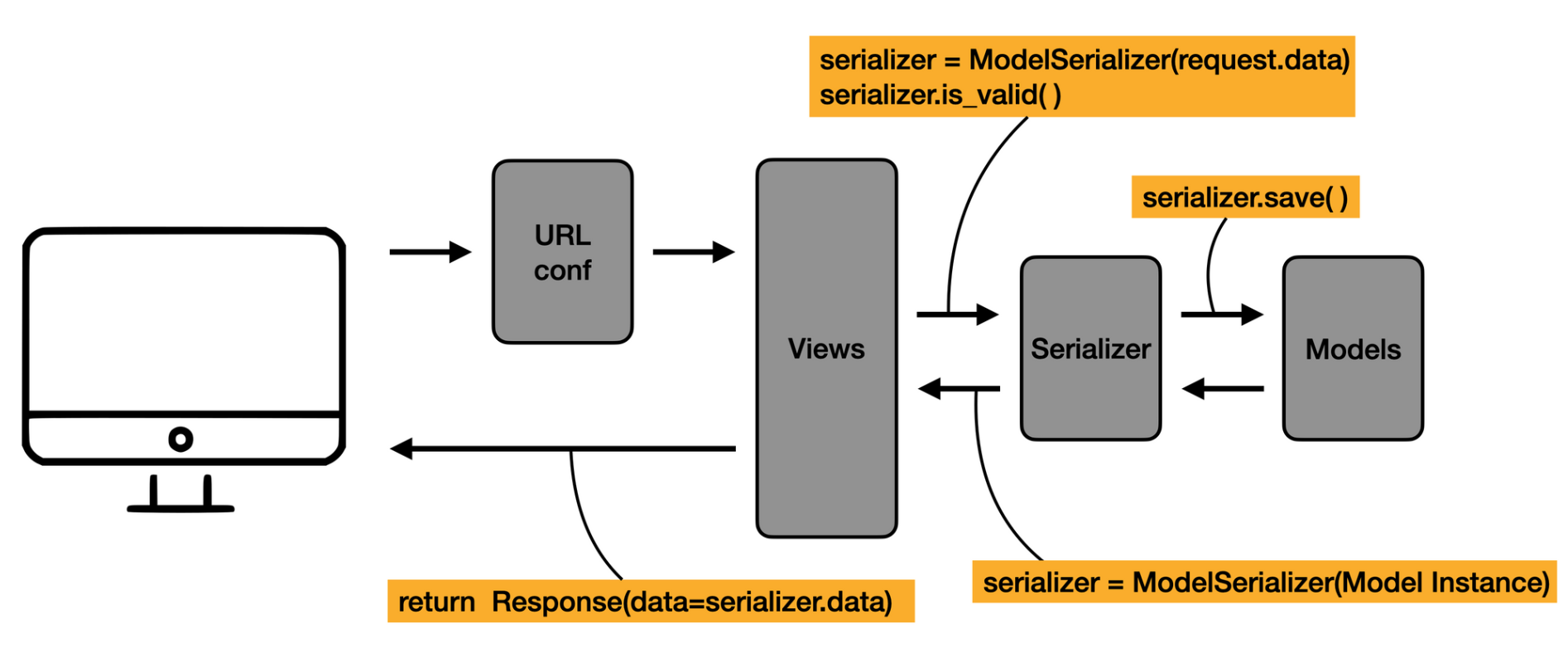
DRF serializers perform a lot of validation automatically. When you define a ModelSerializer, it inspects the corresponding model fields and enforces rules like max_length, unique=True, and data type constraints (e.g., an IntegerField won't accept text). However, for robust security and business logic, you will always need to add your own custom validation.
Let's explore the primary methods for adding custom validation to your serializers.
Effectively Using Django REST Framework Serializers
The article 'Effectively Using Django REST Framework Serializers' from TestDriven.io provides excellent, clear examples of the different validation techniques. We will use it as our main guide for this section.
Please read the section 'Custom Data Validation', including its subsections on 'Custom field validation', 'Object-level validation', and 'Functional validators'. This will give you the foundational code patterns for everything we're about to discuss.
2.1. Field-Level Validation
This is the most common type of validation, used for checking the value of a single field in isolation. You implement it by adding a method named validate_<field_name> to your serializer.
As shown in the article, a validate_rating method is a perfect example:
# In a MovieSerializer
def validate_rating(self, value):
    if value < 1 or value > 10:
        raise serializers.ValidationError('Rating has to be between 1 and 10.')
    return value
This method receives the value of the field and must either return the validated value or raise a serializers.ValidationError. This is ideal for ensuring data format, range, or content for a single field.
2.2. Object-Level Validation
Sometimes, validation depends on the relationship between multiple fields. For example, a "confirm password" field must match the "password" field. This is called object-level validation, and you implement it using the validate method.
The validate method receives a dictionary of the incoming data (after individual field validation has passed). You can then perform comparisons and raise a ValidationError if the data is inconsistent.
# In a MovieSerializer
def validate(self, data):
    # 'data' is a dictionary of field values
    if data['us_gross'] > data['worldwide_gross']:
        raise serializers.ValidationError('US gross cannot be greater than worldwide gross.')
    return data
The following video provides another practical, step-by-step example of implementing both field-level logic (adding a 'confirm email' field) and object-level validation (checking if a user with that email already exists).
Blog API with Django Rest Framework 27 of 33 - Serializer Validation
The video 'Blog API with Django Rest Framework 27 of 33 - Serializer Validation' by CodingEntrepreneurs provides a hands-on demonstration of these validation concepts.
Watch the video from the beginning to 08:43. Pay attention to how he adds a new field email2 and then uses a validate method to compare it to the email field. He also shows how to use a validation method to query the database to prevent duplicate registrations.
Note: In the video, the author initially accesses self.initial_data inside a validator. The TestDriven.io article correctly advises against this because initial_data contains raw, unvalidated data. The more robust approach, which he moves towards, is to use the validate(self, data) method, which receives a dictionary of already-coerced and partially-validated data.
2.3. Reusable Validators
If you find yourself writing the same validation logic in multiple serializers (e.g., validating a username format), you can extract it into a reusable validator. These can be simple functions or more complex classes.
The DRF documentation provides a clear guide on this.
The official DRF documentation on Validators is the definitive source for creating and using reusable validation logic. It also covers powerful built-in validators.
Please read the sections on 'UniqueValidator', 'UniqueTogetherValidator', and 'Writing custom validators'. This shows how to enforce uniqueness constraints declaratively and how to build your own reusable validator functions or classes.
DRF's built-in UniqueValidator is a perfect example of a powerful, reusable validator that is automatically applied by ModelSerializer for fields with unique=True.
Test your understanding!
You are creating a serializer for a Coupon model. The model has code (a string), discount_percentage (an integer), and is_active (a boolean).
Your validation requirements are:
- The
discount_percentagemust be between 1 and 90. - The
codemust be all uppercase and contain only letters and numbers.
How would you implement this validation in the CouponSerializer?
Show answer
You would use two field-level validation methods.
from rest_framework import serializers

class CouponSerializer(serializers.ModelSerializer):
    class Meta:
        model = Coupon
        fields = ['code', 'discount_percentage', 'is_active']

    def validate_discount_percentage(self, value):
        if not (1 <= value <= 90):
            raise serializers.ValidationError("Discount must be between 1 and 90 percent.")
        return value

    def validate_code(self, value):
        # Using .isalnum() checks for alphanumeric characters.
        # Using .isupper() checks if it's uppercase.
        if not (value.isalnum() and value.isupper()):
            raise serializers.ValidationError("Coupon code must be uppercase and alphanumeric.")
        return value
3. Data Sanitization with to_internal_value
What about sanitization—cleaning data instead of just rejecting it? This is a more advanced technique. DRF serializers provide a hook for this: the to_internal_value() method.
This method is called at the beginning of the deserialization process. It takes the raw incoming data and transforms it into the "internal" Python representation that will be used for validation and object creation. By overriding this method, you can clean up data before any validation runs.
For example, imagine you have a comment_text field and you want to strip all HTML tags to prevent XSS. You could use a library like bleach to do this.
# First, install bleach: pip install bleach
import bleach
from rest_framework import serializers

class CommentSerializer(serializers.ModelSerializer):
    # ... other fields

    def to_internal_value(self, data):
        # Get the internal representation from the parent class
        internal_representation = super().to_internal_value(data)

        # Sanitize the 'comment_text' field
        if 'comment_text' in internal_representation:
            # Use bleach to strip all HTML tags
            sanitized_text = bleach.clean(internal_representation['comment_text'], tags=[], strip=True)
            internal_representation['comment_text'] = sanitized_text

        return internal_representation
In this example, even if a user submits This is <script>alert('pwned')</script> a comment., the to_internal_value method will clean it to This is alert('pwned') a comment. before it even reaches the validate_comment_text method or gets saved. This is a powerful way to enforce a "clean data" policy at the application's entry point.
Conclusion
In this lesson, we fortified our API by making our serializers act as robust security gatekeepers. By implementing strong validation and sanitization, you protect your application from data corruption, inconsistencies, and common security vulnerabilities like XSS and SQL Injection.
Key Takeaways:
- Input Validation rejects bad data, while Data Sanitization cleans it. Both are crucial for security.
- DRF serializers are the primary location for implementing input validation logic.
- Use field-level validation (
validate_<field_name>) for rules that apply to a single field. - Use object-level validation (
validate) for rules that depend on multiple fields. - Create reusable validators (functions or classes) to avoid repeating code across serializers.
- For advanced data cleaning and transformation before validation, override the
to_internal_valuemethod.
Preview of the Next Lesson:
Our API is now more secure and robust. We've controlled access, rate-limited requests, and are now validating input. But what happens when our API needs to change? To prevent breaking existing client applications, we need a strategy for managing changes. In our next lesson, we will explore this by learning to describe common API versioning strategies (URL, header, query parameter).