Welcome back! In our last lesson, we focused on the "why" behind every search by exploring the concept of search intent. You learned to distinguish between informational, commercial, and transactional queries, which is the essential first step in understanding your customers.
Now, it's time to move from theory to a practical, step-by-step process. This lesson will equip you to find and evaluate the exact words and phrases potential customers use to find products like yours. We will achieve this by learning how to use free, powerful tools to build a list of potential keywords and then analyze that list to find the most promising opportunities for your Shopify store.
The Keyword Research Workflow
Effective keyword research isn't a single action but a structured process. For our purposes, we can break it down into three main steps:
- Discover: Find a broad list of potential keywords related to your product.
- Evaluate: Analyze that list using data and your own judgment to identify the keywords that offer the best balance of traffic potential and achievability.
- Select: Choose the final primary and secondary keywords you will target on a specific page.
Today, we will focus on the first two steps: Discovery and Evaluation. The final step, Selection, will be the focus of our next lesson.
Step 1: Discovering Keyword Ideas
The goal of the discovery phase is to generate a comprehensive list of search terms. We'll start by brainstorming and then use free tools to expand our initial ideas.
Brainstorming Your "Seed" Keywords
Everything starts with a few core ideas, often called "seed" keywords. These are the most obvious terms that describe your product. Don't overthink this part; just list the first things that come to mind.
To begin, choose one product from your Shopify store. Now, brainstorm a short list of 5-10 terms you think someone would use to find it. For example, if you sell handmade leather wallets, your seed list might include:
- leather wallet
- handmade wallet
- men's leather wallet
- slim leather wallet
- artisan wallet
This initial brainstorming is covered well in a guide from Shopify.
Ecommerce Keyword Research Guide: Tips and Strategies for 2025
This section from Shopify's guide provides a great overview of how to begin the keyword research process.
Read the section on brainstorming seed keywords. This will formalize the process we just discussed.
Expanding Your List with Free Tools
With your seed list in hand, you can now use various tools to uncover hundreds of related keywords.
1. Google's Built-in Features
Google itself is a powerful keyword research tool. The video below demonstrates several simple but effective techniques using Google's search page.
How to Do Keyword Research for Free in 2026 & Beyond
This video from Rank Math SEO shows how to leverage Google's own features to find keyword ideas for free.
Watch the segment from the beginning of the demonstration to see how to use Google Autocomplete, the "People also ask" section, and "Related Searches" to quickly find relevant keywords.
As you try this with your own seed keywords, add any relevant new terms you find to your list.
2. Google Keyword Planner
The primary tool for this lesson is Google Keyword Planner (GKP). It's part of the Google Ads platform, but you can use it for organic SEO research without running any ads. It uses Google's massive search database to suggest keywords and provide data on their search volume.
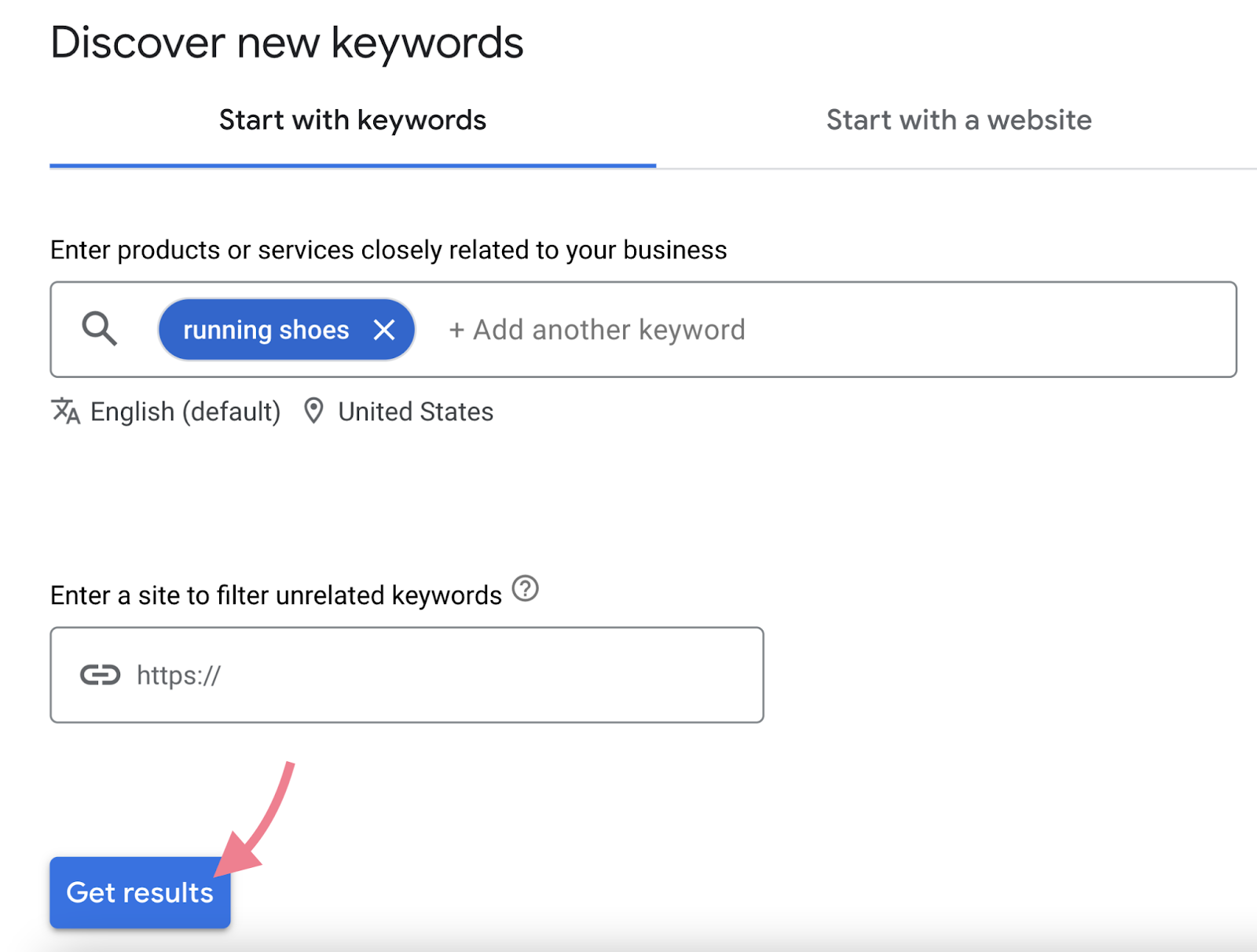
The following guide from Jellyfish provides a clear, step-by-step walkthrough for using this tool.
Free Keyword Research Template and Step-by-Step Guide - Jellyfish
This guide offers excellent, practical instructions for getting started with Google Keyword Planner.
First, review Step 2 as a quick refresher on preparing your initial list. Then, carefully follow the instructions in Step 3 to access the tool and use your seed list to generate a much larger list of keyword ideas.
3. Using AI for Deeper Insights
Given your interest in AI, it's worth noting that tools like ChatGPT can be incredibly powerful for keyword brainstorming. You can treat it as a research assistant, asking it to generate ideas in ways that traditional tools might miss.
The "How to Do Keyword Research for Free" video has a great section on this.
How to Do Keyword Research for Free in 2026 & Beyond
This video demonstrates practical ways to use ChatGPT for keyword discovery.
Watch the segment from this section on ChatGPT. Pay close attention to how the presenter gives the AI a persona ("you are a business owner...") and asks for different types of keywords, like "underserved blog topics" or "questions people asked about [your topic]". This can help you find both transactional keywords for product pages and informational keywords for future blog content.
Step 2: Evaluating Your Keyword List
By now, you should have a long list of potential keywords. The next step is to evaluate this list to find the gems. We'll evaluate keywords based on three main criteria: Search Volume, Competition, and Relevance/Intent.
Key Metrics: Search Volume and Competition
When you use a tool like Google Keyword Planner, you'll see two primary metrics for each keyword:
- Average monthly searches (Search Volume): This tells you, on average, how many times a keyword is searched for per month. Higher volume often means more potential traffic.
- Competition: This metric estimates how difficult it would be to rank on the first page of Google for that keyword. GKP labels this as "Low," "Medium," or "High."
The ideal keyword has high search volume and low competition, but reality is usually a trade-off. A lower-volume keyword with low competition can be more valuable than a high-volume one you have no chance of ranking for.
The Shopify article provides more context on balancing these factors.
Ecommerce Keyword Research Guide: Tips and Strategies for 2025
This section explains how to prioritize keywords using data.
Read the section on prioritizing keywords. Focus on the discussions around Relevance, Search Intent, and the balance between Search volume and keyword difficulty.
Validating Search Volume with Google Trends
Google Keyword Planner often shows broad ranges for search volume (e.g., 1K-10K) if you don't have an active ad campaign. To get a better sense of a keyword's popularity and see its trend over time, you can use another free tool: Google Trends. It's excellent for comparing the relative popularity of two or more keywords.
How to Do Keyword Research for Free in 2026 & Beyond
This video explains how to use Google Trends to validate search volume.
Watch the segment from this demonstration. The key insight is that even if you don't see absolute numbers, the presence and shape of the graph tell you if a keyword has significant search interest.
Assessing Competition
While GKP gives a "Low/Medium/High" rating, a more practical way to assess competition is to look directly at the search results. Who is currently ranking on the first page? Are they major brands like Amazon and Walmart, or are they smaller, independent stores like yours?
You can get a rough measure of a site's authority by using a browser extension that shows Domain Authority (DA) or a similar metric. A site's DA is a score from 1-100 that predicts how well it will rank. As a new store, you'll want to target keywords where some of the top-ranking sites have a lower DA (e.g., under 50).
How to Do Keyword Research for Free in 2026 & Beyond
This video shows a practical method for gauging keyword competition.
Watch the demonstration from this section. Notice how the presenter analyzes the Domain Authority of the top results to decide if a keyword is too competitive. This is a crucial step in finding realistic targets.
Conclusion
In this lesson, we've built a practical, repeatable workflow for finding and evaluating keywords for your e-commerce products. You now have a process to move from a simple product idea to a data-informed list of promising search terms.
Here are your key takeaways:
- The keyword research process involves Discovering ideas and then Evaluating them.
- Start with seed keywords and expand your list using free tools like Google Keyword Planner, Google's search features, and even ChatGPT.
- Evaluate your keyword list based on three critical factors:
- Search Volume: How many people are searching for this? (Use GKP and Google Trends to gauge).
- Competition: How hard will it be to rank? (Use GKP data and analyze the SERP authority).
- Relevance & Intent: Is this keyword a perfect match for my product and does it signal an intent to buy? (This connects back to our previous lesson).
You've done the hard work of building and vetting your list. In our next lesson, we will tackle the final step: taking this evaluated list and selecting the single best primary keyword and a few supporting secondary keywords to optimize your Shopify product page.