Welcome back! In our previous lesson, we completed the crucial strategic work of selecting a primary keyword and a few supporting secondary keywords for one of your product pages. You now have the specific terms you want to be found for on Google.
Today, we transition from strategy to hands-on implementation. This lesson will show you exactly where and how to place those chosen keywords within your Shopify product page. We'll focus on three of the most critical elements for on-page SEO: the page title, the meta description, and the URL. Mastering these will give search engines clear, powerful signals about your product's relevance and entice potential customers to click on your link instead of a competitor's.
Your Product's First Impression on Google
Before we dive into the Shopify editor, let's look at the end result we're aiming for. When a user searches on Google, the search results page (or SERP) displays three key pieces of information for each listing. These are your product's public-facing introduction to the world.
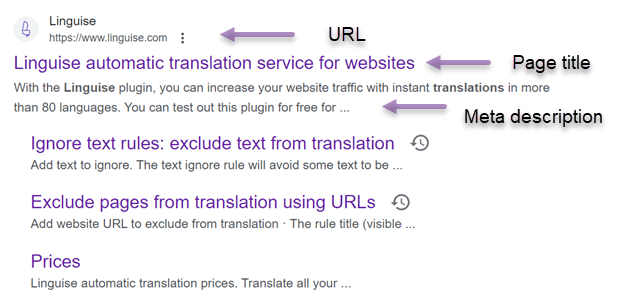
- Page Title (or SEO Title): This is the main clickable blue link. It is arguably the single most important on-page factor for telling both Google and users what your page is about.
- Meta Description: This is the short text snippet below the title. While it doesn't directly influence your ranking, it acts as a short advertisement. A compelling meta description persuades users to click on your result.
- URL: This is the web address of your page. A clean, descriptive URL helps search engines understand the page's content and can build trust with users.
In Shopify, you have direct control over all three of these elements for every product. Let's learn how to optimize them.
Finding the SEO Controls in Shopify
All the settings we'll discuss in this lesson are located in one place within your Shopify admin panel. When you are editing a product, scroll all the way to the bottom of the page. You will find a section called "Search engine listing". Clicking "Edit" will reveal the fields for the Page title, Meta description, and URL handle.

Optimizing Your Product's On-Page Elements
We'll now go through a step-by-step process for optimizing your product page. We'll be using the primary and secondary keywords you selected in the last lesson. For demonstration, let's continue with our example:
- Product: A slim, minimalist wallet.
- Primary Keyword: "men's slim leather wallet"
- Secondary Keywords: "thin bifold wallet for men", "front pocket leather wallet"
The following video provides an excellent walkthrough of how these optimizations are applied directly within the Shopify interface.
How to SEO Optimize a Product Page | eCommerce Optimization for Shopify Products
This video from Mariah Magazine offers a clear, practical demonstration of on-page optimization for a Shopify product page. It will give you a great visual overview of the steps we're about to cover.
Please watch the following segments: First, the introduction from the beginning to understand the goal. Next, watch the segment on the product title from the product title. Then, skip to the part about the URL from the URL. Finally, watch the detailed explanation of the SEO title and meta description from the metadata section.
Now, let's break down each step with specific rules and best practices.
1. The Product Title (<h1> Tag)
The very first field at the top of the product editor, simply labeled "Title," is what customers see on the product page itself. In the background, Shopify automatically uses this as the page's main heading, or <h1> tag. Google pays close attention to the <h1> to understand the page's primary topic.
- Best Practice: Place your primary keyword naturally within the product title. Aim for a title that is descriptive and appealing to a human reader, not just stuffed with keywords.
- Example: A good title would be
The Apollo - Men's Slim Leather Wallet. A less effective, "keyword-stuffed" title would beSlim Wallet Men's Leather Wallet Thin Wallet.
The article "Essential Shopify Product Listing Optimisation" provides a useful formula for this.
Essential Shopify Product Listing Optimization for Maximum Visibility
This article section gives a clear formula for creating effective product titles.
Please read the section titled "Optimise Shopify Product Title." Focus on the "Ideal Title Formula" and the example provided.
2. The URL Handle
Shopify automatically generates a URL (or "handle") based on your product title, but it's crucial to customize it for SEO.
- Best Practices:
- Include your primary keyword.
- Keep it short, clean, and easy to read.
- Use hyphens (
-) to separate words. Never use underscores (_) or spaces.
- Example: Based on our primary keyword, the ideal URL handle would be
mens-slim-leather-wallet. Shopify will add the rest, creating a full URL likeyourstore.com/products/mens-slim-leather-wallet.
3. The SEO Page Title and Meta Description
Now we return to the "Search engine listing" section at the bottom of the page. This is where you control what appears on Google.
SEO Page Title
This is your most powerful lever. While Shopify pre-fills this with your product title, you should always customize it.
- Best Practices:
- Front-load your primary keyword: Place it as close to the beginning as possible.
- Stay within 50-60 characters: This prevents your title from being cut off in search results.
- Make it compelling: Add your brand name or a key benefit (e.g., "Free Shipping").
- Example:
Men's Slim Leather Wallet | RFID Blocking | YourBrandName
Meta Description
This is your sales pitch on the SERP. Your goal is to convince the searcher to click.
- Best Practices:
- Include your primary keyword and one or two secondary keywords if they fit naturally.
- Stay within 155-160 characters.
- Focus on benefits: Don't just list features. Explain how the product helps the customer.
- Include a call to action: Phrases like "Shop now," "Discover the collection," or "Enjoy free shipping."
- Example:
Discover the perfect men's slim leather wallet. Our thin bifold wallet fits in your front pocket and keeps your cards secure. Handcrafted for style and durability. Shop now!
For a detailed reference on these concepts, including character limits and the importance of avoiding keyword stuffing, the following guide is very helpful.
A Guide To Optimizing Titles & Meta Descriptions in Shopify for SEO
This guide from Visibility Gurus provides clear definitions and actionable tips for crafting your titles and descriptions.
First, read the introduction defining the terms to solidify your understanding. Then, review the best practices in the section on optimization and look at the visual examples of well-crafted tags.
Summary of Best Practices
Here is a quick-reference table summarizing the optimizations for our example product:
| Element | Best Practice | Example |
|---|---|---|
| Product Title (H1) | Include primary keyword naturally. Be descriptive. | The Apollo - Men's Slim Leather Wallet |
| URL Handle | Use primary keyword, separated by hyphens. | mens-slim-leather-wallet |
| SEO Page Title | Front-load primary keyword. Under 60 chars. | Men's Slim Leather Wallet | Handcrafted | YourBrand |
| Meta Description | Include primary & secondary keywords. Focus on benefits & CTA. Under 160 chars. | Discover our best-selling men's slim leather wallet. This thin bifold fits any front pocket. RFID blocking for security. Shop now & get free shipping! |
Conclusion
You have now learned how to apply your keyword strategy directly to your Shopify store, transforming abstract keywords into concrete, optimized page elements. By carefully crafting your product title, URL, SEO title, and meta description, you provide clear, consistent signals to Google while also creating a compelling listing for potential customers.
Here are the key takeaways from this lesson:
- The Product Title becomes the
<h1>tag and should contain your primary keyword. - The URL Handle should be a clean, hyphenated version of your primary keyword.
- The SEO Title and Meta Description control how your product appears in Google search results and are your primary tools for earning clicks.
- Always front-load your primary keyword in the SEO title and adhere to character limits to ensure your message is seen.
In our next lesson, we'll continue optimizing your product page by focusing on a component that is crucial for e-commerce: your product images. You'll learn how to write descriptive alt text that helps search engines understand your visuals and improves your store's accessibility.