In our last lesson, you learned how to optimize the crucial text-based elements of your product page—the title, meta description, and URL—to signal your product's relevance to Google and attract clicks from the search results page. We are now going to continue our on-page optimization work by turning our attention to your product images.
This lesson will teach you how to write and implement descriptive, keyword-rich alt text for your product images directly within the Shopify editor. This is a vital skill that serves two key purposes: it makes your store more accessible to all users and significantly improves your product's visibility in search engine results, particularly in Google Image Search. By the end of this lesson, you'll have a clear, step-by-step process for optimizing this often-overlooked but powerful SEO element.
What is Alt Text and Why is it Important?
Before we get into the "how-to," let's establish what alt text is and why it's worth your time. Alt text (short for alternative text) is a short, written description that you attach to an image in your store's code. While it's not typically visible on the page itself, it plays a critical background role.
There are three main benefits to using alt text:
- Accessibility: For visually impaired users who navigate the web with screen-reading software, alt text is essential. The software reads the alt text aloud, describing the image and allowing the user to understand the page's full context.
- Search Engine Optimization (SEO): Search engines like Google are primarily text-based; they can't "see" or interpret the content of an image file on their own. Alt text provides a textual description that helps search engines understand, categorize, and rank your images, making them discoverable in Google Image Search. This can be a significant source of traffic for e-commerce stores.
- User Experience: If an image fails to load due to a slow connection or a technical error, the browser will often display the alt text in its place. This ensures the user still understands what the missing image was meant to convey.
To get a solid overview of these points, the following video provides a great introduction.
Your Shopify Images Are Killing Your Conversions: Fix It! (Shopify Product Image Optimization)
The video "Your Shopify Images Are Killing Your Conversions" from the Shopioso channel explains the importance of alt text very clearly.
Please watch the section from the beginning of the discussion on alt text. The speaker covers its role in accessibility, what happens when images don't load, and how Google uses it for SEO.
Best Practices for Writing Effective Alt Text
Now that you understand the "why," let's focus on the "what." Writing good alt text is a balance between being descriptive for users and being strategic for search engines. It's more of an art than a science, but there are clear best practices to follow.
The article "How To Write and Add Image Alt Text" on the official Shopify blog provides an excellent summary of these rules.
How To Write and Add Image Alt Text - Shopify
This official guide from Shopify outlines the key principles for crafting effective alt text.
Please read the section titled "How to write effective alt text." Pay close attention to the advice on being specific, using keywords, and knowing when to omit alt text for purely decorative images.
To synthesize and expand on that reading, here are the core principles:
- Be Descriptive and Concise: Describe what's in the image as if you were explaining it to someone over the phone. Be specific, but keep it brief. Most screen readers stop reading after about 125 characters, so aim for that as a general limit.
- Use Your Keywords Naturally: This is where you connect back to your keyword research. Include your primary or secondary keywords if they accurately describe the image. For a product with multiple images, you can use different keyword variations in the alt text for each one.
- Avoid "Keyword Stuffing": Your alt text should be a readable sentence, not a jumble of keywords. For example,
Men's slim black leather bifold walletis good.Wallet leather slim men black buy now cheapis bad and can be penalized by search engines. - Don't Start with "Image of..." or "Picture of...": Screen readers and search engines already know it's an image from the HTML code. It's redundant and provides a poor user experience.
- Describe Different Image Types Uniquely: A product page often has multiple images (front view, side view, detail shot, lifestyle shot). Each should have unique alt text that describes that specific view.
This detailed guide provides excellent examples of good vs. bad alt text for different image types.
How to Write Alt Text for Product Images - Starapps
This article from Starapps offers a very practical breakdown of how to write alt text for different kinds of product photos.
Please read the section "How to Write Alt Text for Different Product Image Types." Notice how the "good" examples are specific and descriptive for the main image, variant images, close-ups, and lifestyle shots.
How to Add Alt Text in the Shopify Editor
With the principles clear, let's move to the practical implementation. Adding alt text in Shopify is a straightforward process within the product editor.
Here are the steps:
- From your Shopify admin, go to Products and click on the product you want to edit.
- In the Media section, click on the image you want to add alt text to.
- On the image preview screen, you will see an
ALTbutton or a link that says "Edit alt text". Click it.
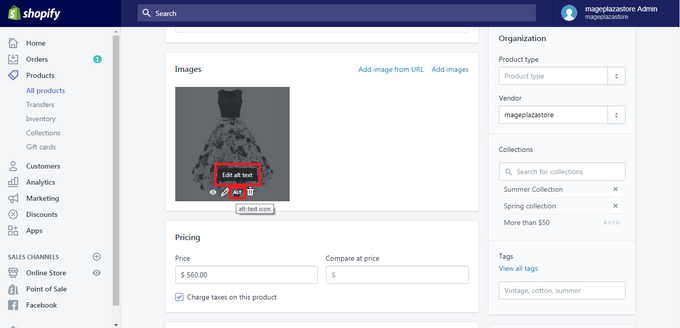
- A dialog box will appear titled "Edit image alt text". Enter your descriptive, keyword-rich alt text in the field provided.
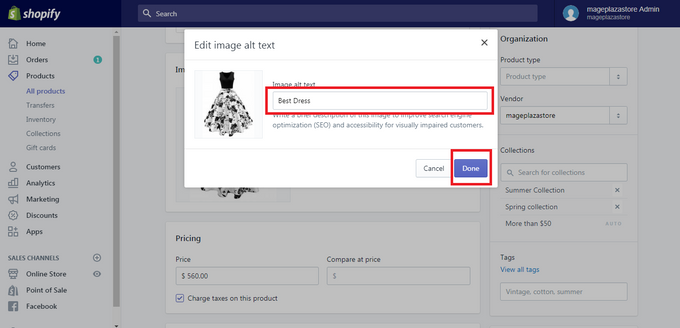
- Click Done, and then click the main Save button for the product to finalize your changes.
Repeat this process for all meaningful images on your product page.
The following video provides a complete walkthrough of this exact process.
Your Shopify Images Are Killing Your Conversions: Fix It! (Shopify Product Image Optimization)
This segment from the Shopioso video shows the step-by-step process of adding alt text in the Shopify admin.
Watch the section from this timestamp to see exactly where to click and where to paste your generated alt text.
A Practical Workflow Example
Let's tie this all together using our ongoing example of a "men's slim leather wallet". Imagine your product page has three images:
- Image 1: Main product shot (front view)
- Alt Text:
Men's slim leather wallet in black with RFID blocking.(Uses the primary keyword)
- Alt Text:
- Image 2: Detail shot (close-up of the stitching)
- Alt Text:
Close-up view of the fine stitching on a thin bifold wallet for men.(Uses a secondary keyword and describes the specific detail)
- Alt Text:
- Image 3: Lifestyle shot (in someone's pocket)
- Alt Text:
A front pocket leather wallet shown comfortably inside a pair of dark wash jeans.(Uses another secondary keyword and describes the context)
- Alt Text:
Notice how each description is unique, descriptive, and incorporates a relevant keyword naturally. This gives Google multiple, slightly different signals about your product's topic, strengthening its overall relevance.
For finding keyword ideas for your alt text, the Casual Ecommerce video offers a simple, effective technique.
Shopify Image Optimization Tutorial (Compression, Alt Text, Loading Speed, SEO)
This video provides a very practical tip for discovering relevant keywords to use in your alt text.
Watch from this segment to see how you can use Google's autofill suggestions to find what people are actually searching for related to your product.
Conclusion
You have now learned how to optimize another fundamental component of your product page. By writing clear and descriptive alt text, you not only improve your SEO and increase your chances of being discovered through Google Image Search, but you also create a more inclusive and accessible experience for all potential customers.
Here are your key takeaways:
- Alt text serves three functions: accessibility for screen readers, SEO for search engines, and as a placeholder for broken images.
- Write for humans first: Your primary goal is to describe the image accurately and concisely (ideally under 125 characters).
- Incorporate keywords naturally: Use your primary and secondary keywords where they fit, creating unique alt text for each distinct product image.
- Implementation is simple: Add alt text by clicking on an image in the "Media" section of your Shopify product editor.
In our next lesson, we will move from optimizing individual product pages to optimizing collection pages. You will learn how to apply similar SEO principles to these important pages, which group your products and target broader, higher-level keywords.