Hello! Let's continue our journey into state management with Pinia.
Introduction
In the last lesson, we took a major step by installing Pinia and creating our first store, taskStore. We successfully moved our application's "source of truth"—the tasks array—from App.vue into this new centralized store.
However, our to-do app's functionality (adding, deleting, and toggling tasks) is still broken because the logic for these operations remains in App.vue. Today, we will fix that and complete the centralization of our task management logic.
This lesson covers the other two core concepts of a Pinia store: Actions and Getters.
- Actions are functions where we'll place our logic for changing the state (e.g., adding a task).
- Getters are computed properties that derive new information from our state (e.g., counting incomplete tasks).
By the end of this lesson, our taskStore will be a complete, self-contained unit, managing not just the task data, but all the logic associated with it.
Part 1: Centralizing Logic with Actions
In Pinia, actions are the equivalent of methods in a Vue component. They are the designated place to define any logic that mutates the store's state. While Pinia allows you to modify state directly from a component, encapsulating the logic within actions is a crucial best practice.
Why use actions?
- Organization: All the logic for changing a piece of state lives in one place, making your code easier to understand and maintain.
- Reusability: Any component can call the
addTaskaction without needing to know the implementation details. - Traceability: When something goes wrong with your state, you know to look in the store's actions, which simplifies debugging.
This article provides a great summary of Pinia's core concepts.
Leveraging Pinia to simplify complex Vue state management
Read the section from 'Leveraging Pinia to simplify complex Vue state management' that introduces a basic Pinia store. It clearly defines the roles of state, getters, and actions.
Read the part titled 'Using a basic Pinia store'. Focus on the descriptions of state, getters, and actions to solidify your understanding of these three pillars of a store.
Hands-On: Moving Functions to the taskStore
Let's move the logic from App.vue into our taskStore.js as actions.
-
Open
src/App.vueand look at theaddTask,deleteTask, andtoggleCompletefunctions. We are going to move this logic. -
Open
src/stores/taskStore.jsand modify it. We'll define these functions inside thedefineStoresetup function. Remember, since these functions will modify thetasksref, they need to access its.valueproperty.// src/stores/taskStore.js import { ref } from 'vue' import { defineStore } from 'pinia' export const useTaskStore = defineStore('tasks', () => { const tasks = ref([ { id: 1, text: 'Clean the kitchen', isComplete: false }, { id: 2, text: 'Learn Vue.js', isComplete: true }, ]); // --- ACTIONS --- function addTask(text) { if (!text.trim()) return; // Don't add empty tasks const newTask = { id: Date.now(), // Simple unique ID text: text, isComplete: false, }; tasks.value.unshift(newTask); // Add to the beginning of the array } function deleteTask(id) { tasks.value = tasks.value.filter(task => task.id !== id); } function toggleComplete(id) { const task = tasks.value.find(task => task.id === id); if (task) { task.isComplete = !task.isComplete; } } // --- RETURN --- // We must return the new actions to make them available return { tasks, addTask, deleteTask, toggleComplete } })Notice we're using
Date.now()to generate a simple unique ID for new tasks. This is sufficient for our project. -
Update
src/App.vueto use the actions.
Now, modify the handlers inApp.vueto simply call the actions from the store. This makesApp.vuemuch cleaner; it no longer contains business logic, it just delegates to the store.// src/App.vue -> <script setup> import { useTaskStore } from '@/stores/taskStore' import TodoForm from './components/TodoForm.vue' import TodoList from './components/TodoList.vue' const taskStore = useTaskStore() // These functions now simply call the actions in the store const addTask = (text) => { taskStore.addTask(text) } const deleteTask = (id) => { taskStore.deleteTask(id) } const toggleComplete = (id) => { taskStore.toggleComplete(id) }
Check your application now. All the functionality should be working again!
To see another example of actions being defined and used, watch the following short clip.
This clip from 'Introduction To Pinia' by John Komarnicki demonstrates how to define actions as functions within the store and then call them from a component.
Watch from 07:37 to 09:09. Notice how the functions are defined in the store and then returned, making them available to be called from the component's event handlers.
Part 2: Deriving Data with Getters
Getters are the store's version of computed properties. They are perfect for calculating derived data from your state. For example, instead of recalculating the number of completed tasks in every component that needs it, you can define a getter once in the store.
Why use getters?
- Efficiency: Getters are cached. They only re-calculate when one of their dependencies (a state property) changes.
- Reusability: Any component can access the
completedTasksCountgetter without duplicating the filtering and counting logic. - Readability: They help keep your component templates clean and declarative.
Hands-On: Creating Getters
Let's add a couple of getters to our taskStore to count the total and uncompleted tasks.
-
Open
src/stores/taskStore.jsagain. -
Import
computedfromvue. -
Define your getters using
computedand add them to thereturnstatement.// src/stores/taskStore.js import { ref, computed } from 'vue' // 1. Import computed import { defineStore } from 'pinia' export const useTaskStore = defineStore('tasks', () => { const tasks = ref([/* ... */]); // --- GETTERS --- const uncompletedTasksCount = computed(() => { return tasks.value.filter(task => !task.isComplete).length; }); const totalTasks = computed(() => { return tasks.value.length; }); // --- ACTIONS --- function addTask(text) { /* ... */ } function deleteTask(id) { /* ... */ } function toggleComplete(id) { /* ... */ } // --- RETURN --- return { tasks, // Add getters to the return object uncompletedTasksCount, totalTasks, addTask, deleteTask, toggleComplete } }) -
Use the Getters in
App.vue.
You can now access these getters just like any other property on the store instance. Let's add a summary message to ourApp.vuetemplate.<!-- src/App.vue -> <template> --> <template> <h1>My To-Do List</h1> <!-- New summary section --> <p v-if="taskStore.totalTasks > 0"> You have {{ taskStore.uncompletedTasksCount }} of {{ taskStore.totalTasks }} tasks remaining. </p> <p v-else> You have no tasks! Add one below. </p> <TodoForm @add-task="addTask" /> <TodoList :tasks="taskStore.tasks" @delete-task="deleteTask" @toggle-complete="toggleComplete" /> </template>
Now, when you add, complete, or delete tasks, the summary message will automatically and efficiently update!
The following video provides another clear example of creating and using a getter.
This next clip from 'Introduction To Pinia' shows how to create a getter using computed to derive a new value from state.
Watch from 09:09 to 10:36. Pay attention to how a computed property is defined in the store and then accessed directly in the component's template.
Your Complete Task Store
Excellent work! You've successfully defined a complete Pinia store. Take a moment to look at your taskStore.js file. It's now the single source of truth for everything related to tasks:
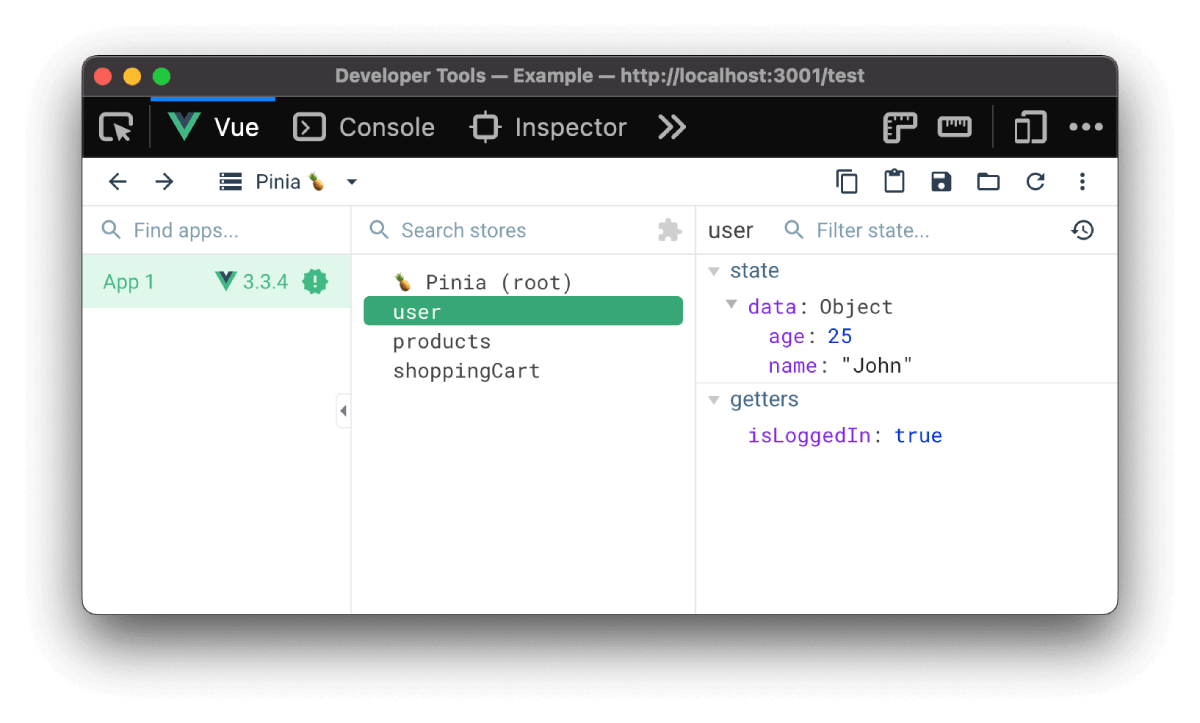
state: The raw data (tasksarray).getters: The derived, computed data (uncompletedTasksCount,totalTasks).actions: The methods used to change the data (addTask,deleteTask,toggleComplete).
This clean separation of concerns is a hallmark of scalable application architecture. When you're developing, you can use the Vue DevTools to inspect your store's state and getters in real-time.
Conclusion
In this lesson, you've mastered the core building blocks of a Pinia store.
Key Takeaways:
- Actions are functions that contain the logic for mutating state. They promote organization and code reuse.
- Getters are
computedproperties for your store. They provide an efficient, cached way to derive data from your state. - A complete Pinia Store centralizes state, getters, and actions into a single, cohesive unit.
While our store is now complete, our App.vue is still passing props and listening for events. In the next lesson, we will leverage the true power of a global store by refactoring our components to access the store directly, finally eliminating prop drilling and event bubbling entirely.