Hello! Welcome back to our journey with Pinia.
Introduction
In our last session, we successfully centralized our to-do list's logic by building a complete Pinia store. We defined the state (the tasks array), getters (like uncompletedTasksCount), and actions (like addTask and deleteTask). Our taskStore is now the single source of truth for all task-related data and logic.
However, if you look at App.vue, it's still acting as a middleman. It receives data from the store only to pass it down as props to child components, and it listens for events from children only to call the store's actions. This pattern is known as prop drilling and event bubbling.
Today's lesson is about eliminating that middleman. You will learn how to access and manipulate the store's state directly from any component. This is the primary reason for using a state management library like Pinia. By the end of this lesson, you'll have refactored the to-do app to be much cleaner and more efficient, truly unlocking the power of a centralized store.
Part 1: The Problem with Prop Drilling
Before we fix the problem, let's clearly understand it. As an application grows, you might have components nested several layers deep. Passing data from a top-level component down to a deeply nested child through all the intermediate components is called "prop drilling." It makes your components tightly coupled and hard to refactor.
The video below gives an excellent visual explanation of this issue and why a centralized store is the solution.
Vue JS with Composition API & Pinia Full Tutorial
Watch this segment from 'Vue JS with Composition API & Pinia Full Tutorial' to see a clear illustration of how component communication becomes complex as an app grows, and how a store simplifies it.
Watch from 00:55:12 to 00:58:52. Focus on the diagrams that contrast passing data through components versus having components communicate directly with a central store.
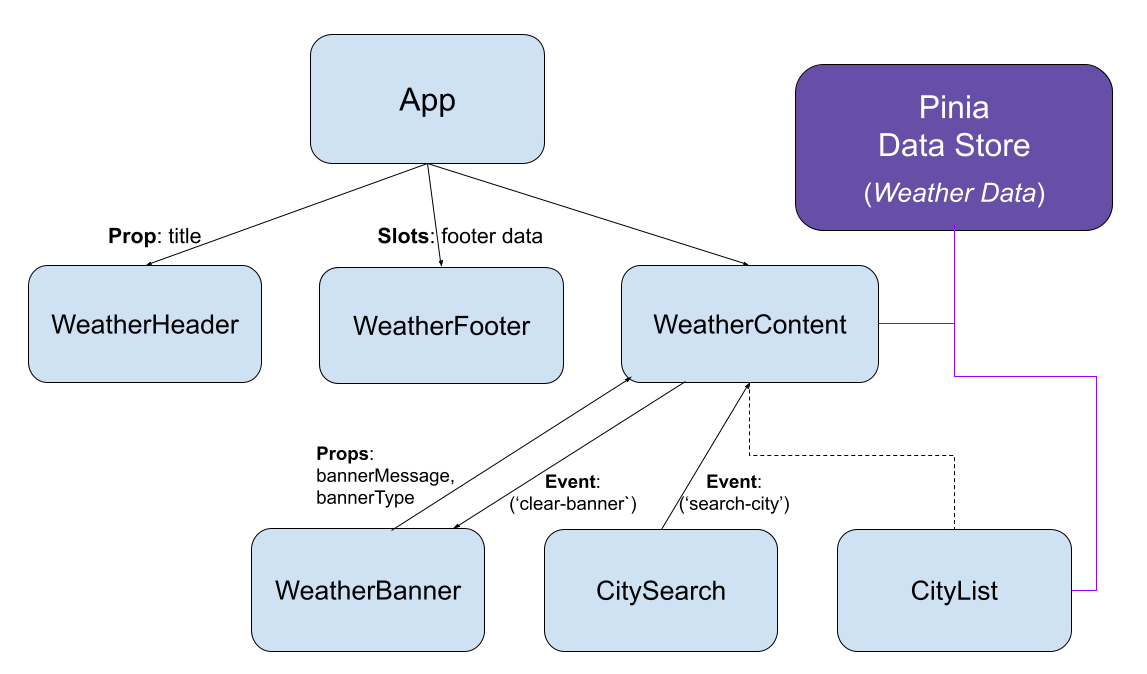
As the video shows, our goal is to move from this complex web of props and events to a cleaner architecture where components interact directly with the store.
Part 2: Hands-On Refactoring
Now, let's apply this concept. We will refactor our TodoList and TodoForm components to use the taskStore directly, and then we'll clean up App.vue.
Step 1: Refactor TodoList.vue
This component currently receives tasks via props and emits events when a user wants to delete or toggle a task. Let's change it to communicate with the store.
- Open
src/components/TodoList.vue. - Import
useTaskStore. - Remove the
definePropsanddefineEmitsmacros. - Instantiate the store.
- Update the template to get tasks from the store and call store actions directly.
Your TodoList.vue file should look like this:
<!-- src/components/TodoList.vue -->
<script setup>
import { useTaskStore } from '@/stores/taskStore'

// No more props or emits!

const taskStore = useTaskStore()
</script>

<template>
  <div>
    <!-- Iterate directly over the tasks in the store -->
    <div v-for="task in taskStore.tasks" :key="task.id">
      <span>{{ task.text }}</span>
      <span :class="{ 'completed': task.isComplete }">
        {{ task.isComplete ? ' (Completed)' : '' }}
      </span>
      <!-- Call store actions directly from the click handlers -->
      <button @click="taskStore.toggleComplete(task.id)">Toggle</button>
      <button @click="taskStore.deleteTask(task.id)">Delete</button>
    </div>
  </div>
</template>

<style scoped>
.completed {
  text-decoration: line-through;
  color: #888;
}
/* Add some basic styling for layout */
div > div {
  display: flex;
  align-items: center;
  gap: 10px;
  margin-bottom: 5px;
}
</style>
We have now made TodoList.vue self-sufficient. It knows how to get the data it needs and how to perform actions on that data.
Step 2: Refactor TodoForm.vue
Next, let's do the same for the form.
- Open
src/components/TodoForm.vue. - Import
useTaskStoreand removedefineEmits. - Instantiate the store.
- Update the
handleSubmitmethod to call the store'saddTaskaction directly.
Here's the updated code for TodoForm.vue:
<!-- src/components/TodoForm.vue -->
<script setup>
import { ref } from 'vue'
import { useTaskStore } from '@/stores/taskStore'

const newTaskText = ref('')
const taskStore = useTaskStore()

// No more emits!

const handleSubmit = () => {
  // Call the action directly
  taskStore.addTask(newTaskText.value)
  newTaskText.value = ''
}
</script>

<template>
  <form @submit.prevent="handleSubmit">
    <input type="text" v-model="newTaskText" placeholder="Add a new task">
    <button type="submit">Add Task</button>
  </form>
</template>
Step 3: Simplify App.vue
With our child components now connected to the store, App.vue becomes incredibly simple. It's now just a layout component, responsible for placing other components on the page, not for managing logic.
- Open
src/App.vue. - Remove all the prop bindings and event listeners from
<TodoList>and<TodoForm>. - Remove the local handler functions (
addTask,deleteTask,toggleComplete) from the<script setup>block.
Your simplified App.vue should look like this:
<!-- src/App.vue -->
<script setup>
import { useTaskStore } from '@/stores/taskStore'
import TodoForm from './components/TodoForm.vue'
import TodoList from './components/TodoList.vue'

const taskStore = useTaskStore() // We still need it for the summary message
</script>

<template>
  <h1>My To-Do List</h1>

  <p v-if="taskStore.totalTasks > 0">
    You have {{ taskStore.uncompletedTasksCount }} of {{ taskStore.totalTasks }} tasks remaining.
  </p>
  <p v-else>
    You have no tasks! Add one below.
  </p>

  <!-- No more props or events! So much cleaner. -->
  <TodoForm />
  <TodoList />

</template>
Test your application. Everything should still work perfectly, but the underlying code is now much more robust, maintainable, and scalable.
Part 3: A Best Practice: storeToRefs
There's one important detail to cover. In our components, we accessed state and getters like taskStore.tasks. This is perfectly fine. However, sometimes you might want to destructure properties from the store for convenience:
const { tasks, uncompletedTasksCount } = taskStore; // This is WRONG!
Doing this will break reactivity. The destructured variables will be plain values, not reactive refs, so your component won't update when the store changes.
Pinia provides a helper function called storeToRefs to solve this. It creates reactive refs for all state properties and getters in the store.
Let's refactor TodoList.vue to use storeToRefs.
- Open
src/components/TodoList.vue. - Import
storeToRefsfrompinia. - Use it to create reactive refs for the
tasks.
<!-- src/components/TodoList.vue -->
<script setup>
import { useTaskStore } from '@/stores/taskStore'
import { storeToRefs } from 'pinia' // 1. Import

const taskStore = useTaskStore()

// 2. Use storeToRefs to create reactive refs
// Now `tasks` is a reactive ref, just like if you defined it with ref()
const { tasks } = storeToRefs(taskStore)

// Actions can be destructured directly because they are just functions
const { toggleComplete, deleteTask } = taskStore
</script>

<template>
  <div>
    <!-- No need to use `taskStore.` prefix anymore -->
    <div v-for="task in tasks" :key="task.id">
      <span>{{ task.text }}</span>
      <span :class="{ 'completed': task.isComplete }">
        {{ task.isComplete ? ' (Completed)' : '' }}
      </span>
      <!-- Call the destructured actions -->
      <button @click="toggleComplete(task.id)">Toggle</button>
      <button @click="deleteTask(task.id)">Delete</button>
    </div>
  </div>
</template>

<style scoped>
/* ... styles ... */
</style>
Key rule:
- Use
storeToRefswhen destructuring state and getters. - You can destructure actions directly.
This article provides another example of this pattern.
Leveraging Pinia to simplify complex Vue state management
The article 'Leveraging Pinia to simplify complex Vue state management' demonstrates how to properly access store data within a component.
Navigate to the section 'Creating the posts view'. Pay close attention to the code block and the explanation immediately following it, which describes why storeToRefs() is used for posts, loading, and error, but not for the fetchPosts action.
Part 4: Proving the State is Shared
The real "aha!" moment comes when you see a second, unrelated component share the same state. Let's prove it works.
We will create a new component, TodoSummary.vue, and move the summary text from App.vue into it.
-
Create a new file:
src/components/TodoSummary.vue. -
Add the following code to it. Notice it imports and uses the store completely independently.
<!-- src/components/TodoSummary.vue --> <script setup> import { storeToRefs } from 'pinia'; import { useTaskStore } from '@/stores/taskStore'; const taskStore = useTaskStore(); // Use storeToRefs to get reactive getters const { totalTasks, uncompletedTasksCount } = storeToRefs(taskStore); </script> <template> <p v-if="totalTasks > 0"> You have {{ uncompletedTasksCount }} of {{ totalTasks }} tasks remaining. </p> <p v-else> You have no tasks! Add one below. </p> </template> -
Update
App.vueto use this new component.<!-- src/App.vue --> <script setup> import TodoForm from './components/TodoForm.vue' import TodoList from './components/TodoList.vue' import TodoSummary from './components/TodoSummary.vue' // Import the new component </script> <template> <h1>My To-Do List</h1> <TodoSummary /> <!-- Use it here --> <TodoForm /> <TodoList /> </template>
Now, TodoList, TodoForm, and TodoSummary are all sibling components. Yet, when you add a task using TodoForm, both TodoList and TodoSummary update instantly. This is the power of a centralized, reactive store.
The following article demonstrates this exact principle by creating two separate views that share state from the same counter store.
Setting up Your First Pinia Store in Vue with TypeScript - dbi services
The article 'Setting up Your First Pinia Store in Vue' clearly shows how state can be shared across multiple components.
Read the section titled 'Sharing the data across multiple component'. It walks through creating a second view that uses the same store, proving that changes in one place are reflected everywhere.
Conclusion
Fantastic work! You've taken a massive step in building scalable Vue applications. By connecting your components directly to the Pinia store, you've decoupled them and made your overall architecture much cleaner.
Key Takeaways:
- Any component can import and use a Pinia store to access state or call actions.
- This pattern eliminates the need for "prop drilling" and "event bubbling," simplifying parent components like
App.vue. - The
storeToRefs()utility is essential for destructuring state and getters from a store while maintaining reactivity. - Actions can be destructured directly from the store instance.
- Multiple, unrelated components can react to the same state changes, proving the power of a single source of truth.
In the next lesson, we will formally recap the problem of prop drilling and solidify why Pinia is the ideal solution, which will conclude this module on state management.