Hello! Welcome back to our journey into Python.
In our last lesson, we explored Python's core data structures: lists, tuples, dictionaries, and sets. You learned how to create them and perform basic operations, building on your C-style understanding of arrays and structs. A common pattern we saw was creating an empty list and then using a for loop to populate it with new elements.
Today, we will learn a more elegant, powerful, and quintessentially "Pythonic" way to accomplish this exact task: list comprehensions. This feature allows you to create lists in a single, highly readable line of code. Mastering list comprehensions is a significant step toward writing clean and efficient Python code, which is crucial for the data manipulation tasks you'll encounter constantly in machine learning.
From for Loop to List Comprehension
Let's start with a familiar task from the previous lesson: building a new list from an existing one. Imagine you want to create a list containing the squares of numbers from 0 to 9. Using a for loop, you would write something like this:
squares = []
for x in range(10):
    squares.append(x**2)

print(squares)


# Output: [0, 1, 4, 9, 16, 25, 36, 49, 64, 81]
This pattern is so common that Python provides a special syntax to condense it. A list comprehension achieves the same result in one line:
squares = [x**2 for x in range(10)]

print(squares)


# Output: [0, 1, 4, 9, 16, 25, 36, 49, 64, 81]
Notice how the key components of the for loop are still present, just rearranged:
x**2is the expression — what to do with each item.for x in range(10)is the loop — which iterates over the source sequence.
The following video from Real Python provides an excellent step-by-step breakdown of how to transform a for loop into a list comprehension.
Python Tutorial: List Comprehensions Step-By-Step
This video methodically converts a standard for loop into a list comprehension, explaining how each part of the loop maps to the new syntax.
Watch the initial transformation to see how a simple loop becomes a one-liner. Then, pay attention to the generalized template, which abstracts this transformation into a reusable pattern.
Adding a Condition to Filter Data
List comprehensions become even more powerful when you add conditional logic. Suppose you only want the squares of the odd numbers. With a for loop, you'd add an if statement:
odd_squares = []
for x in range(10):
    if x % 2 != 0:  # Check if x is odd
        odd_squares.append(x**2)

print(odd_squares)


# Output: [1, 9, 25, 49, 81]
In a list comprehension, you can add an if clause at the end to achieve the same filtering effect:
odd_squares = [x**2 for x in range(10) if x % 2 != 0]

print(odd_squares)


# Output: [1, 9, 25, 49, 81]
The general structure is [expression for item in iterable if condition]. This is visually summarized in the following diagram.
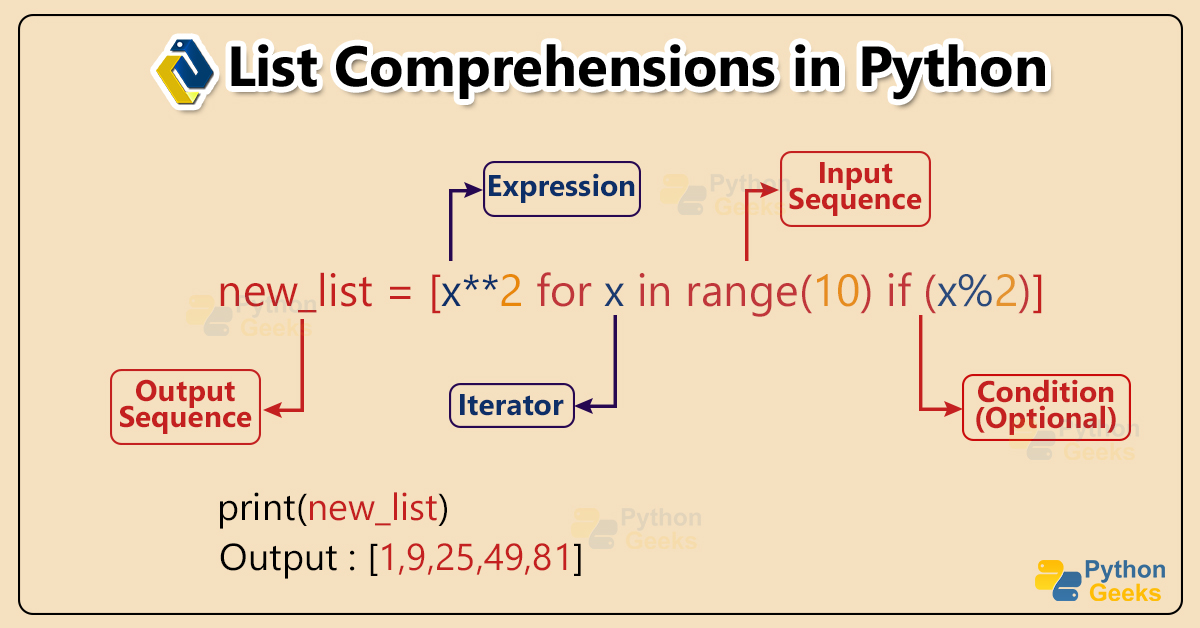
The mathspp blog offers a fantastic, in-depth article on this topic. Let's read the sections that cover this core syntax and the addition of filtering.
List comprehensions 101 | Pydon't 🐍
This article provides a clear, step-by-step introduction to list comprehensions, starting from basic loops and moving to more complex forms.
First, read the sections "A loop that builds a list" to solidify the basic transformation. Next, read the section on "Filtering data in a list comprehension" to see how the if clause works. Note the author's advice on formatting longer comprehensions for readability.
A Connection to Mathematical Notation
Given your background in mathematics, you'll likely appreciate the deep connection between list comprehensions and set-builder notation. In mathematics, you might define the set of the first ten square numbers like this:
This reads as "S is the set of all numbers such that is an element of the set of integers from 0 to 9."
Now look at the Python list comprehension again:squares = [n**2 for n in range(10)]
The parallel is striking. The Python syntax is a direct, executable implementation of the mathematical concept.
- The expression corresponds to
n**2. - The vertical bar
|(meaning "such that") and thefor...inconstruct serve the same purpose. - The source set corresponds to
n in range(10).
This extends to filtering as well. If we wanted to define only the squares of the odd numbers, we might write:
The Python equivalent mirrors this beautifully:odd_squares = [n**2 for n in range(10) if n % 2 != 0]
The mathspp article you started reading has a section that explores exactly this connection.
List comprehensions 101 | Pydon't 🐍
Let's continue with the same article.
Read the section titled "List comprehensions from first principles". This will frame the concept in a way that should feel very intuitive and familiar to you.
Readability and When to Use Comprehensions
List comprehensions are favored in Python because they are often more concise and readable than the equivalent for loops. They declare the intent of the code—creating a new list—right away, rather than forcing someone to read through the logic of initializing a list, looping, and appending. They can also be slightly faster due to optimizations in the Python interpreter.
However, with great power comes responsibility. It's possible to write overly complex, nested list comprehensions that are difficult to read. A good rule of thumb is: if the logic is simple (one or two loops, maybe a simple if), a comprehension is great. If it starts to get convoluted, a standard for loop is often more maintainable.
Let's watch the final part of Corey Schafer's excellent tutorial, where he covers nested loops and also introduces dictionary and set comprehensions.
Python Tutorial: Comprehensions - How they work and why you should be using them
This video demonstrates more advanced uses of comprehensions, including nesting and applying the concept to other data structures.
Watch the section on nested loops to see how you can handle more complex iterations. Then, watch the sections on dictionary comprehensions and set comprehensions. You don't need to master these right now, but it's valuable to see that the same core idea applies to creating other data structures.
Practice Time
The best way to solidify your understanding is to write some comprehensions yourself. Try to solve the following problems. For each one, think first about how you would write it as a for loop, and then convert it to a list comprehension.
- Given the list
words = ['hello', 'world', 'in', 'python'], create a new list containing the uppercase version of each word.- Expected output:
['HELLO', 'WORLD', 'IN', 'PYTHON']
- Expected output:
- Given the same
wordslist, create a new list containing the length of each word.- Expected output:
[5, 5, 2, 6]
- Expected output:
- Create a list of numbers from 1 to 30 that are divisible by 3.
- Expected output:
[3, 6, 9, 12, 15, 18, 21, 24, 27, 30]
- Expected output:
- Given a list of stock data, filter for stocks with a price above $200.
stocks = [ {'symbol':'AAPL', 'price':120.50}, {'symbol':'GOOG', 'price':2500.75}, {'symbol':'META', 'price':180.25}, {'symbol':'MSFT', 'price':280.00} ]- Expected output:
[{'symbol': 'GOOG', 'price': 2500.75}, {'symbol': 'MSFT', 'price': 280.0}]
- Expected output:
Click to see solutions
[word.upper() for word in words][len(word) for word in words][n for n in range(1, 31) if n % 3 == 0][stock for stock in stocks if stock['price'] > 200]
Conclusion
In this lesson, we've unlocked one of Python's most expressive features. You've learned how to transform traditional for loops into concise and readable list comprehensions, a skill that will make your data manipulation code much cleaner.
Key takeaways from today:
- A list comprehension provides a compact syntax for creating lists from iterables:
[expression for item in iterable]. - You can add an
ifclause to filter items:[expression for item in iterable if condition]. - This syntax is directly analogous to mathematical set-builder notation, which makes its logic clear and powerful.
- The same concept can be extended to create dictionaries and sets.
- While powerful, comprehensions should be kept simple for readability. For complex logic, a standard
forloop is often better.
You are now equipped with the fundamental tools for handling data in Python: the core data structures and a powerful way to create them. In our next lesson, we'll shift gears from procedural programming to the foundational concepts of Object-Oriented Programming (OOP) by learning how to define simple Python classes and objects. This will be essential for understanding how most Python libraries, including those for machine learning, are structured.