In our previous lesson, we successfully bridged the gap between your C programming knowledge and Python's fundamental syntax. You learned how Python handles variables, control flow with if/elif/else, and loops, all while emphasizing the crucial role of indentation. Now, we will build on that foundation by exploring one of Python's most powerful aspects: its built-in data structures.
Today's lesson addresses the four core data structures you'll use constantly in data science and machine learning: lists, tuples, dictionaries, and sets. While you're familiar with arrays and structs in C, you'll find Python's data structures are more flexible and high-level. Understanding their unique properties and use cases is essential for organizing, storing, and manipulating the data that fuels every machine learning algorithm.

Let's begin with the most common data structure: the list.
Lists: The Mutable, Ordered Sequence
In C, you work with arrays, which are fixed-size, contiguous blocks of memory that hold elements of a single type. Python's list is the closest equivalent, but with two major enhancements:
- Dynamic Sizing: Lists can grow and shrink as you add or remove elements. You don't need to declare their size beforehand.
- Heterogeneous Elements: A single list can hold items of different data types (e.g., integers, strings, even other lists).
Behind the scenes, a Python list is implemented as a dynamic array, managing memory allocation for you. This makes them incredibly versatile.
To get a hands-on introduction to creating lists, accessing their elements, and performing basic manipulations, let's watch the first part of a detailed video tutorial.
Python Tutorial for Beginners 4: Lists, Tuples, and Sets
This video from Corey Schafer's Python series provides a clear, practical guide to lists.
Watch the initial segment that covers creating a list, accessing elements by index (including negative indices), and "slicing" to get sub-lists. Pay attention to the syntax, which is more flexible than C-style array access. Creation and Access: This section covers the basics. Slicing: This part explains how to extract ranges of elements.
As the video demonstrates, list indexing and slicing are powerful tools for accessing your data. The syntax my_list[start:stop] creates a new list containing elements from the start index up to, but not including, the stop index.
Modifying a List
Because lists are mutable (changeable), Python provides several methods to add and remove items.
Python Tutorial for Beginners 4: Lists, Tuples, and Sets
Let's continue with the same video to see how to modify lists.
This next segment covers the most common methods for changing a list's contents. Adding Items: Watch the explanation of .append(), .insert(), and .extend() from this section. Note how .extend() differs from .append() when adding another list. Removing Items: Next, watch how to use .remove() (by value) and .pop() (by index) from this part. .pop() is useful because it removes an item and also returns it to you.
Sorting and Ordering
You can also easily sort and reverse lists. Python offers two approaches: in-place modification of the original list or creating a new, sorted list.
Python Tutorial for Beginners 4: Lists, Tuples, and Sets
Now let's look at sorting.
This part of the video explains the .sort() method, which modifies the list directly, and the sorted() function, which returns a new sorted list while leaving the original untouched. Watch from the section on reversing and sorting.
Using the sorted() function is often preferred in data analysis because it's good practice to preserve your original, raw data.
Iterating Through a List
In the previous lesson, you saw how to use a for loop with range() to mimic a C-style loop. The more "Pythonic" way is to loop directly over the elements of a sequence.
courses = ['History', 'Math', 'Physics', 'CompSci']


# Loop through each item in the list
for course in courses:
    print(course)


# To get both the index and the item, use enumerate()
for index, course in enumerate(courses):
    print(index, course)
The enumerate function is particularly useful when you need the position of an item as you process it.
For a comprehensive cheat sheet of common list operations, the "Migrating from C++ to Python" guide provides an excellent summary. Although it's aimed at C++ developers, the list operations are identical and the format is very clear.
This section provides a compact summary of list operations.
Please review the bulleted list under the heading "Working With Lists". It covers initialization, access, mutations, slicing, and more. It's a great reference to have.
Tuples: The Immutable Sequence
A tuple is almost identical to a list except for one critical difference: it is immutable. Once you create a tuple, you cannot change its contents—you can't add, remove, or reassign elements.
You create tuples using parentheses () instead of square brackets [].
# A mutable list
my_list = [1, 'a', True]
my_list[0] = 99 # This is perfectly fine


# An immutable tuple
my_tuple = (1, 'a', True)


# my_tuple[0] = 99 # This would raise a TypeError!
This immutability might seem restrictive, but it's very useful. It makes your code safer and more predictable when you have data that should not change, such as geographical coordinates, RGB color values, or configuration settings.
Let's see the direct comparison in the video you've been watching.
Python Tutorial for Beginners 4: Lists, Tuples, and Sets
The video provides a great explanation of why and when you would use a tuple instead of a list.
Watch the section from the beginning of the tuple explanation. It clearly demonstrates the concept of mutability versus immutability and the error you get when trying to modify a tuple.
A common and powerful use of tuples is for tuple unpacking, especially when returning multiple values from a function. In C, you might pass pointers to a function to achieve this, but Python's tuple unpacking is much cleaner.
Let's refer back to this guide for a concise explanation of tuples and unpacking.
Read the section on Tuples. Focus on the example where a function analyse returns two values, which are then unpacked into separate variables.
Dictionaries: Key-Value Mappings
A Python dict (dictionary) is a flexible and powerful data structure for storing key-value pairs. This concept is similar to a C struct, where you map named fields to values. However, dictionaries are dynamic: you can add or remove key-value pairs at any time.
The "keys" in a dictionary must be unique and of an immutable (hashable) type, like strings or numbers. This allows for highly efficient data retrieval. On average, looking up a value by its key takes constant time, or O(1), regardless of the dictionary's size. Your math background will help you appreciate how significant this is compared to searching through a list, which takes linear time, O(n).
Let's watch a video that provides a simple and clear introduction to dictionaries.
Python dictionaries are easy 📙
This "Bro Code" video explains dictionaries in a very straightforward way.
Watch the first few sections to understand the core mechanics: Creating and accessing: See how to define a dictionary and use the .get() method, which safely retrieves a value without causing an error if the key doesn't exist (initial explanation). Updating and removing: Learn how to add, change, and remove key-value pairs using .update(), .pop(), and .clear() (these methods).
Just like with lists, you can iterate over dictionaries. You have the option to loop over just the keys, just the values, or both at the same time.
Python dictionaries are easy 📙
Let's finish the video to see how iteration works.
Watch the final part, which explains the .keys(), .values(), and .items() methods. The .items() method is especially common, as it lets you work with both the key and the value in each loop iteration. Watch from this section on keys, values, and items.
Sets: Unordered, Unique Collections
The final core data structure is the set. As your mathematics background suggests, a Python set behaves like a mathematical set: it's an unordered collection of unique elements.
Sets are extremely useful for two main purposes:
- Removing duplicates: You can instantly get the unique items from a list by converting it to a set.
- Membership testing: Checking if an item exists in a set is very fast (also O(1) on average).
Python Tutorial for Beginners 4: Lists, Tuples, and Sets
Let's return to Corey Schafer's video one last time to cover sets.
These final segments will show you what sets are and how to use them. Introduction to Sets: Watch this part to see how sets automatically handle duplicates and why their order isn't guaranteed (the basics). Set Operations: See how to perform intersection, difference, and union operations, which map directly to set theory concepts (set methods). Creating Empty Sets: Pay close attention to this short but important gotcha about creating empty sets (the syntax).
As the video highlights, remember that my_set = {} creates an empty dictionary, not an empty set. To create an empty set, you must use the constructor: my_set = set().
Putting It All Together
We've covered the four main data structures. Each has its own strengths and is suited for different tasks. This table provides a high-level comparison to help you decide which one to use.
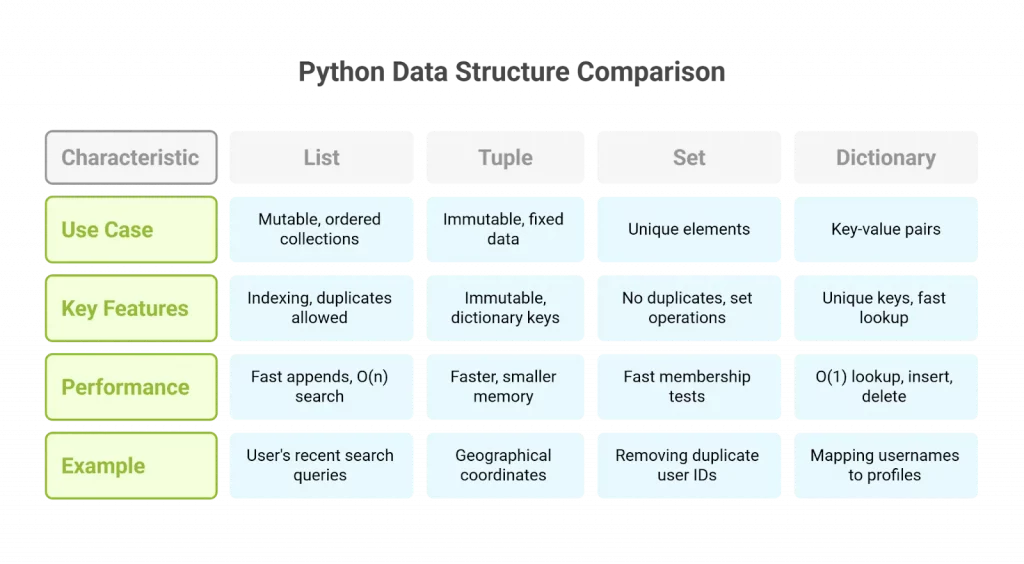
- Use a List when you need an ordered sequence of items that you might need to change (add, remove, or reorder). This is your default, general-purpose container.
- Use a Tuple when you have an ordered collection of items that should not change. They are good for data integrity and can be used as dictionary keys.
- Use a Dictionary when you need to associate unique keys with values for fast lookups. This is ideal for storing structured information, like the features of a single data point.
- Use a Set when you only care about the presence of unique items and need to perform mathematical set operations or remove duplicates efficiently.
Conclusion
In this lesson, you've been introduced to the workhorses of Python data manipulation: lists, tuples, dictionaries, and sets. You learned about their core properties—mutability, ordering, and uniqueness—and saw how to perform the most common operations for each.
Key takeaways include:
- Lists are mutable, ordered sequences, like flexible arrays.
- Tuples are immutable, ordered sequences, useful for fixed data.
- Dictionaries are mutable, ordered (since Python 3.7) mappings of unique keys to values, optimized for fast lookups.
- Sets are mutable, unordered collections of unique elements, optimized for membership tests and mathematical operations.
Mastering these data structures is a huge step toward becoming proficient in Python for machine learning. You will use them in virtually every script you write and every model you build.
In the next lesson, we will dive into list comprehensions. This is a powerful and concise Python feature that lets you create lists in a single, readable line of code, building directly on what you've learned today about lists and loops.