Welcome back. In our last lesson, we took a deep dive into the architectural patterns for Azure Key Vault, establishing how to securely manage the secrets, keys, and certificates that form a critical part of your application's foundation. We focused on securing a specific, vital component of your architecture.
Today, we will zoom out from individual components to the entire cloud estate. This lesson addresses the broader challenge of maintaining security hygiene and detecting active threats across all your resources. The learning outcome is to assess Microsoft Defender for Cloud's role in security posture management and threat protection for an Azure environment.
As a future Principal Engineer, your purview extends beyond single services to the security and integrity of the entire system. Understanding Defender for Cloud is not about learning a single tool, but about grasping Azure's native strategy for enterprise-wide security governance. Given your experience with AWS, you'll find it helpful that we'll frame Defender for Cloud in relation to its AWS counterparts, primarily AWS Security Hub and Amazon GuardDuty, to accelerate your understanding of its architectural role.
The Modern Security Challenge and the CNAPP Solution
In a large, dynamic cloud environment, maintaining a secure posture is a complex task. Resources are provisioned and deprovisioned continuously, new vulnerabilities are discovered daily, and attackers constantly probe for weaknesses. A simple list of security alerts is no longer sufficient.
The industry's answer to this challenge is the Cloud Native Application Protection Platform (CNAPP). A CNAPP unifies multiple security capabilities into a single, integrated platform that protects applications from development through to production.
Microsoft Defender for Cloud is Azure's native CNAPP. It's designed to provide a unified view of security across your entire environment, including resources in Azure, on-premises, and in other clouds like AWS and GCP.
The core functions of Defender for Cloud can be understood through three primary pillars, as illustrated in the diagram below.
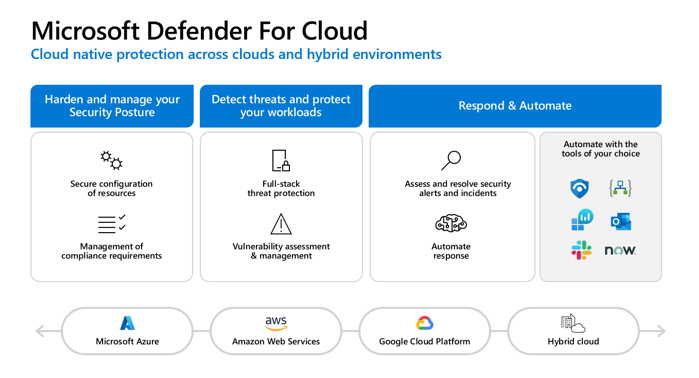
For this lesson, we will focus on the first two pillars which represent its primary roles:
- Cloud Security Posture Management (CSPM): The "Harden" pillar.
- Cloud Workload Protection Platform (CWPP): The "Detect and Protect" pillar.
Before we explore these pillars, let's map these concepts to the AWS services you are already familiar with.
AWS Security vs Azure Security: Complete Comparison Guide
This article from PUMP provides a useful, high-level comparison of the security services offered by AWS and Azure. It will help you quickly build a mental model of where Defender for Cloud fits.
Please focus on two parts of this article: First, review the comparison table. Note the mapping for "Threat Detection" (GuardDuty to Defender for Cloud) and "Security Monitoring" (Security Hub to Azure Security Center, which is the old name for Defender for Cloud). Then, read the brief section on Microsoft Defender for Cloud. The key takeaway is that Microsoft Defender for Cloud combines the functionality that AWS offers through multiple, separate services. Broadly speaking, the CSPM features of Defender for Cloud are analogous to AWS Security Hub, while the CWPP features are analogous to Amazon GuardDuty and other threat detection services.
Pillar 1: Cloud Security Posture Management (CSPM)
CSPM is the proactive side of Defender for Cloud. Its goal is to help you understand your current security posture, identify misconfigurations and weaknesses, and provide prioritized recommendations to strengthen it.
At its core, CSPM in Defender for Cloud is powered by Azure Policy, a service you've encountered in previous lessons for enforcing governance. Defender for Cloud provides a specialized set of policies and initiatives, benchmarked against industry standards like CIS and NIST, to continuously assess your resources.
The output of this continuous assessment is summarized in your Secure Score.
Defender for Cloud (Azure Security Center) and Azure Sentinel Overview (AZ-500)
This video from John Savill, though it uses the older name "Azure Security Center," provides an excellent conceptual overview of the foundational, free CSPM capabilities.
Watch the segment from the free part of the service. Pay attention to how the Secure Score is calculated and how it provides a prioritized list of recommendations. The higher the point value of a recommendation, the greater its impact on your security posture.
The Secure Score gives you a gamified, high-level metric to track your security hygiene. While the foundational CSPM capabilities are free, the paid Defender CSPM plan unlocks advanced tools that provide a much deeper, context-aware view of your posture. These are the tools that are most valuable from an architectural perspective.
Manage cloud security posture with Microsoft Defender for Cloud
This video from Microsoft Security showcases the advanced features of Defender CSPM. It demonstrates how the platform moves beyond a simple list of findings to provide contextual, risk-prioritized insights.
Please watch the following demonstrations: Risk-based recommendations: Notice how recommendations can be filtered by risk factors like "sensitive data," helping you prioritize what to fix first. Attack Path Analysis: This is a critical feature. It visualizes how an attacker could chain together multiple, seemingly low-risk misconfigurations to achieve a high-impact breach, like accessing a storage account with sensitive data. Cloud Security Explorer: This demonstrates the proactive "hunting" capability, allowing you to run graph-based queries to find latent risks in your environment, such as identifying all container images affected by a newly discovered CVE.
These advanced capabilities—Attack Path Analysis and the Cloud Security Explorer—are what elevate Defender for Cloud from a simple compliance checker to a strategic tool for risk management. For a Principal Engineer, being able to model potential attack vectors and proactively hunt for complex risks is far more valuable than just remediating a long list of low-level findings.
For a comprehensive list of all CSPM features, you can refer to the official documentation.
Microsoft Defender for Cloud Overview
This section of the official Microsoft Learn documentation provides a detailed breakdown of the CSPM capabilities, both foundational and advanced.
Please read the section on Cloud security posture management. Pay particular attention to the table that lists capabilities like Data Security Posture Management and Security Governance, which are essential for managing security at an enterprise scale.
Pillar 2: Cloud Workload Protection Platform (CWPP)
While CSPM is about hardening your environment against potential attacks, CWPP is about detecting and protecting your workloads from active threats. This is the reactive side of Defender for Cloud.
Unlike the unified CSPM offering, the CWPP capabilities are delivered through a suite of workload-specific Defender plans. You enable and pay for the plans that correspond to the resources you use. This modular approach allows you to tailor your threat detection coverage to your architecture.
Microsoft Defender for Cloud Overview
These sections of the documentation introduce the concept of the Defender plans and list the specific protections they offer.
First, review the table in the CNAPP section. This table lists all the available Defender plans, such as Defender for Servers, Defender for Containers, Defender for Storage, and even Defender for Key Vault, which directly relates to our previous lesson. Next, read the section on the Cloud workload protection platform. This explains how these plans provide workload-specific security alerts and advanced protections.
These plans go beyond simple log analysis. They use a combination of agent-based and agentless scanning, machine learning, behavioral analytics, and Microsoft's global threat intelligence to detect malicious activity.
To make this concrete, let's look at some of the specific "advanced protection" features these plans enable.
Defender for Cloud (Azure Security Center) and Azure Sentinel Overview (AZ-500)
Returning to John Savill's video, this segment explains several of the key advanced protection features provided by the Defender plans.
Watch the section from advanced protection. This covers several powerful features, including: Just-in-Time (JIT) VM Access: Mitigates brute-force attacks by locking down management ports like RDP/SSH and only opening them on-demand for a limited time. Adaptive Application Control: Creates an allow-list of known-good processes on your VMs and alerts you if any unauthorized code runs. Container Image Scanning: Scans container images in your Azure Container Registry for known vulnerabilities (CVEs). Adaptive Network Hardening: Uses machine learning to analyze your network traffic patterns and recommend more restrictive Network Security Group (NSG) rules.
These features demonstrate that CWPP is not just about passive detection; it provides active protection mechanisms to reduce your attack surface and block threats in real time.
The Architect's Perspective: Defender for Cloud vs. Microsoft Sentinel
A common point of confusion for architects is the distinction between Microsoft Defender for Cloud and Microsoft Sentinel.
-
Microsoft Defender for Cloud is the CNAPP. Its primary job is to provide security posture management (CSPM) and threat protection for your cloud workloads (CWPP). It is the source of high-fidelity, workload-specific security findings and alerts.
-
Microsoft Sentinel is the Security Information and Event Management (SIEM) and Security Orchestration, Automation, and Response (SOAR) platform. Its job is to ingest security signals from all sources—Defender for Cloud, Microsoft Entra ID, firewalls, user activity logs, on-premises systems, etc.—and provide a single place for security operations teams to perform large-scale threat hunting, incident investigation, and automated response.
Think of it this way: Defender for Cloud protects your cloud resources and generates alerts. Sentinel collects those alerts, correlates them with signals from the rest of your digital estate, and orchestrates the response. Defender for Cloud is a critical input to Sentinel.
Conclusion
In this lesson, we have assessed the role of Microsoft Defender for Cloud as Azure's comprehensive security management and threat protection platform. For an architect, it is the central nervous system for cloud security.
Key Takeaways:
- Defender for Cloud is a CNAPP, combining the capabilities of AWS Security Hub (CSPM) and Amazon GuardDuty (CWPP) into a single, integrated platform.
- Cloud Security Posture Management (CSPM) provides proactive hardening through continuous assessment, a Secure Score, and advanced tools like Attack Path Analysis to help you find and fix misconfigurations before they can be exploited.
- Cloud Workload Protection Platform (CWPP) provides reactive threat detection through a suite of modular Defender plans that protect specific resource types like VMs, containers, databases, and storage.
- Defender for Cloud is a primary source of security signals for Microsoft Sentinel, which is the broader SIEM/SOAR platform used for enterprise-wide security operations.
You are now prepared to think strategically about how to leverage Defender for Cloud to establish and maintain a robust security posture for any Azure environment you design.
In our next lesson, we will continue our journey through security architecture by focusing on another fundamental layer of defense: data encryption options in Azure, where we will explore encryption at rest, in transit, and the use of customer-managed keys.