Welcome back. In our previous module, we focused on building a robust observability platform, culminating in a comparison of Azure Dashboards and Workbooks for visualizing operational data. Now, we transition from observing system behavior to proactively securing its foundations. This begins our module on Security Architecture and Compliance.
In any distributed system, the management of credentials, cryptographic keys, and certificates is a foundational security concern. Mishandling these "crown jewels" can undermine all other security measures. This lesson directly addresses the learning outcome: to evaluate architectural patterns for integrating Azure Key Vault to manage secrets, keys, and certificates securely.
For your role as a future Principal Engineer, this is not merely about using a service; it's about making deliberate architectural choices. You will learn to evaluate the patterns for how services authenticate to Key Vault, how cryptographic keys are managed and rotated for data services, and, most importantly, how to select the right tool from Azure's key management portfolio based on stringent security, compliance, and operational requirements.
The Central Role of Key Vault
In a modern cloud architecture, applications and services need access to secrets like database connection strings, API keys, and certificates for TLS. A common anti-pattern is to store these in application configuration files, environment variables, or source code. This practice creates a significant security risk, making secrets difficult to rotate and easy to expose.
The solution is a centralized, hardened, and auditable secret store. In Azure, this is Azure Key Vault. It acts as the secure heart of the application ecosystem.

Before we dive into specific patterns, it's crucial to understand the conceptual difference between a Key Management Service (KMS) and a Hardware Security Module (HSM), as this distinction underpins the entire Azure portfolio.
HSM vs KMS - AWS | Azure | Thales | Entrust - Accutive Security
This article from Accutive Security provides an excellent, vendor-neutral breakdown of the fundamental difference between an HSM and a KMS. This conceptual clarity is essential for making sound architectural decisions.
Please read the following sections: Review the table to get a quick sense of the decision points. Read the section The Fundamental Difference to understand the concepts of a hardware-enforced boundary and "root of trust." Finally, read the section When KMS Is Your Best Choice to see the typical use cases where a service like Azure Key Vault shines.
As the article explains, Azure Key Vault is best understood as a KMS. Its primary purpose is to manage the lifecycle of secrets at scale, providing convenience, automation, and integration with other cloud services. While it uses HSMs internally for protection, its service model is that of a managed key service, not a raw HSM.
Azure Key Vault is designed to store three main types of objects. John Savill provides a concise overview.
Azure Key Vault RBAC and Policy Deep Dive
This clip from "Azure Key Vault RBAC and Policy Deep Dive" introduces the three core object types managed by Key Vault.
Watch the segment from the beginning to understand the distinction between secrets, keys, and certificates, and the concept of software-based vs. HSM-based operations.
Architectural Pattern 1: Secure Access via Managed Identities and RBAC
The first and most fundamental pattern answers the question: "How does an application get a secret without having a secret?" The answer lies in using Managed Identities.
A managed identity provides an Azure resource (like a VM, App Service, or Function App) with an identity in Microsoft Entra ID. The resource can then use this identity to authenticate to services that support Entra ID authentication, including Key Vault, without any credentials being stored in your code.
The flow is as follows:
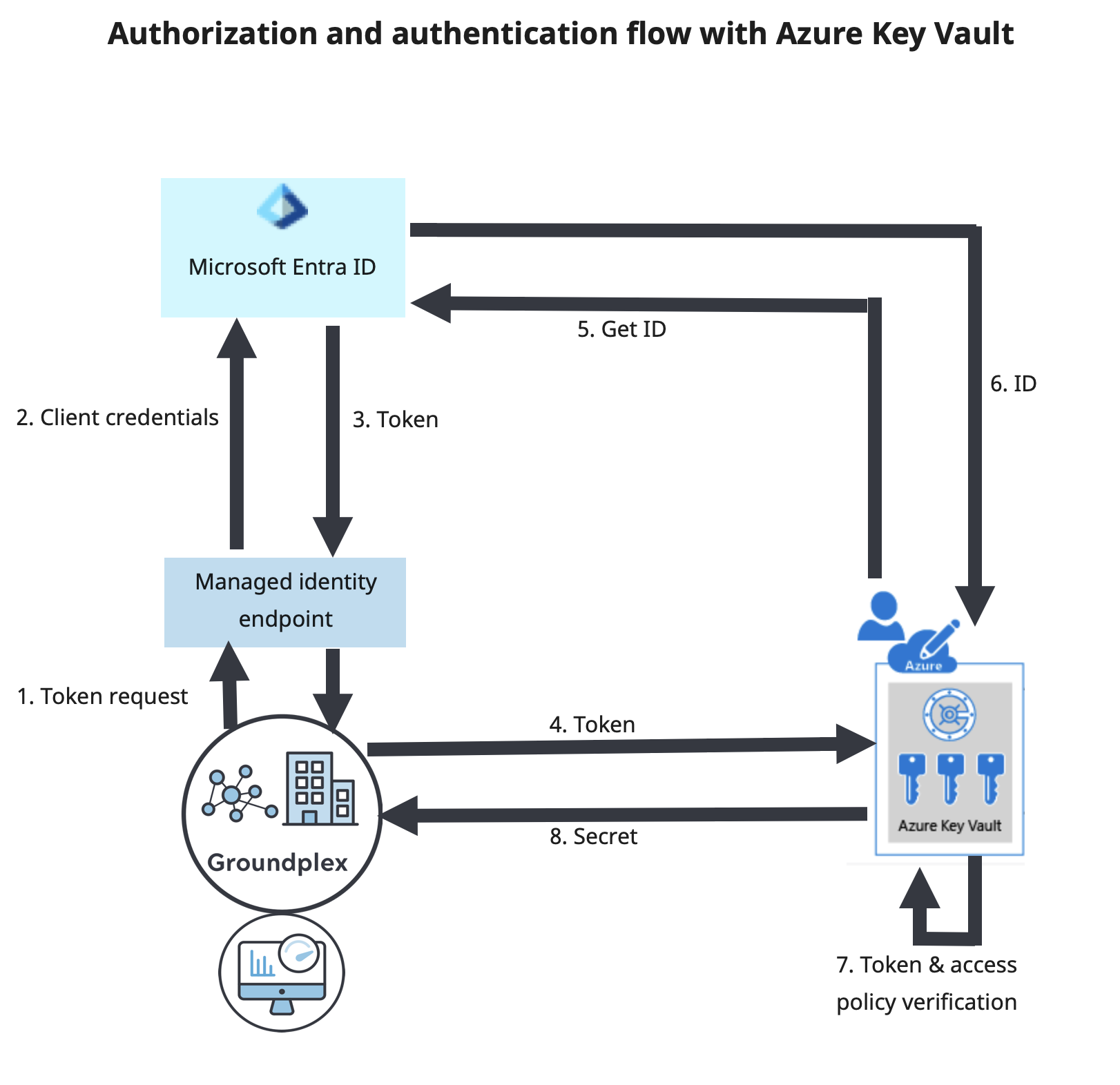
Once authenticated, the next question is authorization: what is this identity allowed to do? Key Vault supports two permission models:
- Vault Access Policies: The legacy model. Permissions (e.g., "Get Secret," "List Keys") are granted to an identity at the scope of the entire vault. This lacks granularity; if you have access to get secrets, you have access to get all secrets.
- Azure Role-Based Access Control (RBAC): The modern, recommended model. It allows you to assign roles to identities at different scopes: the subscription, resource group, the vault itself, or even an individual secret, key, or certificate. This aligns with the principle of least privilege.
The following video provides a deep dive into this crucial comparison and demonstrates the power of the RBAC model.
Azure Key Vault RBAC and Policy Deep Dive
In the same video, John Savill contrasts the old access policy model with the modern RBAC model, showing a practical example of granting a managed identity access to a single secret.
Please watch these segments: Access Policies: Understand the limitations of the older, vault-level permission model. Role-Based Access Control: Grasp the concept of data plane RBAC and its granularity. RBAC in Action: See a demonstration where a Function App's managed identity is granted access to read Secret2 but is denied access to Secret1. This is a core security pattern in practice.
For any new architecture, using Managed Identities combined with Azure RBAC at the individual secret/key scope is the preferred pattern for securing application access.
Architectural Pattern 2: Customer-Managed Keys (CMK) and Rotation
Beyond application secrets, Key Vault is critical for managing the cryptographic keys used for encryption at rest. Many Azure PaaS services (e.g., Azure Storage, Azure SQL Database, Azure Cosmos DB) encrypt data by default using Microsoft-managed keys. For enhanced control and to meet compliance requirements, these services allow you to use a Customer-Managed Key (CMK) stored in your Key Vault.
When using CMKs, key rotation becomes a critical operational task. A key should not live forever. The best practice is to periodically create a new version of the key and have services begin using it. This can be achieved through a few patterns:
- Service-side automatic rotation: The Azure service (e.g., a Storage Account) is configured to point to the key URI without a version. It periodically checks the Key Vault and automatically starts using the newest version of the key when it appears.
- Key Vault-side automatic rotation: You define a rotation policy directly on the key within Key Vault. The policy instructs Key Vault to generate a new version automatically based on a schedule (e.g., 30 days before the current version expires).
- Event-driven rotation: Key Vault can emit events to Azure Event Grid when a new key is created or is near expiry. This can trigger a custom process (e.g., an Azure Function) to orchestrate the key update for services that don't support automatic rotation.
This video demonstrates these rotation patterns in detail.
Using Azure Key Vault Key Rotation Policies
In "Using Azure Key Vault Key Rotation Policies," John Savill explains the importance of key rotation and demonstrates the automated patterns available.
Watch these key sections: Key Rotation Concepts: An introduction to why key rotation is necessary. Service and Key Overlap: This section explains how a service like Azure Storage can be configured for automatic key rotation and highlights the crucial need for an overlap period where both the old and new keys are valid. Rotation Policy: See how to configure an automatic rotation policy directly on a key within Key Vault, defining expiry times and renewal schedules.
Architectural Pattern 3: Governance with Azure Policy
To ensure these security practices are followed at scale, we use Azure Policy. You can apply policies to enforce rules such as:
- Secrets must have an expiration date set.
- Keys must be of a certain type and size (e.g., RSA 4096-bit).
- Key Vaults should have diagnostic logging enabled.
- Keys should have a rotation policy configured.
This allows you to audit your environment for non-compliance or even deny the creation of non-compliant resources.
Azure Key Vault RBAC and Policy Deep Dive
Returning to our first video, this segment shows how Azure Policy can be used to govern Key Vault resources.
Watch the clip on Azure Policy to see an example of a policy that audits for secrets without an expiration date.
Evaluating the Broader Key Management Landscape
While Azure Key Vault is the default choice for most scenarios, your role as an architect requires knowing when it's not enough. Azure offers a spectrum of solutions for more demanding requirements.
This Microsoft Learn document provides the official decision framework for selecting between Azure's key management offerings.
Focus on these key elements: Review the flowchart to understand the primary decision drivers like FIPS compliance and use case. Study the table in the Service characteristics and responsibilities section. Pay close attention to the differences in the service model (PaaS vs. IaaS-style) and who controls HSM administration. Carefully analyze the Decision criteria table. This is a powerful tool for comparing the solutions based on compliance, key sovereignty, tenancy, and cost.
The Microsoft documentation gives you the "what," but a third-party perspective can provide the critical "why" and highlight real-world trade-offs. The Accutive Security article contains several invaluable insights.
HSM vs KMS - AWS | Azure | Thales | Entrust - Accutive Security
This article offers practical case studies and clarifies common points of confusion that lead to architectural mistakes.
Your focus here should be on the architectural lessons: Read When HSMs Are Non-Negotiable to understand use cases like Certificate Authority operations and payment processing where a standard KMS is insufficient. Review the case study Costly Misuse of Dedicated HSMs. This is a classic example of over-engineering based on a misunderstanding of compliance needs. Skim the Platform Comparisons table, especially the insights on Azure Dedicated HSM. This leverages your AWS knowledge by contrasting with AWS CloudHSM. Finally, and most importantly, read Common Misconceptions. The point about Azure Key Vault Premium is particularly crucial for architects to understand.
The key takeaway is that moving up the stack from Key Vault Premium to Managed HSM or Cloud HSM is a deliberate architectural decision driven by specific, non-negotiable requirements for things like FIPS 140-2 Level 3 validation, single-tenancy, or complete control over the HSM's root of trust. It is not simply a matter of "more secure is better"; it's a trade-off involving significantly higher cost and operational complexity.
Conclusion
In this lesson, we have moved beyond simply using a key vault to evaluating the architectural patterns that enable secure and scalable secret management in Azure.
Key Takeaways:
- Azure Key Vault is a KMS, central to securing applications by managing secrets, keys, and certificates.
- The primary access pattern for Azure resources is Managed Identity with data plane RBAC, which provides granular, auditable, and credential-free access.
- For services requiring encryption at rest with CMK, key rotation is paramount. This can be automated using a combination of service-side features and Key Vault's own rotation policies.
- Azure Policy is the tool for enforcing governance and compliance standards across all your Key Vault instances.
- Choosing the right key management solution is an architectural trade-off. While Key Vault is suitable for most use cases, Azure Managed HSM and other offerings exist for stringent compliance and security scenarios that demand single-tenancy and greater control.
You are now equipped to design solutions that not only use Azure Key Vault but do so following secure, scalable, and governable architectural patterns.
In our next lesson, we will broaden our security focus. We'll explore how Microsoft Defender for Cloud provides comprehensive security posture management and threat protection for your entire Azure environment, building on the secure foundations we've established today.