Welcome to the next lesson in our security module. In our previous session, we examined Microsoft Defender for Cloud, focusing on its role in providing a high-level view of your security posture and protecting workloads from active threats. We established how to "harden" and "protect" your cloud estate from an enterprise-wide perspective.
Today, we will transition from that broad oversight to a fundamental, specific layer of defense: data encryption. The objective for this lesson is to explain data encryption options in Azure, including encryption at rest, in transit, and the use of customer-managed keys.
For a Principal Engineer, encryption is not merely a technical implementation detail; it represents a series of critical architectural decisions. These decisions have direct implications for security, compliance, performance, and operational complexity. Your role will require you to evaluate these trade-offs and select the appropriate encryption strategy based on data sensitivity and business requirements. We will approach this topic from that architectural viewpoint, focusing on the "why" and "when" behind Azure's various encryption models.
The Three States of Data
To build a comprehensive encryption strategy, you must protect data throughout its entire lifecycle. In a cloud environment, data exists in three distinct states, each with its own threat model and corresponding protective measures.
Architecture strategies for data encryption - Azure
This document from the Azure Well-Architected Framework introduces the core concepts of data protection. It's a great starting point for framing our discussion.
Please read the introductory section, from the beginning down to the heading "Determine encryption requirements". Pay close attention to the definitions of the three states of data: at rest, in transit, and in use.
As you've just read, every piece of data in your system exists in one of these states. A robust security architecture must address all three. Let's look at a high-level view of how these encryption types are applied across a typical Azure application.

The Key to Encryption: Understanding the Hierarchy
Before diving into the specifics of "at rest" and "in transit," we need to clarify how encryption keys are managed. It's a common misconception that the key you control is used directly to encrypt terabytes of data. For performance and security reasons, cloud providers use a system of key wrapping, or a key hierarchy.
The core principle is this:
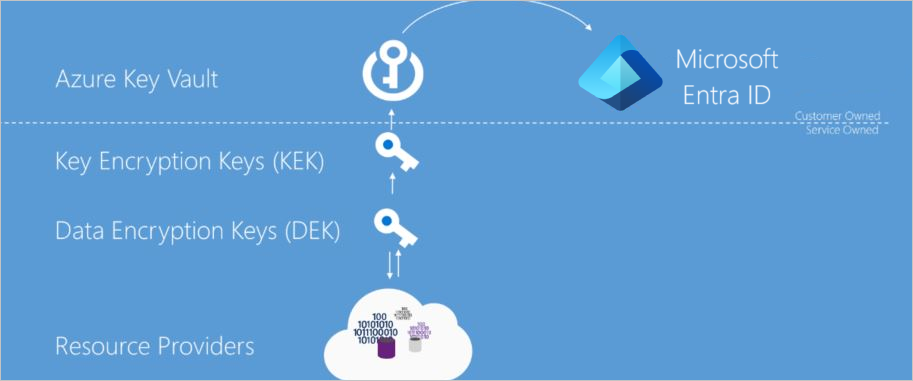
- A Data Encryption Key (DEK) is a symmetric key used to encrypt and decrypt the actual data. These are generated in large numbers and live close to the data for performance.
- A Key Encryption Key (KEK) is another key (often asymmetric) used to encrypt, or "wrap," the DEK. The KEK acts as a protector of the DEK.
By protecting the KEK, you control access to all the data encrypted by the DEKs that it wraps. This hierarchy is visualized in the diagram below.
John Savill provides a clear, concise explanation of this DEK/KEK model in practice.
Azure Storage and Disk Encryption Deep Dive
This segment from John Savill's deep dive on Azure encryption explains the default server-side encryption model for Azure Storage, which is an excellent illustration of the DEK/KEK hierarchy.
Please watch the section from this overview of how data is encrypted in a storage account. Focus on his description of the data encryption key and the key encryption key.
Architectural Decision: Platform-Managed vs. Customer-Managed Keys
The most significant architectural decision you will make regarding encryption is who controls the KEK. This leads to two primary models:
- Platform-Managed Keys (PMK): This is the default for nearly all Azure services. Microsoft manages the entire key lifecycle—creation, rotation, and storage—of the KEKs. This model offers maximum convenience and low operational overhead.
- Customer-Managed Keys (CMK): You control the KEK. You use Azure Key Vault to store your key, which can be generated in Key Vault or imported from your on-premises HSMs (a pattern known as Bring Your Own Key or BYOK). You are responsible for the key's lifecycle.
The trade-off is clear: convenience versus control. CMK is essential for meeting stringent compliance requirements (e.g., PCI-DSS, HIPAA) that mandate customer control over encryption keys and the ability to revoke access to data by deleting or rotating the key.
Encryption at Rest
Encryption at rest protects your data when it's stored on physical media. As mentioned, nearly all Azure storage services enable encryption at rest by default using PMK. This includes Azure Blob Storage, Azure Files, Managed Disks, Azure SQL Database, and Azure Cosmos DB.
From an architectural standpoint, the interesting work begins when the default PMK model is insufficient and you need to implement CMK or other advanced patterns.
Storage Accounts: SSE, CMK, and Advanced Patterns
For Azure Storage, the default is Server-Side Encryption (SSE) with a PMK. When you need to use a CMK, you configure the storage account to use a key from your Azure Key Vault.
Azure Storage and Disk Encryption Deep Dive
Continuing with John Savill's video, this part demonstrates how to switch from the default PMK to a CMK for a storage account.
Watch from this segment on CMK. Note his emphasis on the control you gain over key rotation and the critical importance of enabling soft-delete on your Key Vault to prevent accidental data loss.
For more complex scenarios, Azure Storage offers even more granular control:
- Double Encryption: For the highest level of assurance, you can enable a second layer of encryption at the infrastructure level. The data is encrypted once with the service-level key (which can be a CMK) and a second time with a platform-managed key using a different algorithm. This increases attacker cost. Savill covers this from
this section in the same video. - Encryption Scopes: In multi-tenant applications where you might store data for different customers in the same storage account, you can use encryption scopes. Each scope can be configured with its own CMK or a PMK, allowing you to enforce cryptographic separation of data at the container or even individual blob level. Savill demonstrates this from
this part .
VM Disks: A Tale of Three Encryption Methods
Encrypting VM disks involves more nuanced architectural choices than storage accounts. There are several overlapping and evolving methods.
-
Server-Side Encryption (SSE) for Managed Disks: This is the default. The underlying storage infrastructure encrypts your managed disk data at rest using a PMK. To use a CMK, you use a resource called a Disk Encryption Set (DES), which links your managed disks to a key in Azure Key Vault. This is analogous to how CMK works for storage accounts.
-
Azure Disk Encryption (ADE): This is a different technology that operates inside the guest OS. It uses BitLocker (on Windows) or dm-crypt (on Linux) to encrypt the OS and data disks. The keys for ADE are also stored in your Key Vault. A key difference is that ADE encrypts the entire data path, including the temporary disk and data flowing from the VM to the storage host. However, ADE is being retired and cannot be used in combination with CMK via Disk Encryption Sets.
-
Encryption at Host: This is the modern approach that combines the benefits of both. When enabled, it ensures that all data—including the temp disk and caches on the VM host itself—is encrypted at rest using the same key specified by your Disk Encryption Set (for CMK) or the default PMK. It provides end-to-end encryption from the host to the storage service without the performance overhead or OS-level complexity of ADE.
Understanding the differences between these three is crucial for making the right architectural choice for IaaS workloads.
Azure Storage and Disk Encryption Deep Dive
This final segment from John Savill's video masterfully compares and contrasts these different disk encryption models. This is a critical concept for any Azure architect.
Please watch the remainder of the video, from this point onward. He will walk you through: The default SSE for managed disks. Using Disk Encryption Sets (DES) for CMK. How Azure Disk Encryption (ADE) works inside the OS. The critical limitations and differences between DES and ADE. How Encryption at Host solves these trade-offs and is the way forward.
Encryption in Transit
Encryption in transit protects data as it moves across network connections. Azure employs several layers of in-transit encryption.
Azure encryption overview - Microsoft Learn
This document provides a good summary of the various mechanisms Azure uses to secure data on the move.
Please read the section Encryption of data in transit. Focus on the different protocols and scenarios it covers, from public traffic to internal datacenter traffic.
From the reading, the key takeaways are:
- TLS/HTTPS: All public-facing Azure service endpoints support TLS (recommending 1.2 or later) for encrypting traffic from clients.
- MACsec: Traffic between Azure datacenters (inter-region or intra-region) is automatically encrypted at the data-link layer using MACsec, protecting against physical wiretapping. This is on by default.
- VPN/ExpressRoute: For hybrid connectivity, IPsec (for VPN) and MACsec (for ExpressRoute Direct) provide encryption for traffic between your on-premises environment and Azure.
VNet Encryption: Securing Intra-VNet Traffic
A more recent and architecturally interesting feature is Virtual Network Encryption. While MACsec protects traffic between datacenters, VNet Encryption protects traffic within a virtual network, between VMs.
Crucially, this encryption is offloaded to the host's SmartNIC (the same hardware that enables Accelerated Networking), meaning there is virtually no CPU performance impact on the guest VMs.
Virtual Network Flow Logs and Encryption Overview
This short clip from John Savill explains the VNet Encryption feature.
Watch the section from this explanation of how VNet encryption works. The key insight is its reliance on hardware offload, making it a "free" performance-wise security enhancement for supported VM types.
A Glimpse into the Future: Encryption in Use
For completeness, especially for your role, it's worth briefly touching on the third state: encryption in use. This emerging field, known as Confidential Computing, aims to protect data while it's being processed in memory.
Azure provides this capability through Trusted Execution Environments (TEEs), which are hardware-isolated enclaves within the CPU. This allows you to process highly sensitive data in the cloud with the assurance that not even the cloud provider's host administrator can access the data or code inside the enclave. Services like Azure Confidential VMs and Confidential Containers on AKS are built on this technology.
Architecture strategies for data encryption - Azure
This resource provides a brief but effective overview of this advanced topic.
Quickly review the sections on Encrypt data in use and Data-in-use protection to understand the concept and the types of services that support it.
Conclusion
In this lesson, we explored Azure's multi-faceted approach to data encryption. We moved beyond a simple checklist to analyze the architectural decisions and trade-offs involved in protecting data across its entire lifecycle.
Key Takeaways:
- Data must be protected in three states: at rest, in transit, and in use.
- Azure uses a DEK/KEK hierarchy. The central architectural decision is whether to use Platform-Managed Keys (PMK) for convenience or Customer-Managed Keys (CMK) for control and compliance, managed via Azure Key Vault.
- Encryption at rest is on by default for most services. Advanced patterns include CMK, double encryption, and for disks, the choice between SSE with Disk Encryption Sets and the modern Encryption at Host.
- Encryption in transit uses standard protocols like TLS for public traffic, with Azure adding automatic MACsec for its backbone traffic and offering performant VNet Encryption for intra-VNet communication.
- Encryption in use is an advanced capability delivered through Azure Confidential Computing to protect data during processing.
You now have a framework for designing and evaluating encryption strategies in Azure, balancing security requirements with operational realities.
In our next and final lesson of the security module, we will connect these technical controls to business needs by learning how to use Microsoft Purview and the Service Trust Portal to assess and report on an organization's compliance posture.