Welcome to the final lesson of our module on Security Architecture and Compliance. In our last session, we delved into the technical specifics of data encryption, examining how to protect data at rest, in transit, and in use. We established that these encryption strategies are fundamental technical controls for securing your Azure environment.
However, implementing technical controls is only half the battle. For a Principal Engineer, it is equally critical to demonstrate that these controls meet specific business and regulatory requirements. This is the bridge between engineering and governance. Today's lesson is about crossing that bridge. Our goal is to learn how to use Microsoft Purview Compliance Manager and the Service Trust Portal to assess and report on an organization's compliance posture.
We will explore two key resources that allow you to manage and report on compliance from two different perspectives: Microsoft's and your own. This isn't about becoming a compliance officer; it's about understanding the tools that translate your architectural decisions into the language of trust, risk, and legal adherence—a crucial skill for senior technical leadership.
The Two Sides of Cloud Compliance
In the cloud, compliance is a partnership. The shared responsibility model, which we've touched on before, is paramount here. Microsoft is responsible for the security of the cloud (the physical infrastructure, the virtualization layer, the managed service operations), while you are responsible for security in the cloud (how you configure your services, manage identity, and protect your data).
This means you need answers to two fundamental questions:
- How does Microsoft ensure its platform is compliant with global standards like ISO 27001, SOC 2, or PCI DSS?
- How can I assess, track, and prove that the way I've configured my services on Azure meets the requirements of those same standards?
Answering these questions is the key to navigating audits and satisfying stakeholders. Microsoft provides dedicated portals for each.
Microsoft Service Trust Portal: Trust but Verify
Before you can build a compliant application, you must trust the foundation it's built upon. The Microsoft Service Trust Portal is your window into Microsoft's own compliance and security practices. It's a repository of documentation that provides the evidence of Microsoft's adherence to a vast array of international and industry-specific standards.
As an architect, this portal is your primary source for due diligence. When your security team, a customer, or an auditor asks, "Can you provide the SOC 2 Type II report for Azure?", this is where you go.
Microsoft Service Trust Portal And Privacy Capabilities Guide
This article provides a concise overview of the Service Trust Portal. It clearly outlines its purpose and the key resources it contains.
Please read the sections titled Service Trust Portal and the Frequently Asked Questions. Focus on understanding what kind of information is available (audit reports, certifications) and how it helps you meet your own compliance needs.
The key takeaway is that the Service Trust Portal allows you to leverage Microsoft's certifications as part of your own compliance story. You don't have to audit Microsoft's datacenters yourself; you can download their certified audit reports and present them as evidence. This is a massive accelerator.
Microsoft Purview Compliance Manager: From Regulation to Action
While the Service Trust Portal tells you about Microsoft's responsibilities, Microsoft Purview Compliance Manager is the tool you use to manage your own. It translates complex regulatory standards into actionable checklists, helping you assess your current posture, implement improvements, and report on your progress.
At its core, Compliance Manager operationalizes the shared responsibility model. It shows you what Microsoft has done, and then gives you a clear, prioritized list of what you need to do.
This video from Microsoft Mechanics provides an excellent conceptual walkthrough of why Compliance Manager exists and how it works.
Simplify regulatory compliance with Microsoft Purview Compliance Manager
This video explains the core value proposition of Compliance Manager: simplifying the complex world of regulatory compliance.
Watch the first three minutes, from the introduction. Pay close attention to how it frames the problem of tracking compliance and the role of Compliance Manager in helping "everyone get on the same page."
The Compliance Score: A Navigational Beacon
When you first enter Compliance Manager, you're greeted with a Compliance Score. This score provides an at-a-glance measure of your compliance posture. It is not, by itself, proof of compliance. Rather, it's a tool for prioritization and progress tracking.
The score is calculated based on two categories of actions:
- Microsoft managed actions: These are controls completely owned and managed by Microsoft. You inherit the points for these automatically.
- Your improvement actions: These are controls you are responsible for implementing. They can be technical configurations, policies, or operational procedures.
This video segment explains the score in more detail.
Simplify regulatory compliance with Microsoft Purview Compliance Manager
Let's continue with the Microsoft Mechanics video to understand how this score is composed.
Watch the section from this point. Note how the score is initially based on a general "data protection baseline" and how it clearly separates Microsoft's actions from your own.
Assessments: Turning Standards into Checklists
The core workflow in Compliance Manager is the assessment. You choose a regulation or standard from a vast library (e.g., GDPR, PCI DSS, ISO 27001), and the tool generates a detailed assessment based on a pre-built template. This assessment contains all the controls and improvement actions relevant to that standard.
For a Principal Engineer, this is where the abstract language of a regulation gets translated into concrete technical and procedural requirements.
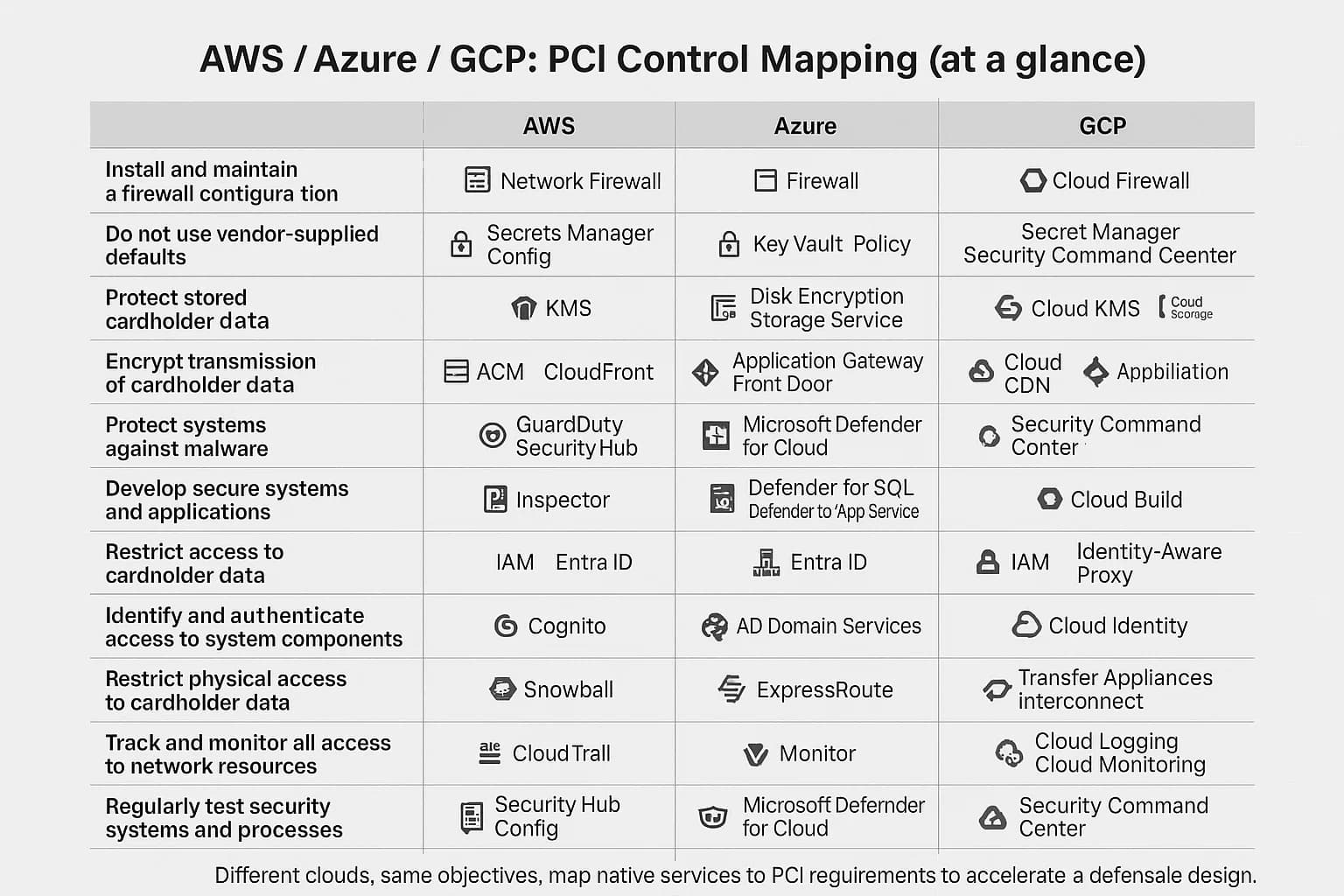
Let's watch how to create an assessment.
Simplify regulatory compliance with Microsoft Purview Compliance Manager
This next segment demonstrates how to move beyond the generic baseline and create an assessment for a specific regulation.
Watch from this section. The key concept here is the library of templates that codify hundreds of regulations, and the ability to use "universal" templates that are service-agnostic.
Improvement Actions: The Engineer's To-Do List
Once an assessment is created, it presents you with a list of improvement actions. This is where your team's work happens. These actions fall into two main categories:
- Automatic Actions: These are tied to technical configurations that Compliance Manager can automatically verify. For example, it can check if MFA is enabled for admins, if storage accounts have public access disabled, or if encryption is turned on for a database. Many of these actions have a "Launch Now" link that takes you directly to the Azure portal to make the configuration change.
- Manual Actions: These are tasks that can't be automatically verified, such as "establish a privacy training program for employees" or "document an incident response plan." For these, you must manually provide evidence (like documents, screenshots, or links) and update their status.
Let's see this collaborative workflow in action.
Simplify regulatory compliance with Microsoft Purview Compliance Manager
This is the most critical part of the process. It shows how improvement actions are managed, assigned, and documented.
Please watch the section from this segment. Focus on the collaboration aspect—assigning an action to a stakeholder—and the clear distinction between a manual action (documenting a program) and an automatic one (configuring a retention policy), which provides a deep link to the portal.
This ability to link directly from a compliance requirement to the specific technical control in the Azure portal is a powerful feature. It closes the loop between the compliance team's needs and the engineering team's actions.
Reporting and Continuous Compliance
Finally, Compliance Manager is not a one-time setup. It's a tool for continuous monitoring and reporting.
- You can set up alerts to be notified if a previously compliant configuration changes, causing your score to drop.
- You can generate detailed reports for auditors that export the status of every control, the implementation details, and links to the evidence you've uploaded.
- Microsoft continuously updates the templates as regulations evolve, notifying you of new requirements.
Simplify regulatory compliance with Microsoft Purview Compliance Manager
Let's finish the video to see how Compliance Manager helps you maintain and prove your compliance over time.
Watch the final part, covering alerts, reporting, and updates. This demonstrates how the tool helps move from a "point-in-time" audit to a continuous compliance model.
From an architectural perspective, Compliance Manager acts as a central hub that aggregates signals from services across your entire Azure and Microsoft 365 estate to provide a unified view of your compliance posture.

Conclusion
In this lesson, we connected the technical controls we've been building to the overarching business need for governance and compliance. As a Principal Engineer, your responsibility extends beyond just making things work; you must also ensure they are secure, resilient, and demonstrably compliant.
Key Takeaways:
- Service Trust Portal is your resource for Microsoft's compliance. Use it to obtain audit reports and documentation on the Azure platform itself, fulfilling your due diligence on the cloud provider.
- Microsoft Purview Compliance Manager is your tool for managing and demonstrating your organization's compliance. It translates regulations into actionable checklists and operationalizes the shared responsibility model.
- Improvement Actions are the heart of Compliance Manager, providing a prioritized to-do list that links abstract requirements to concrete technical configurations and manual procedures.
- A well-designed architecture makes proving compliance easier. By using Azure services according to best practices, many "automatic" improvement actions in Compliance Manager will be satisfied by default.
With this, we conclude our module on Security, Identity, and Compliance. You now have a comprehensive view of how to secure an Azure environment, from managing identities with Entra ID, to protecting networks and data with encryption, and finally, to proving it all with Purview.
Our final module will be the Capstone: Architectural Synthesis and Best Practices. We will bring together everything we have learned throughout this course, using the Azure Well-Architected Framework as our guide to evaluate and design robust, scalable, and resilient systems.