Welcome to the final lesson in our module on Platform Engineering. So far, we have explored the high-level CI/CD platforms (Azure DevOps vs. GitHub) and the foundational practice of defining our systems using Infrastructure as Code (Bicep vs. Terraform). Now, we will connect these pieces to address one of the most critical challenges in software delivery: deploying new code to production safely and reliably.
This lesson focuses on how you design a release pipeline using Azure DevOps or GitHub Actions that implements a chosen deployment strategy (e.g., blue-green, canary). As a future Principal Engineer, your role will be less about writing individual pipeline tasks and more about architecting the release process itself—selecting the right strategy to balance velocity with risk, and ensuring the system can recover gracefully from failure. We will explore the architectural principles behind modern deployment patterns and see how they are implemented within the Azure ecosystem.
The Principle of Safe Deployment Practices
Before diving into specific strategies, it's essential to understand the governing principle: Safe Deployment Practices (SDP). The goal is to minimize the "blast radius" of a failed deployment. Instead of a high-risk, "big bang" release, we use techniques that progressively expose a new version to users while continuously verifying its health.
Architecture strategies for safe deployment practices - Microsoft Learn
This article from the Azure Well-Architected Framework introduces the core concepts of safe deployment. It provides the architectural "why" behind the strategies we will discuss.
Please read the introduction and the following two sections: Start with the four guidelines to understand the foundational principles. Read the section on progressive exposure, which introduces the idea of gradual rollouts and the canary model. Finally, review the description of the blue-green model. Pay attention to how it uses two identical environments to de-risk the deployment process.
As the article highlights, the key is to move away from infrequent, large deployments toward frequent, small, and quality-gated releases. This is achieved through two primary strategies: blue-green and canary deployments.
Core Deployment Strategies: A Conceptual Deep-Dive
To truly grasp the architectural trade-offs, it's crucial to understand how these strategies work from first principles, why they exist, and what problems they solve. Kubernetes provides an excellent environment for understanding these patterns in a fundamental way, even when you're deploying to PaaS services.
Kubernetes Deployment Strategies with Demos | Canary | Blue Green | Rolling Update
This video by Abhishek Veeramalla provides one of the clearest conceptual explanations of deployment strategies available. It masterfully explains the "why" behind each one.
We will focus on the conceptual explanations, not the full demos. Please watch the following segments: Why do we need deployment strategies? This section perfectly frames the problem of downtime that these strategies are designed to solve. What is a Canary deployment? Pay close attention to the explanation of why canary exists: to test a new version on a small subset of real production traffic, solving the problem of "it worked in staging." This is a critical architectural insight. What is a Blue-Green deployment? This segment explains the blue-green model, emphasizing its safety due to instant rollback capabilities and its primary drawback: cost.
Distilling the Architectural Trade-offs
The video provides the raw concepts. Now, let's structure them into a decision framework, which is essential for your role.
| Strategy | Core Mechanism | Key Advantage | Key Disadvantage | Best For... |
|---|---|---|---|---|
| Rolling Update | Gradually replace old instances with new ones, one by one or in batches. | Simplicity; built-in to platforms like Kubernetes. | Difficult to manage traffic split; brief period of mixed versions can cause issues; rollback is another rollout. | Simple, stateless applications where mixed versions are not problematic. |
| Blue-Green | Deploy new version to an identical "green" environment. Switch all traffic from "blue" (old) to "green" (new) at the router level. | Instant rollback. The old environment is kept on standby. Zero downtime. | Cost. Requires double the infrastructure capacity during the deployment window. | Mission-critical applications where instant rollback is paramount and the cost is justifiable. Applications with database schema changes that are hard to manage with mixed versions. |
| Canary | Deploy new version to a small subset of infrastructure. Route a small percentage of live traffic (e.g., 1%) to it. Monitor health. Gradually increase traffic. | Reduces risk and blast radius. Validates new version with real users before full rollout. Catches issues that don't appear in staging. | Complexity. Requires sophisticated traffic splitting (at the load balancer or service mesh level) and robust monitoring to be effective. | Large-scale, user-facing systems where you want to test new features or performance with a limited audience before a full commitment. |
Implementing Deployment Strategies in Azure
Now, let's see how these architectural patterns are realized using Azure services.
Blue-Green with Azure App Service Deployment Slots
Azure App Service, a PaaS offering, has first-class support for the blue-green strategy through deployment slots. A deployment slot is a fully functional, live instance of your application with its own hostname. The "production" slot is where your main application runs.
You can create a "staging" slot, which is your "green" environment. The process is:
- Deploy the new version of your application to the
stagingslot. - Run validation tests against the staging slot's unique URL. This can include automated smoke tests and manual verification.
- Perform a swap operation. Azure warms up the staging slot to match production traffic levels and then redirects the production traffic to the staging slot's instance. The previous production instance is now in the staging slot.
- This swap is nearly instantaneous and has zero downtime. If an issue is detected, you can simply swap back.

This is a powerful example of how a PaaS platform can abstract away the complexity of a deployment strategy. You don't manage the underlying VMs or load balancers; you just use the swap API.
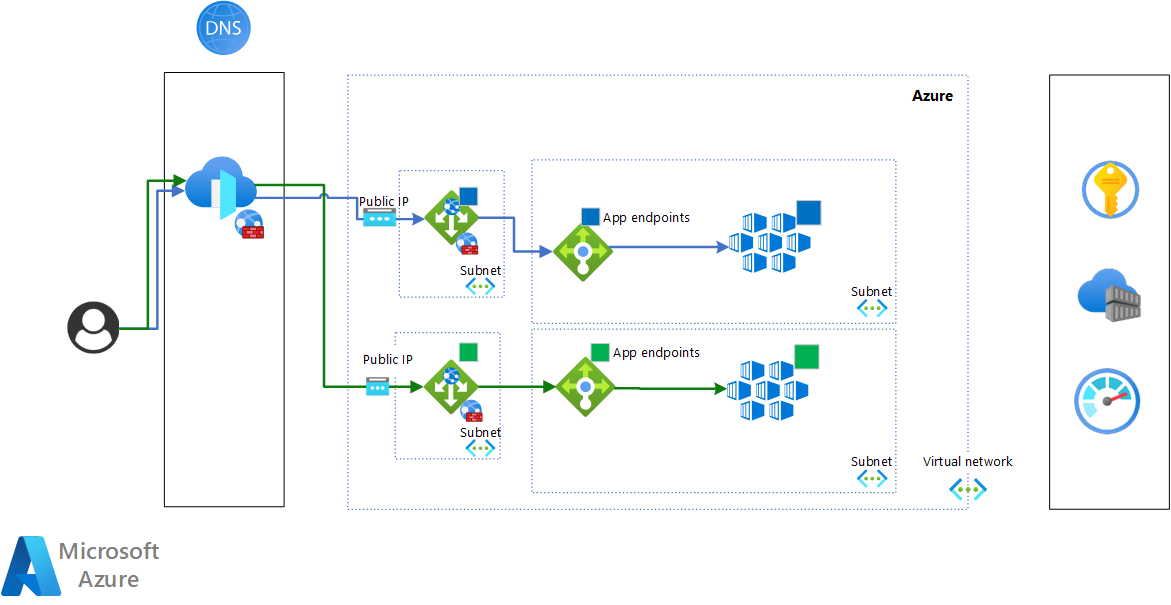
Blue-Green and Canary with Azure Kubernetes Service (AKS)
For containerized applications on AKS, the implementation is closer to the fundamental concepts we saw in the video. You have more control but also more responsibility.
-
Blue-Green on AKS: You typically create two separate Kubernetes
Deployments(e.g.,webapp-blue,webapp-green) with identical pod counts. A single KubernetesServiceacts as the load balancer, and itsselectordetermines which deployment receives traffic. To switch from blue to green, you simply patch the service's selector to point fromversion: bluetoversion: green. The rollback is just as fast—patching the service back. -
Canary on AKS: This is more advanced and is typically implemented using an Ingress Controller (like NGINX or Traefik) or a Service Mesh (like Linkerd or Istio). These tools can inspect traffic and split it based on defined rules. For example, you can configure your Ingress resource with annotations that tell the controller to send 95% of traffic to the stable service and 5% to the canary service, as demonstrated in the video
Kubernetes Deployment Strategies with Demos.
Designing the Release Pipeline
Now, let's stitch this all together into a release pipeline definition. Whether you use Azure Pipelines or GitHub Actions, the conceptual stages are the same. A pipeline implementing a blue-green strategy for an App Service would look like this in YAML:
# Conceptual YAML for a Blue-Green Deployment Pipeline (Azure Pipelines)

trigger:
- main

stages:
- stage: Build
  jobs:
  - job: BuildAndPackage


    # Steps to build the application, run unit tests, and publish an artifact

- stage: DeployToStaging
  dependsOn: Build
  jobs:
  - deployment: DeployWebApp
    environment: 'production-webapp' # Azure DevOps Environment
    strategy:
      runOnce:
        deploy:
          steps:
          - task: AzureWebApp@1
            inputs:


              # Deploys the artifact to the 'staging' slot
              appName: 'my-awesome-app'
              slotName: 'staging'


              # ... other inputs

- stage: ValidateStaging
  dependsOn: DeployToStaging
  jobs:
  - job: SmokeTest


    # Steps to run automated smoke tests against the staging slot URL

- stage: Approval
  dependsOn: ValidateStaging
  jobs:
  - job: WaitForApproval
    pool: server # Runs on Azure DevOps, not an agent
    steps:
    - task: ManualValidation@0
      inputs:
        instructions: 'Please validate the staging slot and approve the swap to production.'
        on: 'all' # Email notifications

- stage: PromoteToProduction
  dependsOn: Approval
  jobs:
  - deployment: SwapSlots
    environment: 'production-webapp'
    strategy:
      runOnce:
        deploy:
          steps:
          - task: AzureAppServiceManage@0
            inputs:


              # Swaps the 'staging' slot into 'production'
              action: 'Swap Slots'
              appName: 'my-awesome-app'
              sourceSlot: 'staging'
              targetSlot: 'production'
This pipeline codifies the entire process:
- Build: Compiles and packages the application.
- Deploy to Staging: Pushes the new code to the non-production slot.
- Validate: Runs automated tests to ensure the staging environment is healthy.
- Approval: Pauses the pipeline for a manual gate. This is crucial for giving stakeholders a final go/no-go decision.
- Promote: Executes the slot swap, making the new version live.
The choice between Azure DevOps and GitHub Actions for implementing this pipeline depends on the factors we discussed in the first lesson of this module—enterprise control and integration (favoring Azure DevOps) versus developer-centric workflow and community ecosystem (favoring GitHub Actions). Both are fully capable of implementing these strategies.
The Role of Monitoring
A deployment strategy is only as good as the feedback loop that validates it.
How to Configure Deployment Strategies Like Canary and Blue ...
This article provides practical examples, but for our purposes, the final section on monitoring is most relevant.
Please read the section on monitoring. It outlines the key metrics you must watch to determine if a deployment is successful.
Without monitoring key metrics—error rate, latency, resource usage, and business metrics—a canary deployment is blind. Automated quality gates in a pipeline should query a monitoring tool like Azure Monitor Application Insights to verify that the new version's performance is within acceptable bounds before proceeding.
Conclusion
In this lesson, we have moved from the theory of CI/CD to the practical architecture of safe deployments. You can now design a release pipeline that thoughtfully manages the risk of introducing change.
Key Takeaways:
- Deployment strategies are about risk management. They replace "big bang" releases with controlled, progressive exposure.
- Blue-Green offers instant rollback at the cost of infrastructure. It's ideal for critical systems where recovery time is paramount. Azure App Service slots make this pattern simple to implement on PaaS.
- Canary offers risk reduction by testing with live traffic. It is perfect for validating changes on a small subset of users before a full rollout but requires mature monitoring and traffic-shaping capabilities.
- Pipelines codify the strategy. Tools like Azure DevOps and GitHub Actions allow you to define these strategies as code, creating a repeatable, automated, and auditable release process.
- Monitoring is non-negotiable. The decision to proceed, halt, or roll back a deployment must be driven by real-time health data from the application.
In our next lesson, we will examine Azure Container Registry. It serves as the secure, private library for the container images that are deployed by the sophisticated pipelines we've designed today, forming a critical link in the modern DevOps toolchain.