Welcome back. In our previous lesson, we designed the release pipelines that orchestrate safe deployments, focusing on strategies like blue-green and canary. Those pipelines are the "how" of delivering your application. Today, we turn our attention to the "what"—the container image itself—and explore the secure library where these critical artifacts are stored.
This lesson addresses the role of Azure Container Registry (ACR) in a secure, container-based deployment workflow. For your work as a future Principal Engineer, understanding the registry is not just about image storage. It's about governing the software supply chain, enforcing security policy, and ensuring that the artifacts deployed to production are trusted, scanned, and auditable. We will examine ACR as a central hub that connects your build process to your container runtimes like Azure Kubernetes Service (AKS).
Let's start by visualizing where ACR fits into the overall process.
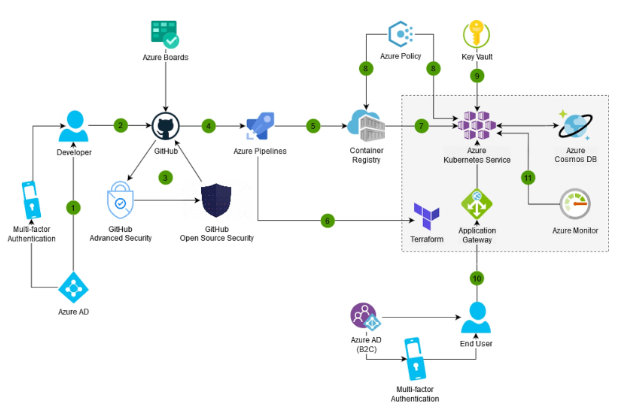
As you can see, the container registry is the critical link between building and running your application. Its security and reliability are paramount.
The Role of a Private Container Registry
At its core, a container registry is a storage and distribution service for container images. However, in an enterprise context, its function is far more sophisticated. Think of it as a private, versioned, and access-controlled repository, analogous to what Maven is for Java artifacts or npm is for Node.js packages, but for entire application environments encapsulated in images.
Using a private registry like ACR, as opposed to a public one like Docker Hub, is a foundational security decision. It mitigates supply chain risk by giving you complete control over which images are used in your organization and who has access to them.
To understand ACR's purpose and capabilities, let's dive into a foundational overview.
This article from DevOps School provides a comprehensive breakdown of what Azure Container Registry is, the problems it solves, and the primary reasons for adopting it. This will establish the "why" behind using a managed, private registry.
Please read the first three sections of the article: Start with the introduction for a high-level definition and context. Next, review the section "What is Azure Container Registry?" focusing on the core capabilities and its ecosystem fit. Note its role as a PaaS service and its native integrations. Finally, study the "Why use Azure Container Registry?" section. This is crucial for architectural decision-making, as it outlines the key drivers from business, technical, and security perspectives.
ACR is Azure's native solution, but it exists in a landscape of other registry products. Understanding its feature set in comparison to others is key to making informed architectural choices.

Architecting a Secure Deployment Workflow with ACR
Now, let's focus on the "secure" aspect of the learning outcome. A secure workflow is not an accident; it's a deliberate design that integrates security at multiple layers. ACR is central to this design. We will explore four key security pillars: Identity and Access Control, Vulnerability Management, Network Isolation, and Immutability.
1. Identity and Access Control
The first step in securing your artifacts is controlling who can access them. ACR's primary advantage here is its deep integration with Microsoft Entra ID and Azure Role-Based Access Control (RBAC).
Instead of relying on static, shared credentials (the admin user, which is an anti-pattern for production), you can assign granular permissions to identities:
- CI/CD Pipelines: A service principal or managed identity can be granted the
AcrPushrole, allowing it to push new images to the registry but nothing more. - Azure Compute Services: An AKS cluster's managed identity can be granted the
AcrPullrole, allowing its nodes to pull images for deployment but not modify the registry. - Developers: Developers might have read-only access for debugging but no permission to push images directly, ensuring all changes go through the CI/CD pipeline.
This model enforces the principle of least privilege and provides a full audit trail through Entra ID, a significant step up from managing separate registry credentials.
2. Vulnerability Management and Supply Chain Security
Storing an image securely is only half the battle; you must also ensure the image itself is not a security risk. This involves scanning for Common Vulnerabilities and Exposures (CVEs) in the image's components—the base OS, system libraries, and application frameworks.
ACR integrates with Microsoft Defender for Containers to automate this process. When you push an image, Defender can automatically scan it and report its findings. This is a critical "shift left" security practice.
The following resource explains how this scanning process fits into the container lifecycle.
Azure Container Security Scanning Overview - Wiz
This article by Wiz explains the importance of container scanning and how it is implemented in Azure. It directly addresses the security mechanisms that make ACR more than just a storage service.
Please read the following sections: Begin with how container security scanning works to understand the three phases: pre-deployment, registry, and runtime. Next, focus on the section describing registry-specific scanning. This details the integration with Microsoft Defender for Containers. Finally, read about securing the container supply chain. Pay close attention to the concepts of using hardened base images and private registries to control what enters your environment.
An essential practice highlighted in the article is the use of minimal, hardened base images. A smaller attack surface from the start means fewer vulnerabilities to manage. Another critical concept is the Software Bill of Materials (SBOM), which is an inventory of all components in your image. It becomes invaluable for auditing and quickly responding to new vulnerabilities like the historical Log4j incident.
The following video demonstrates the dramatic security improvement from switching to a minimal base image and explains the value of an SBOM.
How to Create a DevSecOps CI/CD Pipeline
This video from the "DevOps Journey" channel offers a practical look at the concepts of SBOMs and secure base images.
First, watch the segment on the Software Bill of Materials (SBOM). This clearly explains what an SBOM is and its critical role in security auditing. Next, watch the demonstration on using a more secure base image. It shows how moving from a standard nginx:latest image to a minimal, "distroless" image can eliminate hundreds of vulnerabilities.
3. Network Isolation
For high-security environments, you'll want to ensure that traffic to and from your container registry does not traverse the public internet. ACR supports Azure Private Link through private endpoints. This gives your registry a private IP address within your virtual network. Your AKS clusters and build agents can then communicate with ACR over the Azure backbone, completely isolating the data plane traffic. This is a powerful architectural choice for meeting strict compliance and security requirements.
4. Immutability and Auditability
A secure workflow relies on trust and verifiability. Using mutable tags like :latest or :prod is a dangerous practice because the image associated with the tag can change, breaking the "what you test is what you deploy" principle.
The best practice is to deploy using an image's immutable digest (e.g., myimage@sha256:123...). The digest is a content-addressed SHA256 hash of the image manifest. It uniquely and permanently identifies a specific version of an image. Your release pipeline should lock onto this digest after testing and use it for all subsequent deployments.
ACR facilitates this by allowing you to pull by digest and provides diagnostic logs for all repository events. By forwarding these logs to Azure Monitor, you can create a complete audit trail of who (or what) pushed or pulled a specific image digest and when, which is essential for compliance and incident investigation.
Architectural Decisions and Trade-offs
As an architect, you'll need to make several key decisions when incorporating ACR.
-
SKU Selection: ACR comes in Basic, Standard, and Premium tiers.
- Basic: Suitable for development and learning.
- Standard: A good choice for most production workloads, offering a balance of performance and storage.
- Premium: Essential for enterprise-grade requirements. It provides higher throughput, more concurrent operations, and critical features like private endpoints for network isolation and geo-replication. Geo-replication automatically replicates your images to other Azure regions, enabling faster pulls for globally distributed applications and adding a layer of regional disaster recovery.
-
Registry Strategy: For large organizations, a common pattern is to use separate registries for different environments (e.g.,
mycompany-dev-acr,mycompany-prod-acr). This creates a strong isolation boundary, allowing you to apply much stricter security policies (like no manual pushes) to the production registry. -
ACR vs. Alternatives: While ACR is the default choice for Azure-native workloads, you should know the trade-offs.
- ACR vs. GitHub Container Registry (GHCR): GHCR is tightly integrated with GitHub Actions and is excellent for open-source projects or workflows centered entirely within GitHub. ACR offers superior integration with the broader Azure ecosystem, including networking, identity (Entra ID), and other Azure services.
- ACR vs. Self-hosted (e.g., Harbor): Self-hosting a registry like Harbor gives you maximum control and policy customization, which might be necessary for air-gapped or highly specific compliance scenarios. However, it comes with the significant operational overhead of managing, scaling, and securing the underlying infrastructure. ACR, as a managed PaaS service, abstracts all of that away.
Conclusion
In this lesson, we've positioned Azure Container Registry as a cornerstone of a secure DevOps practice in Azure. It is far more than a simple image store; it is a control plane for your containerized software supply chain.
Key Takeaways:
- Central Role: ACR is the critical link between your CI pipelines and your container runtimes, serving as the trusted source for your application artifacts.
- Security as a Pillar: A secure workflow is built on ACR's native integrations for identity (
Microsoft Entra ID), vulnerability management (Microsoft Defender for Cloud), and network isolation (Private Link). - Operational Best Practices: Using immutable digests for deployment, minimal base images, and automated scanning are essential practices that ACR enables.
- Architectural Decisions Matter: Your choice of SKU (especially Premium for geo-replication and private endpoints) and your registry topology (e.g., per-environment) are key architectural decisions that impact security, performance, and cost.
In our final lesson of this module, we will step back and evaluate the architectural trade-offs between the two primary CI/CD orchestrators in the Microsoft ecosystem: Azure Pipelines and GitHub Actions. Having now designed release strategies and secured our artifacts, we will be well-equipped to compare the platforms that execute these workflows.