Welcome to the first lesson in our module on Platform Engineering. We've just completed our exploration of Azure's AI and ML services, culminating in a deep dive into the Retrieval-Augmented Generation (RAG) pattern. That module focused on what you can build with Azure. Now, we pivot to how you build, manage, and deploy software at enterprise scale.
In this lesson, you will compare Azure DevOps Services with GitHub for source control, CI/CD, and project management in an enterprise context. As both are flagship Microsoft products, understanding their distinct philosophies, strategic positioning, and ideal use cases is a critical piece of architectural knowledge for any senior technical leader within the company. Our goal is not to declare a "winner," but to equip you with a decision framework for choosing the right tool—or combination of tools—for a given engineering culture and set of business requirements.
The Tale of Two Platforms: Core Philosophies
At first glance, Azure DevOps and GitHub might seem redundant. Both are comprehensive platforms for software development. However, they were born from different eras and with fundamentally different goals, which continue to shape their architecture and user experience today.
-
Azure DevOps traces its lineage back to Team Foundation Server (TFS), an on-premises product designed for centralized control, process enforcement, and end-to-end traceability. Its philosophy is rooted in Application Lifecycle Management (ALM), providing a single, tightly integrated suite of services for large enterprises that need to manage complex projects and demonstrate compliance.
-
GitHub, acquired by Microsoft in 2018, was built from the ground up with a "developer-first" ethos centered on collaboration, community, and open-source principles. Its philosophy prioritizes developer velocity, autonomy, and a frictionless experience, relying on a vast, extensible ecosystem rather than a monolithic, all-in-one structure.
This fundamental difference—integrated process control versus extensible developer experience—is the most important concept to grasp when comparing them.
Choosing Between Azure DevOps and GitHub for Development - Curotec
This short article from Curotec provides an excellent high-level summary of the core philosophical differences between the two platforms.
Please read the sections The Core Difference Comes Down to Philosophy and Where the Differences Start to Show Up. Focus on the distinction between GitHub's emphasis on simplicity and speed versus Azure DevOps's focus on structure and coordination.
Head-to-Head Comparison: The Enterprise View
With that philosophical framing, let's analyze the platforms across the key functional areas for an enterprise: source control, CI/CD, and project management. The following table gives a high-level overview of their features.
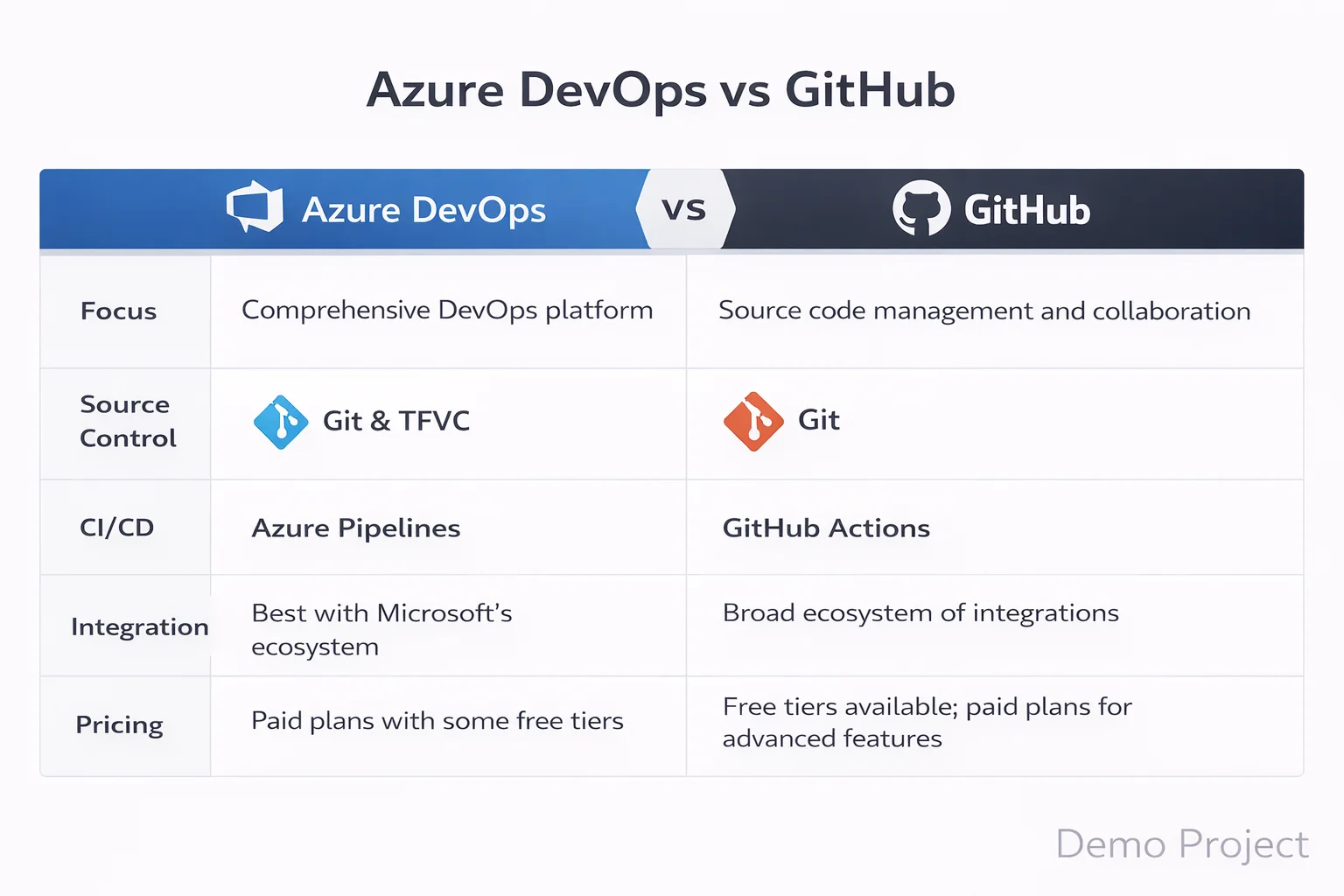
To go deeper, we'll rely on an excellent, in-depth analysis from EPC Group that compares the platforms across 14 enterprise categories.
Azure DevOps vs GitHub: Enterprise Comparison 2026 - EPC Group
This article is a comprehensive guide tailored for enterprise decision-making. It provides detailed, feature-by-feature comparisons that are essential for architectural evaluation.
Please read the following sections: Architecture and Philosophy: Read the two subsections under this heading for a more detailed look at the architectural models of each platform. Head-to-Head Comparison: Review the summary table to get a broad sense of the strengths and weaknesses. CI/CD: Read the section CI/CD Pipelines. Pay attention to the specific strengths of Azure Pipelines (e.g., classic UI editor, multi-stage deployment gates) versus GitHub Actions (e.g., marketplace, OIDC). Project Management: Read the section Project Management. This is a critical differentiator; focus on why Azure Boards is considered superior for enterprise-scale agile (like SAFe). Source Control: Read the section Code Management and Review. Note the advantages GitHub has in the developer experience, particularly with its pull request workflow and native GitHub Copilot integration.
Let's distill the key architectural trade-offs from that reading:
-
Project Management: Azure Boards is the clear leader for enterprise portfolio management. Its support for hierarchical work items (Epics > Features > Stories), customizable process templates (Agile, Scrum, CMMI), and powerful query/reporting capabilities are designed for the complex planning and traceability needs of large organizations and Program Management Offices (PMOs). GitHub Projects is a much lighter, Kanban-style tool, excellent for individual team backlogs but insufficient for large-scale, multi-team program coordination.
-
Source Control & Collaboration: While both offer robust Git hosting, GitHub provides a superior developer experience. The platform is optimized around the pull request workflow, with features like
CODEOWNERS, draft PRs, and better discussion threading. Most importantly, the deep, native integration of GitHub Copilot for code completion, PR summaries, and reviews gives it a significant productivity advantage, which aligns with your interest in AI development tools. Azure Repos also supports TFVC, but this is a legacy version control system and is not recommended for new projects. -
CI/CD (Continuous Integration/Continuous Deployment): This is the most nuanced comparison. A short video can help clarify the practical differences.
GitHub Actions or Azure DevOps? Don’t Pick Wrong
This video by Dara Oladapo provides a practical, no-fluff comparison of GitHub Actions and Azure Pipelines, focusing on the core differences and the "bigger picture" of speed versus scale.
Please watch the first part of the video covering the core differences in integration, setup, workflow design, and ecosystem. Then, continue with the segment on the bigger picture, which frames the choice as one between speed (GitHub) and scale/control (Azure DevOps).
As the video and articles highlight:
- Azure Pipelines is more mature for complex, multi-stage release orchestration requiring manual approval gates and strict environment controls. Its optional classic UI editor can also lower the barrier to entry for teams less comfortable with YAML.
- GitHub Actions excels in flexibility, speed, and ecosystem support. Its marketplace contains over 20,000 reusable actions, dramatically accelerating pipeline development. Its support for OIDC provides a more modern, secretless way to authenticate to cloud providers like Azure, a significant security and operational advantage.
Security, Governance, and The Hybrid Enterprise Model
For a Principal Engineer, the decision also hinges on security, governance, and how these platforms fit into a broader enterprise strategy.
-
Security Focus: GitHub leads in Application & Supply-Chain Security. Features like GitHub Advanced Security (with CodeQL static analysis), Dependabot (for automated dependency patching), and secret scanning with push protection are best-in-class for securing code. Azure DevOps's strengths lie more in Organizational & Infrastructure Security, with its native Entra ID integration for conditional access policies and the option for a fully air-gapped on-premises server.
-
The Hybrid Model: Most large enterprises, including many teams at Microsoft, don't make a binary choice. They adopt a hybrid approach to leverage the best of both platforms.
Azure DevOps vs GitHub: Enterprise Comparison 2026 - EPC Group
The same EPC Group article concludes with the most common enterprise pattern: using both platforms together.
Please read the section Using Both Together. This is arguably the most important architectural pattern to understand.
The typical hybrid architecture looks like this:
- Source Control & CI: Code lives in GitHub. Developers benefit from the superior PR experience, InnerSource collaboration patterns, and GitHub Copilot. GitHub Actions runs the Continuous Integration (build, test, scan) pipeline.
- Project Management: Planning, backlog grooming, and portfolio tracking happen in Azure Boards. Work items in Boards are linked to commits and PRs in GitHub, providing end-to-end traceability.
- Continuous Deployment (CD): This is flexible. Simpler deployments can be handled by GitHub Actions. For complex, multi-stage releases with elaborate approval gates, Azure Pipelines is often used to orchestrate the deployment, triggered by the CI build in GitHub.
The Business and Strategic View
Your interest in the business side of technology is key here. The platform choice has direct financial and strategic implications.

While Azure DevOps may appear cheaper on a per-seat basis, a true TCO analysis must account for the features included and the potential for productivity gains. GitHub Enterprise includes advanced security and governance features that are add-ons or require separate licensing in the Azure DevOps world. Furthermore, the productivity multiplier of GitHub Copilot ($19-$39/user/month) can provide an ROI that far outweighs its cost.
Strategically, it is clear that Microsoft's primary investment and innovation in the DevOps space are centered on GitHub. While Azure DevOps is fully supported and maintained, the most transformative features—from AI coding assistants to advanced security—are debuting on GitHub first. For any new, long-term initiative, GitHub represents the more forward-looking strategic bet.
Conclusion
In this lesson, we compared Azure DevOps and GitHub not as competitors, but as two distinct, strategic assets in the Microsoft ecosystem, each with a clear purpose and ideal use case.
Key Takeaways:
- Different Philosophies: The core difference is process control (Azure DevOps) versus developer experience (GitHub).
- Strengths & Weaknesses:
- Azure DevOps excels at enterprise-scale project management (Azure Boards), comprehensive test management, and release orchestration for environments with heavy governance.
- GitHub leads in developer experience, AI-powered development (Copilot), community ecosystem (Actions), and modern application security (Advanced Security).
- The Hybrid Pattern is King: For many large enterprises, the optimal architecture is a hybrid model that combines GitHub's developer-centric tools for code and CI with Azure Boards' powerful project management capabilities.
- Strategic Direction: Microsoft's investment and innovation are heavily focused on GitHub, making it the primary platform for new development initiatives.
This understanding of the "how" of software delivery sets the stage for our next topic. We will remain in the realm of platform engineering but shift our focus from CI/CD pipelines to the code that defines our infrastructure. In the next lesson, we will explore Bicep, Microsoft's modern domain-specific language for Infrastructure as Code, and compare it to alternatives like ARM Templates and Terraform.