Welcome back. In our previous lesson, we established the "city plan" for your Azure network using the hub-spoke topology, creating a scalable structure for connecting multiple virtual networks. Now that the roads are built, we need to manage the flow of traffic to your applications. How do you ensure that user requests are distributed efficiently across multiple servers for high availability and performance, whether those servers are in one region or spread across the globe?
This lesson directly addresses that question by comparing Azure's primary load balancing services. Your goal is to develop a decision-making framework for selecting the right tool for the job. We will dissect the four main options—Azure Load Balancer, Application Gateway, Traffic Manager, and Azure Front Door—by analyzing them along two critical dimensions: their operational scope (regional vs. global) and the network layer at which they operate (Layer 4 vs. Layer 7). This comparative approach will equip you to make sound architectural choices, a key competency for a Principal Engineer.
A Framework for Comparison: Scope and Layer
Choosing a load balancer is not about finding the "best" one, but the most appropriate one for a specific task. The vast majority of decisions can be framed by answering two questions:
- What is the traffic's scope? Are you balancing traffic within a single Azure region (Regional) or directing users to different regions across the world (Global)?
- What is the traffic's type? Are you dealing with raw network packets (TCP/UDP) at the transport layer (Layer 4), or do you need to inspect the application data itself, like HTTP headers and URL paths (Layer 7)?
These two axes give us a powerful 2x2 matrix for categorizing Azure's main load balancing services:
| Layer 4 (Transport) | Layer 7 (Application) | |
|---|---|---|
| Regional | Azure Load Balancer | Azure Application Gateway |
| Global | Azure Traffic Manager (DNS-based) | Azure Front Door |
Understanding this categorization is the first step. Let's start with a foundational video from John Savill, who provides an excellent overview of the problem space and the key differences between Layer 4 and Layer 7 solutions.
Picking the right Azure Load Balancing Solution
This video sets the stage by explaining the fundamental need for load balancing and introducing the critical distinction between Layer 4 (transport) and Layer 7 (application) traffic, which governs your choice of service.
Please watch the introductory segment from the beginning. Focus on his explanation of why we need multiple instances and how the OSI model's Layer 4 (TCP/UDP) and Layer 7 (HTTP) dictate which type of load balancer is appropriate.
With this foundational understanding, let's explore each quadrant of our matrix, starting with the regional services that operate within the virtual networks we designed in the last lesson.
Regional Load Balancing: Inside the VNet
When your application's components are all located within a single Azure region, you'll choose between Azure Load Balancer and Application Gateway.
Azure Load Balancer: The Layer 4 Workhorse
Azure Load Balancer is a high-performance, ultra-low-latency Layer 4 service. It operates at the transport layer, distributing TCP and UDP traffic. It has no awareness of the application data (like HTTP) within the packets. It simply forwards traffic based on a hash of source/destination IP addresses and ports (a 5-tuple hash).
This makes it ideal for:
- Distributing traffic from public IPs to a set of web server VMs.
- Balancing internal traffic between application tiers, such as from your web tier to your business logic tier.
- Handling any non-HTTP/S TCP/UDP workload.
The Load Balancer can be public (with a public IP frontend) or internal (with a private IP frontend). The Standard SKU, which you should almost always use, is zone-redundant by default, providing high availability across Availability Zones within a region.
Azure Application Gateway: The Layer 7 Specialist
Azure Application Gateway is a regional Layer 7 service that acts as a reverse proxy. Because it understands the HTTP/S protocol, it offers far more sophisticated capabilities than a simple Layer 4 load balancer.
Key features that differentiate it include:
- URL Path-Based Routing: Route requests for
/images/*to one pool of servers and/video/*to another. - SSL/TLS Termination: Offload the expensive work of encrypting and decrypting traffic from your backend servers to the gateway.
- Web Application Firewall (WAF): Integrate a powerful security service to protect your application from common web vulnerabilities like SQL injection and cross-site scripting.
- Session Affinity: Use cookies to ensure a user's session is always directed to the same backend server.
You would choose Application Gateway when you need to make routing decisions based on the content of HTTP requests or when you require its advanced WAF or SSL offloading features.
The following segment from John Savill's video provides a clear, side-by-side comparison of these two regional options.
Picking the right Azure Load Balancing Solution
This part of the video walks through the specifics of Azure Load Balancer and Application Gateway, highlighting their distinct features and use cases.
Please watch the following two segments: Azure Load Balancer: Note the distinction between public and internal, the 5-tuple hash for distribution, and its scope being within a single region. Azure Application Gateway: Pay attention to the Layer 7 capabilities like SSL termination, WAF integration, and advanced routing that are impossible with a Layer 4 load balancer.
Global Load Balancing: Spanning the World
When your application is deployed across multiple Azure regions to serve a global audience, provide disaster recovery, or reduce latency, you need a global load balancer to direct traffic to the appropriate regional deployment.
Azure Traffic Manager: DNS-Based Global Routing
Azure Traffic Manager is a DNS-based global load balancer. It works by responding to DNS queries with the IP address of the most appropriate endpoint based on a routing method you select. It never handles the application traffic itself; it simply tells the client which endpoint to connect to.
Its primary routing methods are:
- Performance: Routes the user to the "closest" endpoint in terms of lowest network latency.
- Priority: Routes all traffic to a primary endpoint, failing over to backup endpoints only when the primary is unhealthy.
- Weighted: Distributes traffic across endpoints based on assigned weights, useful for canary releases or blue-green deployments.
- Geographic: Routes users to specific endpoints based on the geographic location from which their DNS query originates.
Because it's DNS-based, its main drawback is failover speed. DNS records have a Time-to-Live (TTL), and clients and resolvers will cache responses. If an endpoint fails, traffic will continue to be sent there until the TTL expires.
Azure Front Door: The Global Layer 7 Entry Point
Azure Front Door is a modern, global Layer 7 load balancing service that acts as a secure and accelerating entry point for your web applications. Unlike Traffic Manager, it is a reverse proxy that sits in the path of your traffic, terminating user connections at one of Microsoft's many global edge locations (Points of Presence - PoPs).
This architecture provides several key advantages:
- Anycast Routing and Split TCP: User traffic enters the Microsoft network at the closest edge location, providing a fast and reliable connection over Microsoft's private global backbone to your application's backend.
- Instant Failover: Since Front Door is in the data path, it can detect a failed backend and instantly reroute traffic to a healthy one without waiting for DNS TTLs to expire.
- Caching: It can cache static content at the edge, similar to a Content Delivery Network (CDN), reducing load on your backend servers and improving performance for users.
- Global WAF: You can apply Web Application Firewall policies at the edge to block malicious traffic before it even reaches your network.
Let's watch two more clips. The first, from John Savill, contrasts these global options. The second provides a fantastic plain-english explanation of what makes Front Door so powerful.
Picking the right Azure Load Balancing Solution
This segment continues the comparison, now focusing on the global services.
Watch the sections on Azure Front Door and Azure Traffic Manager. Focus on the architectural differences: Front Door as a Layer 7 reverse proxy using anycast, and Traffic Manager as a Layer 4-agnostic DNS-based router.
Azure Front Door explained in plain english
This short video uses a great analogy to explain why Front Door's use of the Microsoft global network is a significant advantage over traditional approaches.
Please watch the segments covering the core concept and the key characteristics of Front Door. The transportation analogy is particularly effective at clarifying its value.
The Decision Framework in Practice
Now that we've defined each service, let's put it all together. The Azure Architecture Center provides a decision tree that formalizes the thought process for choosing a load balancer. It's a critical tool for architectural design.
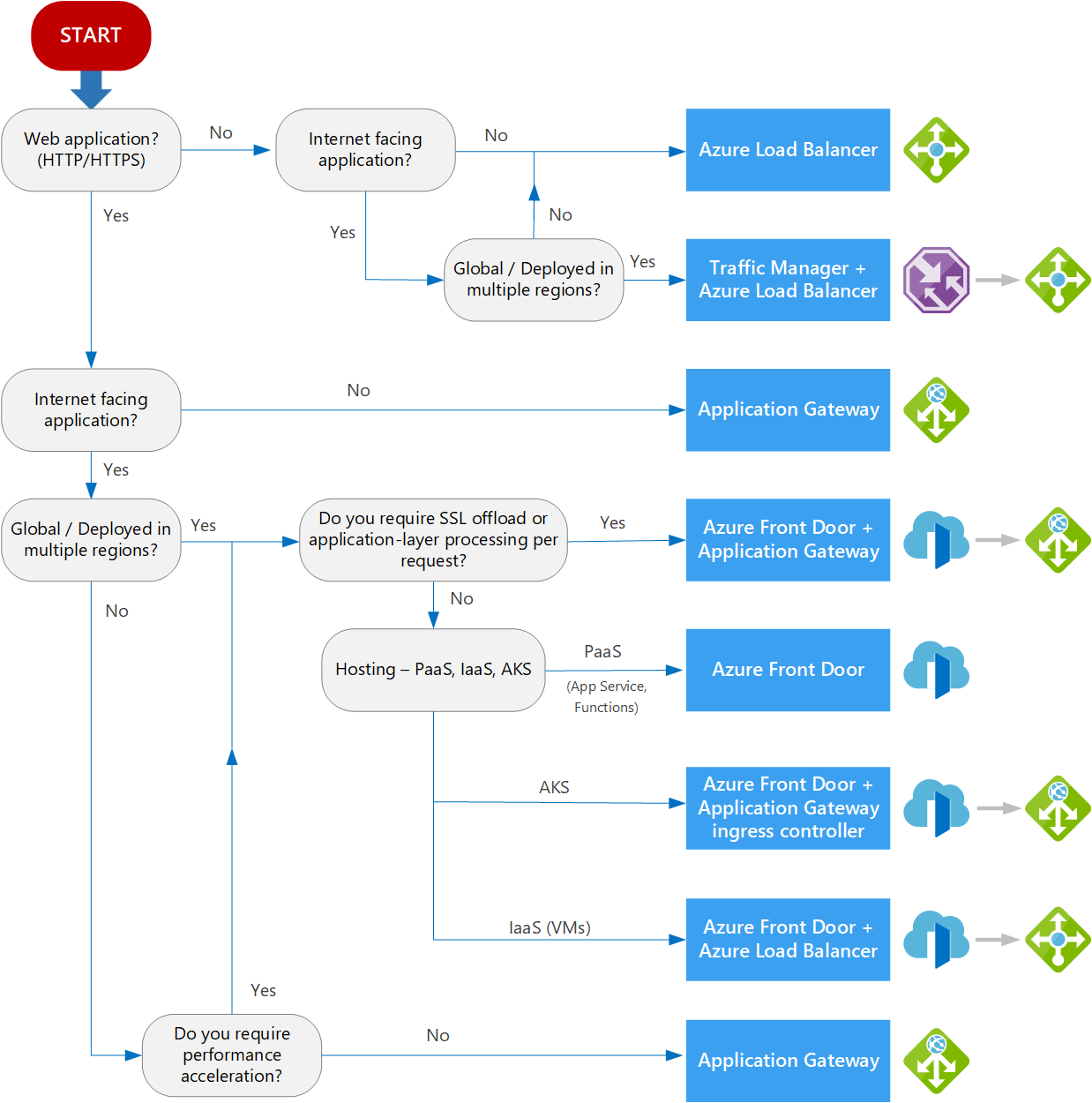
To use this flowchart effectively, you need to understand the terms it uses. The following reading from the Azure Architecture Center defines these terms and presents the decision tree.
Load Balancing Options - Azure Architecture Center
This official documentation provides the complete context for the decision tree, defining the categories and terms used.
Please read the following sections: Service categorizations: Review the definitions of global vs. regional and HTTP(S) vs. non-HTTP(S) traffic. The summary table is an excellent reference. The introduction to the decision flowchart. The definitions for key terms like "Internet-facing," "Global," and "PaaS." This will clarify the questions being asked in the flowchart.
Combining Services: A Layered Architecture
Finally, it's important to recognize that these services are not mutually exclusive. In fact, a robust, globally-distributed application will often use several of them together in a layered architecture.
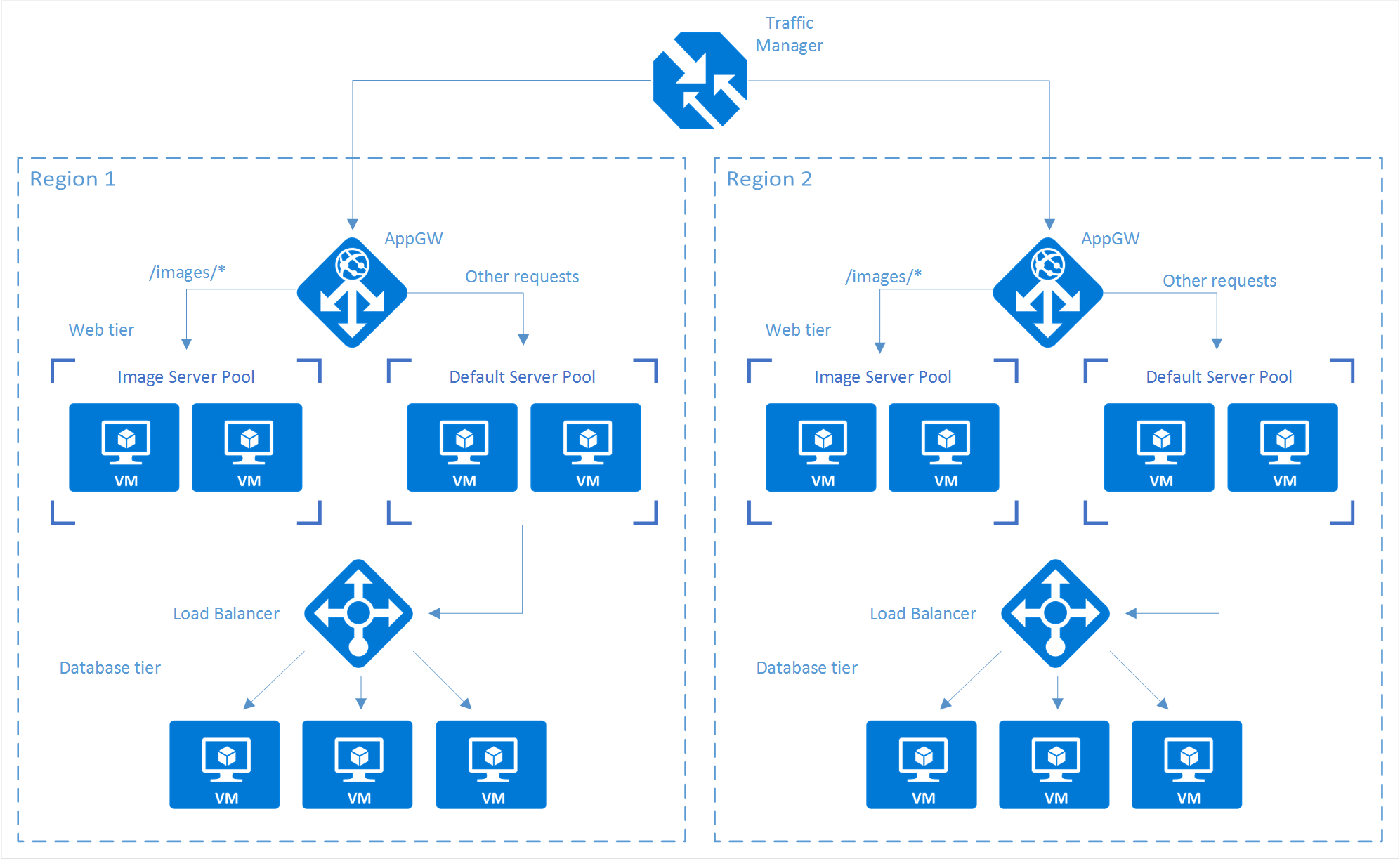
Let's break down the roles in the architecture shown above:
- Azure Traffic Manager (Global): A user's DNS request for the application is resolved by Traffic Manager. It uses the "Performance" routing method to direct the user to the closest Azure region (Region 1 or Region 2).
- Azure Application Gateway (Regional): The user's HTTP request arrives at the Application Gateway in the selected region. The gateway provides WAF protection and Layer 7 routing. For example, it routes requests for
/images/*to a dedicated pool of image servers, while all other requests go to the default server pool. - Azure Load Balancer (Internal): Within the default server pool, the web tier needs to communicate with the database tier. An internal Azure Load Balancer distributes this internal, Layer 4 traffic across the VMs in the database tier, which are not exposed to the internet.
This layered approach allows you to use the right tool for each specific job, combining global DNS routing, regional application-aware routing, and internal transport-level balancing.
Conclusion
In this lesson, we have systematically compared Azure's four primary load balancing services. You can now articulate the distinct roles of each and apply a decision framework to select the appropriate service based on your application's requirements.
Here are the key takeaways:
- Decision Axis: The choice of a load balancer is primarily driven by scope (Global vs. Regional) and traffic type (Layer 4 vs. Layer 7).
- Azure Load Balancer: Your go-to for regional, Layer 4 (TCP/UDP) traffic. It's fast, efficient, and ideal for both public-facing and internal traffic distribution.
- Application Gateway: The solution for regional, Layer 7 (HTTP/S) traffic. Use it when you need advanced routing, SSL offloading, or a Web Application Firewall.
- Traffic Manager: A global, DNS-based router. It directs clients to the best endpoint based on routing rules but does not handle the traffic itself. Failover is subject to DNS TTLs.
- Azure Front Door: The premier service for global, Layer 7 web applications. It provides fast, secure, and highly available application delivery by leveraging Microsoft's global edge network.
- Layered Architectures: These services are often used together to create a comprehensive, multi-tiered traffic management solution for globally distributed applications.
You now have a solid understanding of how to build out your network topology and manage traffic within it. In our next lesson, we will focus on securing this traffic by exploring Azure's network security services, including Azure Firewall, Web Application Firewalls (WAF), and Network Security Groups (NSGs).