Welcome back. In our previous lessons, we designed the network topology for your applications and explored how to distribute traffic efficiently using Azure's load balancing services. Now that traffic can reach your workloads, our focus shifts to a critical aspect of system design: security. How do you protect your applications and data from a landscape of ever-evolving threats?
This lesson addresses that question by building a "defense in depth" model for your network. We will compare Azure's core network security services: Network Security Groups (NSGs), Azure Firewall, Web Application Firewall (WAF), and DDoS Protection. Your goal is to understand the specific role each service plays, the types of threats it mitigates, and how they combine to create a robust, multi-layered security posture. This architectural perspective is essential for designing secure and resilient systems, a core competency you'll need in your Principal Engineer role.
The Principle of Layered Security
A modern security strategy doesn't rely on a single, monolithic defense. Instead, it employs a "defense in depth" approach, layering multiple, independent security controls. If one layer is breached, others are in place to contain and mitigate the threat. In Azure, these layers correspond to different services operating at different levels of the network stack.
We will explore these layers systematically:
- Subnet/NIC Level (Layer 4): Basic traffic filtering with Network Security Groups.
- Network Perimeter (Layers 3/4/7): Centralized, intelligent traffic inspection with Azure Firewall.
- Application Level (Layer 7): Specialized protection for web applications with a Web Application Firewall.
- Infrastructure Level (Layers 3/4): Defense against volumetric attacks with DDoS Protection.
Let's start with the most fundamental layer of network control.
Layer 1: Network Security Groups (NSGs) — The Distributed Guards
Network Security Groups are the foundational filtering mechanism in Azure Virtual Networks. Think of them as a simple, stateful firewall attached directly to a resource's network interface (NIC) or the subnet it resides in. Since you're familiar with AWS, the concept is very similar to AWS Security Groups.
NSGs operate at Layer 4 of the OSI model. Their rules allow or deny traffic based on a 5-tuple:
- Source IP address
- Source port
- Destination IP address
- Destination port
- Protocol (TCP, UDP, ICMP)
For a quick overview of NSGs and a related concept, Application Security Groups (ASGs), the following video provides a concise explanation.
AZ-500 Exam EP 09: Azure Network Security
This video covers the fundamentals of Network Security Groups and introduces Application Security Groups as a way to simplify rule management.
Watch the segments on what NSGs are, their rules, and evaluation logic. Then, watch the brief introduction to Application Security Groups, which allow you to group VMs by application role rather than managing explicit IP addresses.
The key architectural takeaway is that NSGs are used for micro-segmentation. In a typical three-tier application, you would use NSGs to enforce rules like:
- The web tier subnet can only accept traffic from the internet on port 443.
- The application tier subnet can only accept traffic from the web tier subnet.
- The database tier subnet can only accept traffic from the application tier subnet on the database port (e.g., 1433 for SQL).
This prevents lateral movement by attackers. Even if a web server is compromised, the NSG on the database subnet prevents the attacker from directly accessing the database.
The Microsoft Cloud Security Benchmark underscores the importance of this practice.
Microsoft cloud security benchmark v2 - Network Security
This document outlines best practices for network security. This section explains the principle of network segmentation and how to implement it using VNets, subnets, and NSGs.
Please read the section NS-1: Establish network segmentation boundaries. Focus on the descriptions under NS-1.1 and NS-1.2 to see how NSGs are the primary tool for enforcing these boundaries.
While NSGs are essential, they are distributed and rule-based. For centralized, intelligent threat detection and filtering of all traffic entering or leaving your network, you need a more powerful tool: Azure Firewall.
Layer 2: Azure Firewall — The Centralized Network Police
Azure Firewall is a managed, cloud-native, stateful firewall service that you deploy into your virtual network, typically in a central hub VNet. It serves as a single enforcement point for all traffic—north-south (to/from the internet) and east-west (between spokes or to on-premises).
Unlike NSGs, which are simple Layer 4 filters, Azure Firewall provides advanced capabilities:
- Layer 7 Application Rules: Filter outbound traffic based on Fully Qualified Domain Names (FQDNs), not just IP addresses. For example, allow access to
*.github.combut deny access to social media sites. - Threat Intelligence-based Filtering: Automatically block traffic to/from known malicious IP addresses and domains, based on Microsoft's global threat intelligence feed.
- Centralized Logging and Policy: All traffic is logged in one place, and policies can be managed centrally and applied to multiple firewalls.
For a deeper understanding of Azure Firewall's capabilities, particularly the powerful features in its Premium SKU, John Savill provides an excellent technical walkthrough.
This video provides a comprehensive deep dive into Azure Firewall, explaining its core purpose, rule structure, and the advanced features available in the Premium SKU.
Please watch the following segments to build a detailed understanding: Introduction: What Azure Firewall is and its role in a VNet. Configuration Model: Understand the hierarchy of policies, rule collection groups, and the three main rule types (DNAT, Network, Application). Threat Intelligence: How this feature provides a baseline of protection against known threats. TLS Inspection: Grasp the concept of how Firewall Premium performs a "man-in-the-middle" action to inspect encrypted HTTPS traffic. This is a crucial capability for advanced filtering. IDPS: Learn about the Intrusion Detection and Prevention System (IDPS), which uses signatures to detect and block known exploits and malware patterns.
Azure Firewall Premium's TLS Inspection and IDPS are critical for a Zero Trust architecture. They allow the firewall to look inside encrypted traffic to block sophisticated threats that would be invisible to a standard firewall or NSG. This is a significant step up from basic IP/port filtering.
Layer 3: Web Application Firewall (WAF) — The Application Bodyguard
While Azure Firewall is excellent at protecting your network, it isn't designed to understand the nuances of web application attacks. For that, you need a Web Application Firewall (WAF).
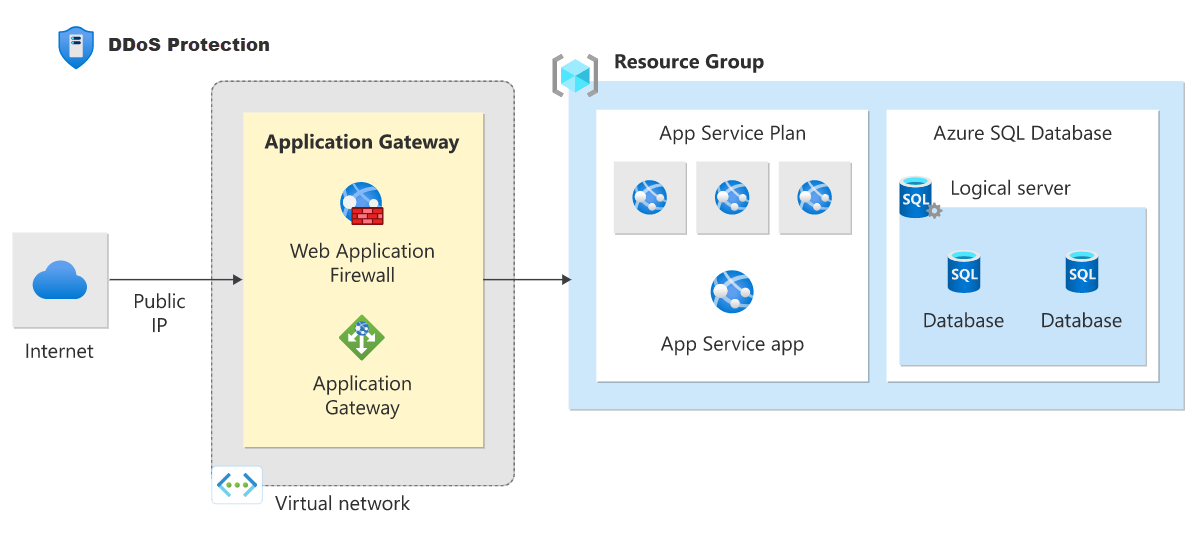
As we touched on in the previous lesson, WAF is a feature of Azure Application Gateway and Azure Front Door. It operates at Layer 7 and is specifically designed to protect your web applications from common exploits defined by the Open Web Application Security Project (OWASP), such as:
- SQL Injection (SQLi)
- Cross-Site Scripting (XSS)
- Remote File Inclusion
The crucial architectural distinction is:
- Azure Firewall protects your network. It looks at packets and traffic flows.
- WAF protects your web application. It looks at HTTP/S requests and their content.
An attacker could craft a perfectly valid HTTPS request from a non-malicious IP address that would pass through an NSG and Azure Firewall, but which contains a SQL injection payload in a form field. Only a WAF would detect and block this.
Combining Azure Firewall and WAF
For comprehensive protection, you don't choose between Azure Firewall and WAF; you use them together. The architectural question is how to combine them. The Azure Architecture Center outlines several proven patterns. The most common and recommended pattern is running them in parallel.
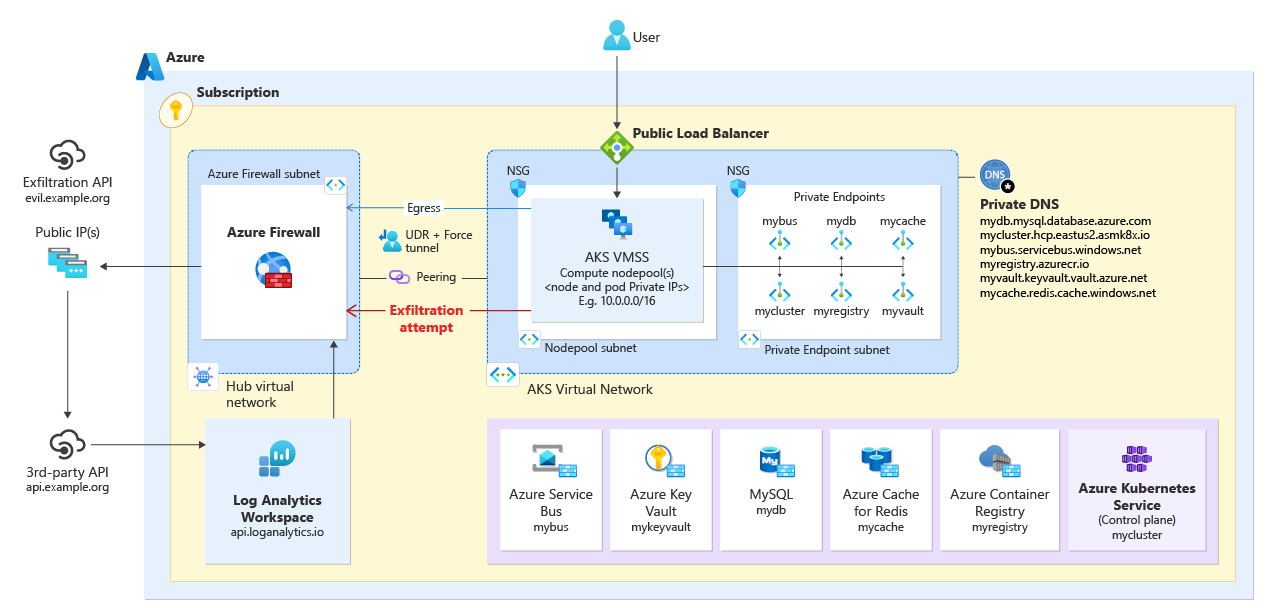
In this parallel design:
- Inbound web traffic (HTTP/S) is directed to the public IP of the Application Gateway. Its WAF inspects the traffic for web attacks and then forwards legitimate requests to the application servers.
- Inbound non-web traffic (e.g., SSH for management) is directed to the public IP of the Azure Firewall.
- All outbound traffic from the application subnets is forced through the Azure Firewall using User-Defined Routes (UDRs). This allows the firewall to inspect and filter all egress traffic, preventing data exfiltration and blocking communication with malicious endpoints.
The following document provides an excellent breakdown of these patterns.
Azure Firewall and Application Gateway for Virtual Networks
This article provides a detailed comparison and presents several architectural patterns for deploying Azure Firewall and Application Gateway/WAF together.
Please read the following sections: The introduction, which defines each service. The decision tree section, which helps frame the choice of architecture. The "in parallel" design, which is the most common and flexible pattern for combining these services.
Layer 4: DDoS Protection — The Riot Shield
Distributed Denial of Service (DDoS) attacks attempt to exhaust an application's resources, making it unavailable to legitimate users. These are typically volumetric attacks (Layer 3/4) that flood the network with traffic.
Azure provides two tiers of DDoS protection:
- DDoS Infrastructure Protection (Basic): This is enabled by default on the Azure platform at no extra cost. It protects against common network-layer attacks.
- DDoS Network Protection (Standard): This is a paid service that provides enhanced mitigation capabilities specifically for your Virtual Network resources. It offers adaptive tuning, attack analytics, metrics, and alerting. Crucially, it also provides access to the DDoS Rapid Response team during an attack and cost protection for resource scaling.
You enable DDoS Network Protection on the VNet itself. It then protects all public IP addresses of resources within that VNet, including those on Load Balancers, Application Gateways, and Firewalls.
Microsoft cloud security benchmark v2 - Network Security
This section of the benchmark explains the risk of DDoS attacks and how to mitigate them using Azure's tiered protection services.
Please read section NS-5: Deploy DDOS protection. Focus on the distinction between network layer protection and application layer protection via WAF.
The Complete Decision Framework
To make an architectural decision, you need to select the right tool for the threat you are trying to mitigate. Here is a comparative summary:
| Service | OSI Layer | Scope | Primary Threat Mitigated | Typical Placement |
|---|---|---|---|---|
| NSG | 3, 4 (IP, Port) | Subnet / NIC | Unauthorized network access, lateral movement | On every subnet and/or NIC |
| Azure Firewall | 3, 4, 7 (FQDN) | VNet (Centralized) | Network-level intrusions, malware, data exfiltration, access to malicious sites | In a central hub VNet |
| WAF | 7 (HTTP/S) | Web Application | Web exploits (SQLi, XSS), malicious bots, application-layer DDoS | On Application Gateway or Front Door |
| DDoS Protection | 3, 4 | VNet | Volumetric and protocol-level denial of service attacks | Enabled on the VNet |
In a production environment, you will almost always use a combination of these services to build a comprehensive defense-in-depth security posture for your applications.
Conclusion
In this lesson, we've constructed a multi-layered security model for your Azure network. You can now differentiate between Azure's core network security services and understand how they complement each other to protect against different types of threats.
Key takeaways for your architectural toolkit:
- Defense in Depth: Security is not a single product but a layered strategy.
- NSGs for Micro-segmentation: Use NSGs as your first line of defense to control traffic flow between subnets, enforcing the principle of least privilege.
- Azure Firewall for Perimeter Control: Deploy Azure Firewall in a central hub to inspect all ingress and egress traffic, using its threat intelligence and advanced features like IDPS and TLS inspection to block network-level threats.
- WAF for Application Protection: Protect your web applications from Layer 7 attacks like SQL injection and cross-site scripting by enabling WAF on your Application Gateway or Front Door.
- DDoS Protection for Availability: Safeguard your public-facing services from volumetric attacks by enabling DDoS Network Protection on your VNets.
- Combine for Strength: The most secure architectures use these services in concert, typically in a parallel pattern where WAF handles web traffic and Azure Firewall handles everything else.
We have now secured the virtual network itself. However, many Azure services, like Azure Storage and Azure SQL Database, are PaaS offerings that live outside your VNet by default. In our next lesson, we will explore Azure Private Link and private endpoints, which allow you to bring these PaaS services securely into your virtual network, eliminating public internet exposure.