In our previous lesson, we examined the core engine of Azure Cosmos DB by exploring its five consistency models. You learned how to navigate the trade-offs between consistency, latency, and availability, a crucial skill for designing globally distributed systems. Now that you understand how Cosmos DB guarantees data correctness, we will shift our focus to what kind of data it can manage and how your applications can interact with it.
This lesson directly addresses the next architectural decision point: selecting the appropriate Azure Cosmos DB API. Cosmos DB is a "multi-model" database, meaning it can present itself as different types of databases through various APIs. We will dissect this capability to create a decision framework for choosing the right API—such as NoSQL, MongoDB, or PostgreSQL—based on your data model and specific application requirements. This aligns with your goal of mastering architectural decision-making, moving beyond implementation details to understand the strategic "why" behind service selection.
The Fundamental Choice: Native Power vs. Migration Simplicity
Before diving into individual APIs, the most critical decision fork for an architect is whether you are building a new, "greenfield" application or migrating an existing one. Azure Cosmos DB is explicitly designed around this choice.
Understanding Azure Cosmos DB’s APIs | Azure Cosmos DB Essentials Season 2
This video from the Azure Cosmos DB Essentials series clearly articulates the primary decision-making axis for choosing an API.
Watch the segment from New vs. Migrating, which introduces the distinction between the native Core API and the open-source compatibility APIs. Then, continue watching to understand the advantages of compatibility APIs, such as leveraging existing team skills and tools. The conclusion at summarizes the choice as one between optimizing for an existing setup or taking full advantage of the native engine.
As the video highlights, the decision is:
- For new applications: The recommendation is to use the Core API (now called API for NoSQL). This is the native interface to the Cosmos DB engine, ensuring you get the latest features, highest performance, and financially-backed SLAs.
- For migrating applications: The compatibility APIs (MongoDB, Cassandra, Gremlin, Table) are designed to be "drop-in" replacements, implementing the wire protocols of popular open-source databases. This minimizes refactoring, reduces migration friction, and leverages your team's existing expertise.
One Engine, Many Personalities
This multi-model capability can seem complex, but it's powered by a clever architectural abstraction. Under the hood, Cosmos DB's native storage format is based on JSON documents. The various APIs act as translation layers that map different data models and query languages onto this unified storage engine.
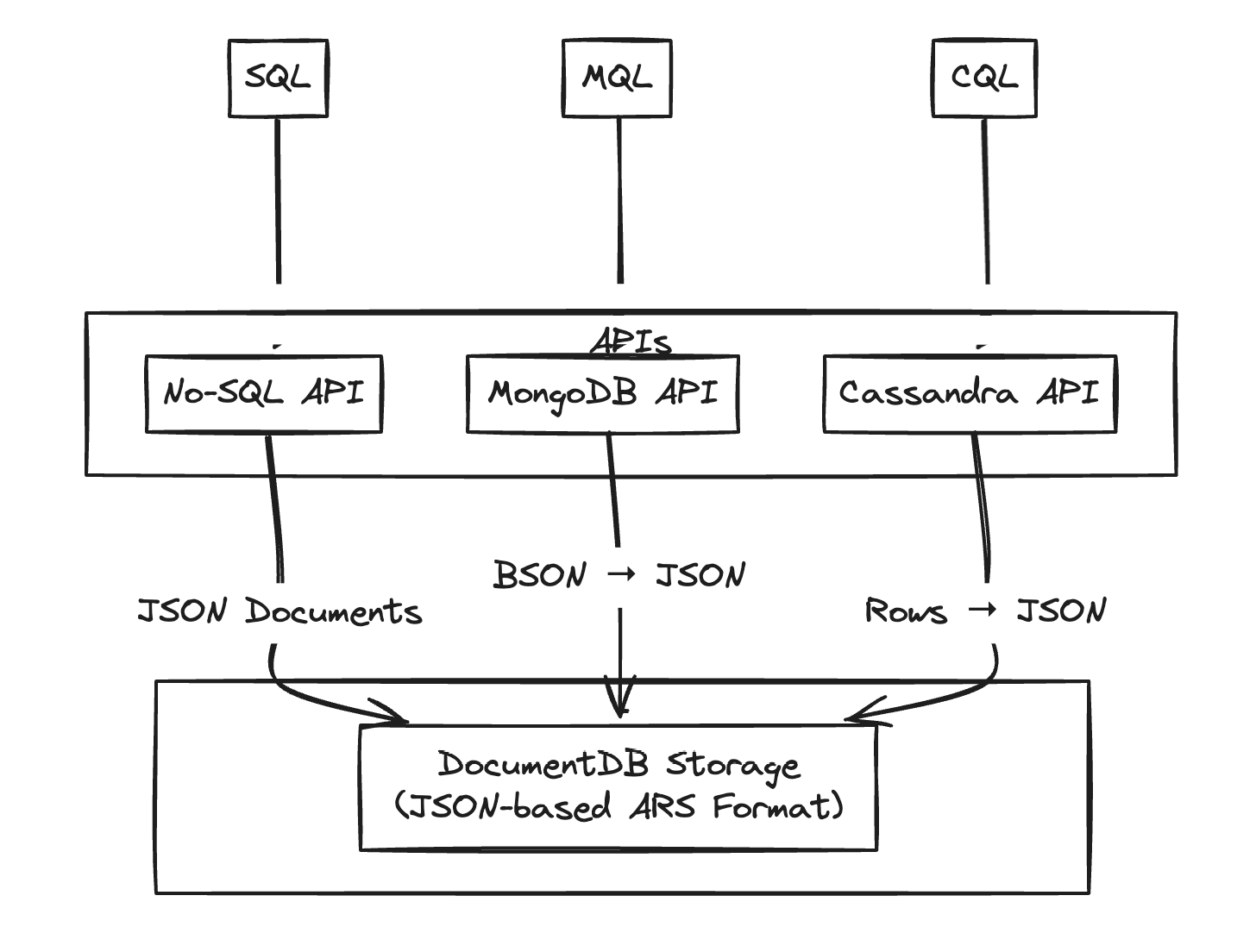
This design means that while you might be speaking the language of Cassandra or MongoDB to the service, the underlying benefits of Cosmos DB—global distribution, elastic scaling, and tunable consistency—remain consistent across the board.
A Tour of the APIs: An Architect's Decision Guide
Now let's walk through each major API to build a framework for when to use each one. The following overview provides a high-level summary of the options available.

We will use a comprehensive blog post from Pluralsight as our guide, supplementing it with critical analysis to help you weigh the trade-offs.
Azure Cosmos DB APIs: Use cases and trade-offs | Pluralsight
This article provides an excellent overview of the different APIs and the general thought process for choosing one.
First, read the introduction to get a feel for the service. Then, focus on the section on initial guidance. This section poses the key questions about existing applications, schema flexibility, and data models that should be your first step in any analysis.
1. API for NoSQL (The Core API)
This is the native and default API for Cosmos DB.
- Data Model: Schemaless JSON documents. It can also function as a key-value store for simple lookups.
- Query Language: A rich SQL-like dialect. This is a significant advantage over many other NoSQL databases (including AWS DynamoDB) that often have more limited query capabilities.
- Primary Use Case: The default choice for all new cloud-native applications built on Azure. It provides the most direct access to the engine's capabilities and guarantees you receive new features first.
Azure Cosmos DB APIs: Use cases and trade-offs | Pluralsight
Let's explore the Core API in more detail.
Read the section titled "Core (SQL) API". Pay attention to the example of an e-commerce application, where the flexibility of a document model shines, but the power of SQL queries provides a familiar and powerful way to access the data.
However, it's crucial not to mistake the SQL query capability for a relational database. It operates on schemaless documents and does not support the complex joins or referential integrity of a traditional RDBMS.
2. API for MongoDB
This API implements the MongoDB wire protocol, allowing you to use existing MongoDB drivers, SDKs, and tools.
- Data Model: BSON documents (the binary representation of JSON used by MongoDB).
- Query Language: MongoDB Query Language (MQL).
- Primary Use Case: Migrating existing MongoDB applications to Azure to take advantage of Cosmos DB's PaaS benefits (e.g., global distribution, managed scaling) with minimal code changes.
Azure Cosmos DB APIs: Use cases and trade-offs | Pluralsight
This section covers the migration scenario for MongoDB.
Read the section on the MongoDB API. The example of migrating a purchase order system highlights the key value proposition: leveraging a managed service without a significant rewrite. Note the mention of using the Azure Database Migration Service for a low-downtime transition.
Architectural Trade-off: While this "lift-and-shift" approach is fast, it's not a free lunch. You are still interacting with the Cosmos DB engine, which has its own cost model (Request Units, or RUs) and partitioning concepts. To optimize performance and cost, your team must learn these Cosmos DB specifics. Some advanced MongoDB features may also not be supported. For a new project, the native API for NoSQL is almost always the better choice.
3. API for Apache Cassandra
Similar to the MongoDB API, this provides wire-protocol compatibility for Apache Cassandra.
- Data Model: Wide-column, organized into keyspaces and tables.
- Query Language: Cassandra Query Language (CQL).
- Primary Use Case: Migrating existing Cassandra workloads or for new applications that require a wide-column model for high-throughput data ingestion (e.g., IoT, time-series) and prefer the manageability of a PaaS solution over self-hosting Cassandra.
Azure Cosmos DB APIs: Use cases and trade-offs | Pluralsight
Now, let's look at the Cassandra scenario.
Read the section on the Cassandra API. This section emphasizes its suitability for high-volume, real-time data and its integration with analytics tools like Apache Spark.
4. API for Apache Gremlin
This is the API for graph database workloads.
- Data Model: Graph, consisting of vertices (nodes) and edges (relationships).
- Query Language: Gremlin, a graph traversal language.
- Primary Use Case: Modeling and querying highly connected data. This is ideal for social networks, recommendation engines, fraud detection, and any scenario where the relationships between data points are as important as the data points themselves.
Azure Cosmos DB APIs: Use cases and trade-offs | Pluralsight
This section explains the use case for graph data.
Read the section on the Gremlin API. The product recommendation example ("people who bought X also bought Y") is a classic use case that is cumbersome to model in a relational or document database but is natural for a graph.
5. API for Table
This API offers compatibility with Azure Table Storage.
- Data Model: Key-value. Each item is identified by a PartitionKey and a RowKey.
- Primary Use Case: Migrating existing Azure Table Storage applications to gain the premium features of Cosmos DB, such as single-digit millisecond latency SLAs, global distribution, and automatic secondary indexing on all properties.
Azure Cosmos DB APIs: Use cases and trade-offs | Pluralsight
Finally, let's examine the Table API.
Read the section on the Table API. The key takeaway is that this is an upgrade path for existing Table Storage users who need more performance and features.
Architectural Trade-off: This upgrade comes at a higher cost. For simple key-value workloads with less stringent performance requirements, the standard Azure Table Storage is significantly more cost-effective. As an architect, you must justify the extra expense with a clear need for Cosmos DB's premium capabilities.
A Critical Distinction: The "API for PostgreSQL"
The learning outcome lists PostgreSQL, and you might see "Azure Cosmos DB for PostgreSQL" in the portal. It's vital to understand that this is a branding and portfolio distinction, not a technical one in the same vein as the other APIs.
When to Use Cosmos DB | Pulumi Blog
The Pulumi blog provides a sharp, analytical perspective that is essential for a senior engineer. This section cuts through the marketing to clarify a critical point about the PostgreSQL offering.
Please read the section that starts with the comparison to relational databases. The author makes an unambiguous and crucial point: "Azure Cosmos DB for PostgreSQL... is not based on Cosmos DB’s NoSQL DocumentDB storage layer and is a Postgres database."
To be perfectly clear:
- API for MongoDB/Cassandra/etc.: These are compatibility layers over the core, multi-model Cosmos DB engine.
- Azure Cosmos DB for PostgreSQL: This is a completely separate service. It is a managed cluster of PostgreSQL servers that uses the open-source Citus extension to distribute data and queries. It does not use the Cosmos DB storage engine.
The "Cosmos DB" brand is used here to signify a distributed, scalable database service. Recognizing this distinction between a true API and a branded portfolio offering is a key insight for any architect working in the Azure ecosystem.
Conclusion
In this lesson, we deconstructed Azure Cosmos DB's multi-model capabilities to create a clear architectural decision framework. You now have the tools to select the right API based on your application's needs and context.
The key takeaways are:
- Native vs. Compatibility is the First Question: For new applications, the API for NoSQL (Core API) is the recommended choice to access the full power of the platform. For migrations, the compatibility APIs (MongoDB, Cassandra, Gremlin, Table) offer a low-friction path to the cloud.
- Each API Serves a Specific Data Model: The choice of API is fundamentally a choice of data model—document, wide-column, graph, or key-value.
- Compatibility is a Trade-off: While migration APIs accelerate moving to the cloud, they require you to understand the underlying Cosmos DB concepts (RUs, partitioning) to truly optimize cost and performance.
- Branding isn't Architecture: "Azure Cosmos DB for PostgreSQL" is a distinct, Citus-based managed PostgreSQL service, not another personality of the core NoSQL engine.
In our next lesson, we will continue this theme by diving deeper into the relational database world. We will formally compare Azure Database for PostgreSQL (Flexible Server) with Azure SQL, giving you a framework to choose between Microsoft's premier open-source and native relational PaaS offerings.