Welcome to the first lesson in our module on Azure's database services. In the previous module, we concluded our exploration of Azure's storage offerings by examining Azure Data Lake Storage Gen2, the foundation for large-scale analytics. We are now shifting our focus from storing files and objects to managing structured data, a cornerstone of most software applications.
This lesson addresses a fundamental architectural choice for any relational workload on Azure: comparing the Azure SQL Database deployment options of Single Database, Elastic Pool, and Managed Instance. As a principal engineer, selecting the right database service is not just a technical detail; it's a strategic decision that impacts application architecture, cost, scalability, and long-term maintenance. Your familiarity with AWS RDS provides a solid foundation, as we will be exploring Azure's fully managed Platform-as-a-Service (PaaS) offerings for SQL Server.
The Azure SQL PaaS Spectrum
When you want to run SQL Server workloads on Azure, you have a spectrum of choices ranging from full-control Infrastructure-as-a-Service (IaaS) to fully managed PaaS.
- SQL Server on Azure VMs (IaaS): This is equivalent to running SQL Server on a virtual machine you manage. You have complete control over the operating system and SQL Server instance, but you are also responsible for all management tasks like patching, backups, and high availability. This is often a last resort for applications with deep OS-level dependencies.
- Azure SQL (PaaS): This is Azure's family of fully managed SQL Server database services. Microsoft handles the infrastructure and administrative tasks, allowing you to focus on your data and application. Within this family, there are two primary offerings: Azure SQL Database and Azure SQL Managed Instance.
Our focus in this lesson is on the PaaS options, as this is where the most critical architectural decisions for modern applications lie.
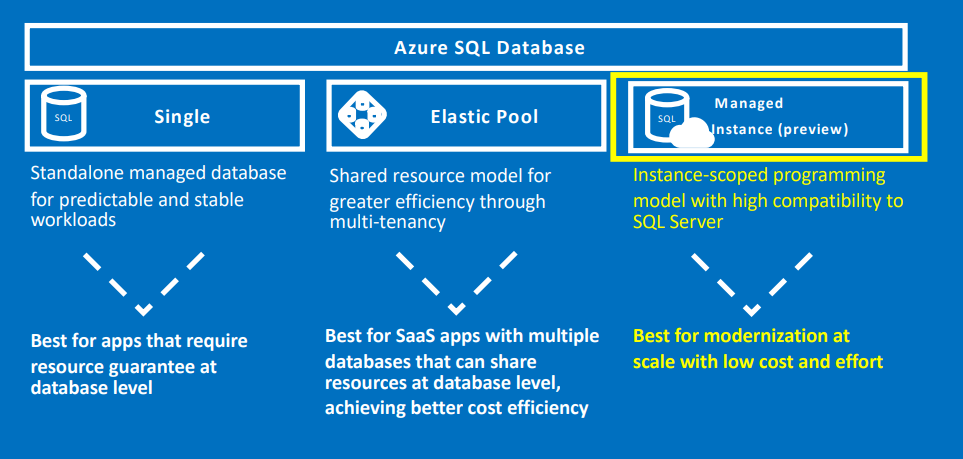
Azure SQL Database: The Cloud-Native Option
Azure SQL Database is a database-as-a-service (DaaS) designed for modern, cloud-native applications. It is provisioned at the database level, meaning you think in terms of individual databases rather than a whole SQL Server instance. It offers two main deployment models: Single Database and Elastic Pools.
A Cloud Architect’s Guide to Azure SQL Service Selection and Pricing – A Cloud Guy
This section of the "Cloud Architect's Guide" introduces the deployment methods within Azure SQL Database.
Please read the descriptions under the "Deployment Methods" heading for Single Database and Elastic Pool. This will clarify how these two models address different workload patterns.
-
Single Database: This is the simplest model. You create a single database with its own dedicated and guaranteed set of resources (CPU, memory, I/O). It's ideal for applications that have predictable performance requirements and need resource isolation.
-
Elastic Pool: This model addresses a common business problem, especially in multi-tenant SaaS applications where you might have one database per customer. Instead of provisioning resources for each database individually (which can be expensive if usage is spiky), an elastic pool allows multiple databases to share a common set of resources. This provides significant cost savings by accommodating the unpredictable usage patterns of many small databases. If one database is idle, another can use the available resources from the pool.
Service Tiers and the Serverless Advantage
A key aspect of Azure SQL Database is its service tiers, which determine performance, storage, and features. The Hyperscale tier, for example, is an architectural choice unique to SQL Database, allowing for databases up to 100 TB with near-instantaneous backups and scaling.
The video below explains these tiers and highlights a crucial feature for cost optimization: the Serverless compute option available in the General Purpose tier. This is particularly relevant given your interest in the economics of system design.
Azure SQL Database Deployment Options | Azure SQL for beginners (Ep. 9)
This video from the "Azure SQL for beginners" series clearly breaks down the deployment models and service tiers for Azure SQL Database.
Watch from the initial choice between Single Database and Elastic Pool. Then, watch the explanation of the service tiers from General Purpose to Hyperscale. Pay close attention to the description of Serverless compute and how it separates compute from storage to save costs during inactive periods.
Azure SQL Managed Instance: The Migration-Optimized Option
Azure SQL Managed Instance is designed to solve a different problem: making it as easy as possible to migrate existing on-premises SQL Server applications to the cloud. It is an instance-as-a-service, providing nearly 100% compatibility with the latest on-premises SQL Server Enterprise Edition.
This means that features that are unavailable in Azure SQL Database but are commonly used in legacy applications—such as SQL Server Agent, cross-database queries, Service Broker, and CLR integration—are fully supported in Managed Instance. Architecturally, it is deployed within your Azure Virtual Network (VNet), providing strong network isolation by default.
A Cloud Architect’s Guide to Azure SQL Service Selection and Pricing – A Cloud Guy
Let's return to the "Cloud Architect's Guide" to understand the positioning of Managed Instance.
Read the section on Azure SQL Managed Instance. Focus on the "Architectural Fit" and the list of supported instance-level features. This highlights its primary role as a "lift-and-shift" target.
The Architectural Decision Framework
Choosing between these options requires evaluating the trade-offs between compatibility and modernization. The following video offers a practical perspective on when to choose one over the other, framing it as a strategic choice based on your application's architecture and your willingness to refactor.
Azure SQL vs Azure SQL Managed Instance
This video provides a direct comparison between Azure SQL and Managed Instance, focusing on real-world decision-making.
First, watch the segment from highlighting key differences. The speaker contrasts the scale-out model of SQL Database (ideal for SaaS) with the scale-up, instance-based model of Managed Instance. Next, watch the section on on-prem migration, which provides a clear "cheat sheet": if you can't or won't rewrite your app and need instance-level features, choose Managed Instance. If you can refactor, SQL Database becomes a powerful option.
To formalize this decision, let's use a structured comparison. The following table from the "Cloud Architect's Guide" provides an excellent summary.
A Cloud Architect’s Guide to Azure SQL Service Selection and Pricing – A Cloud Guy
This table concisely summarizes the key differences from an architect's perspective.
Review the comparison table carefully. It contrasts the services across critical factors like admin overhead, compatibility, scalability, networking, and ideal use cases.
Diving Deeper: Feature Compatibility
The "near 100% compatibility" of Managed Instance is the most common reason for choosing it. To appreciate what this means in practice, it's useful to see the specific feature gaps that exist in Azure SQL Database.
The official Microsoft documentation provides an exhaustive comparison. You don't need to memorize this, but scanning it will solidify your understanding of the features that necessitate Managed Instance.
Compare SQL Database Engine Features - Azure - Microsoft Learn
This official document contains a detailed feature-by-feature comparison.
Scan the large feature table. Specifically, find the rows for these common on-premises features and note the difference in support: SQL Server Agent Cross-database/three-part name queries Service Broker Common language runtime - CLR Database mail - DbMail Seeing these specific differences makes it clear why an application that relies heavily on, for example, SQL Agent for job scheduling cannot be easily moved to Azure SQL Database without significant refactoring (e.g., using a separate service like Azure Automation or Elastic Jobs).
Conclusion
We've covered the three primary PaaS deployment options for SQL Server on Azure. Your choice as an architect hinges on a fundamental trade-off between modern cloud-native design and compatibility with existing on-premises systems.
Here are the key takeaways for your decision framework:
- Azure SQL Database - Single Database: The default choice for new, cloud-native applications with predictable workloads. Offers powerful features like the Serverless compute tier for cost efficiency and the Hyperscale tier for massive scale.
- Azure SQL Database - Elastic Pool: An economic optimization for multi-tenant SaaS applications or any scenario with many databases that have unpredictable, spiky usage. It allows databases to share resources, lowering the total cost.
- Azure SQL Managed Instance: The "lift-and-shift" champion. It provides an entire SQL Server instance as a managed service with high feature parity, making it the path of least resistance for migrating complex, monolithic applications that depend on instance-level features like SQL Agent or cross-database queries.
This decision is often the first and most critical one when bringing a relational workload to Azure. In our next lesson, we will move beyond the relational model to explore one of Azure's flagship NoSQL offerings. We will dive into Azure Cosmos DB and analyze its various consistency models, a crucial factor in designing globally distributed applications.