Welcome back. In our previous lessons, we've systematically explored Azure's storage landscape, covering object blobs, network file shares, and block storage for VMs. This completes our survey of general-purpose storage solutions.
Now, we pivot to a specialized and critical component of any modern data strategy. This lesson addresses the final outcome in this module: Explain the role of Azure Data Lake Storage Gen2 in building modern data platforms for big data and analytics.
For a principal engineer, understanding Azure Data Lake Storage (ADLS) Gen2 is not about learning another way to store files. It's about grasping the foundational building block for large-scale data processing, analytics, and machine learning in Azure. Given your familiarity with AWS S3, this lesson will provide a valuable "compare and contrast" perspective, focusing on the architectural decisions that make ADLS Gen2 uniquely suited for its role, a distinction that directly impacts system performance and governance in enterprise data platforms.
What is a Data Lake?
Before diving into the specifics of ADLS Gen2, it's essential to solidify the concept of a "data lake." In traditional data warehousing, a common pattern was ETL (Extract, Transform, Load), where data was cleaned and structured before being loaded into a warehouse. This approach risks discarding potentially valuable raw data because its utility wasn't understood at the time of ingestion.
Modern data platforms often favor an ELT (Extract, Load, Transform) pattern. Data is first loaded in its raw, original format into a central repository—the data lake. Transformations and analysis happen later, on-demand.
Azure Data Lake Storage Gen 2 Overview
This clip from John Savill's "Azure Data Lake Storage Gen 2 Overview" provides a concise introduction to the data lake concept and the value of the ELT pattern.
Watch the first two minutes, from the introduction of data pipelines to the discussion of data types. Pay attention to his explanation of why storing data in its "original unmodified format" is a powerful capability for future, unforeseen analysis.
A data lake serves as a central repository for all types of data—structured, semi-structured, and unstructured. The key idea is to provide a single, scalable storage layer that eliminates data silos and supports diverse analytical needs, from business intelligence to data science. It is complementary to a data warehouse; the lake stores everything, and the warehouse often stores a curated, structured subset for specific reporting and BI tasks.
Introducing Azure Data Lake Storage Gen2
On Azure, the premier service for implementing a data lake is ADLS Gen2. From an architectural standpoint, it's crucial to understand that ADLS Gen2 is not a brand-new service built from scratch. Instead, it is a set of capabilities built directly on top of Azure Blob Storage, combining the low-cost, tiered-storage economics of an object store with features optimized for big data analytics.
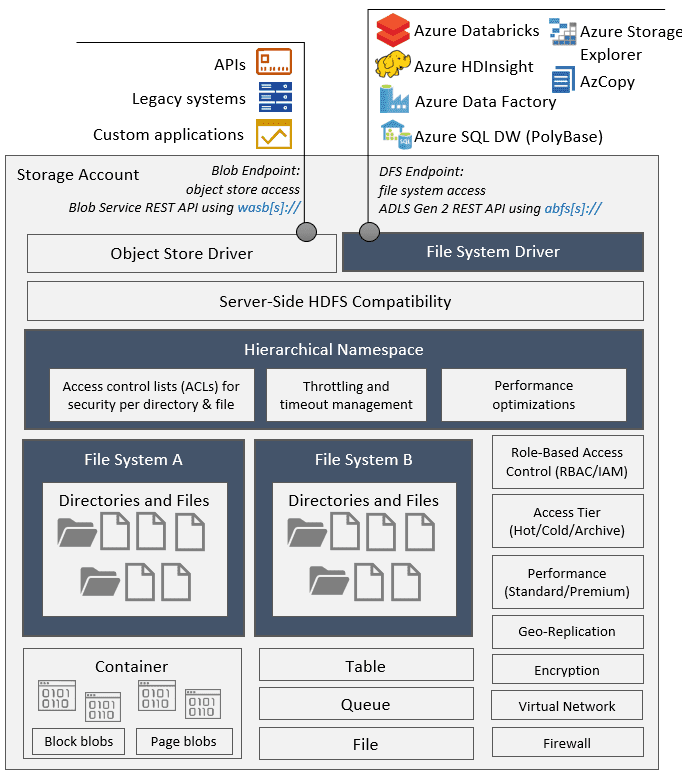
This layered architecture is a key design choice. It allows ADLS Gen2 to inherit the immense scale, reliability, and security features of Blob Storage while adding a crucial new capability. The following diagram gives a high-level view of how ADLS Gen2 fits into the Azure data ecosystem, serving as the central storage layer.

The switch that "activates" ADLS Gen2 capabilities on a storage account is a simple checkbox during creation: Hierarchical Namespace.
The Core Architectural Difference: Hierarchical Namespace (HNS)
The Hierarchical Namespace is the single most important concept to understand about ADLS Gen2 and what distinguishes it from standard object stores like Azure Blob Storage or AWS S3.
Your experience with S3 is a perfect reference. In S3, the structure is flat. You have a bucket, and inside it, you have objects. While you can use prefixes in object keys (e.g., data/2023/11/log.txt) and many tools will render this as a folder structure, it's an illusion. The "folders" data, 2023, and 11 do not exist as distinct entities.
ADLS Gen2, with HNS enabled, implements a true hierarchical file system, just like NTFS on Windows or ext4 on Linux. Folders (or directories) are first-class objects in the system.
This might seem like a subtle difference, but its performance implications for analytics workloads are enormous.
Azure Data Lake Storage Gen 2 Overview
This segment of John Savill's video masterfully explains the architectural and performance difference between the "virtual directories" of a flat namespace and the "true directories" of HNS.
Please watch the section from hierarchical namespace. The key takeaway is his explanation of a rename operation. In a flat object store, renaming a "folder" requires copying every single object to a new key and deleting the old ones. With HNS, it's a single, atomic metadata operation on the parent directory, which is orders of magnitude faster.
This performance characteristic is not a minor optimization. Big data processing jobs (e.g., in Spark or Hadoop) frequently perform operations like renaming or moving entire directories as part of their final output commit phase. In a flat namespace, this step can take longer than the actual data computation, creating a severe bottleneck. HNS eliminates this bottleneck.
The article "S3 vs. ADLS vs. GCS" reinforces this point, identifying HNS as the unique feature that sets ADLS Gen2 apart for analytics.
S3 vs. ADLS vs. GCS: Choosing Your Cloud Storage - Curate Partners
This article provides a direct comparison of the major cloud storage offerings.
Read the section ADLS Gen2 (Azure) to see how the Hierarchical Namespace is positioned as its key technical distinction, purpose-built for big data analytics workloads.
Advanced Capabilities Enabled by HNS
Beyond the critical performance boost for directory manipulations, the Hierarchical Namespace enables two other key features essential for enterprise data lakes.
-
Fine-Grained Security with POSIX ACLs: Because directories are real objects, ADLS Gen2 supports POSIX-compliant Access Control Lists (ACLs), just like a Linux file system. This allows you to set read, write, and execute permissions for specific users and groups on individual files and directories. This is far more granular than the typical object store security model (like S3 bucket policies or Azure RBAC on a container), which is often too coarse for a multi-tenant data lake where different teams need access to different data subsets.
-
Specialized API and Driver: ADLS Gen2 exposes a new endpoint, the Distributed File System (DFS) endpoint, accessible via the
abfs(Azure Blob File System) driver. This driver is designed to plug directly into analytics frameworks like Apache Spark (used by Azure Databricks) and Azure Synapse Analytics, allowing them to interact with ADLS Gen2 as if it were a local Hadoop Distributed File System (HDFS).
This architectural diagram provides a detailed view of how these pieces fit together.
Building a Modern Data Platform: Organizing the Lake
With this foundational storage in place, the next architectural consideration is how to organize the data within it. A best practice is to structure the data lake into zones, representing the stages of data refinement. This approach provides governance, clarity, and logical separation.
The Hitchhiker's Guide to the Data Lake | Azure Storage
This guide from Azure Storage architects provides an excellent overview of data lake design patterns. We'll focus on the standard methodology for data organization.
In the document, navigate to the section "How do I organize my data?". Read from the initial description of the zones through the descriptions of Raw, Enriched, and Curated data. Then, carefully review the table under the "Recommendations" subheading, which starts with this table. This table is a powerful framework summarizing the purpose, consumers, access control, and lifecycle for each data zone.
As you've just read, this zonal architecture (Raw, Enriched, Curated, etc.) provides a mental model and a physical structure for a data pipeline:
- Raw Zone: The landing area. Data is ingested here in its original, unmodified format. Access is typically restricted to data engineering pipelines.
- Enriched/Processed Zone: Raw data is cleaned, validated, and combined with other sources. The data is now structured (e.g., in Parquet or Delta Lake format). Data scientists and analysts may have read access here.
- Curated/Serving Zone: The final, high-value data, often aggregated and optimized for consumption by BI tools or data warehousing services. This is the "gold standard" data served to the business.
Decision Framework: When to Use ADLS Gen2
Given that ADLS Gen2 is built on Blob Storage, when should you choose one over the other? The decision framework is straightforward.
-
Use Standard Azure Blob Storage when:
- Your primary use case is general-purpose object storage (e.g., storing images/videos for a web app, backups, application assets).
- Your applications are designed to work with a flat object-store model and do not perform file-system-intensive operations.
-
Use Azure Data Lake Storage Gen2 when:
- You are building a data platform for any big data analytics or machine learning workload.
- You will be using services like Azure Databricks, Azure Synapse Analytics, or HDInsight.
- You need the performance of atomic directory operations.
- You require fine-grained, folder-level security using POSIX ACLs.
Essentially, for any new data platform initiative on Azure, ADLS Gen2 should be the default choice for the storage layer. The performance and governance benefits for analytics workloads far outweigh the marginal cost difference. You retain all the benefits of Blob Storage (like tiering and lifecycle management) while gaining the capabilities of a true, distributed file system.
Conclusion
In this lesson, we've defined the architectural role of Azure Data Lake Storage Gen2 as the foundation of modern data platforms in Azure. We focused on the crucial design choices that differentiate it from general-purpose object storage.
Our key takeaways are:
- Built on Blob, Optimized for Analytics: ADLS Gen2 combines the cost-effectiveness and scale of Azure Blob Storage with features purpose-built for big data.
- Hierarchical Namespace is the Key: This feature transforms a flat object store into a true file system, providing massive performance gains for directory operations common in analytics and enabling granular POSIX-style ACLs.
- Foundation of the Data Platform: It is the central storage repository for ELT patterns, designed for seamless integration with Azure Databricks and Synapse Analytics via the
abfsdriver. - Zonal Architecture is Best Practice: Organizing the lake into Raw, Enriched, and Curated zones provides a robust structure for data pipelines and governance.
- The Default Choice for Analytics: If your workload involves large-scale data analysis, ADLS Gen2 is the clear and recommended choice over standard Blob Storage.
This lesson concludes our module on Azure Storage Solutions. We've journeyed from general-purpose storage to this specialized analytics foundation. In the next module, we will shift our focus from files and objects to structured data, beginning our exploration of Azure's diverse database services with its flagship relational offering: Azure SQL Database.